
Start Menu Bug

Revenge

New member
Local time
2:15 AM
Messages
7
Hi all, I'm new here and I'm not much of a computer person. I have a start menu problem, and it's about to drive me insane. I can't search anything in the Start menu.
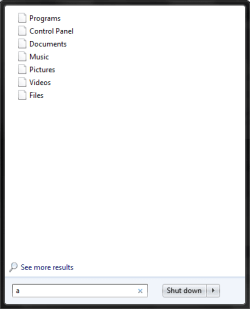
Untitled.png

Then when I try clicking on it, this comes up.
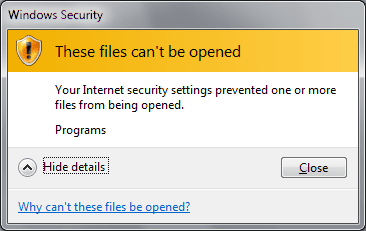
Untitled1.png

Sorry is I posted this in the wrong section.

I just want to so it shows my documents, etc.

~Rev
 

My Computer

OS
Windows 7 Ultimate x64
If you want to open files you have downloaded from the internet or from another computer, you have to change the security settings on the files;

Right click on the file and choose "Properties";


Now click on "Unblock" ( Lower right of the box after the warning).

Regards....Mike Connor
 

My Computer

OS
Several, including Windows 7 x64 Ultimate
No, I just want my documents and stuff to show up.
 

My Computer

OS
Windows 7 Ultimate x64
No, I just want my documents and stuff to show up.

You posted this;


What happens when you click on "Why can't these files be opened?

Regards....Mike Connor
 

My Computer

OS
Several, including Windows 7 x64 Ultimate
It's probably because the site that the file comes from has been identified by Windows as potentially dangerous. Windows uses security zones to determine whether or not a site is trusted. To learn more about trust and the Internet, see When to trust a website.

Windows assigns all websites to one of four security zones: Internet, Local intranet, Trusted sites, or Restricted sites. The zone to which a website is assigned specifies the security settings that are used for that site.

That's what it said.
 

My Computer

OS
Windows 7 Ultimate x64
It's probably because the site that the file comes from has been identified by Windows as potentially dangerous. Windows uses security zones to determine whether or not a site is trusted. To learn more about trust and the Internet, see When to trust a website.

Windows assigns all websites to one of four security zones: Internet, Local intranet, Trusted sites, or Restricted sites. The zone to which a website is assigned specifies the security settings that are used for that site.

That's what it said.

OK, if you want to open them anyway, and that is the reason, go to Control Panel, Internet Options.


Move the slider down to the lowest level and try to open the files. You can also disable protected mode, or set custom levels.

Regards....Mike Connor
 

My Computer

OS
Several, including Windows 7 x64 Ultimate
For your first problem, star menu one, Reset the start menu settings by

Right click Start menu Orb -> Properties -> Start Menu -> Customize -> Use Default Settings. Done

For the second problem, Reset the Internet Explorer's settings to default

Open Internet Explorer -> Tools -> Internet Options -> Security -> Reset All Zones to Default Level.

Also Internet Options -> Advanced -> Reset.
 

My Computer

Computer Manufacturer/Model Number
Apple - MBP 5,4
OS
Win 7 64, OSX Snow Leopard
CPU
Intel Core 2 Duo P8700
Memory
4 GB 1066 MHz DDR3
Graphics Card(s)
nVidia 9400 M
Screen Resolution
1440x900
Hard Drives
WD Caviar Black 500GB 7200RPM
None of your options helped. :(

I'm getting frustrated! :mad:
 

My Computer

OS
Windows 7 Ultimate x64
Where did you get your copy of win7 ? Have you installed any customs themes or done any regristry hacks ?
 

My Computer

Computer type
PC/Desktop
Computer Manufacturer/Model Number
Built them myself, Science Experiments !
OS
Win7 Enterprise, Win7 x86 (Ult 7600), Win7 x64 Ult 7600, TechNet RTM on AMD x64 (2.8Ghz)
CPU
AMD fx8350 4ghz, AMD-32 2400mhz, AMD-64 3200mhz, AMDx64 2.8G
Motherboard
SIS 755, ECS-K8M890M-M (Ult 7600), GigaByte & others
Memory
2gb, 4gb on the Ult 7600, 4gb on Technet RTM, 32gb on FX8350
Graphics Card(s)
Draw my own Graphics, several nVidia cards
Sound Card
on motherboard
Monitor(s) Displays
19" flat scr, 28" I-Inc widescr,22" Emprex Widescr, 23" Acer
Screen Resolution
1280 x 1024, 1440 x 900, 1920 x 1080
Hard Drives
6 pata Ide HD's & 2 Sata HD's
added 80gb external on Ult 7600 computer,
numerous extra 1tb, 2TB, 3Tb SATA HD's
A collection of ext HD Docks w/ HDs
PSU
430w, 550w, 600w, 700, 800, etc
Case
All Generic Full Towers
Cooling
Open Air & a few fans, some w/ colored LEDs
Keyboard
Compaq & Dell recycled from GoodWill
Mouse
Made in China Optical Wired Mouse
Internet Speed
Fast Cable InterNet
Antivirus
AVG Free on 24 different Desktops, NO Problems!
Browser
IE 8 is preferred, but use FireFox sometimes
Other Info
Linksys Routers, switches, & Hubs
Too Many USB Flash Drives to count, Biggest is 64GB !
Eight computers in my home network.
Sixteen computers at my business network.
Linked via TeamViewer !
Lots of old used spare computer parts everywhere!
These things can be very frustrating. The nature of the beast.

OK. Download this and run it;

Malwarebytes

Tell us what it says.

Regards....Mike Connor
 

My Computer

OS
Several, including Windows 7 x64 Ultimate
I already have malware bytes and I have to go right now. I'll leave it scanning overnight and tell you guys what happened in the morning.

Good night!
 

My Computer

OS
Windows 7 Ultimate x64
Nothing is bad on it. What else do you guys recommend?
 

My Computer

OS
Windows 7 Ultimate x64
Doc Brown's post #9?
 

My Computer

Computer Manufacturer/Model Number
Toshiba Satellite L500
OS
Windows 7 Home Premium x64 OEM --> RTM clean install
CPU
Intel T4400
Motherboard
? - laptop inbuilt ?
Memory
4Gb
Graphics Card(s)
? - Mobile Intel(R) 4 Series Express Chipset Family ?
Sound Card
Realtek
Monitor(s) Displays
? + extended to a 42" LG55PC plasma tele!
Screen Resolution
1366 * 768
Hard Drives
320Gb 5500rpm
PSU
?
Case
?
Cooling
?
Internet Speed
3Meg, when it works.
Other Info
A LOWLY LAPTOP!
Where did you get your copy of win7 ? Have you installed any customs themes or done any regristry hacks ?

No. Windows 7 came with my computer. I have not done any registry hacks or anything.
 

My Computer

OS
Windows 7 Ultimate x64
Back
Top