Start Menu Button - Change

How to Change the Start Menu Button in Windows 7

   Information
This will show you how to change the Start Menu button orb in Windows 7 32-bit and 64-bit.
   Warning
REMEMBER TO BACK UP EXPLORER.EXE!


Here's How:

For custom made start buttons, and further information, please visit this thread: http://www.sevenforums.com/customization/2002-custom-themes-icons-start-buttons-92.html

   Information
The explorer.exe you want to edit is:

C:\Windows\explorer.exe

and not C:\Windows\SysWOW64\explorer.exe (for those running x64)

And for those who use the larger DPI's i.e 125% , 150% you need to change:

6806 - 66 x 198
6807 - 81 x 243
6808 - 106 x 318


NOTE: The start orb replacement always HAS to look like this:
1 orb: Orb when not in use (when not clicked or mouseover'ed)
2 orb: mouseover
3 orb: When start orb is clicked
2u9ka5w.jpg

1. Download Restorator (Shareware) (Restorator 2007 Resource Editor - Restorator - Bome Software)

2. Take ownership of the whole Windows folder (see these links for more info: Take Ownership of file - Vista Forums and http://www.sevenforums.com/tutorials/1911-take-ownership-shortcut.html)

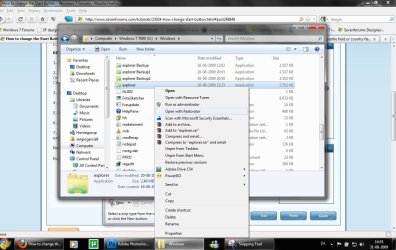
3. Open explorer.exe with restorator
1.jpg

2.jpg
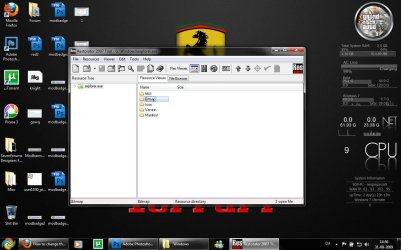
4. Go to the folder called "Bitmap"
3.jpg
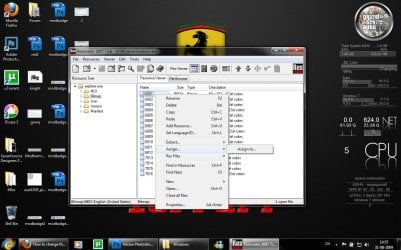
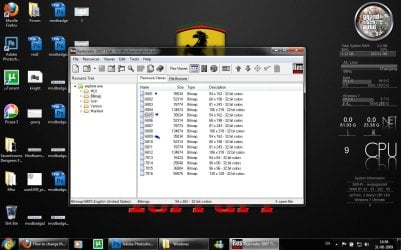
5. Replace 6801.bmp, 6805.bmp, and 6809.bmp (as seen on the picture, you will need to right click and click assign, and then click assign to, then select your file.)
4.jpg

5.jpg
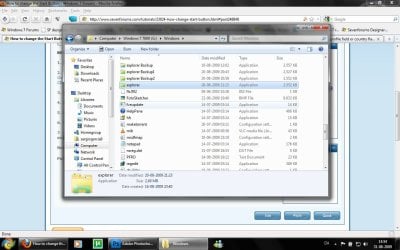
6. Go to "file" and Save as explorer.exe on your desktop

7. Go to the windows folder and rename explorer.exe to explorer.exe.bak and then copy-paste the new explorer, Kill the process in task manager and start it again.
Now you have a new start button! :D

Please comment, if you have something to say :)


Last edited by a moderator:
Thanks Sergio.
 

My Computer

Computer Manufacturer/Model Number
Samsung NP530U4B-S02IN
OS
Windows® 8 Pro (64-bit)
CPU
Intel® Core™ i5 Processor 2467M (1.60GHz, 3MB L3 Cache)
Motherboard
Samsung Electronics
Memory
6GB DDR3 System Memory at 1,333MHz (on BD 4GB + 2GB x 1)
Graphics Card(s)
AMD Radeon™ HD7550M 1GB DDR3 (Ext. Graphic)
Sound Card
Realtek High Definition Audio
Monitor(s) Displays
35.56cm (14.0) SuperBright 300nit HD LED Display
Screen Resolution
1366x768
Hard Drives
1TB S-ATA II Hard Drive (5400RPM) with ExpressCache 16GB SSD
Internet Speed
sucks
Antivirus
Microsoft Security Essentials
Browser
Google Chrome (Sync enabled)
xD thanks man!!!!!! thanks to your tutorial i finally changed the explorer.exe icon xD!!!!! i replace his icon in explorer.exe ;) check:

explorerchanged.png
 

My Computer

OS
Windows 7 Ultimate
Hey...I can't replace my explorer.exe even when I take ownership of it, and the windows folder...It says I don't have permission to edit it when I am a Admin...Please Help!
 

My Computer

OS
Windows 7
Awesome tutorial... Had no problems with anything...

EXCEPT:

Now the start button don't do NOTHING! It shows the new image but I can't click it. Nothing happens. I should mention that I have a little app in my startup folder that automatically kills the taskbar but that never affected the old start button (no taskbar is visible, just the orb - looks pretty cool). All this tutorial does is change the orb image, nothing else right? So i don't see why the orb shows but doesn't respond...

Strangely, when I press the start key on the keyboard THEN the orb highlights (as if its has been clicked) and the start menu appears...

I mean, wtf?

Help guys, please...

PS: why can't I edit the explorer.exe file with ResHack?
 

My Computer

Computer type
PC/Desktop
Computer Manufacturer/Model Number
Own build
OS
Windows 7 x64 Professional
CPU
Intel Core i7-870 Lynnfield 2.93 GHz
Motherboard
Intel Whitesburg P55 LGA1156
Memory
Kingston Hyper X 1333MHz DDR3 4x4Gb
Graphics Card(s)
Nvidia GTS 250
Monitor(s) Displays
AOC Q3279VWF 31.5"
Screen Resolution
2560x1440
Hard Drives
Western Digital 1000GB Hard Drive (SATA 3.0Gb/s, 7200rpm, 32MB Cache)
Verbatim 500GB (External)
PSU
650W
Case
Coolermaster HAF 912
Cooling
Stock
Keyboard
Logitech
Mouse
Logitech
Antivirus
Avira
Browser
Firefox
Other Info
LG OptDrive 24x SATA DVDRW Lightscribe
Awesome tutorial... Had no problems with anything...

EXCEPT:

Now the start button don't do NOTHING! It shows the new image but I can't click it. Nothing happens. I should mention that I have a little app in my startup folder that automatically kills the taskbar but that never affected the old start button (no taskbar is visible, just the orb - looks pretty cool). All this tutorial does is change the orb image, nothing else right? So i don't see why the orb shows but doesn't respond...

Strangely, when I press the start key on the keyboard THEN the orb highlights (as if its has been clicked) and the start menu appears...

I mean, wtf?

Help guys, please...

PS: why can't I edit the explorer.exe file with ResHack?
Hmm sounds weird. Might have something to do with that app. Try restoring to your old explorer.exe and see if the problem is still there.

And yes i believe you can use reshacker for editing the explorer.exe
 
Hmm sounds weird. Might have something to do with that app. Try restoring to your old explorer.exe and see if the problem is still there.

Gonna try that now...

And yes i believe you can use reshacker for editing the explorer.exe

It won't show in reshack though

FILE ---> OPEN ----> (C:/windows/explorer.exe) ---> NOTHING!!! AAAARRRRGGGHHH!

BTW: that was quick :cool:
 

My Computer

Computer type
PC/Desktop
Computer Manufacturer/Model Number
Own build
OS
Windows 7 x64 Professional
CPU
Intel Core i7-870 Lynnfield 2.93 GHz
Motherboard
Intel Whitesburg P55 LGA1156
Memory
Kingston Hyper X 1333MHz DDR3 4x4Gb
Graphics Card(s)
Nvidia GTS 250
Monitor(s) Displays
AOC Q3279VWF 31.5"
Screen Resolution
2560x1440
Hard Drives
Western Digital 1000GB Hard Drive (SATA 3.0Gb/s, 7200rpm, 32MB Cache)
Verbatim 500GB (External)
PSU
650W
Case
Coolermaster HAF 912
Cooling
Stock
Keyboard
Logitech
Mouse
Logitech
Antivirus
Avira
Browser
Firefox
Other Info
LG OptDrive 24x SATA DVDRW Lightscribe
Hmm sounds weird. Might have something to do with that app. Try restoring to your old explorer.exe and see if the problem is still there.

Reverted back to original explorer.exe and it works perfectly ?! :huh: I dunno mate, is it possible that the images alone can affect it so? My anti-taskbar app hasn't been touched - I really doubt it's that though...

Any other ideas?
 

My Computer

Computer type
PC/Desktop
Computer Manufacturer/Model Number
Own build
OS
Windows 7 x64 Professional
CPU
Intel Core i7-870 Lynnfield 2.93 GHz
Motherboard
Intel Whitesburg P55 LGA1156
Memory
Kingston Hyper X 1333MHz DDR3 4x4Gb
Graphics Card(s)
Nvidia GTS 250
Monitor(s) Displays
AOC Q3279VWF 31.5"
Screen Resolution
2560x1440
Hard Drives
Western Digital 1000GB Hard Drive (SATA 3.0Gb/s, 7200rpm, 32MB Cache)
Verbatim 500GB (External)
PSU
650W
Case
Coolermaster HAF 912
Cooling
Stock
Keyboard
Logitech
Mouse
Logitech
Antivirus
Avira
Browser
Firefox
Other Info
LG OptDrive 24x SATA DVDRW Lightscribe
Hmm sounds weird. Might have something to do with that app. Try restoring to your old explorer.exe and see if the problem is still there.

Reverted back to original explorer.exe and it works perfectly ?! :huh: I dunno mate, is it possible that the images alone can affect it so? My anti-taskbar app hasn't been touched - I really doubt it's that though...

Any other ideas?
It has to have something to do with that app. :huh:
 

My Computer

Computer type
PC/Desktop
Computer Manufacturer/Model Number
Own build
OS
Windows 7 x64 Professional
CPU
Intel Core i7-870 Lynnfield 2.93 GHz
Motherboard
Intel Whitesburg P55 LGA1156
Memory
Kingston Hyper X 1333MHz DDR3 4x4Gb
Graphics Card(s)
Nvidia GTS 250
Monitor(s) Displays
AOC Q3279VWF 31.5"
Screen Resolution
2560x1440
Hard Drives
Western Digital 1000GB Hard Drive (SATA 3.0Gb/s, 7200rpm, 32MB Cache)
Verbatim 500GB (External)
PSU
650W
Case
Coolermaster HAF 912
Cooling
Stock
Keyboard
Logitech
Mouse
Logitech
Antivirus
Avira
Browser
Firefox
Other Info
LG OptDrive 24x SATA DVDRW Lightscribe
Good luck :geek:

Works but I'm not happy :cry: I really like not hving the taskbar showing. Why do the buttons not work once taskbar is killed? It works fine with the original button?! Is it cos the buttons in your tutorial (I'm using those to play around with) are slightly larger than the original buttons?

Also I still can't seem to open the file with ResHack... :mad:
 

My Computer

Computer type
PC/Desktop
Computer Manufacturer/Model Number
Own build
OS
Windows 7 x64 Professional
CPU
Intel Core i7-870 Lynnfield 2.93 GHz
Motherboard
Intel Whitesburg P55 LGA1156
Memory
Kingston Hyper X 1333MHz DDR3 4x4Gb
Graphics Card(s)
Nvidia GTS 250
Monitor(s) Displays
AOC Q3279VWF 31.5"
Screen Resolution
2560x1440
Hard Drives
Western Digital 1000GB Hard Drive (SATA 3.0Gb/s, 7200rpm, 32MB Cache)
Verbatim 500GB (External)
PSU
650W
Case
Coolermaster HAF 912
Cooling
Stock
Keyboard
Logitech
Mouse
Logitech
Antivirus
Avira
Browser
Firefox
Other Info
LG OptDrive 24x SATA DVDRW Lightscribe
Good luck :geek:

Works but I'm not happy :cry: I really like not hving the taskbar showing. Why do the buttons not work once taskbar is killed? It works fine with the original button?! Is it cos the buttons in your tutorial (I'm using those to play around with) are slightly larger than the original buttons?

Also I still can't seem to open the file with ResHack... :mad:
I have no idea why it does it. Sorry i cant help you further :(
 

My Computer

Computer type
PC/Desktop
Computer Manufacturer/Model Number
Own build
OS
Windows 7 x64 Professional
CPU
Intel Core i7-870 Lynnfield 2.93 GHz
Motherboard
Intel Whitesburg P55 LGA1156
Memory
Kingston Hyper X 1333MHz DDR3 4x4Gb
Graphics Card(s)
Nvidia GTS 250
Monitor(s) Displays
AOC Q3279VWF 31.5"
Screen Resolution
2560x1440
Hard Drives
Western Digital 1000GB Hard Drive (SATA 3.0Gb/s, 7200rpm, 32MB Cache)
Verbatim 500GB (External)
PSU
650W
Case
Coolermaster HAF 912
Cooling
Stock
Keyboard
Logitech
Mouse
Logitech
Antivirus
Avira
Browser
Firefox
Other Info
LG OptDrive 24x SATA DVDRW Lightscribe
Why is it in my computer can not replace :confused: when saving after editing.
What can help me?
thanks before ....:)
 

My Computer

Computer Manufacturer/Model Number
Biostar
OS
Windows 7
CPU
Inntel Core 2 Duo E7300
Motherboard
Biostar
Memory
! Gb
Graphics Card(s)
Geoforce 7300
Sound Card
Realtek
Monitor(s) Displays
Samsung CRT 17"
Hard Drives
Seagate
PSU
Simbada
Case
simbada
Cooling
Fan Standart
Why is it in my computer can not replace :confused: when saving after editing.
What can help me?
thanks before ....:)_:)....
 

My Computer

Computer Manufacturer/Model Number
Biostar
OS
Windows 7
CPU
Inntel Core 2 Duo E7300
Motherboard
Biostar
Memory
! Gb
Graphics Card(s)
Geoforce 7300
Sound Card
Realtek
Monitor(s) Displays
Samsung CRT 17"
Hard Drives
Seagate
PSU
Simbada
Case
simbada
Cooling
Fan Standart
Hi,please..
¿Where disclaimer icons to change them?
thanks
a greeting
 

My Computer

Computer Manufacturer/Model Number
ASUS
OS
windows 7 ULTIMATE 64 BITS
CPU
AMD ATHLON II 620X4 QUAD CORE 2,60 GHZ
Motherboard
ASUS M4A78 PRO
Memory
MUSHKIN ESSENTIAL DDR2 8 GB
Graphics Card(s)
ATI RADEON HD 4650 1 GB
Sound Card
REALTEK HD
Monitor(s) Displays
SAMSUNG SYNCMASTER 2032 BW
Screen Resolution
1680X1050
Hard Drives
Seagate Barracuda 7.200 750 GB
Cooling
SCYTHE KATANA III
Keyboard
LOGITECH G15 GAMMING
Mouse
LOGITECH G9
Internet Speed
20 MB
Hi again..
The translator i translates poorly,i am sorry


I wanted to say that where the icons,thanks
 

My Computer

Computer Manufacturer/Model Number
ASUS
OS
windows 7 ULTIMATE 64 BITS
CPU
AMD ATHLON II 620X4 QUAD CORE 2,60 GHZ
Motherboard
ASUS M4A78 PRO
Memory
MUSHKIN ESSENTIAL DDR2 8 GB
Graphics Card(s)
ATI RADEON HD 4650 1 GB
Sound Card
REALTEK HD
Monitor(s) Displays
SAMSUNG SYNCMASTER 2032 BW
Screen Resolution
1680X1050
Hard Drives
Seagate Barracuda 7.200 750 GB
Cooling
SCYTHE KATANA III
Keyboard
LOGITECH G15 GAMMING
Mouse
LOGITECH G9
Internet Speed
20 MB
Back
Top