Start Menu - Customize

How to Open and Set "Customize Start Menu" Settings in Windows 7


   Information
This will show you how to customize the links, icons, and menus look and behave in the Windows 7 Start Menu using the Taskbar Start Menu Propertes page settings.
   Note

  • Display as a link - When the Start Menu button is clicked on, it opens a window for it.
  • Display as a menu - When the Start Menu button is clicked on or hovered over, it expands a menu for it.

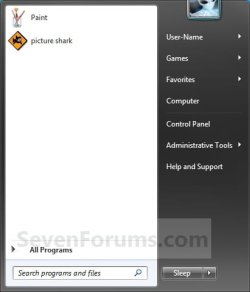
EXAMPLE: Customized Windows 7 Start Menu Start_Menu.jpg


OPTION ONE

Through Customize Start Menu Property Settings

1. Right click on the Start button and click on Properties.

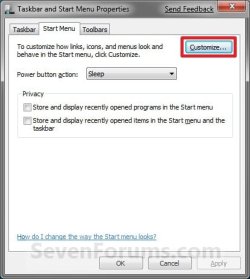
2. Click on the Customize button. (See screenshot below)Properties.jpg

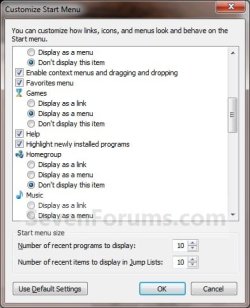
3. To Customize the Start MenuA) Dot, check, and uncheck the settings for how you want them to look and behave in the Start Menu.
NOTE: The four screenshots below show all available customize settings.Customize-1.jpgCustomize-2.jpg
Customize-3.jpgCustomize-4.jpg

B) Go to step 5.

4. To Restore All Default Customize SettingsA) Click on the Use Default Settings button at the bottom. (See bottom right screenshot above)

5. Click on OK. (See screenshots below step 3A)

6. Click on OK. (See screenshot below step 2)


OPTION TWO

Manually Through Registry Editor

1. Open the Start Menu, then type regedit in the search box and press Enter.

2. If prompted by UAC, then click on Yes.

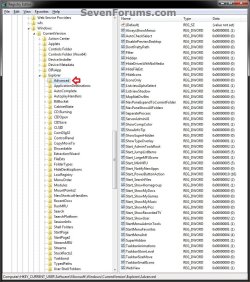
3. In regedit, navigate to the location below. (see screenshot below)

Code:
HKEY_CURRENT_USER\Software\Microsoft\Windows\CurrentVersion\Explorer\Advanced
REG-1.jpg


4. For User Folder, Computer, and Control Panel Links or Menu ButtonsA) In the right pane of Advanced, double click on the DWORD value for the Customize Start Menu option that you want to set. (see screenshot above and table below)
NOTE: If the DWORD value is not here, then right click on a blank space in the right pane of Advanced, click on New and DWORD (32-bit) value, type in the DWORD value name below and press enter.

Customize Start Menu optionDWORD value
ComputerStart_ShowMyComputer
Control PanelStart_ShowControlPanel
DocumentsStart_ShowMyDocs
DownloadsStart_ShowDownloads
GamesStart_ShowMyGames
MusicStart_ShowMyMusic
Personal folderStart_ShowUser
PicturesStart_ShowMyPics
Recorded TVStart_ShowRecordedTV
VideosStart_ShowVideos

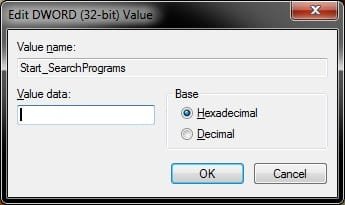
B) Type in the Data value for the Display option that you want for the selected Customize Start Menu option (step 4A), then click on OK. (see screenshot below)
Display optionData value
Don't display this item0
Display as link1
Display as a menu2

REG-2.jpg


5. For Enable or Disable Only OptionsA) In the right pane of Advanced, double click on the DWORD value for the Customize Start Menu option that you want to set. (see screenshot below step 3 and table below)
NOTE: If the DWORD value is not here, then right click on a blank space in the right pane of Advanced, click on New and DWORD (32-bit) value, type in the DWORD value name below and press enter.

Customize Start Menu optionDWORD value
Connect ToStart_ShowNetConn
Default ProgramsStart_ShowSetProgramAccessAndDefaults
Devices and PrintersStart_ShowPrinters
Enable context menus and dragging and droppingStart_EnableDragDrop
Favorites menuStartMenuFavorites
HelpStart_ShowHelp
Highlight newly installed programsStart_NotifyNewApps
HomegroupStart_ShowHomegroup
NetworkStart_ShowNetPlaces
Open submenus when I pause on them with the mouse pointerStart_AutoCascade
Recent ItemsStart_ShowRecentDocs
Run commandStart_ShowRun
Search programs and Control PaneStart_SearchPrograms
Sort All Programs menu by nameStart_SortByName
Use large iconsStart_LargeMFUIcons

B) Type in the Data value for the Display option that you want for the selected Customize Start Menu option (step 4A), then click on OK. (see screenshot below)
Display optionData value
Disable this item0
Enable this item1

REG-2.jpg


6. For the "Search other files and libraries" OptionA) In the right pane of Advanced, double click on the Start_SearchFiles. (see screenshot below step 3)
NOTE: If the Start_SearchFiles DWORD value is not here, then right click on a blank space in the right pane of Advanced, click on New and DWORD (32-bit) value, type in Start_SearchFiles and press enter.

B) Type in the Data value for the Display option that you want for this Customize Start Menu option, then click on OK. (see screenshot below)
Display optionData value
Don't search0
Search without public folders1
Search with public folders2

REG-2.jpg


7. For the "System administrative tools" Option

A) See OPTION TWO or OPTION THREE at this tutorial link below for how.Administrative Tools - Add or Remove from Start Menu


8. Close regedit.

9. Log off and log on, or restart the computer to apply.

That's it,
Shawn Brink


Last edited:
Hi.
You are really proficient at displaying these useful little help items. Maybe you could supplement the above.
What you have outlined, customises the right hand panel and associated windows.
I am a customise freak. I like to move quite a few of the Program items around into fiolders of my choice. In Vista, I found that to do this, I needed to go into classic mode. Unfortunately, in "7", for the time being, the option is not available. Nerds like me will find they cannot drag and drop. Not all the items appear under the Users - username - Appdata - Roaming - Microsoft - Windows - Startmenu. It is necessary to also open Program data - Microsoft - Windows - Startmenu, and drag and drop between those two.
 

My Computer

Computer Manufacturer/Model Number
Three desktops and one laptop with good specs..
OS
Vista and now 7 in 32 and 64 bit.
Hello Dave,

I'm not sure why they did not include (yet) that Start Menu button's context menu item in Windows 7 to make it easier to open those locations to Customize the Start Menu shortcuts like it is in Vista.

It is on the list on tutorials to make though. :geek:

Thank you,
Shawn
 

My Computer

Computer type
PC/Desktop
Computer Manufacturer/Model Number
Self built custom
OS
64-bit Windows 11 Pro for Workstations
CPU
Intel i7-8700K OC'd to 5 GHz
Motherboard
ASUS ROG Maximus XI Formula Z390
Memory
64 GB (4x16GB) G.SKILL TridentZ RGB DDR4 3600 MHz
Graphics Card(s)
ASUS ROG-STRIX-GTX1080TI-O11G-GAMING
Sound Card
Integrated
Monitor(s) Displays
2 x Samsung Odyssey G7 27"
Screen Resolution
2560x1440
Hard Drives
1TB Samsung 990 PRO M.2,
4TB Samsung 990 PRO PRO M.2,
TerraMaster F8 SSD Plus NAS
PSU
Seasonic Prime Titanium 850W
Case
Thermaltake Core P3
Cooling
Corsair Hydro H115i
Keyboard
Logitech wireless K800
Mouse
Logitech MX Master 4
Internet Speed
2 Gb/s Download and 100 Mb/s Upload
Antivirus
Malwarebyte Anti-Malware Premium
Browser
Google Chrome
Other Info
Logitech Z625 speaker system,
Logitech BRIO 4K Pro webcam,
HP Color LaserJet Pro MFP M477fdn,
APC SMART-UPS RT 1000 XL - SURT1000XLI,
Galaxy S23 Plus phone

My Computer

Computer type
PC/Desktop
Computer Manufacturer/Model Number
Self built custom
OS
64-bit Windows 11 Pro for Workstations
CPU
Intel i7-8700K OC'd to 5 GHz
Motherboard
ASUS ROG Maximus XI Formula Z390
Memory
64 GB (4x16GB) G.SKILL TridentZ RGB DDR4 3600 MHz
Graphics Card(s)
ASUS ROG-STRIX-GTX1080TI-O11G-GAMING
Sound Card
Integrated
Monitor(s) Displays
2 x Samsung Odyssey G7 27"
Screen Resolution
2560x1440
Hard Drives
1TB Samsung 990 PRO M.2,
4TB Samsung 990 PRO PRO M.2,
TerraMaster F8 SSD Plus NAS
PSU
Seasonic Prime Titanium 850W
Case
Thermaltake Core P3
Cooling
Corsair Hydro H115i
Keyboard
Logitech wireless K800
Mouse
Logitech MX Master 4
Internet Speed
2 Gb/s Download and 100 Mb/s Upload
Antivirus
Malwarebyte Anti-Malware Premium
Browser
Google Chrome
Other Info
Logitech Z625 speaker system,
Logitech BRIO 4K Pro webcam,
HP Color LaserJet Pro MFP M477fdn,
APC SMART-UPS RT 1000 XL - SURT1000XLI,
Galaxy S23 Plus phone
Great stuff.
 

My Computer

Computer Manufacturer/Model Number
Three desktops and one laptop with good specs..
OS
Vista and now 7 in 32 and 64 bit.
Better than the Registry Editor

Thanks for that little Tip after me being in there and tweaking, I never seen it LOL :pbetter then going in the Registry Thanks Man
 

My Computer

Computer type
PC/Desktop
Computer Manufacturer/Model Number
PowerUsers build there Computer's
OS
Windows 7 Professional (64-bit)
CPU
Intel Core 2 Duo E8400 45nm (Codename: Penryn)
Motherboard
ASUS P5Q Pro - P45 Chipset
Memory
OCZ PC2 8500 SLI 1066MHz
Graphics Card(s)
EVGA GeForce GTX 670 (Codename: Kepler)
Sound Card
RealtekI ACL1200
Monitor(s) Displays
2X Acer V223W
Screen Resolution
1680+1050
Hard Drives
3x Western Digital Black (1TB)
PSU
PC Power & Cooling 610W Silencer
Case
Cooler Master HAF 912
Cooling
Zlaman CNPS9700
Keyboard
Logitech G110
Mouse
Logitech MX518
Internet Speed
6.5 Mbps Speedtest.net
Antivirus
What is a Antivirus?
Browser
Mozilla Firefox
You're welcome PhoneyVirus. ;)
 

My Computer

Computer type
PC/Desktop
Computer Manufacturer/Model Number
Self built custom
OS
64-bit Windows 11 Pro for Workstations
CPU
Intel i7-8700K OC'd to 5 GHz
Motherboard
ASUS ROG Maximus XI Formula Z390
Memory
64 GB (4x16GB) G.SKILL TridentZ RGB DDR4 3600 MHz
Graphics Card(s)
ASUS ROG-STRIX-GTX1080TI-O11G-GAMING
Sound Card
Integrated
Monitor(s) Displays
2 x Samsung Odyssey G7 27"
Screen Resolution
2560x1440
Hard Drives
1TB Samsung 990 PRO M.2,
4TB Samsung 990 PRO PRO M.2,
TerraMaster F8 SSD Plus NAS
PSU
Seasonic Prime Titanium 850W
Case
Thermaltake Core P3
Cooling
Corsair Hydro H115i
Keyboard
Logitech wireless K800
Mouse
Logitech MX Master 4
Internet Speed
2 Gb/s Download and 100 Mb/s Upload
Antivirus
Malwarebyte Anti-Malware Premium
Browser
Google Chrome
Other Info
Logitech Z625 speaker system,
Logitech BRIO 4K Pro webcam,
HP Color LaserJet Pro MFP M477fdn,
APC SMART-UPS RT 1000 XL - SURT1000XLI,
Galaxy S23 Plus phone
My Customize Start Menu is missing the Pictures link. I could just click my username, and then the My Pictures folder, but that defeats the purpose.

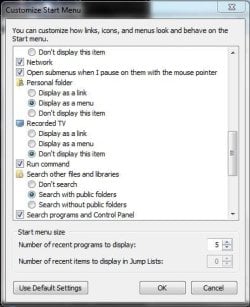
Seen below, I have no Pictures choices like in the 2nd picture in step 3 above.

Does any one else have this problem, or have any idea how to fix it? I didn't have this problem in the beta or the RC.

Thanks for any replies.
 

Attachments

  • missing_pictures_link.jpg
    missing_pictures_link.jpg
    37.9 KB · Views: 63,711

My Computer

Computer type
PC/Desktop
Computer Manufacturer/Model Number
Inskipp the Uncatchable/Tower of Power
OS
Windows 7 Professional RTM (6.1 Build 7600)
CPU
Intel i7-2600k @ 4.0Ghz
Motherboard
Asus P8P67
Memory
8GB Corsair Dominator
Graphics Card(s)
Geforce 470GTX
Sound Card
High Definition Onboard
Monitor(s) Displays
Acer 27"
Screen Resolution
1920x1080
Hard Drives
Corsair GT SSD 120gb
2x WD 1TB
WD 3TB
PSU
PC Power & Cooling Silencer 750W Quad
Case
Lian-Li PC-A70A full tower
Cooling
Arctic Cooling Freezer 7 Pro
Keyboard
Logitech G510
Mouse
Microsoft Intellimouse Explorer 3.0
Internet Speed
50Mbit down, 15Mbit up
Hello Inskipp,

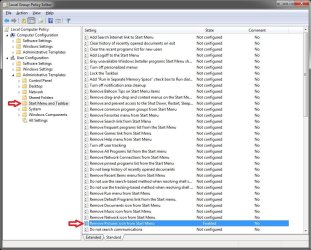
Double check in the Local Group Policy Editor to make sure that the policy highlighted in blue below is set to Not Configured.
GPEDIT.MSC.JPG
Downloading and merging this registry file should restore Pictures back to the Start Menu as well for you. It sets the group policy back to default for you automatically.

Hope this helps,
Shawn
 

Attachments

My Computer

Computer type
PC/Desktop
Computer Manufacturer/Model Number
Self built custom
OS
64-bit Windows 11 Pro for Workstations
CPU
Intel i7-8700K OC'd to 5 GHz
Motherboard
ASUS ROG Maximus XI Formula Z390
Memory
64 GB (4x16GB) G.SKILL TridentZ RGB DDR4 3600 MHz
Graphics Card(s)
ASUS ROG-STRIX-GTX1080TI-O11G-GAMING
Sound Card
Integrated
Monitor(s) Displays
2 x Samsung Odyssey G7 27"
Screen Resolution
2560x1440
Hard Drives
1TB Samsung 990 PRO M.2,
4TB Samsung 990 PRO PRO M.2,
TerraMaster F8 SSD Plus NAS
PSU
Seasonic Prime Titanium 850W
Case
Thermaltake Core P3
Cooling
Corsair Hydro H115i
Keyboard
Logitech wireless K800
Mouse
Logitech MX Master 4
Internet Speed
2 Gb/s Download and 100 Mb/s Upload
Antivirus
Malwarebyte Anti-Malware Premium
Browser
Google Chrome
Other Info
Logitech Z625 speaker system,
Logitech BRIO 4K Pro webcam,
HP Color LaserJet Pro MFP M477fdn,
APC SMART-UPS RT 1000 XL - SURT1000XLI,
Galaxy S23 Plus phone
The group policy was not configured.

The registry had the difference, I had a 1 in NoSMMyPictures in the HKCU\Software\Microsoft\Windows\CurrentVersion\Policies\Explorer folder.

Your fix took care of it, thank you very much.
 

My Computer

Computer type
PC/Desktop
Computer Manufacturer/Model Number
Inskipp the Uncatchable/Tower of Power
OS
Windows 7 Professional RTM (6.1 Build 7600)
CPU
Intel i7-2600k @ 4.0Ghz
Motherboard
Asus P8P67
Memory
8GB Corsair Dominator
Graphics Card(s)
Geforce 470GTX
Sound Card
High Definition Onboard
Monitor(s) Displays
Acer 27"
Screen Resolution
1920x1080
Hard Drives
Corsair GT SSD 120gb
2x WD 1TB
WD 3TB
PSU
PC Power & Cooling Silencer 750W Quad
Case
Lian-Li PC-A70A full tower
Cooling
Arctic Cooling Freezer 7 Pro
Keyboard
Logitech G510
Mouse
Microsoft Intellimouse Explorer 3.0
Internet Speed
50Mbit down, 15Mbit up
You're most welcome Inskipp. I'm happy to hear that you got it sorted. :)
 

My Computer

Computer type
PC/Desktop
Computer Manufacturer/Model Number
Self built custom
OS
64-bit Windows 11 Pro for Workstations
CPU
Intel i7-8700K OC'd to 5 GHz
Motherboard
ASUS ROG Maximus XI Formula Z390
Memory
64 GB (4x16GB) G.SKILL TridentZ RGB DDR4 3600 MHz
Graphics Card(s)
ASUS ROG-STRIX-GTX1080TI-O11G-GAMING
Sound Card
Integrated
Monitor(s) Displays
2 x Samsung Odyssey G7 27"
Screen Resolution
2560x1440
Hard Drives
1TB Samsung 990 PRO M.2,
4TB Samsung 990 PRO PRO M.2,
TerraMaster F8 SSD Plus NAS
PSU
Seasonic Prime Titanium 850W
Case
Thermaltake Core P3
Cooling
Corsair Hydro H115i
Keyboard
Logitech wireless K800
Mouse
Logitech MX Master 4
Internet Speed
2 Gb/s Download and 100 Mb/s Upload
Antivirus
Malwarebyte Anti-Malware Premium
Browser
Google Chrome
Other Info
Logitech Z625 speaker system,
Logitech BRIO 4K Pro webcam,
HP Color LaserJet Pro MFP M477fdn,
APC SMART-UPS RT 1000 XL - SURT1000XLI,
Galaxy S23 Plus phone
Brink sure do love your tutorials. Nice work thanks. Fabe
 

My Computer

Computer Manufacturer/Model Number
Self Built
OS
Windows 7 ultimate 64 bit / XP Home sp3
CPU
intel Core 2 Duo E8400 3.0ghz
Motherboard
Asus P5ND bios 1401
Memory
8 gigs 1066 OCZ Fata1ty
Graphics Card(s)
EVGA GTX 580 Call of Duty Black Ops Edition
Sound Card
Creative Soundblaster Audigy 2zs
Monitor(s) Displays
Asus 24in LCD's 2MS X2
Screen Resolution
1920x1080p @60Hz
Hard Drives
WD Caviar 500 Black/ WD Caviar 200 Blue
PSU
OCZ 700W GameXtreme
Case
NZXT Apollo
Cooling
Corsair H50 CPU/120mm x3 /60mm x2 /Corsair Dominator Ram
Keyboard
Logitech Bluetooth Wireless MX5000
Mouse
Logitech Bluetooth Wireless MX1000
Internet Speed
Download 19.83 Upload 0.97
Other Info
Logitech Z2300 Speakers/ Bose Noise Cancelling Headphones/Avermedia PCI-e Hybrid TV Bravo/Epson NX415 all in one/ 4 Port Powered USB Hub/ LG 10x Bluray Burner /TSST Corp DVDRW External
You're most welcome Fabe, and thank you. :o

Please feel free to critique them though. All input helps make them that much better and easier to use for everyone. :)
 

My Computer

Computer type
PC/Desktop
Computer Manufacturer/Model Number
Self built custom
OS
64-bit Windows 11 Pro for Workstations
CPU
Intel i7-8700K OC'd to 5 GHz
Motherboard
ASUS ROG Maximus XI Formula Z390
Memory
64 GB (4x16GB) G.SKILL TridentZ RGB DDR4 3600 MHz
Graphics Card(s)
ASUS ROG-STRIX-GTX1080TI-O11G-GAMING
Sound Card
Integrated
Monitor(s) Displays
2 x Samsung Odyssey G7 27"
Screen Resolution
2560x1440
Hard Drives
1TB Samsung 990 PRO M.2,
4TB Samsung 990 PRO PRO M.2,
TerraMaster F8 SSD Plus NAS
PSU
Seasonic Prime Titanium 850W
Case
Thermaltake Core P3
Cooling
Corsair Hydro H115i
Keyboard
Logitech wireless K800
Mouse
Logitech MX Master 4
Internet Speed
2 Gb/s Download and 100 Mb/s Upload
Antivirus
Malwarebyte Anti-Malware Premium
Browser
Google Chrome
Other Info
Logitech Z625 speaker system,
Logitech BRIO 4K Pro webcam,
HP Color LaserJet Pro MFP M477fdn,
APC SMART-UPS RT 1000 XL - SURT1000XLI,
Galaxy S23 Plus phone
Folders In Start Menu

Do they not automatically expand when you point at them?

I thought for sure they did this in vista

I have 'Open submenus when i pause on them with the mouse pointer' checked'

Pointing at other things in the start menu works, just not the folders inside the all programs
 

My Computer

Computer Manufacturer/Model Number
HP DV9033CL
OS
Windows 7 Professional 32 Bit
Memory
2 GB
Graphics Card(s)
nVidia GeForce Go 7600
Sound Card
Conexant HD Audio Board
Screen Resolution
1440x900
Internet Speed
aDSL 1.5Mbps / 256 Kbps
Hello BGF,

Only on the dark right side when you have the buttons set to display as a menu will they automatically expand. The folders in the "All Programs" area will only expand when you click on them. :)
 

My Computer

Computer type
PC/Desktop
Computer Manufacturer/Model Number
Self built custom
OS
64-bit Windows 11 Pro for Workstations
CPU
Intel i7-8700K OC'd to 5 GHz
Motherboard
ASUS ROG Maximus XI Formula Z390
Memory
64 GB (4x16GB) G.SKILL TridentZ RGB DDR4 3600 MHz
Graphics Card(s)
ASUS ROG-STRIX-GTX1080TI-O11G-GAMING
Sound Card
Integrated
Monitor(s) Displays
2 x Samsung Odyssey G7 27"
Screen Resolution
2560x1440
Hard Drives
1TB Samsung 990 PRO M.2,
4TB Samsung 990 PRO PRO M.2,
TerraMaster F8 SSD Plus NAS
PSU
Seasonic Prime Titanium 850W
Case
Thermaltake Core P3
Cooling
Corsair Hydro H115i
Keyboard
Logitech wireless K800
Mouse
Logitech MX Master 4
Internet Speed
2 Gb/s Download and 100 Mb/s Upload
Antivirus
Malwarebyte Anti-Malware Premium
Browser
Google Chrome
Other Info
Logitech Z625 speaker system,
Logitech BRIO 4K Pro webcam,
HP Color LaserJet Pro MFP M477fdn,
APC SMART-UPS RT 1000 XL - SURT1000XLI,
Galaxy S23 Plus phone
Customize Windows 7 Start Menu

I have a question. I have been trying to figure out how I would add a customized item to the right half of the start menu, where the user name is, then documents, etc... I have searched all over the forums and cant seem to find anything.
 

My Computer

Computer Manufacturer/Model Number
Asus G50vt
OS
Windows 7 RC1 Build 7057
CPU
Intel Core 2 Duo P8400 @3.0Ghz OC'd
Motherboard
Asus G50vt
Memory
4Gb OCZ DDR2 6-6-6-18
Graphics Card(s)
Nvidia GeForce 9800m GS 512Mb
Sound Card
Nvidia HDA
Monitor(s) Displays
15.6" Laptop LCD
Screen Resolution
1366x768
Hard Drives
Internal Seagate 320Gb, 5400rpm SATA HDD
Internal Western Digital 250Gb, 5400rpm SATA HDD
PSU
Generic Laptop PSU
Internet Speed
AT&T Uverse 18mbps Downstream
Hello xbxhkz,

You can use a 3rd party program like Vista Start Menu in Windows 7 to have a fully customizable Start Menu.

Hope this helps,
Shawn
 

My Computer

Computer type
PC/Desktop
Computer Manufacturer/Model Number
Self built custom
OS
64-bit Windows 11 Pro for Workstations
CPU
Intel i7-8700K OC'd to 5 GHz
Motherboard
ASUS ROG Maximus XI Formula Z390
Memory
64 GB (4x16GB) G.SKILL TridentZ RGB DDR4 3600 MHz
Graphics Card(s)
ASUS ROG-STRIX-GTX1080TI-O11G-GAMING
Sound Card
Integrated
Monitor(s) Displays
2 x Samsung Odyssey G7 27"
Screen Resolution
2560x1440
Hard Drives
1TB Samsung 990 PRO M.2,
4TB Samsung 990 PRO PRO M.2,
TerraMaster F8 SSD Plus NAS
PSU
Seasonic Prime Titanium 850W
Case
Thermaltake Core P3
Cooling
Corsair Hydro H115i
Keyboard
Logitech wireless K800
Mouse
Logitech MX Master 4
Internet Speed
2 Gb/s Download and 100 Mb/s Upload
Antivirus
Malwarebyte Anti-Malware Premium
Browser
Google Chrome
Other Info
Logitech Z625 speaker system,
Logitech BRIO 4K Pro webcam,
HP Color LaserJet Pro MFP M477fdn,
APC SMART-UPS RT 1000 XL - SURT1000XLI,
Galaxy S23 Plus phone
I want my classic start menu back...

Short of a program like Vista Start Menu, is there a simple way to get a folder that you've pinned to the start menu to open as a menu instead of as a link?

This would restore a core aspect of how I used the "classic" start menu; I would typically have three folders at the top of the start menu (not in Programs, but in the main menu itself) and all of my day-to-day links would live in those three folders. (each was a category relative to what I typically do)

What I want is for a simple key combo that can get me into a menu that (hierarchically) lists off my most commonly used programs. I get close with a pinned folder in the start menu, but I don't really want to open an explorer window and then navigate in it--I want that pinned folder to open up in place as a menu and show me the options right there.

Frankly it wouldn't be a hard utility to write, sidestepping the entire start menu for my personal shortcuts, but surely someone has written something like this already?

Thoughts? Options?
 

My Computer

Computer Manufacturer/Model Number
Lenovo W500
OS
Windows 7 x64
CPU
Core 2 Duo
Memory
4Gb
Graphics Card(s)
ATI / Intel
Hard Drives
500Gb

My Computer

Computer type
PC/Desktop
Computer Manufacturer/Model Number
Self built custom
OS
64-bit Windows 11 Pro for Workstations
CPU
Intel i7-8700K OC'd to 5 GHz
Motherboard
ASUS ROG Maximus XI Formula Z390
Memory
64 GB (4x16GB) G.SKILL TridentZ RGB DDR4 3600 MHz
Graphics Card(s)
ASUS ROG-STRIX-GTX1080TI-O11G-GAMING
Sound Card
Integrated
Monitor(s) Displays
2 x Samsung Odyssey G7 27"
Screen Resolution
2560x1440
Hard Drives
1TB Samsung 990 PRO M.2,
4TB Samsung 990 PRO PRO M.2,
TerraMaster F8 SSD Plus NAS
PSU
Seasonic Prime Titanium 850W
Case
Thermaltake Core P3
Cooling
Corsair Hydro H115i
Keyboard
Logitech wireless K800
Mouse
Logitech MX Master 4
Internet Speed
2 Gb/s Download and 100 Mb/s Upload
Antivirus
Malwarebyte Anti-Malware Premium
Browser
Google Chrome
Other Info
Logitech Z625 speaker system,
Logitech BRIO 4K Pro webcam,
HP Color LaserJet Pro MFP M477fdn,
APC SMART-UPS RT 1000 XL - SURT1000XLI,
Galaxy S23 Plus phone
Tanks for Trikx very appreciated:)
 

My Computer

Computer Manufacturer/Model Number
Assemblato
OS
Windows 7 Home Premium 64 bit
CPU
Intel core due duo E8500
Motherboard
Asus Maxymus Formula
Memory
Corsair Dominetor 4 Gb
Graphics Card(s)
Nvidia GTS 260
Monitor(s) Displays
Samsung Sync Master 21"
Hard Drives
Hitachy 500 Gb
Western Digital 360 GB
Case
Cooler Master 840
Cooling
Zalman cs 9500
Back
Top