Start Menu icons showing as .ink files

A3Paper

New member
Local time
7:52 AM
Messages
4
Hi,

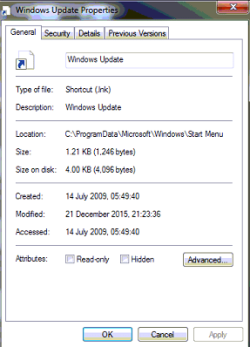
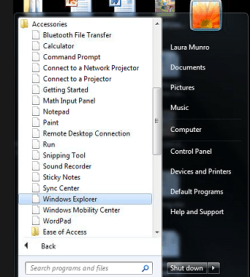
Most programs within Start > All Programs are showing as blank .ink files (see screenshot attached).

Tried the following:
- Rebuilding icon cache as per http://www.sevenforums.com/tutorials/49819-icon-cache-rebuild.html
- Deleting HKEY_CURRENT_USER\Software\Microsoft\Windows\Current Version\Explorer\File Exts\.Ink\UserChoice

Any ideas?

Thanks,
Pete
 

Attachments
  • Icons.PNG
    Icons.PNG
    40.6 KB · Views: 47
  • File type.png
    File type.png
    15.3 KB · Views: 46

My Computer My Computer

At a glance

Windows 7 Ultimate x64
OS
Windows 7 Ultimate x64
That's .lnk (LNK) which is a link or shortcut That's what it should be.

What problem are you having.
 

My Computer My Computer

At a glance

Windows 10 Pro X64Intel Quad Core i7-4770 @ 3.4Ghz16.0GB PC3-12800 DDR3 SDRAM 1600 MHzIntel Integrated HD Graphics
Computer type
PC/Desktop
Computer Manufacturer/Model Number
Lenovo IdeaCenter 450
OS
Windows 10 Pro X64
CPU
Intel Quad Core i7-4770 @ 3.4Ghz
Memory
16.0GB PC3-12800 DDR3 SDRAM 1600 MHz
Graphics Card(s)
Intel Integrated HD Graphics
Sound Card
Realtek HD Audio
Monitor(s) Displays
HP 22" LCD
Screen Resolution
1680 x 1050
Hard Drives
250GB Samsung EVO SATA-3 SSD
2TB Seagate ST2000DM001 SATA-2
1.5TB Seagate ST3150041AS SATA
Keyboard
Dell USB
Mouse
Lenovo USB
Internet Speed
Cable via Road Runner 3MB Upload, 30MB Download
Antivirus
Windows Defender, MBAM Pro, MBAE
Browser
Seamonkey
Other Info
UEFI/GPT
PLDS DVD-RW DH16AERSH
Might try a right-click on the Windows Orb -> Properties -> Start Menu tab -> untick "Store and display recently used programs in the Start menu" ... click APPLY. Change the setting back, click APPLY again... see if it restored the Start Menu programs to showing their icons.
 

My Computer My Computer

At a glance

Win 7 Ultimate 64-bit
OS
Win 7 Ultimate 64-bit
A little more info:
The files that are showing as .lnk appears to be all shortcuts within the Start > All Programs folder and anything within Control Panel. Shortcuts on the Desktop and Task Bar are fine. To open files such as notepad or calculator, we have to go to Start and enter "Notepad.exe" in the search bar instead of just "Notepad".
- When we click to open the .lnk files nothing happens.
- This is also an issue for all users on this computer.

Tried:
- System Restore to the earliest point (1 month ago). This must have been an issue before then.
- Tried the manual way of rebuilding icon cache.
- Exported 19 registries from my own machine and imported on the users machine.
- Right clicking the Start Menu, Customize, Use Default Settings.
- Tried a few other scripts found online that more or less do the same thing as cache rebuilding and registry changes.

Thanks in advance for any assistance.
 

My Computer My Computer

At a glance

Windows 7 Ultimate x64
OS
Windows 7 Ultimate x64
I know the DT shortcuts are working, but have you looked at this?
 

My Computer My Computer

At a glance

Win 7 Ultimate 64-bit
OS
Win 7 Ultimate 64-bit

My Computer My Computer

At a glance

Windows 10 Pro X64Intel Quad Core i7-4770 @ 3.4Ghz16.0GB PC3-12800 DDR3 SDRAM 1600 MHzIntel Integrated HD Graphics
Computer type
PC/Desktop
Computer Manufacturer/Model Number
Lenovo IdeaCenter 450
OS
Windows 10 Pro X64
CPU
Intel Quad Core i7-4770 @ 3.4Ghz
Memory
16.0GB PC3-12800 DDR3 SDRAM 1600 MHz
Graphics Card(s)
Intel Integrated HD Graphics
Sound Card
Realtek HD Audio
Monitor(s) Displays
HP 22" LCD
Screen Resolution
1680 x 1050
Hard Drives
250GB Samsung EVO SATA-3 SSD
2TB Seagate ST2000DM001 SATA-2
1.5TB Seagate ST3150041AS SATA
Keyboard
Dell USB
Mouse
Lenovo USB
Internet Speed
Cable via Road Runner 3MB Upload, 30MB Download
Antivirus
Windows Defender, MBAM Pro, MBAE
Browser
Seamonkey
Other Info
UEFI/GPT
PLDS DVD-RW DH16AERSH
Sorry for the late reply. The user was unavailable for 2 weeks.

Tried both suggestions above however no joy. We're imaging the laptop to resolve.

Would have liked to have got to the bottom of this one, but never-mind!! I appreciate the assistance given, so thank you.
 

My Computer My Computer

At a glance

Windows 7 Ultimate x64
OS
Windows 7 Ultimate x64
Back
Top