
theColster123
New member
- Local time
- 2:33 PM
- Messages
- 8
Hi.
I'd like to first appologise if this is in the wrong section.
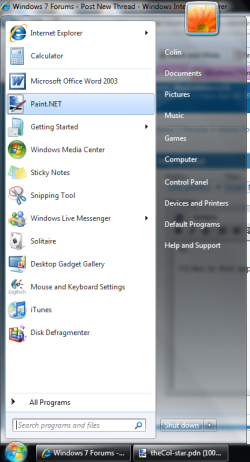
If you look at the screenshot below, you can see Internet Explorer, Getting Started and Windows Live Messenger have those 'extra options' arrows. Well, the highlighted program, Paint.NET, had one of those arrows, where I could quickly open any recent files I was working on. However, today that arrow has disappeared.
Is there a way of getting it back?
You can see my System Specifications at the bottom of my post.
Thanks in advance for your help.
~theColster123.
I'd like to first appologise if this is in the wrong section.
If you look at the screenshot below, you can see Internet Explorer, Getting Started and Windows Live Messenger have those 'extra options' arrows. Well, the highlighted program, Paint.NET, had one of those arrows, where I could quickly open any recent files I was working on. However, today that arrow has disappeared.
Is there a way of getting it back?
You can see my System Specifications at the bottom of my post.
Thanks in advance for your help.
~theColster123.
Attachments
My Computer
- Computer Manufacturer/Model Number
- Sony Vaio VPCL14S1E
- OS
- Windows 7 Home Premium 64-bit
- CPU
- Intel Core 2 Quad CPU Q8400 @ 2.66GHz 2.67 GHz
- Memory
- 8.00 GB
- Screen Resolution
- 1920*1080


