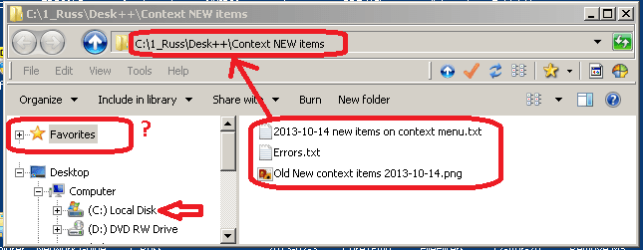
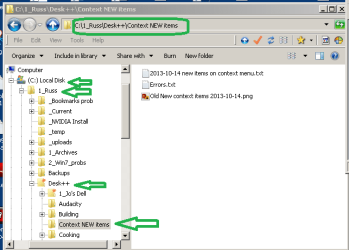
Hi
ICit2lol 
ICit2lol said:
:tip: Just resolved my own problem. "Key" reminded me of "switches".
My target string for the shortcut was "C:\1_Russ\Desk++\Context NEW items" ...
it should have been ...
C:\Windows\explorer.exe /e,"C:\1_Russ\Desk++\Context NEW items"
" /e," opens the navigation pane -- NOTE the space between "~.exe" and "/e,~"
Any path strings with spaces MUST be wrapped in quotes.
How do I rep myself. My gray cells are working, again
 How I create a shortcut on the Start menu (or sub-menu on Start)
I use a clipboard extender ClipX so I can store multiple strings.
... or ... assemble/concatenate the Target-path in a temporary Notepad orphan.
Target path can be to files, folders or URLs
Right click in the location where you want the shortcut, avoid RClcking on a menu/folder else the short cut will be created in an unintended folder.
. . . Shortcuts can be relocated by dragging once they are created
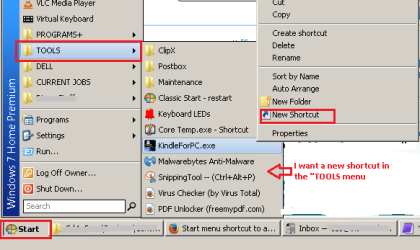
In "
Type the location of the item" paste your assembled "path"

[Next] button
In the "Type a Name for this shortcut" type in whatever you want to call the shortcut

[Finish] button
-----
Sample Target string to a folder, with Navigation pane visible
- assembled in a notepad orphan, don't forget the space after the .EXE string
C:\Windows\explorer.exe /e,"C:\1_Russ\Desk++\Context NEW items"
- note the folder path has spaces so it must be wrapped in quotes
Sample Target string to a file, in this case a TXT file
- assembled in a notepad orphan, don't forget the space after the .EXE string
C:\Windows\Notepad.exe "C:\My folder\My text file.txt"
- note the folder path has spaces so it must be wrapped in quotes
** Target path is two strings separated by a space
Part_1: full name of the application
Part_2: the full name to the document
- (I cannot find my notes for switches to open a doc in full screen, reduced or minimized)
- (if I am pressed I will dig around for the document switches, just let me know)
Sample Target string to a web page
- if I remember rightly if URL contains spaces the entire string must be wrapped in quotes
"http://www.sevenforums.com"
- copied from the address bar when the web page is open
To view the results in shortcut Properties
Right click the shortcut > Properties > Shortcut tab
Callout text can be customized...
- the default is the target path
Shortcut > right click > Properties > Shortcut (tab) > Comments
- type your own text in the "Comments" edit box
- URLs cannot be commented, unless someone else knows how?
Hope this helps.