
Hello,
Customer Toshiba Laptop, Win7 Home Pre, lots of add ons, toolbars, PCFix Speed, Reg Optimizer Pro, etc. Removed with REVO, Cleaned up startup with CCleaner, and MSCONFIG.
Ran Malwarebytes and MWAV (Microworld stand alone anti-virus tool.) Reset all 3 browsers (IE11, Chrome, Firefox30) Reboot. All of the browsers open up to w w w-search .net > Tuvaro. Verified proxy in internet settings was clear and set to "automatically detect" and also without auto detect. (Proxy was set to 55150?) Reset each browser homepage but still goes to w w w-search .net.
Ran Combo-Fix 2x and the internet browser problem is fixed.
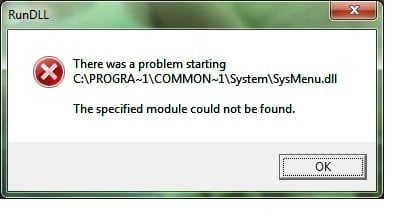
Now whenever the system boots up it shows two separate error messages box with RunDLL in the upper left corner and states
"There was a problem starting C:\Progra~!\common~1\System\Sysmenu.dll" The Specified module could not be found."
C:\Program Files\Common Files\System - no Sysmenu.dll here
C:\Program Files (x86)\Common Files\System - no Sysmenu.dll here
I have re-run Malwarebytes and it did not find anything.
Looking in MSCONFIG and the startup section in CCleaner I do not see any item pointing to either of the locations - C:\Program Files\Common Files\System - in either program.
Is there any other load point that could be calling for this?
Customer Toshiba Laptop, Win7 Home Pre, lots of add ons, toolbars, PCFix Speed, Reg Optimizer Pro, etc. Removed with REVO, Cleaned up startup with CCleaner, and MSCONFIG.
Ran Malwarebytes and MWAV (Microworld stand alone anti-virus tool.) Reset all 3 browsers (IE11, Chrome, Firefox30) Reboot. All of the browsers open up to w w w-search .net > Tuvaro. Verified proxy in internet settings was clear and set to "automatically detect" and also without auto detect. (Proxy was set to 55150?) Reset each browser homepage but still goes to w w w-search .net.
Ran Combo-Fix 2x and the internet browser problem is fixed.
Now whenever the system boots up it shows two separate error messages box with RunDLL in the upper left corner and states
"There was a problem starting C:\Progra~!\common~1\System\Sysmenu.dll" The Specified module could not be found."
C:\Program Files\Common Files\System - no Sysmenu.dll here
C:\Program Files (x86)\Common Files\System - no Sysmenu.dll here
I have re-run Malwarebytes and it did not find anything.
Looking in MSCONFIG and the startup section in CCleaner I do not see any item pointing to either of the locations - C:\Program Files\Common Files\System - in either program.
Is there any other load point that could be calling for this?
Attachments
Last edited:
My Computer
- Computer type
- PC/Desktop
- Computer Manufacturer/Model Number
- Custom Build for Video edit
- OS
- Win7 Pro 64 Dual boot with Win7 Pro 64
- CPU
- Intel i7 4790
- Motherboard
- ASUS Z97-A
- Memory
- Corsair 8GB
- Graphics Card(s)
- Intel 4600 (embedded in processor chip)
- Sound Card
- Realtek ALC 892 8 channel
- Monitor(s) Displays
- 3 ACER AL2016w
- Hard Drives
- Crucial M500 SSD 240GB, WD 2TB 7200 rpm
- PSU
- Seasonic 80 Plus Gold 550W
- Case
- Fractal design R4
- Internet Speed
- 5mbps
- Other Info
- First custom build specifically for editing video.

 I was looking for a solution for two days and couldn't find anything. Thanks again!


