Startup issue

Datman

New member
Member
VIP
Local time
7:22 AM
Messages
158
Any idea why since I discovered that my monitor with a 1280 x 768 resolution looks way better, problem is when I reboot the computer the image is over scanned so much the taskbar is completely gone. I have to set it to 1024 x 768 (bad picture) and back to 1280 x 768 and I have a perfect desktop. If I remember to set it back to 1024 x 768 before I shutdown it’s a little easier, but I never do.
 

My Computer

OS
Window 7 home x64
CPU
AMD FX-8150 Zambezi 3.6GHz Socket AM3+
Motherboard
GIGABYTE GA-970A-UD3 AM3
Memory
G.SKILL Ripjaws X Series 8GB (2 x 4GB
Graphics Card(s)
SAPPHIRE 100328L Radeon HD 6770 1GB GDDR5
Sound Card
Asus xonar hdav 1.3 deluxe
Hard Drives
Seagate Barracuda ST31000524AS 1TB 7200 RPM SATA 6.0Gb/s
Case
Rosewill CHALLENGER Black Gaming ATX Mid Tower
Cooling
CORSAIR Hydro Series H60
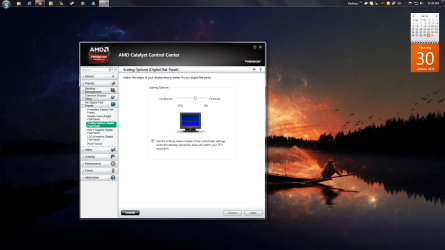
If your video card is the one the specs listed in your profile. I would say to open up CCC (catalyst Control center) and check the monitor options. Then check in the scaling options menu and move the slider to fit it on the desktop then when you have it how you like click apply. I have to do this every time on my flat screen since it comes in a bit zoomed every time I would say reinstall drivers or did a clean install. After that it just stuck and the screen looks correct now on my flat screen. For me it's in my digital flat panels but for you it might be a monitor since I use a tv for my computer setup. Not completely sure if it will fix the issue but this fixed it for me. Worth a try I would say.
 

Attachments

  • cccscaling.png
    cccscaling.png
    383.9 KB · Views: 5

My Computer

Computer type
PC/Desktop
Computer Manufacturer/Model Number
custom build
OS
Windows 10 64bit
CPU
AMD Phenom II X4 925 (Deneb)(2.8GHz) OC 3.4GHz
Motherboard
M5A78L-MLX Plus
Memory
Corsair Vengeance DDR3 4GBX2 (8192MB)
Graphics Card(s)
XFX HD 6870 1GB (OC)- 940MHz core, mem 1150MHz
Monitor(s) Displays
Vizio 26' 1920x1080 / Acer 1336x768
Screen Resolution
1920x1080 60Hz /1336x768
Hard Drives
Kingston Digital 60GB SSDNow V300/500gb HDD Western Digital 7200rpm (/WD 160GB HDD 7200rpm
PSU
CORSAIR CX600 600w
Case
AZZA Orion 202 EVO
Cooling
cooler master hyper TX3 cpu cooler
Keyboard
Razer DeathStalker
Mouse
Logitech Optical Gaming Mouse G400
Antivirus
Defualt on win 10
Browser
Firefox
Other Info
cpu is overclocked in bios
I also us a TV as a monitor. I did figure out that it was the TV and to fix it I switch the input on the tv back and forth.
 

My Computer

OS
Window 7 home x64
CPU
AMD FX-8150 Zambezi 3.6GHz Socket AM3+
Motherboard
GIGABYTE GA-970A-UD3 AM3
Memory
G.SKILL Ripjaws X Series 8GB (2 x 4GB
Graphics Card(s)
SAPPHIRE 100328L Radeon HD 6770 1GB GDDR5
Sound Card
Asus xonar hdav 1.3 deluxe
Hard Drives
Seagate Barracuda ST31000524AS 1TB 7200 RPM SATA 6.0Gb/s
Case
Rosewill CHALLENGER Black Gaming ATX Mid Tower
Cooling
CORSAIR Hydro Series H60
Back
Top