Solved Startup programs help

Andyonline

New member
Member
Local time
6:37 AM
Messages
85
Hi, I have just had to purchase a new PC and went with an off the shelf Lenovo 330 for speed of purchase and I need a little help.

I am not a very experienced user and I am looking for help to decide which programs I can disable/delay at startup. I have looked at the msconfig startup tab but this shows the programs enabled/disabled at startup but does not advise whether its needed, recommended or not needed at at all.

I have seen a few software programs about such as Autoruns, CCleaner but again this does not give an inexperienced user guidance of those which can be disarmed at startup. I think there as only one called Soluto which offered recommendations other than optimizing suites type programs (Tuneup etc)

I have searched the forum for information on the startup topic and quite a few recommend using the features in Windows 7 rather than 3rd party programs but I am a little hesitant attempting this myself without the aid of some sort of program adviser to encourage my decision.

Also, I am thinking of a program updater to assist with program updates. I have Windows update and Filehippo Update checker running on my PC but I understand Update Checker only scans its own database.

I would welcome any comments regarding the above as I do not really want to get too heavily involved in scheduling programs and updating programs but at the same time I dont want to damage anything.

NB I will find the time to update my PC specs on the forum as soon as I can.

Many Thanks

Andy
 

My Computer

Computer Manufacturer/Model Number
LENOVO 330
OS
MS Windows 7 Home Premium 64-bit SP1
CPU
Intel Core i3 2120
Motherboard
LENOVO
Memory
DDR3 Size 8192 MBytes
Graphics Card(s)
Intel(R) HD Graphics
Monitor(s) Displays
Samsung SMS22A100
Screen Resolution
Current Resolution 1920x1080 pixels
Hard Drives
Seagate ST31000524AS ATA Device
Internet Speed
Download 4.8mb, Upload 1.1mb
This is a personal opinion. Others may disagree. But I went into msconfig and disabled everything except my antivirus suite. No problems experienced. Anything that was disabled at startup is still available if and when I need to run it. The good thing about msconfig is if you disable something and find out it needs to run at startup, you can always go back in and enable it. No harm, no foul. :)
 

My Computer

Computer type
Laptop
Computer Manufacturer/Model Number
Sony Vaio VPCEB47GM Laptop
OS
Win 7 Pro 64-bit
CPU
Intel i5 2.4 Ghz
Memory
8GB DDR3
Graphics Card(s)
Intel HD 3000
Sound Card
IDT High Definition
Monitor(s) Displays
15.6 WGXA Anti-Glare LED
Screen Resolution
1280x800
Hard Drives
640Gb 7200rpm
Antivirus
MSE
Browser
Opera (primary) with IE9 backup
Can you post a screenshot of your startup screen and we can advise you.
Although i agree with marsmimar I would be careful stopping ALL but virus programs because laptops are full of Crap that the manufacturer installed and may need one of the programs to run.
 

My Computer

Computer type
PC/Desktop
Computer Manufacturer/Model Number
Self Built Custom Computer.
OS
Windows 10 Pro x64
CPU
i7-4770K
Motherboard
Asus Z87 Sabertooth
Memory
16Gig DDR3-2400
Graphics Card(s)
Gigabyte GT740
Sound Card
Onboard
Monitor(s) Displays
Benq 27" - Dell 23' - Benq 22"
Screen Resolution
1680x1050
Hard Drives
Samsung 840 Pro 128g SSD
1xWestern Digital Caviar Green 1tb
2xWestern Digital Caviar Green 2 tb
PSU
Seasonic 760 watt Platinum
Case
Coolermaster Haf - X
Cooling
Noctua NH-C12P CPU Cooler
Keyboard
Logitech illuminated keyboard
Mouse
Logitech Perfomance MX
Internet Speed
Cable = speeds to 20Mbps downsteam and 512kbps upsteam
Antivirus
Avast Internet Security
Browser
Firefox
If you do what marsmimar has suggested in post #2 you should have no problems.
 

My Computer

Computer type
PC/Desktop
Computer Manufacturer/Model Number
Home made Desktop
OS
Windows 10 Pro. 64/ version 1709 Windows 7 Pro/64
CPU
Intel i7-6800K @ 4.3
Motherboard
ASUS X-99 Deluxe II
Memory
Corsair Platinum 16 gig @2400
Graphics Card(s)
EVGA GTX 1070 OC
Monitor(s) Displays
Asus 27" LED LCD/VE278Q
Screen Resolution
1920-1080 or 1280-720 HDMI
Hard Drives
INTEL SSD 730-240 Gb Sata 3.0/
PSU
EVGA Platium 1200W
Case
Phanteks Luxe Tempered Glass 8 fans/ one radiator
Cooling
XSPC/ Water Cooled CPU
Keyboard
Das 4 Professional
Mouse
Logitech M705/MX Anywhere 2-S
Internet Speed
100 mbits
Antivirus
Microsoft Security Essentials/ Malwarebytes Premium 3.0/ SAS
Browser
I.E. 11 default/Firefox/ ISP Time Warner Cable/Spectrum
Other Info
LG BluRay Burner/
Sound system-KLipsch-THX/
Icy Dock ssd Hot Swap bays.
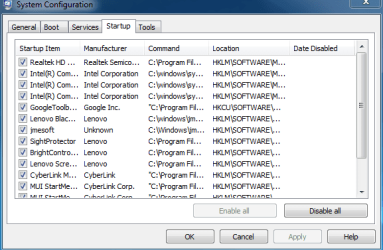
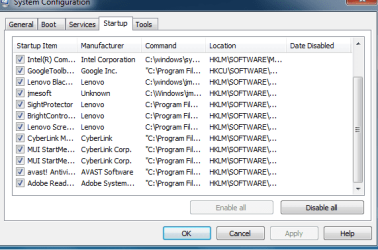
Brian, attached is the startup screen I hope you meant
 

Attachments

  • Capture 1.PNG
    Capture 1.PNG
    12.3 KB · Views: 27
  • Capture 2.PNG
    Capture 2.PNG
    12.3 KB · Views: 25

My Computer

Computer Manufacturer/Model Number
LENOVO 330
OS
MS Windows 7 Home Premium 64-bit SP1
CPU
Intel Core i3 2120
Motherboard
LENOVO
Memory
DDR3 Size 8192 MBytes
Graphics Card(s)
Intel(R) HD Graphics
Monitor(s) Displays
Samsung SMS22A100
Screen Resolution
Current Resolution 1920x1080 pixels
Hard Drives
Seagate ST31000524AS ATA Device
Internet Speed
Download 4.8mb, Upload 1.1mb
This is a personal opinion. Others may disagree. But I went into msconfig and disabled everything except my antivirus suite. No problems experienced. Anything that was disabled at startup is still available if and when I need to run it. The good thing about msconfig is if you disable something and find out it needs to run at startup, you can always go back in and enable it. No harm, no foul. :)
No disagreement at all. that's the way to do it. I may add that you also want to retain the ones you have started yourself - e.g. sidebar ( Gadgets ) or Rocket Dock or similar.
 

My Computer

Computer Manufacturer/Model Number
HP, Dell, Gateway, Toshiba - 4 laptops and 2 desktops
OS
Vista, Windows7, Mint Mate, Zorin, Windows 8
CPU
from 1.6GHz Duo to i7
Monitor(s) Displays
2x HP w2207
Hard Drives
5x HDD, 7x SSD, 12x Externals
Keyboard
with trackball - no mices
Mouse
Trackball mice
Internet Speed
DSL 6000

My Computer

Computer Manufacturer/Model Number
HP, Dell, Gateway, Toshiba - 4 laptops and 2 desktops
OS
Vista, Windows7, Mint Mate, Zorin, Windows 8
CPU
from 1.6GHz Duo to i7
Monitor(s) Displays
2x HP w2207
Hard Drives
5x HDD, 7x SSD, 12x Externals
Keyboard
with trackball - no mices
Mouse
Trackball mice
Internet Speed
DSL 6000
Does that include the Intel one too ?

Any advise on startup programs if my confidence gets the better of me ?
 

My Computer

Computer Manufacturer/Model Number
LENOVO 330
OS
MS Windows 7 Home Premium 64-bit SP1
CPU
Intel Core i3 2120
Motherboard
LENOVO
Memory
DDR3 Size 8192 MBytes
Graphics Card(s)
Intel(R) HD Graphics
Monitor(s) Displays
Samsung SMS22A100
Screen Resolution
Current Resolution 1920x1080 pixels
Hard Drives
Seagate ST31000524AS ATA Device
Internet Speed
Download 4.8mb, Upload 1.1mb
If it makes you feel better, set them on delayed start - like 2 minutes later. Then you have no boot impact and you will not notice the startup of those processes.
 

My Computer

Computer Manufacturer/Model Number
HP, Dell, Gateway, Toshiba - 4 laptops and 2 desktops
OS
Vista, Windows7, Mint Mate, Zorin, Windows 8
CPU
from 1.6GHz Duo to i7
Monitor(s) Displays
2x HP w2207
Hard Drives
5x HDD, 7x SSD, 12x Externals
Keyboard
with trackball - no mices
Mouse
Trackball mice
Internet Speed
DSL 6000

My Computer

Computer type
PC/Desktop
Computer Manufacturer/Model Number
Self Built Custom Computer.
OS
Windows 10 Pro x64
CPU
i7-4770K
Motherboard
Asus Z87 Sabertooth
Memory
16Gig DDR3-2400
Graphics Card(s)
Gigabyte GT740
Sound Card
Onboard
Monitor(s) Displays
Benq 27" - Dell 23' - Benq 22"
Screen Resolution
1680x1050
Hard Drives
Samsung 840 Pro 128g SSD
1xWestern Digital Caviar Green 1tb
2xWestern Digital Caviar Green 2 tb
PSU
Seasonic 760 watt Platinum
Case
Coolermaster Haf - X
Cooling
Noctua NH-C12P CPU Cooler
Keyboard
Logitech illuminated keyboard
Mouse
Logitech Perfomance MX
Internet Speed
Cable = speeds to 20Mbps downsteam and 512kbps upsteam
Antivirus
Avast Internet Security
Browser
Firefox
Many Thanks everyone for taking to time to help me out with this. I think initially I will delay them for a while and if all ok then disable them.

Once again many thanks.

Andy
 

My Computer

Computer Manufacturer/Model Number
LENOVO 330
OS
MS Windows 7 Home Premium 64-bit SP1
CPU
Intel Core i3 2120
Motherboard
LENOVO
Memory
DDR3 Size 8192 MBytes
Graphics Card(s)
Intel(R) HD Graphics
Monitor(s) Displays
Samsung SMS22A100
Screen Resolution
Current Resolution 1920x1080 pixels
Hard Drives
Seagate ST31000524AS ATA Device
Internet Speed
Download 4.8mb, Upload 1.1mb
This is a personal opinion. Others may disagree. But I went into msconfig and disabled everything except my antivirus suite. No problems experienced. Anything that was disabled at startup is still available if and when I need to run it. The good thing about msconfig is if you disable something and find out it needs to run at startup, you can always go back in and enable it. No harm, no foul. :)
No disagreement at all. that's the way to do it. I may add that you also want to retain the ones you have started yourself - e.g. sidebar ( Gadgets ) or Rocket Dock or similar.

I agree with WHS, marsmimar, and others.

I also suggest checking your startup items from time to time...
You may be clean today, but next week might be different.

Some programs you want and install, may include "add on" things you don't want or need.
Usually you can decline the add ons, but you have to read all the install screens/instructions.

If you do turn off "Auto Update startups" for programs you use, it may become your responsibility to manually check for updates.
I suggest using Secunia PSI (ver 2) periodically to check your PC for updates needed.

Others may disagree, but that's my approach for an "ongoing" strategy...
 

My Computer

Computer type
PC/Desktop
Computer Manufacturer/Model Number
home built
OS
Multi-Boot W7_Pro_x64 W8.1_Pro_x64 W10_Pro_x64 +Linux_VMs +Chromium_VM
CPU
AMD Athlon II x4 620
Motherboard
Gigabyte GA-MA785G-UD3H
Memory
6GB GSkill DDR2 800
Graphics Card(s)
AMD 4670 GPU + AMD 4200 IGP
Sound Card
on board Realtek ALC889A
Monitor(s) Displays
RCA 40" LCD TV, Insignia 32" LCD TV, HP 15" LCD monitor
Screen Resolution
1680 x 1050
Hard Drives
OCZ Vertex 3 120GB,
Samsung F3 1TB (3),
Several others - WD, Seagate, Hitachi, ...
PSU
Corsair 500 W
Case
Rosewill mid tower
Cooling
CM 90mm rifle
Keyboard
Gyration wireless, Logitech wireless, Dell USB wired
Mouse
Gyration wireless, Logitech wireless, V7 USB wired
Internet Speed
Spectrum - 100Mbps D / 10Mbps U
Antivirus
Avast, MBAM3, EMET, WinPatrol
Browser
Pale Moon, Firefox, IE
Other Info
2 multi-boot PC's
Mainly HTPC/Office/Gen purpose (no gaming).
Trendnet USB KVM.
LG DVD burner/Blue Ray Player.
Tray system for removable SATA backup drives.

Not currently OCd, under-volted.
I use Hybrid sleep, rarely re-boot or shutdown.

Hauppauge HD-PVR, Avermedia PCIe TV Tuner, Hauppauge PCI TV Tuner.
Well I ws going to delay the startup of most of the processes but I could only find enable or disable.

How does one delay startup please ?
 

My Computer

Computer Manufacturer/Model Number
LENOVO 330
OS
MS Windows 7 Home Premium 64-bit SP1
CPU
Intel Core i3 2120
Motherboard
LENOVO
Memory
DDR3 Size 8192 MBytes
Graphics Card(s)
Intel(R) HD Graphics
Monitor(s) Displays
Samsung SMS22A100
Screen Resolution
Current Resolution 1920x1080 pixels
Hard Drives
Seagate ST31000524AS ATA Device
Internet Speed
Download 4.8mb, Upload 1.1mb

My Computer

Computer Manufacturer/Model Number
HP, Dell, Gateway, Toshiba - 4 laptops and 2 desktops
OS
Vista, Windows7, Mint Mate, Zorin, Windows 8
CPU
from 1.6GHz Duo to i7
Monitor(s) Displays
2x HP w2207
Hard Drives
5x HDD, 7x SSD, 12x Externals
Keyboard
with trackball - no mices
Mouse
Trackball mice
Internet Speed
DSL 6000
Brian, attached is the startup screen I hope you meant

Yeah, that's a lot of stuff stuffed in the startup. I thought Lenovo was good about keeping the bloat down. In fact, aren't they known for their "rapidboot" PC's?
 

My Computer

OS
Windows 7 Home Premium x64
Thanks WHS I will take a look at this
 

My Computer

Computer Manufacturer/Model Number
LENOVO 330
OS
MS Windows 7 Home Premium 64-bit SP1
CPU
Intel Core i3 2120
Motherboard
LENOVO
Memory
DDR3 Size 8192 MBytes
Graphics Card(s)
Intel(R) HD Graphics
Monitor(s) Displays
Samsung SMS22A100
Screen Resolution
Current Resolution 1920x1080 pixels
Hard Drives
Seagate ST31000524AS ATA Device
Internet Speed
Download 4.8mb, Upload 1.1mb
Back
Top