Startup programs not starting on boot

in the last few months this has happened to me aswell, always after an update my startup options return to default and load programs i didn't want loaded and stops loading programs i did want loading.

i've had several dealings with angry customers about it as well over the same period.

what i've found is that it is not a hardware problem or for the most part a software issue but an update comes along and screws my settings of which some are very obscure at the best of times, usually takes me 40 min ish to get my pc back to normal after as well.

i'm not sure there is an actual solution for this as it seems to be linked to a windows update that causes the problem.
 

My Computer

Computer Manufacturer/Model Number
.
OS
.
CPU
.
Motherboard
.
Memory
.
Graphics Card(s)
.
Monitor(s) Displays
.
Screen Resolution
.
Hard Drives
.
PSU
.
Case
.
Cooling
.
Keyboard
.
Mouse
.
Internet Speed
.
Other Info
.
No I was not referring to Malware here, but updaters like Google which is pernicious spyware that spies on your habits and pastes ads everywhere you go, and nearly every other item you allow to start up with your PC. The freeware especially make their money selling the data they collect from spying on you, and all find it's big business.. So almost all do it, even software pretending to monitor HD condition.

Think of it like opening a port to every single listing in the Startup list, to access your PC to do as much or as little as they like. Why do this when you can wait to click on the program to run it and keep for yourself your RAM/CPU, connection and privacy?

I think you're focusing on worst-case examples. And, I can't tell if you've conflated spyware with programs that just phone home with internal data. Can you give me some examples of programs that are not spyware, but do spy on your surfing?

I can see some programs tracking what you do *with that program* and reporting that internal data back, and not being counted as spyware.

But, if it does watch what you do in another part of your system, then it's spyware. And people with technical knowledge who pay attention to that sort of thing end up reporting that. Those reports show up in web searches for "program name malware or spyware."

Does Google really do that? Or, are you talking about their tracking with cookies and sentinels on webpages?

As for "pasting ads everywhere." I use Adblock. So, I never see any ads. It's amazing how much more pleasant surfing is. My eye seems to catch blinky things at the edge of my vision, so animated ads annoy me quite a lot. So, for me, Adblock is nearly indispensable. (The animated smilies on the side of this editor are fairly annoying. I wish forum software would give me the option to use non-animated images.)

Drake
 

My Computer

Computer Manufacturer/Model Number
iBuyPower
OS
Win 7 64 Pro SP1
CPU
AMD Phenom II X4 965
Motherboard
ASUS M4A79T Deluxe (AM3)
Memory
8 Gig (4x2) DDR3
Graphics Card(s)
ATI Radeon 5870
Sound Card
Onboard Reaktek
Monitor(s) Displays
Samsung SyndMaster 204B & SyncMaster 2433
Screen Resolution
1600x1200 & 1920x1200
Hard Drives
Hitachi Deskstar 1TB
PSU
Thermaltake EVO_Bluie 750 Watt
Case
NZXT Gamma Gaming Mid Tower
Cooling
Liquid w/120mm radiator
Keyboard
XArmor U9W wireless
Mouse
Logitech G700 wireless
Internet Speed
20 Mbps down, 1.9 Mbps up
in the last few months this has happened to me aswell, always after an update my startup options return to default and load programs i didn't want loaded and stops loading programs i did want loading.

i've had several dealings with angry customers about it as well over the same period.

what i've found is that it is not a hardware problem or for the most part a software issue but an update comes along and screws my settings of which some are very obscure at the best of times, usually takes me 40 min ish to get my pc back to normal after as well.

i'm not sure there is an actual solution for this as it seems to be linked to a windows update that causes the problem.

Which programs are you disabling that come back? If that's happening with me, I'm not noticing it. Albeit, I can't think of any standard programs that I've purposely disabled.

Is it your Startup folder not being honored, like I'm seeing? Are you able to get it working again consistently?

Drake
 

My Computer

Computer Manufacturer/Model Number
iBuyPower
OS
Win 7 64 Pro SP1
CPU
AMD Phenom II X4 965
Motherboard
ASUS M4A79T Deluxe (AM3)
Memory
8 Gig (4x2) DDR3
Graphics Card(s)
ATI Radeon 5870
Sound Card
Onboard Reaktek
Monitor(s) Displays
Samsung SyndMaster 204B & SyncMaster 2433
Screen Resolution
1600x1200 & 1920x1200
Hard Drives
Hitachi Deskstar 1TB
PSU
Thermaltake EVO_Bluie 750 Watt
Case
NZXT Gamma Gaming Mid Tower
Cooling
Liquid w/120mm radiator
Keyboard
XArmor U9W wireless
Mouse
Logitech G700 wireless
Internet Speed
20 Mbps down, 1.9 Mbps up
One of the times it worked briefly was when I disabled an old wireless keyboard that I'd had plugged in. It worked for a few boots and I thought that had fixed it. Then it failed again. At that point I tried, including the originals, a grand total of four keyboards, one at a time. And one of those keyboards was wired. During that session I also changed to a different mouse. And, I unplugged every other USB device, including the hub. The only things plugged in to any USB port were the wired keyboard and a fairly simple Logitech wireless mouse. And the boot failed.

So, I think I ruled out a flaky keyboard.

I'll look at that link you posted.

Drake
 

My Computer

Computer Manufacturer/Model Number
iBuyPower
OS
Win 7 64 Pro SP1
CPU
AMD Phenom II X4 965
Motherboard
ASUS M4A79T Deluxe (AM3)
Memory
8 Gig (4x2) DDR3
Graphics Card(s)
ATI Radeon 5870
Sound Card
Onboard Reaktek
Monitor(s) Displays
Samsung SyndMaster 204B & SyncMaster 2433
Screen Resolution
1600x1200 & 1920x1200
Hard Drives
Hitachi Deskstar 1TB
PSU
Thermaltake EVO_Bluie 750 Watt
Case
NZXT Gamma Gaming Mid Tower
Cooling
Liquid w/120mm radiator
Keyboard
XArmor U9W wireless
Mouse
Logitech G700 wireless
Internet Speed
20 Mbps down, 1.9 Mbps up
When you say "the Boot failed" are you referring to boot problems other than the startups you want to start with Win7 not loading?

By installing Soluto you can also test if it loads at Startup, besides seeing it's detailed output of your startups.
 
By "failed" I mean exhibited the behavior we've been talking about. The Startup programs not loading.

Drake
 

My Computer

Computer Manufacturer/Model Number
iBuyPower
OS
Win 7 64 Pro SP1
CPU
AMD Phenom II X4 965
Motherboard
ASUS M4A79T Deluxe (AM3)
Memory
8 Gig (4x2) DDR3
Graphics Card(s)
ATI Radeon 5870
Sound Card
Onboard Reaktek
Monitor(s) Displays
Samsung SyndMaster 204B & SyncMaster 2433
Screen Resolution
1600x1200 & 1920x1200
Hard Drives
Hitachi Deskstar 1TB
PSU
Thermaltake EVO_Bluie 750 Watt
Case
NZXT Gamma Gaming Mid Tower
Cooling
Liquid w/120mm radiator
Keyboard
XArmor U9W wireless
Mouse
Logitech G700 wireless
Internet Speed
20 Mbps down, 1.9 Mbps up
Installed Saluto. It had recommendations, of course, but nothing noteworthy. There were a few things I could remove if I were in the mood to optimize, like Google Updater and Windows Media something or other.

It was kind of odd. It spotted some stuff, but not others. For example, it spotted DU Meter, which is in my Startup folder, so not running. But, it did not spot the program that drives my DX1 keyboard, also in my Startup folder. I didn't really see a pattern for what it saw and what it didn't.

It did run on boot, because, according to Autoruns, it sticks itself in the HKLM\SOFTWARE\Microsoft\Windows NT\CurrentVersion\Winlogon\Userinit and HKLM\System\CurrentControlSet\Services registry entries. Those apparently are not affected by whatever this is.

Drake
 

My Computer

Computer Manufacturer/Model Number
iBuyPower
OS
Win 7 64 Pro SP1
CPU
AMD Phenom II X4 965
Motherboard
ASUS M4A79T Deluxe (AM3)
Memory
8 Gig (4x2) DDR3
Graphics Card(s)
ATI Radeon 5870
Sound Card
Onboard Reaktek
Monitor(s) Displays
Samsung SyndMaster 204B & SyncMaster 2433
Screen Resolution
1600x1200 & 1920x1200
Hard Drives
Hitachi Deskstar 1TB
PSU
Thermaltake EVO_Bluie 750 Watt
Case
NZXT Gamma Gaming Mid Tower
Cooling
Liquid w/120mm radiator
Keyboard
XArmor U9W wireless
Mouse
Logitech G700 wireless
Internet Speed
20 Mbps down, 1.9 Mbps up
in the last few months this has happened to me aswell, always after an update my startup options return to default and load programs i didn't want loaded and stops loading programs i did want loading.

i've had several dealings with angry customers about it as well over the same period.

what i've found is that it is not a hardware problem or for the most part a software issue but an update comes along and screws my settings of which some are very obscure at the best of times, usually takes me 40 min ish to get my pc back to normal after as well.

i'm not sure there is an actual solution for this as it seems to be linked to a windows update that causes the problem.

Which programs are you disabling that come back? If that's happening with me, I'm not noticing it. Albeit, I can't think of any standard programs that I've purposely disabled.

Is it your Startup folder not being honored, like I'm seeing? Are you able to get it working again consistently?

Drake

sky drive, drop box adobe reader and such just normal programmes.

interestingly i just reinstalled my os and it did it a few times while doing updates.

though i don't think i have the same issue as your describing.
 

My Computer

Computer Manufacturer/Model Number
.
OS
.
CPU
.
Motherboard
.
Memory
.
Graphics Card(s)
.
Monitor(s) Displays
.
Screen Resolution
.
Hard Drives
.
PSU
.
Case
.
Cooling
.
Keyboard
.
Mouse
.
Internet Speed
.
Other Info
.
I've not experienced this issue since updating the video card. However, one time Chrome did not load but this version of Chrome has major bugs anyway. Drake, are you sure that all of your services are starting up? Some of mine weren't and I wouldn't know until I loaded iTunes and my iPhone was unlisted. I swear this has to do with a conflict between a Windows update and software. My computer's been consistent until this issue.
 

My Computer

OS
Windows 7 Home Premium x64
I've not experienced this issue since updating the video card. However, one time Chrome did not load but this version of Chrome has major bugs anyway. Drake, are you sure that all of your services are starting up? Some of mine weren't and I wouldn't know until I loaded iTunes and my iPhone was unlisted. I swear this has to do with a conflict between a Windows update and software. My computer's been consistent until this issue.

I guess you're right. I see DU Meter and Steam under Services, and neither appears to be running. I don't see any pattern to which is running and which isn't.

Drake
 

My Computer

Computer Manufacturer/Model Number
iBuyPower
OS
Win 7 64 Pro SP1
CPU
AMD Phenom II X4 965
Motherboard
ASUS M4A79T Deluxe (AM3)
Memory
8 Gig (4x2) DDR3
Graphics Card(s)
ATI Radeon 5870
Sound Card
Onboard Reaktek
Monitor(s) Displays
Samsung SyndMaster 204B & SyncMaster 2433
Screen Resolution
1600x1200 & 1920x1200
Hard Drives
Hitachi Deskstar 1TB
PSU
Thermaltake EVO_Bluie 750 Watt
Case
NZXT Gamma Gaming Mid Tower
Cooling
Liquid w/120mm radiator
Keyboard
XArmor U9W wireless
Mouse
Logitech G700 wireless
Internet Speed
20 Mbps down, 1.9 Mbps up
sky drive, drop box adobe reader and such just normal programmes.

interestingly i just reinstalled my os and it did it a few times while doing updates.

though i don't think i have the same issue as your describing.

Odd. You used msconfig or some similar utility to disable them? I guess the updates rewrite part of the registry and don't honor those settings.

Drake
 

My Computer

Computer Manufacturer/Model Number
iBuyPower
OS
Win 7 64 Pro SP1
CPU
AMD Phenom II X4 965
Motherboard
ASUS M4A79T Deluxe (AM3)
Memory
8 Gig (4x2) DDR3
Graphics Card(s)
ATI Radeon 5870
Sound Card
Onboard Reaktek
Monitor(s) Displays
Samsung SyndMaster 204B & SyncMaster 2433
Screen Resolution
1600x1200 & 1920x1200
Hard Drives
Hitachi Deskstar 1TB
PSU
Thermaltake EVO_Bluie 750 Watt
Case
NZXT Gamma Gaming Mid Tower
Cooling
Liquid w/120mm radiator
Keyboard
XArmor U9W wireless
Mouse
Logitech G700 wireless
Internet Speed
20 Mbps down, 1.9 Mbps up
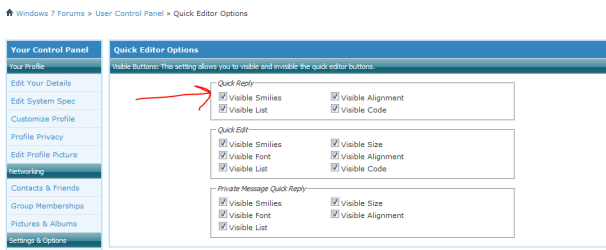
(The animated smilies on the side of this editor are fairly annoying. I wish forum software would give me the option to use non-animated images.)

Hi,

FYI - you can turn off smilies in the Quick Editor Options as shown below.

Regards,
Golden
 

Attachments

  • Capture.PNG
    Capture.PNG
    11.6 KB · Views: 19

My Computer

Computer type
PC/Desktop
Computer Manufacturer/Model Number
Golden Mk. I.4
OS
Windows 10 Pro x64 ; Xubuntu x64
CPU
Intel i7 860 @ 2.80 GHz O/C'ed to 4.0GHz
Motherboard
Gigabyte P55A-UD3R Rev.1. Award BIOS F13
Memory
16GB Corsair Vengance DDR3 @ 661 MHz Dual Channel (9-9-9-24)
Graphics Card(s)
EVGA NVidia GTX 560 1024MB
Sound Card
Realtek Integrated
Monitor(s) Displays
Dual Samsung SyncMaster 2494HS
Screen Resolution
1920*1080 and 1920*1080
Hard Drives
1*Samsung 840 EVO 120GB SSD;
1*OCZ Vertex 2 60GB SSD;
2*Samsung F3 SpinPoint 1TB in RAID0;
1*Samsung F1 SpinPoint 1TB;
2*Western Digital 1TB External USB 3.0
1*Western Digital 500GB External USB 3.0
1*Seagate 500GB External USB 2.0
PSU
Thermaltake ToughPower QFan 750W
Case
Thermaltake Element S VK60001W2Z
Cooling
Corsair H60 Water Cooling, 2*230mm and 2*80mm case fans
Keyboard
Logitech G110
Mouse
Logitech MX518
FYI - you can turn off smilies in the Quick Editor Options as shown below.

Regards,
Golden

Thanks. I'm familiar with that. My preference isn't for *no* smilies. It's for non-animated smilies. The animated ones are cute. I don't mind seeing them in a message for a little bit. But after a few seconds I'd like to switch to a non-animated version.

I've taken a couple of days off of fighting this darn thing. I plan on getting back to it in a day or two.

Drake
 

My Computer

Computer Manufacturer/Model Number
iBuyPower
OS
Win 7 64 Pro SP1
CPU
AMD Phenom II X4 965
Motherboard
ASUS M4A79T Deluxe (AM3)
Memory
8 Gig (4x2) DDR3
Graphics Card(s)
ATI Radeon 5870
Sound Card
Onboard Reaktek
Monitor(s) Displays
Samsung SyndMaster 204B & SyncMaster 2433
Screen Resolution
1600x1200 & 1920x1200
Hard Drives
Hitachi Deskstar 1TB
PSU
Thermaltake EVO_Bluie 750 Watt
Case
NZXT Gamma Gaming Mid Tower
Cooling
Liquid w/120mm radiator
Keyboard
XArmor U9W wireless
Mouse
Logitech G700 wireless
Internet Speed
20 Mbps down, 1.9 Mbps up
The update of the video card driver did not work. I figured out that it occurs on reboots subsequent to a program creating a notification icon that is new to the notification area.

The program that created the icon doesn't even have to be set to run at start-up. Whatever screws with the loading of programs at start-up occurs when the new notification icon is created. I'm guessing that start-up loading stops when Windows comes across the entry for the new notification icon.

To alleviate this, I had to reset the tray notifications cache. I unchecked "Always show all icons and notifications on the taskbar" and I select "Show icons and notifications" for the icons. I hope that this will be fixed in Windows 8.
 

My Computer

OS
Windows 7 Home Premium x64
I promised I would come back and report.

I never did figure out what was wrong. I was just living with it. I set up a .bat file to run most of the stuff for me each time I booted.

Last week, it hung after installing an update. I couldn't get it to finish booting. I tried a couple of things to revive it, but finally gave up. I don't know if that was related to the startup issues I've been having all along.

Since the hard disk is approaching 3 years old, and Google's stats indicates that's when hard disk mortality begins to climb, I decided to go ahead and proactively replace it. I'm all backed up, but I think it's actually going to be easier to pull off just the stuff I want from the old hard drive, rather than go through the backup system to get at it.

It was a frustrating issue. I still think that if I could have found the correct diagnostic tool I would have found the problem. Two or three times in the last few months, it did boot up correctly. That proves that it was capable of working. Wish I could have figured it out.

Drake
 

My Computer

Computer Manufacturer/Model Number
iBuyPower
OS
Win 7 64 Pro SP1
CPU
AMD Phenom II X4 965
Motherboard
ASUS M4A79T Deluxe (AM3)
Memory
8 Gig (4x2) DDR3
Graphics Card(s)
ATI Radeon 5870
Sound Card
Onboard Reaktek
Monitor(s) Displays
Samsung SyndMaster 204B & SyncMaster 2433
Screen Resolution
1600x1200 & 1920x1200
Hard Drives
Hitachi Deskstar 1TB
PSU
Thermaltake EVO_Bluie 750 Watt
Case
NZXT Gamma Gaming Mid Tower
Cooling
Liquid w/120mm radiator
Keyboard
XArmor U9W wireless
Mouse
Logitech G700 wireless
Internet Speed
20 Mbps down, 1.9 Mbps up
Solved

After fighting this for weeks, it seems that I found a way to resolve the programs not starting up. I'm not sure why, but one of the programs set for automatic startup was fouling up the works for the rest of them. Eliminating the one programs from the startup list solved it and now all programs are loading properly.

To find out which was the errant program, I ran MSCONFIG and first cleared all Startup programs, then added the first 10 and rebooted and sure enough a few started to boot up. I kept on trying the next group of 10, rebooted and eventually I could tell when suddenly they all stopped loading. It ended up being Logitech Desktop Messenger and once I removed it, all program started to load again.

Will see if this last - but for the last half dozen reboots, it seems back to normal!
 

My Computer

OS
Windows 7 Ultimate
*slaps forehead*

What a great idea. I have a former colleague who used to do that sort of thing. He called it "Shaking the box" to see if he could alter the behavior in a way that provided clues. But that particular twist didn't occur to me.

I had a Logitech keyboard and mouse on that system when all this started, so that easily could have been the problem with mine. I don't remember if I had that program running at startup or not. As GregRocker would be quick to point out, that's pretty much an unnecessary program, anyway.

Drake
 

My Computer

Computer Manufacturer/Model Number
iBuyPower
OS
Win 7 64 Pro SP1
CPU
AMD Phenom II X4 965
Motherboard
ASUS M4A79T Deluxe (AM3)
Memory
8 Gig (4x2) DDR3
Graphics Card(s)
ATI Radeon 5870
Sound Card
Onboard Reaktek
Monitor(s) Displays
Samsung SyndMaster 204B & SyncMaster 2433
Screen Resolution
1600x1200 & 1920x1200
Hard Drives
Hitachi Deskstar 1TB
PSU
Thermaltake EVO_Bluie 750 Watt
Case
NZXT Gamma Gaming Mid Tower
Cooling
Liquid w/120mm radiator
Keyboard
XArmor U9W wireless
Mouse
Logitech G700 wireless
Internet Speed
20 Mbps down, 1.9 Mbps up
Mighty Drake I'm glad you got it figured out. What programs start up on a boot is pretty much up to the owner operator of the computer. I only have 3 things in Start Up checked. Everything else starts when I tell it to (tick on it) and closes when I tell it to. They don't run in the background unless I choose them to. It allows quicker boots and all around faster responding computer. As you found out Start Up can also be used to trouble shoot. Many of us at times have used it just for that.
If you have any more question just ring are door bell. Someone is always home at th 7 Forum.
Happing computing.
 

My Computer

Computer type
PC/Desktop
Computer Manufacturer/Model Number
Home made Desktop
OS
Windows 10 Pro. 64/ version 1709 Windows 7 Pro/64
CPU
Intel i7-6800K @ 4.3
Motherboard
ASUS X-99 Deluxe II
Memory
Corsair Platinum 16 gig @2400
Graphics Card(s)
EVGA GTX 1070 OC
Monitor(s) Displays
Asus 27" LED LCD/VE278Q
Screen Resolution
1920-1080 or 1280-720 HDMI
Hard Drives
INTEL SSD 730-240 Gb Sata 3.0/
PSU
EVGA Platium 1200W
Case
Phanteks Luxe Tempered Glass 8 fans/ one radiator
Cooling
XSPC/ Water Cooled CPU
Keyboard
Das 4 Professional
Mouse
Logitech M705/MX Anywhere 2-S
Internet Speed
100 mbits
Antivirus
Microsoft Security Essentials/ Malwarebytes Premium 3.0/ SAS
Browser
I.E. 11 default/Firefox/ ISP Time Warner Cable/Spectrum
Other Info
LG BluRay Burner/
Sound system-KLipsch-THX/
Icy Dock ssd Hot Swap bays.
To find out which was the errant program, I ran MSCONFIG and first cleared all Startup programs, then added the first 10 and rebooted and sure enough a few started to boot up. I kept on trying the next group of 10, rebooted and eventually I could tell when suddenly they all stopped loading. It ended up being Logitech Desktop Messenger and once I removed it, all program started to load again.

Will see if this last - but for the last half dozen reboots, it seems back to normal!

Why would you want all of those programs starting up and freeloading on your RAM, CPU and Startup time? Most often the reply is that they wouldn't be set to startup if they weren't needed. This is completely false. They start up because each has found a way to spy on you and sell that information more profitably than the value of their own software.

This couldn't be clearer in Win7 since you don't even have to sort through the needed services to disable everything under msconfig>Startup and msconfig>Services (after hiding all MS Services) except your AV, gadgets, sync, stickies or messenger if you need them running from the get-go.
 
Back
Top