Startup Repair Infinite Loop Recovery

How to Recover from an Infinitely Looping Startup Repair Loop without Reinstalling Windows

If you've ever experienced a Startup Repair that continously loops and fails to fix the problem of not being able to load windows, even in safe mode, then you'll know that usually the only way to recover from this when System Restore does not work is to do a clean install of Windows.

Until now.

This tutorial will show you how to use the System Recovery Options provided by Windows to recover your system to a working state so that you don't have to risk losing data by performing a clean install.

   Warning
The instructions presented withing this tutorial must be followed correctly, or you can damage your Windows 7 installation even further. This tutorial is designed to help recover from a bad registry that is causing the startup repair loop. You should note that there may still be some issues remaining that cannot be fixed by manually restoring the registry.


Recovering Your System
  1. Boot to the System Recovery Options screen.
    • If Windows automatically opens Startup Repair, and subsequently fails to fix a problem, you can skip ahead to step 4 below.
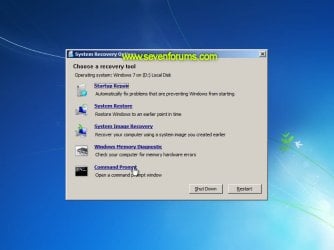
  2. In the System Recovery Options screen, click Startup Repair:
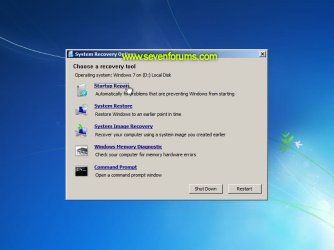
    Image05_startuprepair.jpg


  3. Windows will search for an attempt to repair startup problems:
    Image06_searching.jpg


  4. If startup problems could not be repaired, you will receive the message Windows cannot repair this computer automatically. Click View advanced options for system recovery and support:
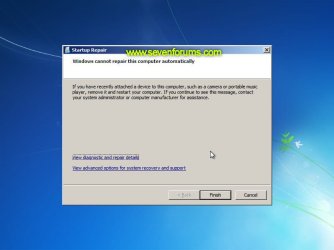
    Image07_cannotfix.jpg


  5. Click View advanced options for system recovery and support, which which bring you back to the main System Recovery Options screen.
  6. Click Command Prompt:
    Image08_clickcommand.jpg


  7. Command Prompt should open to X:, which is an internal ram disk use by System Repair:
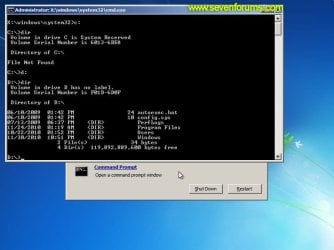
    Image10_changedrive.jpg


  8. Now you need to find your system drive. Depending on how your system is setup, this could be either C: or D:.
    • Type C: and press <ENTER>.
    • Verify that this is your system drive by typing DIR and pressing <ENTER>. If you see the Program Files, Users and Windows folders, then you have found your system drive, and can continue to step 9 below.
    • If the drive is not your system drive, repeat steps I and II above, changing the drive letter to D, E or some other letter until the system drive is located.
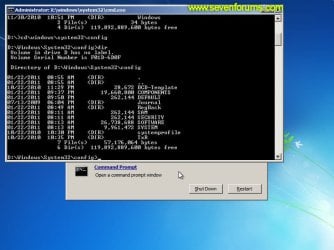
      Image11_chdir_config.jpg

  9. When you have located your Windows system drive, type CD \windows\system32\config and press <ENTER>:
  10. Type DIR and press <ENTER>, and verify that the following files and folders exist in the config folder:
    • RegBack (which is a folder)
    • DEFAULT
    • SAM
    • SECURITY
    • SOFTWARE
    • SYSTEM
      Image11_chdir_config.jpg

  11. Type MD mybackup and press <ENTER> to create a backup folder that you can use incase this procedure does not work as expected.
  12. Type copy *.* mybackup and press <ENTER>.
    • If you are prompted to overwrite existing files, press A to allow all backups to be overwritten.
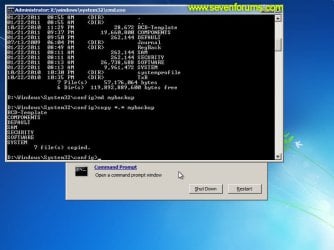
      Image12_mybackup.jpg

  13. Now you need to check if you can use the automatic Windows backups to restore your registry:
    • Type CD RegBack and press <ENTER> to go to the RegBack folder.
    • Type DIR and press <ENTER> to view the contents of the folder. All the following files must exist:
      • The DEFAULT, SAM and SECURITY files should each be about 262,000 bytes in size.
      • The SOFTWARE file should be about 26,000,000 bytes.
      • The SYSTEM file should be about 9,900,000 bytes.
      • The file sizes presented here are approximate estimations, and may vary depending on your system. If any one of them are 0 bytes, then you should stop what you're doing now and seek an alternative method of recovering your system, because Windows cannot function with a 0-byte size registry hive.
    • If the hive files listed in RegBack are ok, then proceed to step 14 of the tutorial.
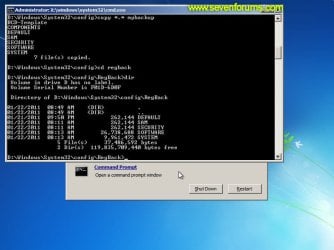
      Image13_checkregback.jpg


  14. Type copy *.* .. and press <ENTER> to copy the backup hive files to \Windows\System32\config.
    • If you are prompted to overwrite existing files, press A to allow all file to be overwritten.
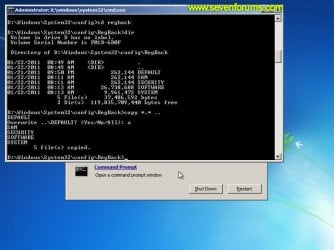
      Image14_copyregback.jpg

  15. Type exit and press <ENTER> to close the command prompt.
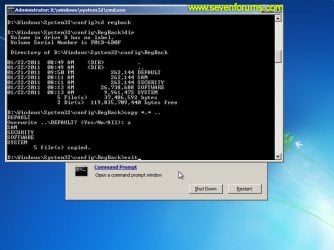
    Image15_exit.jpg


  16. Click the Restart button to reboot your computer. If all goes well, your system will boot normally.
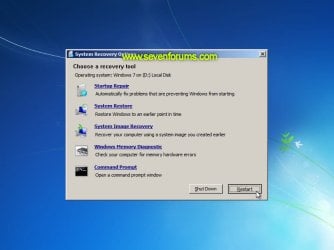
    Image16_restart.jpg
    Image17_working.jpg


Reference Information
This tutorial was made possible after learning how to manualy replace the Windows 7 Registry Hives after reading the Recovering Windows 7 Registry Hives/Files article on Microsoft Technet.


Attachments
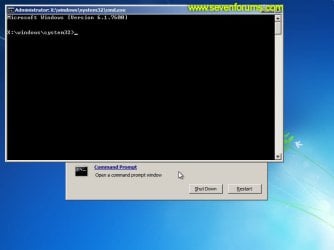
  • Image09_commandprompt.jpg
    Image09_commandprompt.jpg
    26.1 KB · Views: 373
Last edited by a moderator:
I tried the instructions in the tutorial. When i did step 10, each of the files were listed along with a duplicate-log, ie Security-log, showing 12 files and 6 directories. I continued with the next two steps. Many files were copied. On step 13 it showed 0 files and 3 directories listed as "." ".." and "mybackup". Are there any other solutions to this problem as I work from home and need the computer running?
 

My Computer My Computer

At a glance

Windows 7 64bit
OS
Windows 7 64bit
So I did what you asked but It's not booting up , the only thing I did different was name MD mybackup to backup, what should I do, should I do the process all over? Well I tried to do it all over but no result.
 

My Computer My Computer

At a glance

Windows 8.1 64 bitWindows 8.1 64-bit4096 MB RAMMicrosoft Basic Display Adapter
Computer type
Laptop
Computer Manufacturer/Model Number
Acer Aspire M5100
OS
Windows 8.1 64 bit
CPU
Windows 8.1 64-bit
Motherboard
Toshiba L745D
Memory
4096 MB RAM
Graphics Card(s)
Microsoft Basic Display Adapter
Sound Card
High Definition Audio Device
Monitor(s) Displays
1366x768
Screen Resolution
1366x768
Keyboard
Logitech Keyboard K800
Antivirus
MalwareBytes
Browser
Google Chrome
Help!

My computer won't let me get past step 10. As soon as i type in "dir" it only comes up with one reading/date.

3/01/2013 10:40am <DIR> -


and then nothing. It won't let me type or anything! Help! What does this mean and what do I do?? :(
 

My Computer My Computer

At a glance

windows 7
Computer type
PC/Desktop
Computer Manufacturer/Model Number
HP
OS
windows 7
As you can see the image below I have a lot of back ups, now my question would be is how would you delete them as I am going to start the process all over. If you are wondering why I have so many copies its because I wanted to see if I try again to see if it works.

ImageShack® - Online Photo and Video Hosting
 

My Computer My Computer

At a glance

Windows 8.1 64 bitWindows 8.1 64-bit4096 MB RAMMicrosoft Basic Display Adapter
Computer type
Laptop
Computer Manufacturer/Model Number
Acer Aspire M5100
OS
Windows 8.1 64 bit
CPU
Windows 8.1 64-bit
Motherboard
Toshiba L745D
Memory
4096 MB RAM
Graphics Card(s)
Microsoft Basic Display Adapter
Sound Card
High Definition Audio Device
Monitor(s) Displays
1366x768
Screen Resolution
1366x768
Keyboard
Logitech Keyboard K800
Antivirus
MalwareBytes
Browser
Google Chrome
Hello Raiden,

No need to delete the backup. You will be prompted at steps 12 and 14 to override the current backup with the new one. :)
 

My Computer My Computer

At a glance

64-bit Windows 11 Pro for WorkstationsIntel i7-8700K OC'd to 5 GHz64 GB (4x16GB) G.SKILL TridentZ RGB DDR4 3600...ASUS ROG-STRIX-GTX1080TI-O11G-GAMING
Computer type
PC/Desktop
Computer Manufacturer/Model Number
Self built custom
OS
64-bit Windows 11 Pro for Workstations
CPU
Intel i7-8700K OC'd to 5 GHz
Motherboard
ASUS ROG Maximus XI Formula Z390
Memory
64 GB (4x16GB) G.SKILL TridentZ RGB DDR4 3600 MHz
Graphics Card(s)
ASUS ROG-STRIX-GTX1080TI-O11G-GAMING
Sound Card
Integrated
Monitor(s) Displays
2 x Samsung Odyssey G7 27"
Screen Resolution
2560x1440
Hard Drives
1TB Samsung 990 PRO M.2,
4TB Samsung 990 PRO PRO M.2,
TerraMaster F8 SSD Plus NAS
PSU
Seasonic Prime Titanium 850W
Case
Thermaltake Core P3
Cooling
Corsair Hydro H115i
Keyboard
Logitech wireless K800
Mouse
Logitech MX Master 4
Internet Speed
2 Gb/s Download and 100 Mb/s Upload
Antivirus
Malwarebyte Anti-Malware Premium
Browser
Google Chrome
Other Info
Logitech Z625 speaker system,
Logitech BRIO 4K Pro webcam,
HP Color LaserJet Pro MFP M477fdn,
APC SMART-UPS RT 1000 XL - SURT1000XLI,
Galaxy S23 Plus phone
So Brink your saying start at step 12th and keep on going?
 

My Computer My Computer

At a glance

Windows 8.1 64 bitWindows 8.1 64-bit4096 MB RAMMicrosoft Basic Display Adapter
Computer type
Laptop
Computer Manufacturer/Model Number
Acer Aspire M5100
OS
Windows 8.1 64 bit
CPU
Windows 8.1 64-bit
Motherboard
Toshiba L745D
Memory
4096 MB RAM
Graphics Card(s)
Microsoft Basic Display Adapter
Sound Card
High Definition Audio Device
Monitor(s) Displays
1366x768
Screen Resolution
1366x768
Keyboard
Logitech Keyboard K800
Antivirus
MalwareBytes
Browser
Google Chrome
That or start over if you like. Either way will work without having to delete the backup you already created. :)
 

My Computer My Computer

At a glance

64-bit Windows 11 Pro for WorkstationsIntel i7-8700K OC'd to 5 GHz64 GB (4x16GB) G.SKILL TridentZ RGB DDR4 3600...ASUS ROG-STRIX-GTX1080TI-O11G-GAMING
Computer type
PC/Desktop
Computer Manufacturer/Model Number
Self built custom
OS
64-bit Windows 11 Pro for Workstations
CPU
Intel i7-8700K OC'd to 5 GHz
Motherboard
ASUS ROG Maximus XI Formula Z390
Memory
64 GB (4x16GB) G.SKILL TridentZ RGB DDR4 3600 MHz
Graphics Card(s)
ASUS ROG-STRIX-GTX1080TI-O11G-GAMING
Sound Card
Integrated
Monitor(s) Displays
2 x Samsung Odyssey G7 27"
Screen Resolution
2560x1440
Hard Drives
1TB Samsung 990 PRO M.2,
4TB Samsung 990 PRO PRO M.2,
TerraMaster F8 SSD Plus NAS
PSU
Seasonic Prime Titanium 850W
Case
Thermaltake Core P3
Cooling
Corsair Hydro H115i
Keyboard
Logitech wireless K800
Mouse
Logitech MX Master 4
Internet Speed
2 Gb/s Download and 100 Mb/s Upload
Antivirus
Malwarebyte Anti-Malware Premium
Browser
Google Chrome
Other Info
Logitech Z625 speaker system,
Logitech BRIO 4K Pro webcam,
HP Color LaserJet Pro MFP M477fdn,
APC SMART-UPS RT 1000 XL - SURT1000XLI,
Galaxy S23 Plus phone
Brink I already tried that before , the only thing I did different was just change the backup folder name to whatever I want, should I try again?
 

My Computer My Computer

At a glance

Windows 8.1 64 bitWindows 8.1 64-bit4096 MB RAMMicrosoft Basic Display Adapter
Computer type
Laptop
Computer Manufacturer/Model Number
Acer Aspire M5100
OS
Windows 8.1 64 bit
CPU
Windows 8.1 64-bit
Motherboard
Toshiba L745D
Memory
4096 MB RAM
Graphics Card(s)
Microsoft Basic Display Adapter
Sound Card
High Definition Audio Device
Monitor(s) Displays
1366x768
Screen Resolution
1366x768
Keyboard
Logitech Keyboard K800
Antivirus
MalwareBytes
Browser
Google Chrome
Did you ever finish all of the steps?
 

My Computer My Computer

At a glance

64-bit Windows 11 Pro for WorkstationsIntel i7-8700K OC'd to 5 GHz64 GB (4x16GB) G.SKILL TridentZ RGB DDR4 3600...ASUS ROG-STRIX-GTX1080TI-O11G-GAMING
Computer type
PC/Desktop
Computer Manufacturer/Model Number
Self built custom
OS
64-bit Windows 11 Pro for Workstations
CPU
Intel i7-8700K OC'd to 5 GHz
Motherboard
ASUS ROG Maximus XI Formula Z390
Memory
64 GB (4x16GB) G.SKILL TridentZ RGB DDR4 3600 MHz
Graphics Card(s)
ASUS ROG-STRIX-GTX1080TI-O11G-GAMING
Sound Card
Integrated
Monitor(s) Displays
2 x Samsung Odyssey G7 27"
Screen Resolution
2560x1440
Hard Drives
1TB Samsung 990 PRO M.2,
4TB Samsung 990 PRO PRO M.2,
TerraMaster F8 SSD Plus NAS
PSU
Seasonic Prime Titanium 850W
Case
Thermaltake Core P3
Cooling
Corsair Hydro H115i
Keyboard
Logitech wireless K800
Mouse
Logitech MX Master 4
Internet Speed
2 Gb/s Download and 100 Mb/s Upload
Antivirus
Malwarebyte Anti-Malware Premium
Browser
Google Chrome
Other Info
Logitech Z625 speaker system,
Logitech BRIO 4K Pro webcam,
HP Color LaserJet Pro MFP M477fdn,
APC SMART-UPS RT 1000 XL - SURT1000XLI,
Galaxy S23 Plus phone

My Computer My Computer

At a glance

Windows 8.1 64 bitWindows 8.1 64-bit4096 MB RAMMicrosoft Basic Display Adapter
Computer type
Laptop
Computer Manufacturer/Model Number
Acer Aspire M5100
OS
Windows 8.1 64 bit
CPU
Windows 8.1 64-bit
Motherboard
Toshiba L745D
Memory
4096 MB RAM
Graphics Card(s)
Microsoft Basic Display Adapter
Sound Card
High Definition Audio Device
Monitor(s) Displays
1366x768
Screen Resolution
1366x768
Keyboard
Logitech Keyboard K800
Antivirus
MalwareBytes
Browser
Google Chrome

My Computer My Computer

At a glance

64-bit Windows 11 Pro for WorkstationsIntel i7-8700K OC'd to 5 GHz64 GB (4x16GB) G.SKILL TridentZ RGB DDR4 3600...ASUS ROG-STRIX-GTX1080TI-O11G-GAMING
Computer type
PC/Desktop
Computer Manufacturer/Model Number
Self built custom
OS
64-bit Windows 11 Pro for Workstations
CPU
Intel i7-8700K OC'd to 5 GHz
Motherboard
ASUS ROG Maximus XI Formula Z390
Memory
64 GB (4x16GB) G.SKILL TridentZ RGB DDR4 3600 MHz
Graphics Card(s)
ASUS ROG-STRIX-GTX1080TI-O11G-GAMING
Sound Card
Integrated
Monitor(s) Displays
2 x Samsung Odyssey G7 27"
Screen Resolution
2560x1440
Hard Drives
1TB Samsung 990 PRO M.2,
4TB Samsung 990 PRO PRO M.2,
TerraMaster F8 SSD Plus NAS
PSU
Seasonic Prime Titanium 850W
Case
Thermaltake Core P3
Cooling
Corsair Hydro H115i
Keyboard
Logitech wireless K800
Mouse
Logitech MX Master 4
Internet Speed
2 Gb/s Download and 100 Mb/s Upload
Antivirus
Malwarebyte Anti-Malware Premium
Browser
Google Chrome
Other Info
Logitech Z625 speaker system,
Logitech BRIO 4K Pro webcam,
HP Color LaserJet Pro MFP M477fdn,
APC SMART-UPS RT 1000 XL - SURT1000XLI,
Galaxy S23 Plus phone
Dam is that the only way , This Laptop isn't for me by the way I am fixing it for a client so I really don't know what they want.
 

My Computer My Computer

At a glance

Windows 8.1 64 bitWindows 8.1 64-bit4096 MB RAMMicrosoft Basic Display Adapter
Computer type
Laptop
Computer Manufacturer/Model Number
Acer Aspire M5100
OS
Windows 8.1 64 bit
CPU
Windows 8.1 64-bit
Motherboard
Toshiba L745D
Memory
4096 MB RAM
Graphics Card(s)
Microsoft Basic Display Adapter
Sound Card
High Definition Audio Device
Monitor(s) Displays
1366x768
Screen Resolution
1366x768
Keyboard
Logitech Keyboard K800
Antivirus
MalwareBytes
Browser
Google Chrome
I suppose you could copy the entire drive to another location, and save it back into a folder afterwards if there's enough space for them to copy back what they want.
 

My Computer My Computer

At a glance

64-bit Windows 11 Pro for WorkstationsIntel i7-8700K OC'd to 5 GHz64 GB (4x16GB) G.SKILL TridentZ RGB DDR4 3600...ASUS ROG-STRIX-GTX1080TI-O11G-GAMING
Computer type
PC/Desktop
Computer Manufacturer/Model Number
Self built custom
OS
64-bit Windows 11 Pro for Workstations
CPU
Intel i7-8700K OC'd to 5 GHz
Motherboard
ASUS ROG Maximus XI Formula Z390
Memory
64 GB (4x16GB) G.SKILL TridentZ RGB DDR4 3600 MHz
Graphics Card(s)
ASUS ROG-STRIX-GTX1080TI-O11G-GAMING
Sound Card
Integrated
Monitor(s) Displays
2 x Samsung Odyssey G7 27"
Screen Resolution
2560x1440
Hard Drives
1TB Samsung 990 PRO M.2,
4TB Samsung 990 PRO PRO M.2,
TerraMaster F8 SSD Plus NAS
PSU
Seasonic Prime Titanium 850W
Case
Thermaltake Core P3
Cooling
Corsair Hydro H115i
Keyboard
Logitech wireless K800
Mouse
Logitech MX Master 4
Internet Speed
2 Gb/s Download and 100 Mb/s Upload
Antivirus
Malwarebyte Anti-Malware Premium
Browser
Google Chrome
Other Info
Logitech Z625 speaker system,
Logitech BRIO 4K Pro webcam,
HP Color LaserJet Pro MFP M477fdn,
APC SMART-UPS RT 1000 XL - SURT1000XLI,
Galaxy S23 Plus phone
I just powered the laptop on and it give me a message about over heating. I think this laptop is pretty much gone. That would be a good idea but I only have the recovery disc for windows not the installation disc. I have to call and tell her if she has the installation disc if I can save her computer.
 

My Computer My Computer

At a glance

Windows 8.1 64 bitWindows 8.1 64-bit4096 MB RAMMicrosoft Basic Display Adapter
Computer type
Laptop
Computer Manufacturer/Model Number
Acer Aspire M5100
OS
Windows 8.1 64 bit
CPU
Windows 8.1 64-bit
Motherboard
Toshiba L745D
Memory
4096 MB RAM
Graphics Card(s)
Microsoft Basic Display Adapter
Sound Card
High Definition Audio Device
Monitor(s) Displays
1366x768
Screen Resolution
1366x768
Keyboard
Logitech Keyboard K800
Antivirus
MalwareBytes
Browser
Google Chrome
Thank you for posting this man . I don't understand why this isn't working I have done these steps many of times and it won't reboot. I think it's a Laptop hardware issue.
 

My Computer My Computer

At a glance

Windows 8.1 64 bitWindows 8.1 64-bit4096 MB RAMMicrosoft Basic Display Adapter
Computer type
Laptop
Computer Manufacturer/Model Number
Acer Aspire M5100
OS
Windows 8.1 64 bit
CPU
Windows 8.1 64-bit
Motherboard
Toshiba L745D
Memory
4096 MB RAM
Graphics Card(s)
Microsoft Basic Display Adapter
Sound Card
High Definition Audio Device
Monitor(s) Displays
1366x768
Screen Resolution
1366x768
Keyboard
Logitech Keyboard K800
Antivirus
MalwareBytes
Browser
Google Chrome
I suppose you could copy the entire drive to another location, and save it back into a folder afterwards if there's enough space for them to copy back what they want.

Hi Brick , I decided to try another method which was to use AVG Rescue . Every time I tried to access safe mode the last file that would load would be avgidsha.sys . I decided to use the AVG rescue disk but now I seem to be having a problem because I can't rename the files . when I press F6 it only goes down. I followed these guidelines below . I have a gut feeling that is what is stopping Windows from booting properly. This is an HP laptop btw so the key functions may be different.

AVG Support and Discussion Forums | AVG Worldwide
 

My Computer My Computer

At a glance

Windows 8.1 64 bitWindows 8.1 64-bit4096 MB RAMMicrosoft Basic Display Adapter
Computer type
Laptop
Computer Manufacturer/Model Number
Acer Aspire M5100
OS
Windows 8.1 64 bit
CPU
Windows 8.1 64-bit
Motherboard
Toshiba L745D
Memory
4096 MB RAM
Graphics Card(s)
Microsoft Basic Display Adapter
Sound Card
High Definition Audio Device
Monitor(s) Displays
1366x768
Screen Resolution
1366x768
Keyboard
Logitech Keyboard K800
Antivirus
MalwareBytes
Browser
Google Chrome
Are you able to connect the laptop's hard drive to another computer to make a backup of it?
 

My Computer My Computer

At a glance

64-bit Windows 11 Pro for WorkstationsIntel i7-8700K OC'd to 5 GHz64 GB (4x16GB) G.SKILL TridentZ RGB DDR4 3600...ASUS ROG-STRIX-GTX1080TI-O11G-GAMING
Computer type
PC/Desktop
Computer Manufacturer/Model Number
Self built custom
OS
64-bit Windows 11 Pro for Workstations
CPU
Intel i7-8700K OC'd to 5 GHz
Motherboard
ASUS ROG Maximus XI Formula Z390
Memory
64 GB (4x16GB) G.SKILL TridentZ RGB DDR4 3600 MHz
Graphics Card(s)
ASUS ROG-STRIX-GTX1080TI-O11G-GAMING
Sound Card
Integrated
Monitor(s) Displays
2 x Samsung Odyssey G7 27"
Screen Resolution
2560x1440
Hard Drives
1TB Samsung 990 PRO M.2,
4TB Samsung 990 PRO PRO M.2,
TerraMaster F8 SSD Plus NAS
PSU
Seasonic Prime Titanium 850W
Case
Thermaltake Core P3
Cooling
Corsair Hydro H115i
Keyboard
Logitech wireless K800
Mouse
Logitech MX Master 4
Internet Speed
2 Gb/s Download and 100 Mb/s Upload
Antivirus
Malwarebyte Anti-Malware Premium
Browser
Google Chrome
Other Info
Logitech Z625 speaker system,
Logitech BRIO 4K Pro webcam,
HP Color LaserJet Pro MFP M477fdn,
APC SMART-UPS RT 1000 XL - SURT1000XLI,
Galaxy S23 Plus phone
Hi Peter. Thanks for the tutorial. I read it and several others, followed procedures, but still having problems.
1) Initial Problem was Windows failed to start. A recent hardware or software change might be the cause. I tried startup repair and kept receiving message: Startup Repair could not cannot repair this computer automatically. Also, system Recovery Options not compatible with version of windows trying to repair on Win7 repair disks.
2) Went into Advanced Boot Options, Command Prompt and chkdsk /r. No problems found.
3) Ran sfc which also returned normal results.
4) Ran 2 system restores but PC failed to start.
5) Ran Windows Memory Diagnostic tool – PC froze during test 2 of 2 at 62% overall. Performed manual shutdown.
6) I followed the Startup Repair Infinite Loop Recovery tutorial on this forum, rebooted at step 16 and no joy.
7) Powered down, reset battery, mem modules, restarted and received the following message:
“Windows failed to start. A recent hardware or software change might be the cause. To fix the problem…
File: \EFCI\MICROSOFT\Boot\BCD
Status: 0xc0000034
Info: The Windows Boot Configuration Data file is missing required information.”

My PC: Desktop ; Custom Build; Win 7 Home Premium ; AMD A6-3650 APU with Radeon HD graphics; Quad core; MBD: F1A75-V PRO; 8192 MB DDR3 1333Mhz; SATA ST1000DM003
Any assistance would be appreciated.
Thanks
 

My Computer My Computer

At a glance

Win 7 Home Premium 64 Bit SP1AMD A6-3650 APU with Radeon HD graphics; Quad...8192 MB DDR3 1333Mhz)
Computer type
PC/Desktop
Computer Manufacturer/Model Number
Custom Build
OS
Win 7 Home Premium 64 Bit SP1
CPU
AMD A6-3650 APU with Radeon HD graphics; Quad core
Motherboard
ASUS F1A75-V PRO
Memory
8192 MB DDR3 1333Mhz)
Hard Drives
SATA ST1000DM003
Case
Thermaltake V3 Black
Antivirus
Windows Defender
Browser
IE9
Hi, I realise this is an old thread but I was hoping I could get some help..
Every single option under F8 sends me to the repair screen, so I tried the troubleshoot posted, however, when I hit the "view advanced options for system recovery and support" nothing happens. The box will vanish and I'm left staring at the background screen, eventually the computer will just shut itself off. Is there another way to get command prompt up so I may try to repair as per the suggestion? I'd rather not lose everything on my hardrive.
 

My Computer My Computer

At a glance

Windows 7 home premiums 64bit
Computer type
PC/Desktop
OS
Windows 7 home premiums 64bit
Hi, I realise this is an old thread but I was hoping I could get some help..
Every single option under F8 sends me to the repair screen, so I tried the troubleshoot posted, however, when I hit the "view advanced options for system recovery and support" nothing happens. The box will vanish and I'm left staring at the background screen, eventually the computer will just shut itself off. Is there another way to get command prompt up so I may try to repair as per the suggestion? I'd rather not lose everything on my hardrive.

Hello Victoria, and welcome to Seven Forums.

If you like, you could use OPTION ONE in the tutorial below with either a Windows 7 installation disc or Windows 7 System Repair Disc to open a command prompt at boot.

http://www.sevenforums.com/tutorials/682-command-prompt-startup.html

Hope this helps, :)
Shawn
 
Last edited:

My Computer My Computer

At a glance

64-bit Windows 11 Pro for WorkstationsIntel i7-8700K OC'd to 5 GHz64 GB (4x16GB) G.SKILL TridentZ RGB DDR4 3600...ASUS ROG-STRIX-GTX1080TI-O11G-GAMING
Computer type
PC/Desktop
Computer Manufacturer/Model Number
Self built custom
OS
64-bit Windows 11 Pro for Workstations
CPU
Intel i7-8700K OC'd to 5 GHz
Motherboard
ASUS ROG Maximus XI Formula Z390
Memory
64 GB (4x16GB) G.SKILL TridentZ RGB DDR4 3600 MHz
Graphics Card(s)
ASUS ROG-STRIX-GTX1080TI-O11G-GAMING
Sound Card
Integrated
Monitor(s) Displays
2 x Samsung Odyssey G7 27"
Screen Resolution
2560x1440
Hard Drives
1TB Samsung 990 PRO M.2,
4TB Samsung 990 PRO PRO M.2,
TerraMaster F8 SSD Plus NAS
PSU
Seasonic Prime Titanium 850W
Case
Thermaltake Core P3
Cooling
Corsair Hydro H115i
Keyboard
Logitech wireless K800
Mouse
Logitech MX Master 4
Internet Speed
2 Gb/s Download and 100 Mb/s Upload
Antivirus
Malwarebyte Anti-Malware Premium
Browser
Google Chrome
Other Info
Logitech Z625 speaker system,
Logitech BRIO 4K Pro webcam,
HP Color LaserJet Pro MFP M477fdn,
APC SMART-UPS RT 1000 XL - SURT1000XLI,
Galaxy S23 Plus phone
Back
Top