Startup Repair Infinite Loop Recovery

How to Recover from an Infinitely Looping Startup Repair Loop without Reinstalling Windows

If you've ever experienced a Startup Repair that continously loops and fails to fix the problem of not being able to load windows, even in safe mode, then you'll know that usually the only way to recover from this when System Restore does not work is to do a clean install of Windows.

Until now.

This tutorial will show you how to use the System Recovery Options provided by Windows to recover your system to a working state so that you don't have to risk losing data by performing a clean install.

   Warning
The instructions presented withing this tutorial must be followed correctly, or you can damage your Windows 7 installation even further. This tutorial is designed to help recover from a bad registry that is causing the startup repair loop. You should note that there may still be some issues remaining that cannot be fixed by manually restoring the registry.


Recovering Your System
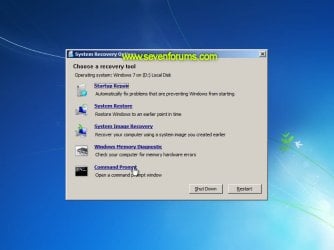
  1. Boot to the System Recovery Options screen.
    • If Windows automatically opens Startup Repair, and subsequently fails to fix a problem, you can skip ahead to step 4 below.
  2. In the System Recovery Options screen, click Startup Repair:
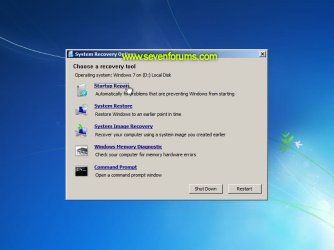
    Image05_startuprepair.jpg


  3. Windows will search for an attempt to repair startup problems:
    Image06_searching.jpg


  4. If startup problems could not be repaired, you will receive the message Windows cannot repair this computer automatically. Click View advanced options for system recovery and support:
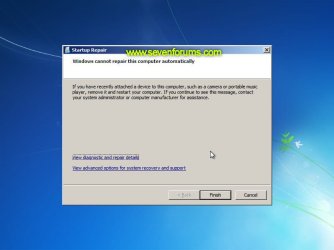
    Image07_cannotfix.jpg


  5. Click View advanced options for system recovery and support, which which bring you back to the main System Recovery Options screen.
  6. Click Command Prompt:
    Image08_clickcommand.jpg


  7. Command Prompt should open to X:, which is an internal ram disk use by System Repair:
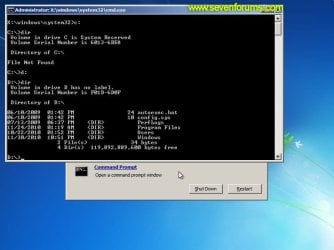
    Image10_changedrive.jpg


  8. Now you need to find your system drive. Depending on how your system is setup, this could be either C: or D:.
    • Type C: and press <ENTER>.
    • Verify that this is your system drive by typing DIR and pressing <ENTER>. If you see the Program Files, Users and Windows folders, then you have found your system drive, and can continue to step 9 below.
    • If the drive is not your system drive, repeat steps I and II above, changing the drive letter to D, E or some other letter until the system drive is located.
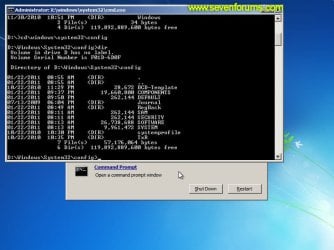
      Image11_chdir_config.jpg

  9. When you have located your Windows system drive, type CD \windows\system32\config and press <ENTER>:
  10. Type DIR and press <ENTER>, and verify that the following files and folders exist in the config folder:
    • RegBack (which is a folder)
    • DEFAULT
    • SAM
    • SECURITY
    • SOFTWARE
    • SYSTEM
      Image11_chdir_config.jpg

  11. Type MD mybackup and press <ENTER> to create a backup folder that you can use incase this procedure does not work as expected.
  12. Type copy *.* mybackup and press <ENTER>.
    • If you are prompted to overwrite existing files, press A to allow all backups to be overwritten.
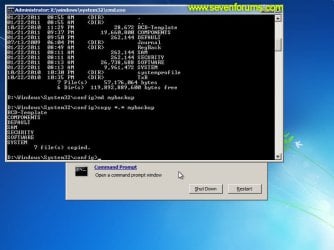
      Image12_mybackup.jpg

  13. Now you need to check if you can use the automatic Windows backups to restore your registry:
    • Type CD RegBack and press <ENTER> to go to the RegBack folder.
    • Type DIR and press <ENTER> to view the contents of the folder. All the following files must exist:
      • The DEFAULT, SAM and SECURITY files should each be about 262,000 bytes in size.
      • The SOFTWARE file should be about 26,000,000 bytes.
      • The SYSTEM file should be about 9,900,000 bytes.
      • The file sizes presented here are approximate estimations, and may vary depending on your system. If any one of them are 0 bytes, then you should stop what you're doing now and seek an alternative method of recovering your system, because Windows cannot function with a 0-byte size registry hive.
    • If the hive files listed in RegBack are ok, then proceed to step 14 of the tutorial.
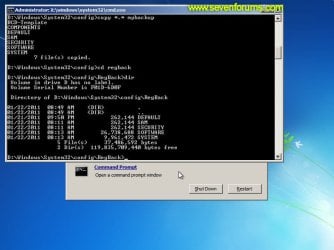
      Image13_checkregback.jpg


  14. Type copy *.* .. and press <ENTER> to copy the backup hive files to \Windows\System32\config.
    • If you are prompted to overwrite existing files, press A to allow all file to be overwritten.
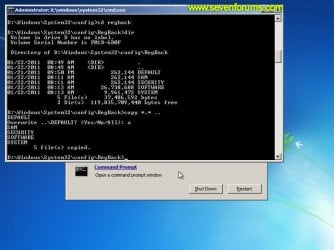
      Image14_copyregback.jpg

  15. Type exit and press <ENTER> to close the command prompt.
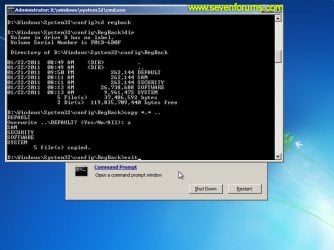
    Image15_exit.jpg


  16. Click the Restart button to reboot your computer. If all goes well, your system will boot normally.
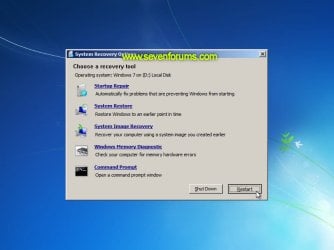
    Image16_restart.jpg
    Image17_working.jpg


Reference Information
This tutorial was made possible after learning how to manualy replace the Windows 7 Registry Hives after reading the Recovering Windows 7 Registry Hives/Files article on Microsoft Technet.


Attachments
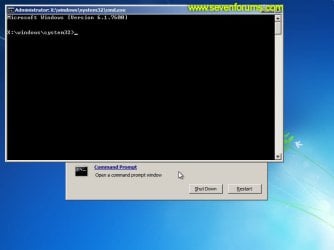
  • Image09_commandprompt.jpg
    Image09_commandprompt.jpg
    26.1 KB · Views: 373
Last edited by a moderator:
Not always.
 

My Computer My Computer

At a glance

64-bit Windows 11 Pro for WorkstationsIntel i7-8700K OC'd to 5 GHz64 GB (4x16GB) G.SKILL TridentZ RGB DDR4 3600...ASUS ROG-STRIX-GTX1080TI-O11G-GAMING
Computer type
PC/Desktop
Computer Manufacturer/Model Number
Self built custom
OS
64-bit Windows 11 Pro for Workstations
CPU
Intel i7-8700K OC'd to 5 GHz
Motherboard
ASUS ROG Maximus XI Formula Z390
Memory
64 GB (4x16GB) G.SKILL TridentZ RGB DDR4 3600 MHz
Graphics Card(s)
ASUS ROG-STRIX-GTX1080TI-O11G-GAMING
Sound Card
Integrated
Monitor(s) Displays
2 x Samsung Odyssey G7 27"
Screen Resolution
2560x1440
Hard Drives
1TB Samsung 990 PRO M.2,
4TB Samsung 990 PRO PRO M.2,
TerraMaster F8 SSD Plus NAS
PSU
Seasonic Prime Titanium 850W
Case
Thermaltake Core P3
Cooling
Corsair Hydro H115i
Keyboard
Logitech wireless K800
Mouse
Logitech MX Master 4
Internet Speed
2 Gb/s Download and 100 Mb/s Upload
Antivirus
Malwarebyte Anti-Malware Premium
Browser
Google Chrome
Other Info
Logitech Z625 speaker system,
Logitech BRIO 4K Pro webcam,
HP Color LaserJet Pro MFP M477fdn,
APC SMART-UPS RT 1000 XL - SURT1000XLI,
Galaxy S23 Plus phone
It dosent work on my laptop. when Im finished doing the procedures and i restarted my computer, the startup repair is still looping. please help
 

My Computer My Computer

At a glance

windows 7 starter x32
OS
windows 7 starter x32
thanks for the tutorial sir,

unfortunately i tried the tutorial and am still stuck in the loop, i am going to try the bootrec options in the command prompt and the "last known settings" options now and hope they work
 

My Computer My Computer

At a glance

Windows 7 64bit
OS
Windows 7 64bit
JUST WHAT I FREAKING NEEDED

Dzomlija
I just want to personally thank-you for helping me fix this issue i had with my computer looping. I followed your instructions to the "T" and it worked beautifully!!! Wow im still amazed. I thought i was going to spend money that i really didnt have to spend in order to fix this today! You do not know how much grief and time and money you saved me today. THANK U THANK U THANK U!!!!!!!!!!!!!!!!!!!!!!!!!!!!!!!
 

My Computer My Computer

At a glance

64 bit home premium
OS
64 bit home premium
I tried this and it didn't work for me...tried chkdsk and it says 'Error detected in index $I30 for file 3578.' It listed that 9 times before saying choral cannot continue. Unfortunately I can't find my Windows 7 install disc, and I don't have access to another computer (using my phone for this post). Can anyone help me?

Update:
Now I'm getting a BOOTMGR is missing message....I'm screwed...
 
Last edited by a moderator:

My Computer My Computer

At a glance

Windows 7 64
OS
Windows 7 64
What if

I noticed no one answered what to do if all the files and directories are zero bytes. Does anyobe have a suggestion?
 

My Computer My Computer

At a glance

w7 32
OS
w7 32
For Cmurph, i think the only way to fix your issue is to get a windows 7 disc. It can be any version of windows 7 because thats what worked for me. Anyway i hope this helps your problem if you follow the steps like i did. And for bryandav, i am quite sure if you have all of your files and directories to be zero bytes then that is not good. When i followed the steps to fix the infinite loop, i noticed my directories and files were different sizes. I thought they had to be the same exact number as shown in the steps, but that is not true in order for it to work. As long as you see anything bigger than 0 bytes your good. I hope this fixes everything.
 

My Computer My Computer

At a glance

64 bit home premium
OS
64 bit home premium
Sadly Breedee, I think you're right. Was hoping against hope that someone had another option. Luckily, I found how to copy files on this site under System Repair, so I saved everything that needed saving. Now on to rebuilding the system....
 

My Computer My Computer

At a glance

w7 32
OS
w7 32
really in need of help. was getting the same error message during system recovery. tried the steps for camand promp. found program files in c drive with 0 bytes (not sure if thats helpful) tried next step cd \windows\system32\config and got the message the request could not be performed because of an I/O device error. please tell me what this means and how to fix it.
 

My Computer My Computer

At a glance

windows 7 32bit
OS
windows 7 32bit
God bless you! Great tutorial and it is working one! Thank you you so much, you saved me a lot of time and headache.
 

My Computer My Computer

At a glance

Windows 7 Home Premium x64i74GBATI
Computer Manufacturer/Model Number
Dell
OS
Windows 7 Home Premium x64
CPU
i7
Memory
4GB
Graphics Card(s)
ATI
Can not find: Regback , Default, Sam, Security, Software, System
@ Cd \windows\system32\config
I get: the request could not be performed because of an I\O error
I tried: bootrec/fixmbr
Bootrec/fixboot
Message: the operation completed successfully
At startup still stuck in startup repair loop.
Any help would be appreciated.
 

My Computer My Computer

At a glance

Windows 7
OS
Windows 7
Help!

I'm not sure what steps to take next I have tried this process numerous times and nothing is working!
What causes this stupid glitch, is it a virus? Or an error with the operating system?
any suggestions are appreciated and will be tried I'm getting desperate.

And I don't really have access to another computer, I'm doing all my research on a little tablet...... Sigh, someone help me!
 

My Computer My Computer

At a glance

windows 7
OS
windows 7
Sweeeeeeeet!

Your advice was extremely easy to follow and worked like a charm. I am soooooooooo happy my computer is fixed! :thumbsup:

The power of the internet to hook up those in need with those who have the answer never ceases to amaze me.

Thank you for posting such an easy and effective solution.

Do we give you gold stars, kisses, chocolate covered bits and bytes? The least I can do is say "thank you!"
 

My Computer My Computer

At a glance

Windows 7 Home Premium x64
Computer Manufacturer/Model Number
Dell Inspiron
OS
Windows 7 Home Premium x64
After I do step 9 I get a message saying "The system cannot find the path specified." What do I do to fix this?
 

My Computer My Computer

At a glance

windows 7 32bit
OS
windows 7 32bit
Thank you so much! This fixed my computer today. :)
 

My Computer My Computer

At a glance

Windows 7 home premium 64 bit
OS
Windows 7 home premium 64 bit
That didn't work for me. It's wierd because i can access my ubuntu, and it's on windows via wubi, but i can't use my windows. It reboots when it gets to the logo's part, and if i select the option to not reboot, it just freezes in a black screen.
The safe mode stops after loading file classpnp.sys. I've tried already to rename and replace it, but that didn't work either.
I've tried everything i could find on the internet.
I installed the ubuntu two or three months ago but the problem began like a week ago. So, the problem is not the "dual boot".
Does anyone know how the hell i could solve this? I really can't format.
Thanks.
 

My Computer My Computer

At a glance

Windows 7 Home Premium 64
OS
Windows 7 Home Premium 64
I followed the steps twice, everything was in order, but my computer remained in the loop, so it made no difference.
 

My Computer My Computer

At a glance

Windows 7 Ultimate x64
OS
Windows 7 Ultimate x64
many thanks

will try it out thanks alot for the quick reply
 

My Computer My Computer

At a glance

Windows 7 Ultimate 32 bit
OS
Windows 7 Ultimate 32 bit
Thank you! Thank you! Thank you! I was able to use this to get into my brothers computer and save all our family photos, including ones of our father who passed away recently. Thank you so much!!!!
 

My Computer My Computer

At a glance

windows 7
OS
windows 7
I have been following your guide but have quickly hit a problem.

Firstly the system recovery tool startup screen advises me that Windows 7 is installed on D: (I thought it was C:). Anyway, in CMD I can access C: but it contains just two folders called files & recovery and a file called install.wim. No sign of the windows folder.

I cannot access D: as it says "data redundancy error (cyclic redundancy check)". After some quick googling I have tried running chkdsk on this drive but it tells me that it is RAW and chkdsk cannot performed on RAW drives. So this is where I have got.

I am not adverse to completely formatting with a new install but there are some files I would like to copy over first. So any help on how I could access files to copy to an external hdd would be welcomed too.
 

My Computer My Computer

At a glance

Windows 7
OS
Windows 7
Back
Top