Startup Repair Infinite Loop Recovery

How to Recover from an Infinitely Looping Startup Repair Loop without Reinstalling Windows

If you've ever experienced a Startup Repair that continously loops and fails to fix the problem of not being able to load windows, even in safe mode, then you'll know that usually the only way to recover from this when System Restore does not work is to do a clean install of Windows.

Until now.

This tutorial will show you how to use the System Recovery Options provided by Windows to recover your system to a working state so that you don't have to risk losing data by performing a clean install.

   Warning
The instructions presented withing this tutorial must be followed correctly, or you can damage your Windows 7 installation even further. This tutorial is designed to help recover from a bad registry that is causing the startup repair loop. You should note that there may still be some issues remaining that cannot be fixed by manually restoring the registry.


Recovering Your System
  1. Boot to the System Recovery Options screen.
    • If Windows automatically opens Startup Repair, and subsequently fails to fix a problem, you can skip ahead to step 4 below.
  2. In the System Recovery Options screen, click Startup Repair:
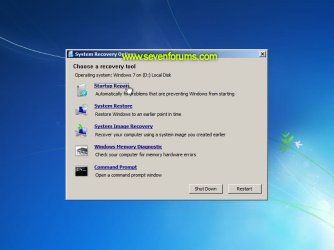
    Image05_startuprepair.jpg


  3. Windows will search for an attempt to repair startup problems:
    Image06_searching.jpg


  4. If startup problems could not be repaired, you will receive the message Windows cannot repair this computer automatically. Click View advanced options for system recovery and support:
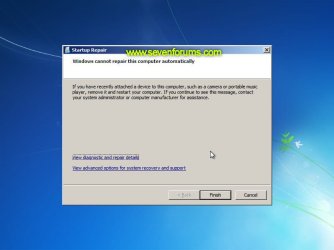
    Image07_cannotfix.jpg


  5. Click View advanced options for system recovery and support, which which bring you back to the main System Recovery Options screen.
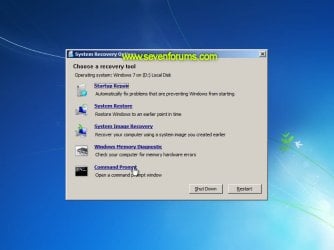
  6. Click Command Prompt:
    Image08_clickcommand.jpg


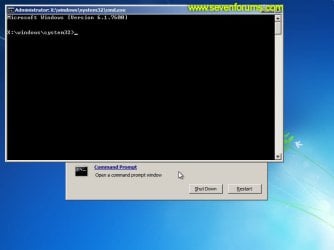
  7. Command Prompt should open to X:, which is an internal ram disk use by System Repair:
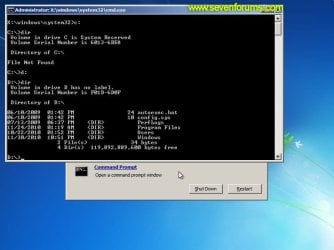
    Image10_changedrive.jpg


  8. Now you need to find your system drive. Depending on how your system is setup, this could be either C: or D:.
    • Type C: and press <ENTER>.
    • Verify that this is your system drive by typing DIR and pressing <ENTER>. If you see the Program Files, Users and Windows folders, then you have found your system drive, and can continue to step 9 below.
    • If the drive is not your system drive, repeat steps I and II above, changing the drive letter to D, E or some other letter until the system drive is located.
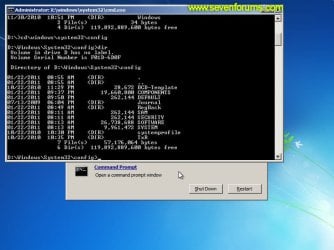
      Image11_chdir_config.jpg

  9. When you have located your Windows system drive, type CD \windows\system32\config and press <ENTER>:
  10. Type DIR and press <ENTER>, and verify that the following files and folders exist in the config folder:
    • RegBack (which is a folder)
    • DEFAULT
    • SAM
    • SECURITY
    • SOFTWARE
    • SYSTEM
      Image11_chdir_config.jpg

  11. Type MD mybackup and press <ENTER> to create a backup folder that you can use incase this procedure does not work as expected.
  12. Type copy *.* mybackup and press <ENTER>.
    • If you are prompted to overwrite existing files, press A to allow all backups to be overwritten.
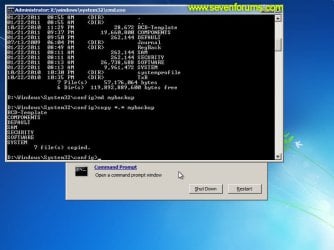
      Image12_mybackup.jpg

  13. Now you need to check if you can use the automatic Windows backups to restore your registry:
    • Type CD RegBack and press <ENTER> to go to the RegBack folder.
    • Type DIR and press <ENTER> to view the contents of the folder. All the following files must exist:
      • The DEFAULT, SAM and SECURITY files should each be about 262,000 bytes in size.
      • The SOFTWARE file should be about 26,000,000 bytes.
      • The SYSTEM file should be about 9,900,000 bytes.
      • The file sizes presented here are approximate estimations, and may vary depending on your system. If any one of them are 0 bytes, then you should stop what you're doing now and seek an alternative method of recovering your system, because Windows cannot function with a 0-byte size registry hive.
    • If the hive files listed in RegBack are ok, then proceed to step 14 of the tutorial.
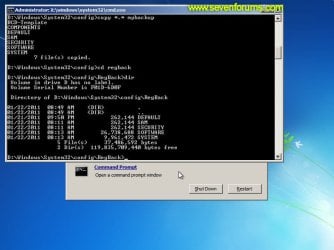
      Image13_checkregback.jpg


  14. Type copy *.* .. and press <ENTER> to copy the backup hive files to \Windows\System32\config.
    • If you are prompted to overwrite existing files, press A to allow all file to be overwritten.
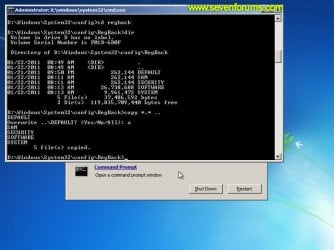
      Image14_copyregback.jpg

  15. Type exit and press <ENTER> to close the command prompt.
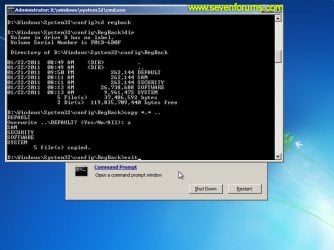
    Image15_exit.jpg


  16. Click the Restart button to reboot your computer. If all goes well, your system will boot normally.
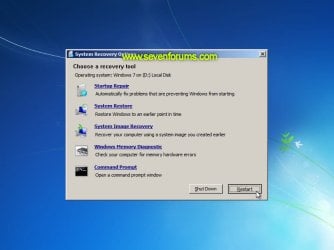
    Image16_restart.jpg
    Image17_working.jpg


Reference Information
This tutorial was made possible after learning how to manualy replace the Windows 7 Registry Hives after reading the Recovering Windows 7 Registry Hives/Files article on Microsoft Technet.


Attachments
  • Image09_commandprompt.jpg
    Image09_commandprompt.jpg
    26.1 KB · Views: 373
Last edited by a moderator:
Hey so here is my deal.
I have a Inspiron dell with with windows 7 and intel core duo (I'm reading the stickers on my comp)
I keep getting a "bootmgr is missing" and to press control alt delete to restart. I've tried many ways to fix it such as going into command prompt and entered the following:
Bootrec /RebuildBcd (enter)
Bootrec /FixMbr (enter)
Bootrec /Fixboot (enter)
Another website had me type this into the command prompt As well:
bcdedit /export C:\BCD_Backup (enter)
c: (enter)
cd boot (enter)
attrib bcd -s -h -r (enter)
ren c:\boot\bcd bcd.old (enter)
bootrec /RebuildBcd (enter)
That still has not fixed my problem. Also the startup Repair does not work. When attempting to repair it stops and says "startup repair cannot repair this computer automatically"
Additional notes: when I pull up my system recovery options after hitting f12 at the dell load screen and loading from the cd drive. It says "operating system: unknown on (unknown) local disk" above my recovery options.
System restore option says "to use system restore, you must specify which windows installation to restore. Restart computer, select operating system, then select system restore." nothing seems to work and when i first start the repair system option before I get to the 5 options of startup repair, system repair etc. the box that comes up finds no operating system.
Please help if any additional info is needed just let me know

Also I am not to knowledged in what I'm doing so explain it like im a noob lol thank you
 

My Computer My Computer

At a glance

Windows 7
OS
Windows 7
Sadly I think this tutorial only works if you have not tried any other recovery techniques such as the bootrec options and you use the regback file immediately after the failure.
The last 12 hrs has revealed:
Many people experience this after an update
Many people are very annoyed that the System restore utility just does not work when this happens (0x8000ffff)
Many people are stuck in Startup repair loop and Microsoft have again messed something up
Many people say it happens again even after a full re-install
Some people find a FULL format and re-install works .....?

I got this problem after installing a brand new hybrid drive and I wonder if the OS/HW has trouble with interpreting the new disk although it has worked perfectly for 3 days. Oh well I'll try another 3 evening re-installing after a full format.
 

My Computer My Computer

At a glance

win7 pro 64
OS
win7 pro 64
My SAM is 65,536 and SECURITY is 45,056 only. My DEFAULT is about 3.3m. Should I continue?
 

My Computer My Computer

At a glance

Windows 7 x64
OS
Windows 7 x64
Crappy microsoft Startup Repair does it again

Fresh install, W7 went without hitch then Office 2010 , no problem. Windows Update updated 3 files and rebooted, now I am stuck in Start up repair again.
Reports Registry is corrupt again.

Hybrid Drive....Seagate software was totally pants too. Would not work, did a silly reboot into linux and refused to do anything. Drive detect finds drive ok but links to website to find firmware updates and after tediously filling in serial number, stock number and a couple of other things only to be told the system is not working and to try again later.

Can nobody write a reliable piece of code any more?

I'll go back and try the manual registry back up before doing anything else this time. Feeling a move to linux coming on ....
 

My Computer My Computer

At a glance

win7 pro 64
OS
win7 pro 64
Man, I have spent hours trying to fix a friends computer that was disabled by a virus. I found this article and followed the instructions perfectly and IT WORKED!! This thread is a lifesaver if you have the same problem. I even registered so I could write this review so I am impressed!! Thank you soooooo much for your assistance!
 

My Computer My Computer

At a glance

Windows 7 Ultimate x64
OS
Windows 7 Ultimate x64
Thanks for the tutorial sir,

It was the only way I could solve this problem!!

THANK YOU
 

My Computer My Computer

At a glance

Windows 7
OS
Windows 7
It worked!

Thank you! Followed instructions exactly and it got me out of the dreaded loop. Had a couple of power ons/offs right in a row due to T.D. Isaac this afternoon and worried my computer was toast as a result. All seems well now.
 

My Computer My Computer

At a glance

Windows 7 home premium 64 bit
OS
Windows 7 home premium 64 bit
Hey! Thanks for the great guide! Unfortunately, My girlfriend dropped my laptop, played it for a while, then it randomly reset and got the infinite loop. I used your awesome guide, and it seemed to work at first. Then I restarted and...back to the loop. I then chose to restore my system using Acer eRecovery, and it's running as we speak. I'll get back to this when it's done. But thanks for the guide!

Well I ran it and it gave me an Error 0x7, but didnt explain what that meant. I believe, from my mediocre tech experience that the drop could've damaged the hard drive? And if so, how would i be able to repair it? I really don't want to buy a new one :P
 

My Computer My Computer

At a glance

windows 7 ultimate 644gbIntel HD Graphics
Computer Manufacturer/Model Number
Acer Aspire 5742
OS
windows 7 ultimate 64
Memory
4gb
Graphics Card(s)
Intel HD Graphics
My SAM is 65,536 and SECURITY is 45,056 only. My DEFAULT is about 3.3m. Should I continue?

Same with mine but I wasn't able to get this fix to work. Tried it 3 times. Also not sure if this affects anything but I have iobit software installed. Actually installed it before the crash
 

My Computer My Computer

At a glance

7 home premium x64
OS
7 home premium x64
Stopping the loop

Peter, thank you very much for your efforts in creating this tutorial. I was able to bring back a computer from hell, (no matter what I tried, it didn't work) and have it up and running fine now. Hats off to ya!

Todd
 

My Computer My Computer

At a glance

Windows 7 Pro- 32bit.Intel(R) Celeron(R) CPU 440 @ 2.00GHz, ~2.0GHz2038MB RAM DDR2Intel Corporation
Computer Manufacturer/Model Number
Gateway-Emachine, T-3656
OS
Windows 7 Pro- 32bit.
CPU
Intel(R) Celeron(R) CPU 440 @ 2.00GHz, ~2.0GHz
Motherboard
ELITEGROUP 945GCT-M3 3.1 V1.10 12/24/2007
Memory
2038MB RAM DDR2
Graphics Card(s)
Intel Corporation
Sound Card
HdAudio.sys 6.00.6002.18005
Monitor(s) Displays
Generic PnP... 17''
Screen Resolution
1440 x 900 (32bit) 75Hz
Hard Drives
2
Keyboard
Tevion "wireless" HID
Mouse
Tevion "wireless" HID
Internet Speed
Download.... 3.11 mb/s Upload.... 0.64 mb/s
Other Info
BIOS Phoenix- AwardBios v600PG / DirectX 11
Hi... I'm facing the same problem n followed the command prompt procedure but unfortunately there is low space in my c drive where my os is installed... Pls tell me the solution... I'm not a tech genius... So pls explain...
 

My Computer My Computer

At a glance

Windows 7 ultimate x64
OS
Windows 7 ultimate x64
Did it give you a message telling you that you have low disk space when you tried this tutorial? Or are you worried about trying this tutorial because you know you have low disk space? Just wanted to understand what you mean because it is a good question and I would like to know the answer also. I may run into something like this in the future and want to know how to proceed with it.
 

My Computer My Computer

At a glance

Windows 7 Pro- 32bit.Intel(R) Celeron(R) CPU 440 @ 2.00GHz, ~2.0GHz2038MB RAM DDR2Intel Corporation
Computer Manufacturer/Model Number
Gateway-Emachine, T-3656
OS
Windows 7 Pro- 32bit.
CPU
Intel(R) Celeron(R) CPU 440 @ 2.00GHz, ~2.0GHz
Motherboard
ELITEGROUP 945GCT-M3 3.1 V1.10 12/24/2007
Memory
2038MB RAM DDR2
Graphics Card(s)
Intel Corporation
Sound Card
HdAudio.sys 6.00.6002.18005
Monitor(s) Displays
Generic PnP... 17''
Screen Resolution
1440 x 900 (32bit) 75Hz
Hard Drives
2
Keyboard
Tevion "wireless" HID
Mouse
Tevion "wireless" HID
Internet Speed
Download.... 3.11 mb/s Upload.... 0.64 mb/s
Other Info
BIOS Phoenix- AwardBios v600PG / DirectX 11
I get to step 10 and type dir, but it shows nothing at all in the config folder. Your tutorial doesn't say what to do if that happens. Please help!!!
 

My Computer My Computer

At a glance

Windows 7
Computer Manufacturer/Model Number
Asus K60J laptop
OS
Windows 7
Without the repair disk in, I wasn't able to see the files you can't see. I know there's a way and I will keep trying for you. The computer I fixed with this tutorial was a friends and I was on my last leg. If this tutorial didn't work, I was going to have to reinstall. Not sure why Peter hasn't answered here yet. You might try going to his profile and leaving a message or contacting Brink about this tutorial. Go to this tutorials avitar and click on it or under his signature picture Dzomlija, it looks like he has other addresses you could try. You should be able to leave a message. I will keep trying to see if I can't find a way to help.
 

My Computer My Computer

At a glance

Windows 7 Pro- 32bit.Intel(R) Celeron(R) CPU 440 @ 2.00GHz, ~2.0GHz2038MB RAM DDR2Intel Corporation
Computer Manufacturer/Model Number
Gateway-Emachine, T-3656
OS
Windows 7 Pro- 32bit.
CPU
Intel(R) Celeron(R) CPU 440 @ 2.00GHz, ~2.0GHz
Motherboard
ELITEGROUP 945GCT-M3 3.1 V1.10 12/24/2007
Memory
2038MB RAM DDR2
Graphics Card(s)
Intel Corporation
Sound Card
HdAudio.sys 6.00.6002.18005
Monitor(s) Displays
Generic PnP... 17''
Screen Resolution
1440 x 900 (32bit) 75Hz
Hard Drives
2
Keyboard
Tevion "wireless" HID
Mouse
Tevion "wireless" HID
Internet Speed
Download.... 3.11 mb/s Upload.... 0.64 mb/s
Other Info
BIOS Phoenix- AwardBios v600PG / DirectX 11
Thanks Simono1. I wasn't able to leave Dzomlija a message for some reason. What about copying the files from the Users folder to a DVD or flash drive? I'm not very tech savvy, but I can follow directions if you're able to help me with that. At this point, if all I can do is get the files off the laptop so they're not lost, I'll call it good.
 

My Computer My Computer

At a glance

Windows 7
Computer Manufacturer/Model Number
Asus K60J laptop
OS
Windows 7
AWESOME info! Thank you sooooo much! Finally my pc can start properly!! Really good advice!:)
 

My Computer My Computer

At a glance

Windows 7 Ultimate 64 bitAMD Phenom 2 1055T 2.8 GHz Hexacore8 GIG DDR 3 1600 MhzNvidia GTX 560TI GOlden SAMPLE EDITIOn (GAINW...
OS
Windows 7 Ultimate 64 bit
CPU
AMD Phenom 2 1055T 2.8 GHz Hexacore
Motherboard
Gigabyte UDh2 880-GMA
Memory
8 GIG DDR 3 1600 Mhz
Graphics Card(s)
Nvidia GTX 560TI GOlden SAMPLE EDITIOn (GAINWARD)
Hard Drives
SEAGATE 500 GIG Barracuda 7200 RPM
PSU
650 WATT HUntkey
KkksMm1,
I'm sorry, I am not sure about being able to save your files if you can't see them in the dir files... but please, don't take my word for it because I may be wrong. It was my first time ever trying this and I was on my last leg also. Please forgive me for not responding to you earlier, I've been pretty busy and just didn't know an answer for you. Can you ask Brink on this site? He has helped me a few times and is very good about getting back to you. Hope things work-out for you.
 

My Computer My Computer

At a glance

Windows 7 Pro- 32bit.Intel(R) Celeron(R) CPU 440 @ 2.00GHz, ~2.0GHz2038MB RAM DDR2Intel Corporation
Computer Manufacturer/Model Number
Gateway-Emachine, T-3656
OS
Windows 7 Pro- 32bit.
CPU
Intel(R) Celeron(R) CPU 440 @ 2.00GHz, ~2.0GHz
Motherboard
ELITEGROUP 945GCT-M3 3.1 V1.10 12/24/2007
Memory
2038MB RAM DDR2
Graphics Card(s)
Intel Corporation
Sound Card
HdAudio.sys 6.00.6002.18005
Monitor(s) Displays
Generic PnP... 17''
Screen Resolution
1440 x 900 (32bit) 75Hz
Hard Drives
2
Keyboard
Tevion "wireless" HID
Mouse
Tevion "wireless" HID
Internet Speed
Download.... 3.11 mb/s Upload.... 0.64 mb/s
Other Info
BIOS Phoenix- AwardBios v600PG / DirectX 11
THANK YOU Dzomlija, you saved the day!!!

THANK YOU Dzomlija !!!
Thank you so very much for publishing your solution!! My mother's computer crashed, would not reboot and stayed on that indefinite repair loop. She is an Enrolled Agent and has very important and sensitive info stored on her computer and was in dire need of acquiring some of that info. I tried almost everything
picnic.gif
and after much time being spent on those other remedies I finally came across your thread and it worked like a champ
thumbs.gif
!!! So needless to say you are adorned in this house tonight!! Thank you so very much Dzomlija, may the Lord certainly bless ya!!! 2dalou
 

My Computer My Computer

At a glance

Windows 7 Home Premium 64bitIntel(R) Core(TM) i5-2450M [email protected]6.00g
Computer Manufacturer/Model Number
Toshiba Satellite P775-S7100
OS
Windows 7 Home Premium 64bit
CPU
Intel(R) Core(TM) i5-2450M [email protected]
Motherboard
Toshiba
Memory
6.00g
Sound Card
Realteck HD Audio
Hard Drives
T1106348W0B
Many many thanks

Recently hit this problem on a brand new model, I was pretty livid about possibly loosing all my data, I use it for University work and what not. I would just like to thank the absolute hell out of you for posting this. I was stuck in that loop for about 3 hours trying little different steps but your's worked first time.

Thank you so much man, you saved me a hell of a lot of trouble. Drinks on me.
 

My Computer My Computer

At a glance

windows 7 Home premium
OS
windows 7 Home premium
Back
Top