Startup Sound - Change in Windows 7

How to Change the Windows 7 Startup Sound

   Information
This will show you how to change the Windows 7 startup sound, not the "Windows Logon" sound, to any WAV file of your choice.

You must be logged in as an administrator to be able to do the steps in this tutorial.

   Note
If you run a sfc /scannow command, then you will lose all changes made to the system file in the tutorial below since it and all other system files will be restored back to default by the command.
   Warning
Making a mistake while modifying system files can render your Windows 7 installation unusable. To be safe, you should create a restore point before doing this tutorial in case you need to do a system restore at boot using the restore point to undo any mistakes that may be made.
   Tip
If you like, here are the Startup Sounds from previous Windows releases.

Windows History: logos, bootscreens, startup sounds etc | Redmond Pie


OPTION ONE

To Change Startup Sound in Windows 7 using "Startup Sound Changer"

1. If you have not already, download the StartupSoundChanger.zip file for the free Startup Sound Changer program at the link below, and save it to your desktop.
NOTE: You will need to click on the grey download button at the program's site below. WinAero: Downloads / Software / Startup Sound Changer - change your Windows startup

download.png
2. Open the ZIP file, and extract (drag and drop) the StartupSoundChanger.exe to your desktop.

3. Run the StartupSoundChanger.exe file, and click on Yes when prompted by UAC.
NOTE: This is a standalone .exe file that does not install anything on your computer.

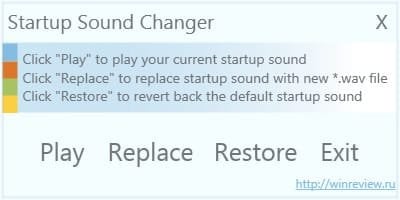
4. With "Startup Sound Changer" you can set a .wav file to replace the startup sound, play current startup sound, and restore the default startup sound. (see screenshot below) ssc.jpg


OPTION TWO

To Manually Change Startup Sound in Windows 7

1. Do step 2 or 3 below for what you would like to do.

2. To Restore Default Startup Sound in Windows 7

   Note
If you lost your backup or didn't create one, then here's a copy of the default startup sound .wav file that you could use to restore it with using step 3 below.


Download


A) Copy the default backup imageres_original.dll file (step 3O below) to your desktop.

B) Right click on the imageres_original.dll file and click on Rename.

C) Rename it to imageres.dll and press enter.

D) Repeat steps 3Q to 3X below to restore this file.
3. To Change Startup Sound in Windows 7 A) In Windows Explorer, navigate to C:\Windows\System32\imageres.dll. (see screenshot below) Step1.jpg
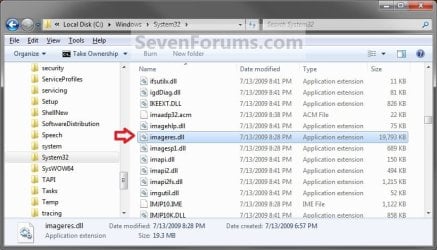
B) Right click on the imageres.dll file, and click on Copy. (see screenshot above)

C) Right click on your desktop, and click on Paste.

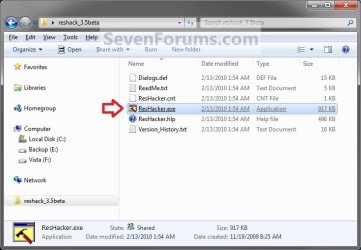
D) If you have not already, then download and install Resource Hacker.

E) Right click on the Resource Hacker shortcut in Start Menu - All Programs, then click on Run as administrator. (see screenshot below) Start_Menu.jpg
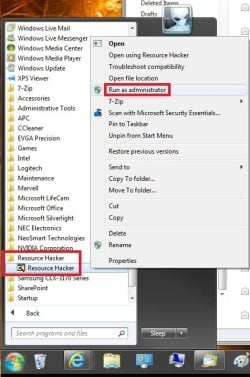
F) If prompted by UAC, then click on Yes.

G) In Resource Hacker, click on File and Open. (see screenshot below) Step4.jpg
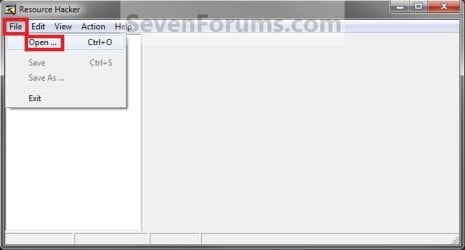
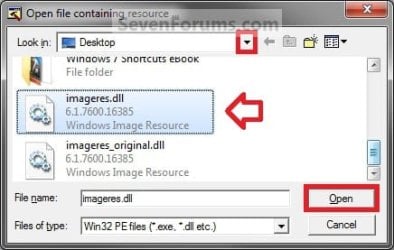
H) Navigate to and select the imageres.dll file copy on your desktop, and click on Open. (see screenshot below) Step5.jpg
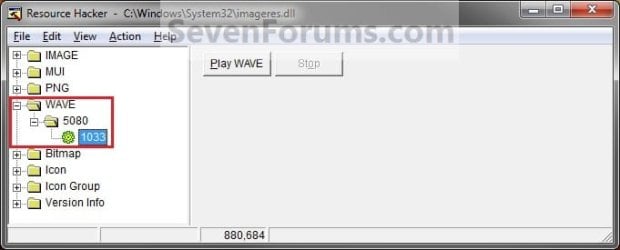
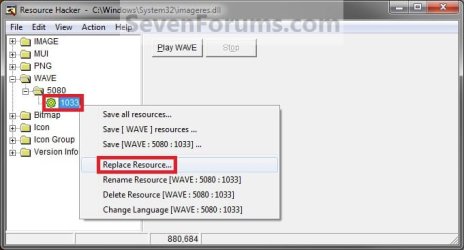
I) In the left pane of Resource Hacker, expand WAVE, and 5080, to 1033. (see screenshot below)
NOTE: If 5080 and 1033 is named something else, then that is fine as long as they are still under WAVE. Just substitute what you have instead in the steps below. You can click on the Play WAVE button to hear what the current startup sound is. Step6.jpg
J) Right click on 1033 and click on Replace Resource. (see screenshot below) Step7.jpg
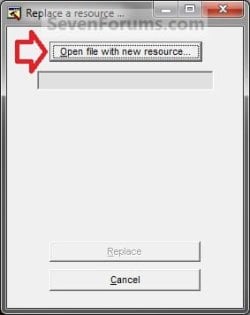
K) Click on Open file with new resource. (see screenshot below) Step8.jpg
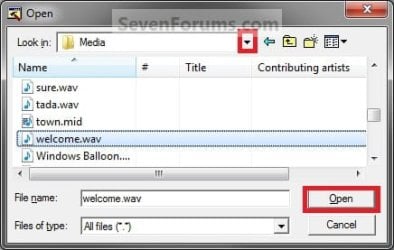
L) Navigate to and select the .wav file that you want for the startup sound, and click on Open. (see screenshot below)
NOTE: This .wav file must be unblocked and remain at this same location. For example, move or copy the .wav into the C:\Windows\Media. If you move or delete this .wav file, the startup sound will no longer play it. Step9.jpg
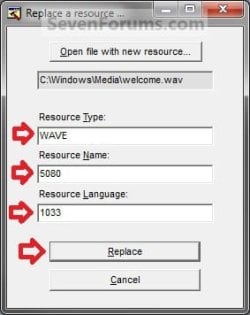
M) Under Resource Type, type WAVE. Under Resource Name, type 5080. Under Resource Language, type 1033. Click on the Replace button. (see screenshots below) Step10A.jpg
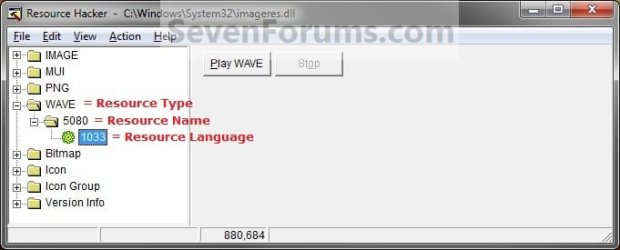
Step10B.jpg

N) Click on File and Save, then close Resource Hacker. (see screenshot below)
NOTE: You can click on the Play WAVE button first to hear and verify what the current startup sound is set as in this file. Step11.jpg
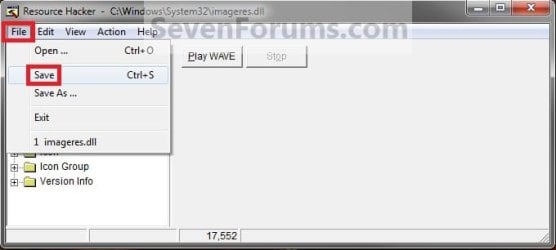
O) On your desktop, Move and Save the imageres_original.dll file to another safe location of your choice as a backup.

   Warning
THIS IS YOUR ONLY BACKUP OF THE ORIGINAL IMAGERES.DLL FILE WITH THE DEFAULT STARTUP SOUND.


P) Check to make sure that the Play Windows Startup sound is checked in Sound so that it is turned on. (see screenshot below) Sounds.jpg
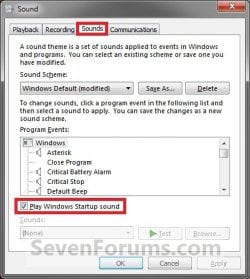
Q) Restart the computer and boot into the System Recovery Options (WinRE) screen, then select the Command Prompt option and press enter.
NOTE: If you do not have a retail Windows 7 installation disc, then you can create a System Repair Disc to use to boot to the System Recovery Screen instead. System_Recovery_Options.jpg
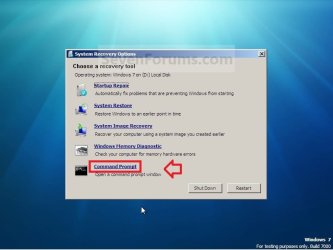
R) In the command prompt, type diskpart and press enter. (see screenshot below step 3V)

S) In the command prompt, type list volume and press enter. (see screenshot below step 3V)

T) Make note of what the drive letter is for your Windows 7 partition or drive. (see screenshot below step 3V)
NOTE: The Windows drive is not always C at boot. For example, mine is listed as D here. Look at the volume name and size to help you determine which letter is the one that you have Windows 7 installed on.

U) In the command prompt, type exit and press enter. (see screenshot below step 3V)

V) In the command prompt, type the command below and press enter. (see screenshot below)
NOTE: Substitute D in the command below with the drive letter you have listed in step 3T for your Windows 7, and substitute username in the command below with your user account name.

Code:
COPY /V /Y "[B][COLOR=red]D[/COLOR][/B]:\Users\[B][COLOR=red]username[/COLOR][/B]\Desktop\imageres.dll" "[B][COLOR=red]D[/COLOR][/B]:\Windows\System32"
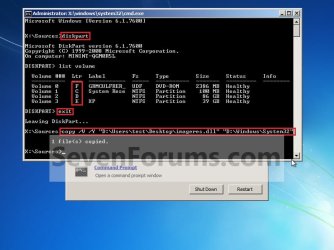
Command.jpg
W) Close the command prompt, and click on the Restart button. (see screenshot above)

X) As Windows 7 restarts, you will hear your new startup sound.

   Tip
If you ever wanted to change the startup sound again anytime after the first time you did this tutorial, you would only need to replace the .wav file at the exact same location in step 3L in Windows Explorer with a different .wav file that you want to use now instead, then rename the new .wav file with the exact same name as the old .wav file. No other steps would be required.

That's it,
Shawn


Attachments

Last edited:
Sounds like an entire song or music track now any small wav file to be that large. The average wav file comes in at about 65-70kb. The file you are trying may simply be too large and would delay the loading of the desktop in Windows.
 

My Computers My Computers

  • At a glance

    W7 Ultimate x64/W10 Pro x64/W11 Pro Triple Bo...AMD Phenom II X4 975 Deneb 3.6ghz - 965 2nd r...Kingston Hyper X DDR3 1600 1.5v 16gb - Hyper ...MSI HD Radeon 5750 1gb - MSI HD Radeon 6450 o...
    Computer type
    PC/Desktop
    Computer Manufacturer/Model Number
    Custom builds = 2
    OS
    W7 Ultimate x64/W10 Pro x64/W11 Pro Triple Boot - Main PC W7 Remote PC Micro ATX W7 Pro x64/W11 Pro
    CPU
    AMD Phenom II X4 975 Deneb 3.6ghz - 965 2nd remote pc
    Motherboard
    Gigabyte GA-790XTA-UD4-Gigabyte GA-880GM-D2H remote pc
    Memory
    Kingston Hyper X DDR3 1600 1.5v 16gb - Hyper X Fury 8gb 2nd
    Graphics Card(s)
    MSI HD Radeon 5750 1gb - MSI HD Radeon 6450 on mini tower
    Sound Card
    Creative Labs X-Fi Xtreme Audio P - Realtek onooard 2nd case
    Monitor(s) Displays
    ASUS VW199T-P 19" HP 2082a Main-HP 2082a 20" remote pc
    Screen Resolution
    Asus 1440x900 - HP 1600x900
    Hard Drives
    WD Black 1TB HD per OS W7, W10, and pending W11 presently on 500gb OS Drive - Pending Triple 1TB HDs for Spanned Storage/backup volume
    Single 2TB external USB enclosure, single 1TB System 7 Host/Boot drive, Pending 8TB external HD for system image b
    PSU
    Corsair 750TX - primary / Corsair CX600 - second
    Case
    Antec 900-2 - SSD compatible / NZXT Vulcan mini tower
    Cooling
    Zalman CNPS9900A
    Keyboard
    AZIO L70 Backlit Letters Gaming - ONN Cordless/USB
    Mouse
    MSI DS200 Programmable, Logitech Cordless
    Internet Speed
    30mbps upgrade - primary hard wired - mini tower usb WiFi
    Antivirus
    GFI VIPRE Internet Security 2014 on W7 2016 beta on W10,
    Browser
    Cyberfox, WaterFox 64bit FF variants, FireFox x64, Pale Moon
    Other Info
    Accomdata fan cooled usb 2.0 PIDE/Sata II, III external enclosure.
    Sambient usb/eSata PATA/Sata II, III external enclosure.
  • At a glance

    W7 Pro x64/W11 ProAMD Deneb 3.6ghz - 965Kingston Hyper X Fury 8gbMSI HD Radeon 6450 DVI Output
    Computer type
    PC/Desktop
    System Manufacturer/Model Number
    CUSTOM ASSEMBLY
    OS
    W7 Pro x64/W11 Pro
    CPU
    AMD Deneb 3.6ghz - 965
    Motherboard
    Gigabyte GA-880GM-D2H remote pc
    Memory
    Kingston Hyper X Fury 8gb
    Graphics Card(s)
    MSI HD Radeon 6450 DVI Output
    Sound Card
    Realtek onooard Creative or Other separate PENDING
    Monitor(s) Displays
    VIZIO 32" LCD TV Separate LCD Pending
    Screen Resolution
    1600x1080
    Hard Drives
    WD 500GB OS Host/Boot WD Green 1TB Storage/Backup
    PSU
    Corsair 600W - THERMALTAKE 600W spare case
    Case
    NZXT Vulcan mini tower
    Cooling
    Twin 120mm Top Fans - 240mm Side Cover
    Keyboard
    ONN Cordless/USB Logitech Cordless
    Mouse
    ONN USB/Cordless - Logitech Cordless
    Internet Speed
    DSL 5G
    Browser
    MS Edge, FireFox, WaterFox x64, FireFox Nightly
    Other Info
    OS Testing-Remote Access to Main TeamViewer
Okay uhmmm... I have another problem

It seems that the file is 14MB when zipped.

If the .wav file is that large, then that's your problem. You'll need to use one that's way smaller in the low KB range as Night Hawk posted above.
 

My Computer My Computer

At a glance

64-bit Windows 11 Pro for WorkstationsIntel i7-8700K OC'd to 5 GHz64 GB (4x16GB) G.SKILL TridentZ RGB DDR4 3600...ASUS ROG-STRIX-GTX1080TI-O11G-GAMING
Computer type
PC/Desktop
Computer Manufacturer/Model Number
Self built custom
OS
64-bit Windows 11 Pro for Workstations
CPU
Intel i7-8700K OC'd to 5 GHz
Motherboard
ASUS ROG Maximus XI Formula Z390
Memory
64 GB (4x16GB) G.SKILL TridentZ RGB DDR4 3600 MHz
Graphics Card(s)
ASUS ROG-STRIX-GTX1080TI-O11G-GAMING
Sound Card
Integrated
Monitor(s) Displays
2 x Samsung Odyssey G7 27"
Screen Resolution
2560x1440
Hard Drives
1TB Samsung 990 PRO M.2,
4TB Samsung 990 PRO PRO M.2,
TerraMaster F8 SSD Plus NAS
PSU
Seasonic Prime Titanium 850W
Case
Thermaltake Core P3
Cooling
Corsair Hydro H115i
Keyboard
Logitech wireless K800
Mouse
Logitech MX Master 4
Internet Speed
2 Gb/s Download and 100 Mb/s Upload
Antivirus
Malwarebyte Anti-Malware Premium
Browser
Google Chrome
Other Info
Logitech Z625 speaker system,
Logitech BRIO 4K Pro webcam,
HP Color LaserJet Pro MFP M477fdn,
APC SMART-UPS RT 1000 XL - SURT1000XLI,
Galaxy S23 Plus phone
I tried using music tracks before on XP, not Vista however, and then while trying this out on 7 found you have to keep them relatively short. That always seems to work out the best and as most would prefer anyways for the faster loading of Windows once arriving at the desktop.

Wav files are generally about 2-3 seconds in length depending what type of sound it is. From a tv series if you find a collection on the web may be a second or two longer then that.
 

My Computers My Computers

  • At a glance

    W7 Ultimate x64/W10 Pro x64/W11 Pro Triple Bo...AMD Phenom II X4 975 Deneb 3.6ghz - 965 2nd r...Kingston Hyper X DDR3 1600 1.5v 16gb - Hyper ...MSI HD Radeon 5750 1gb - MSI HD Radeon 6450 o...
    Computer type
    PC/Desktop
    Computer Manufacturer/Model Number
    Custom builds = 2
    OS
    W7 Ultimate x64/W10 Pro x64/W11 Pro Triple Boot - Main PC W7 Remote PC Micro ATX W7 Pro x64/W11 Pro
    CPU
    AMD Phenom II X4 975 Deneb 3.6ghz - 965 2nd remote pc
    Motherboard
    Gigabyte GA-790XTA-UD4-Gigabyte GA-880GM-D2H remote pc
    Memory
    Kingston Hyper X DDR3 1600 1.5v 16gb - Hyper X Fury 8gb 2nd
    Graphics Card(s)
    MSI HD Radeon 5750 1gb - MSI HD Radeon 6450 on mini tower
    Sound Card
    Creative Labs X-Fi Xtreme Audio P - Realtek onooard 2nd case
    Monitor(s) Displays
    ASUS VW199T-P 19" HP 2082a Main-HP 2082a 20" remote pc
    Screen Resolution
    Asus 1440x900 - HP 1600x900
    Hard Drives
    WD Black 1TB HD per OS W7, W10, and pending W11 presently on 500gb OS Drive - Pending Triple 1TB HDs for Spanned Storage/backup volume
    Single 2TB external USB enclosure, single 1TB System 7 Host/Boot drive, Pending 8TB external HD for system image b
    PSU
    Corsair 750TX - primary / Corsair CX600 - second
    Case
    Antec 900-2 - SSD compatible / NZXT Vulcan mini tower
    Cooling
    Zalman CNPS9900A
    Keyboard
    AZIO L70 Backlit Letters Gaming - ONN Cordless/USB
    Mouse
    MSI DS200 Programmable, Logitech Cordless
    Internet Speed
    30mbps upgrade - primary hard wired - mini tower usb WiFi
    Antivirus
    GFI VIPRE Internet Security 2014 on W7 2016 beta on W10,
    Browser
    Cyberfox, WaterFox 64bit FF variants, FireFox x64, Pale Moon
    Other Info
    Accomdata fan cooled usb 2.0 PIDE/Sata II, III external enclosure.
    Sambient usb/eSata PATA/Sata II, III external enclosure.
  • At a glance

    W7 Pro x64/W11 ProAMD Deneb 3.6ghz - 965Kingston Hyper X Fury 8gbMSI HD Radeon 6450 DVI Output
    Computer type
    PC/Desktop
    System Manufacturer/Model Number
    CUSTOM ASSEMBLY
    OS
    W7 Pro x64/W11 Pro
    CPU
    AMD Deneb 3.6ghz - 965
    Motherboard
    Gigabyte GA-880GM-D2H remote pc
    Memory
    Kingston Hyper X Fury 8gb
    Graphics Card(s)
    MSI HD Radeon 6450 DVI Output
    Sound Card
    Realtek onooard Creative or Other separate PENDING
    Monitor(s) Displays
    VIZIO 32" LCD TV Separate LCD Pending
    Screen Resolution
    1600x1080
    Hard Drives
    WD 500GB OS Host/Boot WD Green 1TB Storage/Backup
    PSU
    Corsair 600W - THERMALTAKE 600W spare case
    Case
    NZXT Vulcan mini tower
    Cooling
    Twin 120mm Top Fans - 240mm Side Cover
    Keyboard
    ONN Cordless/USB Logitech Cordless
    Mouse
    ONN USB/Cordless - Logitech Cordless
    Internet Speed
    DSL 5G
    Browser
    MS Edge, FireFox, WaterFox x64, FireFox Nightly
    Other Info
    OS Testing-Remote Access to Main TeamViewer
Hi Brink, I cant change the imageres.dll in command prompt after I hit enter it say THE SYSTEM CANNOT FIND THE PATH SPECIFIED. I think I followed your tutorial correctly and I just found my command prompt looked [X:\Windows\system32>] not liked on you tutorial. can you help me about this issue?
Thanks
Sorry for my bad English
 

My Computer My Computer

At a glance

windows 7 ultimate 32bit
OS
windows 7 ultimate 32bit
Hello Hedgehog, and welcome to Seven Forums.

It sounds like you may not have the correct drive letter for the drive/partition that you have Windows 7 installed on. When you are at step 20, double check to make sure that the size and label for the drive letter match for your Windows 7 drive. :)

Hope this helps for now,
Shawn
 

My Computer My Computer

At a glance

64-bit Windows 11 Pro for WorkstationsIntel i7-8700K OC'd to 5 GHz64 GB (4x16GB) G.SKILL TridentZ RGB DDR4 3600...ASUS ROG-STRIX-GTX1080TI-O11G-GAMING
Computer type
PC/Desktop
Computer Manufacturer/Model Number
Self built custom
OS
64-bit Windows 11 Pro for Workstations
CPU
Intel i7-8700K OC'd to 5 GHz
Motherboard
ASUS ROG Maximus XI Formula Z390
Memory
64 GB (4x16GB) G.SKILL TridentZ RGB DDR4 3600 MHz
Graphics Card(s)
ASUS ROG-STRIX-GTX1080TI-O11G-GAMING
Sound Card
Integrated
Monitor(s) Displays
2 x Samsung Odyssey G7 27"
Screen Resolution
2560x1440
Hard Drives
1TB Samsung 990 PRO M.2,
4TB Samsung 990 PRO PRO M.2,
TerraMaster F8 SSD Plus NAS
PSU
Seasonic Prime Titanium 850W
Case
Thermaltake Core P3
Cooling
Corsair Hydro H115i
Keyboard
Logitech wireless K800
Mouse
Logitech MX Master 4
Internet Speed
2 Gb/s Download and 100 Mb/s Upload
Antivirus
Malwarebyte Anti-Malware Premium
Browser
Google Chrome
Other Info
Logitech Z625 speaker system,
Logitech BRIO 4K Pro webcam,
HP Color LaserJet Pro MFP M477fdn,
APC SMART-UPS RT 1000 XL - SURT1000XLI,
Galaxy S23 Plus phone
Hello Brink, and thanks for greet

I almost tried all the drive letter and it always same reply... in your tutorial X:source if I'm not correct...but in my prompt X:\windows\system32 is there any problem in my prompt?
 

My Computer My Computer

At a glance

windows 7 ultimate 32bit
OS
windows 7 ultimate 32bit
What method did you use to open a command prompt at boot?

You can type the command below and press Enter to be back at X:\Sources. Note the space between CD and \Sources. It should work fine from either location though. :)

cd \Sources

It sounds like you may be doing something wrong somewhere. Double check through the steps in the tutorial again to see if you may have missed anything, and that you have followed the steps exactly for where the files should be (step 22) before going to the command prompt at boot.

At step 22, make sure that you substitute the items in red in the command with the correct one for your system.
 

My Computer My Computer

At a glance

64-bit Windows 11 Pro for WorkstationsIntel i7-8700K OC'd to 5 GHz64 GB (4x16GB) G.SKILL TridentZ RGB DDR4 3600...ASUS ROG-STRIX-GTX1080TI-O11G-GAMING
Computer type
PC/Desktop
Computer Manufacturer/Model Number
Self built custom
OS
64-bit Windows 11 Pro for Workstations
CPU
Intel i7-8700K OC'd to 5 GHz
Motherboard
ASUS ROG Maximus XI Formula Z390
Memory
64 GB (4x16GB) G.SKILL TridentZ RGB DDR4 3600 MHz
Graphics Card(s)
ASUS ROG-STRIX-GTX1080TI-O11G-GAMING
Sound Card
Integrated
Monitor(s) Displays
2 x Samsung Odyssey G7 27"
Screen Resolution
2560x1440
Hard Drives
1TB Samsung 990 PRO M.2,
4TB Samsung 990 PRO PRO M.2,
TerraMaster F8 SSD Plus NAS
PSU
Seasonic Prime Titanium 850W
Case
Thermaltake Core P3
Cooling
Corsair Hydro H115i
Keyboard
Logitech wireless K800
Mouse
Logitech MX Master 4
Internet Speed
2 Gb/s Download and 100 Mb/s Upload
Antivirus
Malwarebyte Anti-Malware Premium
Browser
Google Chrome
Other Info
Logitech Z625 speaker system,
Logitech BRIO 4K Pro webcam,
HP Color LaserJet Pro MFP M477fdn,
APC SMART-UPS RT 1000 XL - SURT1000XLI,
Galaxy S23 Plus phone
Thanks BRINK...
Now I have new sound in my start up...

I just followed what said and re check and change my prompt to X:sources

Now its work perfectly...

Thanks again...
 

My Computer My Computer

At a glance

windows 7 ultimate 32bit
OS
windows 7 ultimate 32bit
That's great news hedgehog. :party:
 

My Computer My Computer

At a glance

64-bit Windows 11 Pro for WorkstationsIntel i7-8700K OC'd to 5 GHz64 GB (4x16GB) G.SKILL TridentZ RGB DDR4 3600...ASUS ROG-STRIX-GTX1080TI-O11G-GAMING
Computer type
PC/Desktop
Computer Manufacturer/Model Number
Self built custom
OS
64-bit Windows 11 Pro for Workstations
CPU
Intel i7-8700K OC'd to 5 GHz
Motherboard
ASUS ROG Maximus XI Formula Z390
Memory
64 GB (4x16GB) G.SKILL TridentZ RGB DDR4 3600 MHz
Graphics Card(s)
ASUS ROG-STRIX-GTX1080TI-O11G-GAMING
Sound Card
Integrated
Monitor(s) Displays
2 x Samsung Odyssey G7 27"
Screen Resolution
2560x1440
Hard Drives
1TB Samsung 990 PRO M.2,
4TB Samsung 990 PRO PRO M.2,
TerraMaster F8 SSD Plus NAS
PSU
Seasonic Prime Titanium 850W
Case
Thermaltake Core P3
Cooling
Corsair Hydro H115i
Keyboard
Logitech wireless K800
Mouse
Logitech MX Master 4
Internet Speed
2 Gb/s Download and 100 Mb/s Upload
Antivirus
Malwarebyte Anti-Malware Premium
Browser
Google Chrome
Other Info
Logitech Z625 speaker system,
Logitech BRIO 4K Pro webcam,
HP Color LaserJet Pro MFP M477fdn,
APC SMART-UPS RT 1000 XL - SURT1000XLI,
Galaxy S23 Plus phone
worked as advertised, but I agree, very cumbersome to do (had to use my desktop to read the instructions, while doing it on my laptop). my god, what a process. hope I don't want to do it again anytime soon LOL.
 

My Computer My Computer

At a glance

windows 7 home premium 64 bit
Computer Manufacturer/Model Number
alienware M17x R3
OS
windows 7 home premium 64 bit
I found an easier option I mentioned earlier in the guide about booting live without any Windows processes running in order to back up the original file as well as replace it with the new sound. The only thing about that however was the help of another OS when tried instead of the Windows method outlined here which isn't that complicated if you take it one step at a time. :D
 

My Computers My Computers

  • At a glance

    W7 Ultimate x64/W10 Pro x64/W11 Pro Triple Bo...AMD Phenom II X4 975 Deneb 3.6ghz - 965 2nd r...Kingston Hyper X DDR3 1600 1.5v 16gb - Hyper ...MSI HD Radeon 5750 1gb - MSI HD Radeon 6450 o...
    Computer type
    PC/Desktop
    Computer Manufacturer/Model Number
    Custom builds = 2
    OS
    W7 Ultimate x64/W10 Pro x64/W11 Pro Triple Boot - Main PC W7 Remote PC Micro ATX W7 Pro x64/W11 Pro
    CPU
    AMD Phenom II X4 975 Deneb 3.6ghz - 965 2nd remote pc
    Motherboard
    Gigabyte GA-790XTA-UD4-Gigabyte GA-880GM-D2H remote pc
    Memory
    Kingston Hyper X DDR3 1600 1.5v 16gb - Hyper X Fury 8gb 2nd
    Graphics Card(s)
    MSI HD Radeon 5750 1gb - MSI HD Radeon 6450 on mini tower
    Sound Card
    Creative Labs X-Fi Xtreme Audio P - Realtek onooard 2nd case
    Monitor(s) Displays
    ASUS VW199T-P 19" HP 2082a Main-HP 2082a 20" remote pc
    Screen Resolution
    Asus 1440x900 - HP 1600x900
    Hard Drives
    WD Black 1TB HD per OS W7, W10, and pending W11 presently on 500gb OS Drive - Pending Triple 1TB HDs for Spanned Storage/backup volume
    Single 2TB external USB enclosure, single 1TB System 7 Host/Boot drive, Pending 8TB external HD for system image b
    PSU
    Corsair 750TX - primary / Corsair CX600 - second
    Case
    Antec 900-2 - SSD compatible / NZXT Vulcan mini tower
    Cooling
    Zalman CNPS9900A
    Keyboard
    AZIO L70 Backlit Letters Gaming - ONN Cordless/USB
    Mouse
    MSI DS200 Programmable, Logitech Cordless
    Internet Speed
    30mbps upgrade - primary hard wired - mini tower usb WiFi
    Antivirus
    GFI VIPRE Internet Security 2014 on W7 2016 beta on W10,
    Browser
    Cyberfox, WaterFox 64bit FF variants, FireFox x64, Pale Moon
    Other Info
    Accomdata fan cooled usb 2.0 PIDE/Sata II, III external enclosure.
    Sambient usb/eSata PATA/Sata II, III external enclosure.
  • At a glance

    W7 Pro x64/W11 ProAMD Deneb 3.6ghz - 965Kingston Hyper X Fury 8gbMSI HD Radeon 6450 DVI Output
    Computer type
    PC/Desktop
    System Manufacturer/Model Number
    CUSTOM ASSEMBLY
    OS
    W7 Pro x64/W11 Pro
    CPU
    AMD Deneb 3.6ghz - 965
    Motherboard
    Gigabyte GA-880GM-D2H remote pc
    Memory
    Kingston Hyper X Fury 8gb
    Graphics Card(s)
    MSI HD Radeon 6450 DVI Output
    Sound Card
    Realtek onooard Creative or Other separate PENDING
    Monitor(s) Displays
    VIZIO 32" LCD TV Separate LCD Pending
    Screen Resolution
    1600x1080
    Hard Drives
    WD 500GB OS Host/Boot WD Green 1TB Storage/Backup
    PSU
    Corsair 600W - THERMALTAKE 600W spare case
    Case
    NZXT Vulcan mini tower
    Cooling
    Twin 120mm Top Fans - 240mm Side Cover
    Keyboard
    ONN Cordless/USB Logitech Cordless
    Mouse
    ONN USB/Cordless - Logitech Cordless
    Internet Speed
    DSL 5G
    Browser
    MS Edge, FireFox, WaterFox x64, FireFox Nightly
    Other Info
    OS Testing-Remote Access to Main TeamViewer
hi shawn

i did exactly as in the procedure and in the grand finale it just made me to break my laptop...the thing is when i type the copy command (i checked everything username run as admn etc etc etc) it says access denied 0 files copied..i tried to copy the imageres.dll file directly into system 32 again it says access denied.... and i get to play the dam boring start up sound ...hey shawn what shud i do??i think no program is preventing tis then why??

please c to it.


regards
harshavardhana.c
 

My Computer My Computer

At a glance

windows 7 home
OS
windows 7 home
Hello harshavardhana.c, and welcome to Seven Forums.

Did you do the copy command from a command prompt at boot (step 17), and not from inside Windows 7?
 

My Computer My Computer

At a glance

64-bit Windows 11 Pro for WorkstationsIntel i7-8700K OC'd to 5 GHz64 GB (4x16GB) G.SKILL TridentZ RGB DDR4 3600...ASUS ROG-STRIX-GTX1080TI-O11G-GAMING
Computer type
PC/Desktop
Computer Manufacturer/Model Number
Self built custom
OS
64-bit Windows 11 Pro for Workstations
CPU
Intel i7-8700K OC'd to 5 GHz
Motherboard
ASUS ROG Maximus XI Formula Z390
Memory
64 GB (4x16GB) G.SKILL TridentZ RGB DDR4 3600 MHz
Graphics Card(s)
ASUS ROG-STRIX-GTX1080TI-O11G-GAMING
Sound Card
Integrated
Monitor(s) Displays
2 x Samsung Odyssey G7 27"
Screen Resolution
2560x1440
Hard Drives
1TB Samsung 990 PRO M.2,
4TB Samsung 990 PRO PRO M.2,
TerraMaster F8 SSD Plus NAS
PSU
Seasonic Prime Titanium 850W
Case
Thermaltake Core P3
Cooling
Corsair Hydro H115i
Keyboard
Logitech wireless K800
Mouse
Logitech MX Master 4
Internet Speed
2 Gb/s Download and 100 Mb/s Upload
Antivirus
Malwarebyte Anti-Malware Premium
Browser
Google Chrome
Other Info
Logitech Z625 speaker system,
Logitech BRIO 4K Pro webcam,
HP Color LaserJet Pro MFP M477fdn,
APC SMART-UPS RT 1000 XL - SURT1000XLI,
Galaxy S23 Plus phone
hey shawn i did it ..i will post the entire proceure of wat i did in few hours...just wanted to say that the sound got changed and thanks to you..
 

My Computer My Computer

At a glance

windows 7 home
OS
windows 7 home
That's great news. :party:
 

My Computer My Computer

At a glance

64-bit Windows 11 Pro for WorkstationsIntel i7-8700K OC'd to 5 GHz64 GB (4x16GB) G.SKILL TridentZ RGB DDR4 3600...ASUS ROG-STRIX-GTX1080TI-O11G-GAMING
Computer type
PC/Desktop
Computer Manufacturer/Model Number
Self built custom
OS
64-bit Windows 11 Pro for Workstations
CPU
Intel i7-8700K OC'd to 5 GHz
Motherboard
ASUS ROG Maximus XI Formula Z390
Memory
64 GB (4x16GB) G.SKILL TridentZ RGB DDR4 3600 MHz
Graphics Card(s)
ASUS ROG-STRIX-GTX1080TI-O11G-GAMING
Sound Card
Integrated
Monitor(s) Displays
2 x Samsung Odyssey G7 27"
Screen Resolution
2560x1440
Hard Drives
1TB Samsung 990 PRO M.2,
4TB Samsung 990 PRO PRO M.2,
TerraMaster F8 SSD Plus NAS
PSU
Seasonic Prime Titanium 850W
Case
Thermaltake Core P3
Cooling
Corsair Hydro H115i
Keyboard
Logitech wireless K800
Mouse
Logitech MX Master 4
Internet Speed
2 Gb/s Download and 100 Mb/s Upload
Antivirus
Malwarebyte Anti-Malware Premium
Browser
Google Chrome
Other Info
Logitech Z625 speaker system,
Logitech BRIO 4K Pro webcam,
HP Color LaserJet Pro MFP M477fdn,
APC SMART-UPS RT 1000 XL - SURT1000XLI,
Galaxy S23 Plus phone
HI SHAWN AND FOLKS......
HEY SHAWN I WANT YOU TO LOOK AT THIS IF YOU APPROVE I THINK ITS USEFUL.
before the step 1 (inorder to implement step 1 we face annoyin problems like access denied,trustlander,bla bla bla .to get this FIXED...
TO CHANGE THE TRUSTED INSTALLER
my computer--windows--system32--imageres.dll
right click
properties-security--advanced--owner(here you see the owner as trusted installer)
change the owner to your desired name(preferably admin)
click ok.
then click--edit-administrator(in permissions)
click full control check box.
click-apply-ok.
(thats it we changed the annoying trusted installer to the desired choice owner name)
NOW YOU CAN CUT COPY PASTE..CAN DO WAT EVER.......
even then if the problem persists in cut ...copy etc then YOU HAVE TO DOWNLOAD UNLOCKER USE IT AND THE CUT OPTIONS ETC CAN BE EASILY APPLIED.
NOW CUT THE imageres.dll file and save it in a secured location(because its the original file..if its lost you are lost!!!)
THIS IS BY THE GUIDANCE OF ASEEM KISHORE..THANKS TO HIM.

AND AFTER STEP 14....cut the imageres.dll(modified) file and paste it in system 32( so that we can avoid remaining steps)
thats it we are done

sieg heil.
IF U WANNA CHANGE THE SOUND TO ORIGINAL--ITS SIMPLE DELETE THE IMAGERES.DLL MODIFIED FILE IN SYSTEM32 AND PASTE THE ORIGINAL IMAGERES.DLL FILE(WHICH U HAD IT IN UR SECURED LOCATION).
 
Last edited:

My Computer My Computer

At a glance

windows 7 home
OS
windows 7 home
Hello Derfuher,

Sorry, but that wouldn't work. Even if you took ownership of the imageres.dll file and granted your user account "Full control" of it, you would still get the "Access Denied" message since imageres.dll is "in use". That's why I have it being replaced at boot in steps 17-22 instead. :(

You could also do it from within another OS if you dual booted though.
 

My Computer My Computer

At a glance

64-bit Windows 11 Pro for WorkstationsIntel i7-8700K OC'd to 5 GHz64 GB (4x16GB) G.SKILL TridentZ RGB DDR4 3600...ASUS ROG-STRIX-GTX1080TI-O11G-GAMING
Computer type
PC/Desktop
Computer Manufacturer/Model Number
Self built custom
OS
64-bit Windows 11 Pro for Workstations
CPU
Intel i7-8700K OC'd to 5 GHz
Motherboard
ASUS ROG Maximus XI Formula Z390
Memory
64 GB (4x16GB) G.SKILL TridentZ RGB DDR4 3600 MHz
Graphics Card(s)
ASUS ROG-STRIX-GTX1080TI-O11G-GAMING
Sound Card
Integrated
Monitor(s) Displays
2 x Samsung Odyssey G7 27"
Screen Resolution
2560x1440
Hard Drives
1TB Samsung 990 PRO M.2,
4TB Samsung 990 PRO PRO M.2,
TerraMaster F8 SSD Plus NAS
PSU
Seasonic Prime Titanium 850W
Case
Thermaltake Core P3
Cooling
Corsair Hydro H115i
Keyboard
Logitech wireless K800
Mouse
Logitech MX Master 4
Internet Speed
2 Gb/s Download and 100 Mb/s Upload
Antivirus
Malwarebyte Anti-Malware Premium
Browser
Google Chrome
Other Info
Logitech Z625 speaker system,
Logitech BRIO 4K Pro webcam,
HP Color LaserJet Pro MFP M477fdn,
APC SMART-UPS RT 1000 XL - SURT1000XLI,
Galaxy S23 Plus phone
oh shawn ..thats why we have to use unlocker..use it and there will be no ACCESS DENIED

I HAD MUCH PROBLEMS IN USING CMD PROMPT..IT SAYS O FILES COPIED. SO USING UNLOCKER IT \S EASY WAT SAY U??
 

My Computer My Computer

At a glance

windows 7 home
OS
windows 7 home
If it lets you get past the "in use" "Access Denied" issue, then it may work. However, I wouldn't recommend that for everyone to use though. :(
 

My Computer My Computer

At a glance

64-bit Windows 11 Pro for WorkstationsIntel i7-8700K OC'd to 5 GHz64 GB (4x16GB) G.SKILL TridentZ RGB DDR4 3600...ASUS ROG-STRIX-GTX1080TI-O11G-GAMING
Computer type
PC/Desktop
Computer Manufacturer/Model Number
Self built custom
OS
64-bit Windows 11 Pro for Workstations
CPU
Intel i7-8700K OC'd to 5 GHz
Motherboard
ASUS ROG Maximus XI Formula Z390
Memory
64 GB (4x16GB) G.SKILL TridentZ RGB DDR4 3600 MHz
Graphics Card(s)
ASUS ROG-STRIX-GTX1080TI-O11G-GAMING
Sound Card
Integrated
Monitor(s) Displays
2 x Samsung Odyssey G7 27"
Screen Resolution
2560x1440
Hard Drives
1TB Samsung 990 PRO M.2,
4TB Samsung 990 PRO PRO M.2,
TerraMaster F8 SSD Plus NAS
PSU
Seasonic Prime Titanium 850W
Case
Thermaltake Core P3
Cooling
Corsair Hydro H115i
Keyboard
Logitech wireless K800
Mouse
Logitech MX Master 4
Internet Speed
2 Gb/s Download and 100 Mb/s Upload
Antivirus
Malwarebyte Anti-Malware Premium
Browser
Google Chrome
Other Info
Logitech Z625 speaker system,
Logitech BRIO 4K Pro webcam,
HP Color LaserJet Pro MFP M477fdn,
APC SMART-UPS RT 1000 XL - SURT1000XLI,
Galaxy S23 Plus phone
first of all i would like to apologize... im clueless about computer... i downloaded the theme pack halo reach art from microsoft and the startup sound is the same as the log in sound and i wonder how was it put inside the pack in the first place..? is it through the method from the tutorial? and as i made my own theme pack using wav sound edited an converted on my own, the log off sound just doesnt work.. :confused: this is one of the themepack that i made for a friend of mine..
 
Last edited:

My Computer My Computer

At a glance

windows 7 home premium 64bit
OS
windows 7 home premium 64bit
Back
Top