Static Blue Circle On Network Icon

timw128

New member
Member
VIP
Local time
12:01 PM
Messages
294
Location
Michigan, USA
Hello-

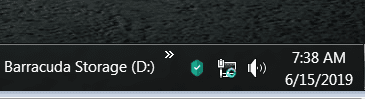
For the past 6-8 mos. we've been experiencing this non rotating blue circle on the

Network icon in the Notification tray. It usually appears on morning start up, and

sometimes when the pc is awakened from Sleep Mode throughout the day.

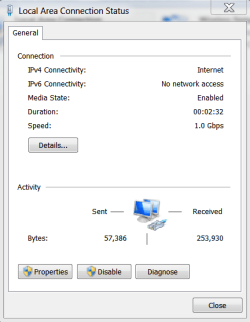
For the life of me, we can't figure it out. By going into Network and Sharing Center,

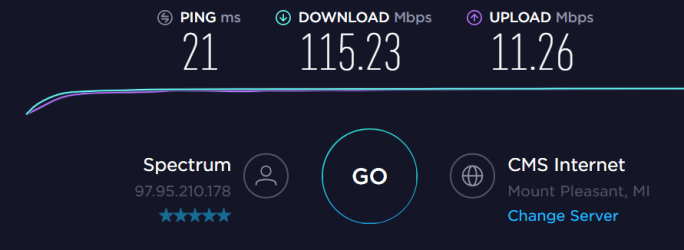
disabling- enabling Network Adapter will fix it. Of note, the issue doesn't affect

connectivity as shown by Ookla Speed Test graphic.

Can someone help me with this annoying issue, please?...

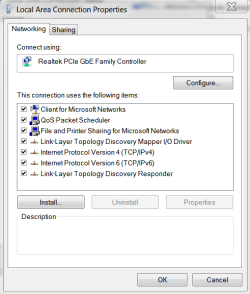
We've included some relevant graphics that may help visually explain this anomaly.

The OS installation appears fine.

Thank you-

Tim
 

Attachments
  • 2.PNG
    2.PNG
    28.5 KB · Views: 26
  • 3.PNG
    3.PNG
    35 KB · Views: 25
  • 4.PNG
    4.PNG
    38.9 KB · Views: 25
  • 5.PNG
    5.PNG
    38.1 KB · Views: 1

My Computer

Computer type
PC/Desktop
Computer Manufacturer/Model Number
HP ENVY 700-515xt CTO, with more cam, headers, and 4.11 gears.
OS
Windows 7 Pro SP1 x64
CPU
Intel Haswell i7-4770 3.4GHz
Motherboard
OEM Kaili2 (MSI MS-7826 v2.0)
Memory
G. SKILLS 32GB Ripjaws X Series DDR3 1600 SDRAM
Graphics Card(s)
Integrated HD4600- upgrade coming!
Sound Card
Integrated...for now.
Monitor(s) Displays
Dell ST-2310 Digital
Screen Resolution
I like 1920x1080
Hard Drives
C\:-Samsung 850PRO SSD-256gb, D:\-SG Barracuda 7200 HDD 1 TB (Storage)
PSU
350w OEM (About to become a display in the aquarium!)
Case
ENVY OEM
Cooling
FANS
Keyboard
Logitech and HP- USB.
Mouse
Logitech LS1 (Alltime favorite of mine!) and HP- both USB
Internet Speed
65Mbps Down (min)/4.5Mbps UP- Charter Comm HS cable
Antivirus
avast! Internet Security 2015/MBAM
Browser
Opera, at present. Love that Chromium horsepower!
Try disabling ipv6 as its not used but it often complains of no network
 

My Computer

Computer type
PC/Desktop
OS
win 8 32 bit
I believe this is actually a display bug with Windows where it freezes on one of the frames of the "connecting" animation instead of displaying the "connected" icon, and does not signify any error with your network. You might be able to fix it by switching to a low colour depth and then back again, as this "refreshes" currently displayed icons.
 

My Computer

Computer type
PC/Desktop
Computer Manufacturer/Model Number
Custom Build
OS
Windows 7 Home Premium
CPU
Intel Core i7-4790K
Motherboard
MSI
Memory
16 GB of RAM
Graphics Card(s)
nVidia GeForce GTX 970
Hard Drives
2 Terabytes of Storage
Antivirus
Kaspersky Internet Security
Browser
Firefox
Try disabling ipv6 as its not used but it often complains of no network

Thanks, tried that and it didn't seem to matter... seems like this issue started after

I got rid of the subscribed VPN service- Private Internet Access- which we had frequent trouble with.

Tim
 

My Computer

Computer type
PC/Desktop
Computer Manufacturer/Model Number
HP ENVY 700-515xt CTO, with more cam, headers, and 4.11 gears.
OS
Windows 7 Pro SP1 x64
CPU
Intel Haswell i7-4770 3.4GHz
Motherboard
OEM Kaili2 (MSI MS-7826 v2.0)
Memory
G. SKILLS 32GB Ripjaws X Series DDR3 1600 SDRAM
Graphics Card(s)
Integrated HD4600- upgrade coming!
Sound Card
Integrated...for now.
Monitor(s) Displays
Dell ST-2310 Digital
Screen Resolution
I like 1920x1080
Hard Drives
C\:-Samsung 850PRO SSD-256gb, D:\-SG Barracuda 7200 HDD 1 TB (Storage)
PSU
350w OEM (About to become a display in the aquarium!)
Case
ENVY OEM
Cooling
FANS
Keyboard
Logitech and HP- USB.
Mouse
Logitech LS1 (Alltime favorite of mine!) and HP- both USB
Internet Speed
65Mbps Down (min)/4.5Mbps UP- Charter Comm HS cable
Antivirus
avast! Internet Security 2015/MBAM
Browser
Opera, at present. Love that Chromium horsepower!
I believe this is actually a display bug with Windows where it freezes on one of the frames of the "connecting" animation instead of displaying the "connected" icon, and does not signify any error with your network. You might be able to fix it by switching to a low colour depth and then back again, as this "refreshes" currently displayed icons.

Hmmm, interesting... we'll give your suggestion a try, but don't think that will resolve.

Thanks.

Tim
 

My Computer

Computer type
PC/Desktop
Computer Manufacturer/Model Number
HP ENVY 700-515xt CTO, with more cam, headers, and 4.11 gears.
OS
Windows 7 Pro SP1 x64
CPU
Intel Haswell i7-4770 3.4GHz
Motherboard
OEM Kaili2 (MSI MS-7826 v2.0)
Memory
G. SKILLS 32GB Ripjaws X Series DDR3 1600 SDRAM
Graphics Card(s)
Integrated HD4600- upgrade coming!
Sound Card
Integrated...for now.
Monitor(s) Displays
Dell ST-2310 Digital
Screen Resolution
I like 1920x1080
Hard Drives
C\:-Samsung 850PRO SSD-256gb, D:\-SG Barracuda 7200 HDD 1 TB (Storage)
PSU
350w OEM (About to become a display in the aquarium!)
Case
ENVY OEM
Cooling
FANS
Keyboard
Logitech and HP- USB.
Mouse
Logitech LS1 (Alltime favorite of mine!) and HP- both USB
Internet Speed
65Mbps Down (min)/4.5Mbps UP- Charter Comm HS cable
Antivirus
avast! Internet Security 2015/MBAM
Browser
Opera, at present. Love that Chromium horsepower!
maybe try uninstalling the ethernet adapter driver and its software, then re-installing
 

My Computer

Computer type
PC/Desktop
Computer Manufacturer/Model Number
diy
OS
Win7 pro x64
CPU
stock i7 7700k
Motherboard
Gigabyte Z270N-WIFI mini-ITX
Memory
Corsair Vengeance LPX 16GB (2x8GB) DDR4 @ 3200MHz
Graphics Card(s)
integrated Intel HD 630
Sound Card
onboard Realtek ALC1220
Monitor(s) Displays
two vertically mounted samsung 55" 4k un55mu8000
Screen Resolution
1920x1280
Hard Drives
256GB Samsung EVO 960 M.2 pci-e NVMe SSD
PSU
SilverStone Nightjar ST45NF 450Watt Fanless
Case
No case. Motherboard is mounted directly onto power supply
Cooling
Evercool low profile 815EP with Panaflow 12L fan at 7v
Keyboard
Ortek MCK-86 mini
Mouse
Belkin 5-button USB
Internet Speed
spectrum 400mbps
maybe try uninstalling the ethernet adapter driver and its software, then re-installing

Tried that... this is a modified OEM machine, and we went to the HP Support site and grabbed the latest

Realtek adapter driver/ software they offered. Also, we went to the Realtek site and grabbed their latest

adapter driver/ software, too. I guess the only difference was the HP driver's been signed by HP, but the

one from the Realtek site is a later revision.

This is just an annoying bug, of sorts. If I go into Network Settings and toggle the adapter between

disable/ enable the issue goes away.

Thanks-

Tim
 

My Computer

Computer type
PC/Desktop
Computer Manufacturer/Model Number
HP ENVY 700-515xt CTO, with more cam, headers, and 4.11 gears.
OS
Windows 7 Pro SP1 x64
CPU
Intel Haswell i7-4770 3.4GHz
Motherboard
OEM Kaili2 (MSI MS-7826 v2.0)
Memory
G. SKILLS 32GB Ripjaws X Series DDR3 1600 SDRAM
Graphics Card(s)
Integrated HD4600- upgrade coming!
Sound Card
Integrated...for now.
Monitor(s) Displays
Dell ST-2310 Digital
Screen Resolution
I like 1920x1080
Hard Drives
C\:-Samsung 850PRO SSD-256gb, D:\-SG Barracuda 7200 HDD 1 TB (Storage)
PSU
350w OEM (About to become a display in the aquarium!)
Case
ENVY OEM
Cooling
FANS
Keyboard
Logitech and HP- USB.
Mouse
Logitech LS1 (Alltime favorite of mine!) and HP- both USB
Internet Speed
65Mbps Down (min)/4.5Mbps UP- Charter Comm HS cable
Antivirus
avast! Internet Security 2015/MBAM
Browser
Opera, at present. Love that Chromium horsepower!
I believe this is actually a display bug with Windows where it freezes on one of the frames of the "connecting" animation instead of displaying the "connected" icon, and does not signify any error with your network. You might be able to fix it by switching to a low colour depth and then back again, as this "refreshes" currently displayed icons.

OK, we've tried your suggestion... we'll see how it works out when we shut down tonight and log on tomorrow

morning. It seems to make sense regarding your 'refresh' logic.

Thanks-

Tim
 

My Computer

Computer type
PC/Desktop
Computer Manufacturer/Model Number
HP ENVY 700-515xt CTO, with more cam, headers, and 4.11 gears.
OS
Windows 7 Pro SP1 x64
CPU
Intel Haswell i7-4770 3.4GHz
Motherboard
OEM Kaili2 (MSI MS-7826 v2.0)
Memory
G. SKILLS 32GB Ripjaws X Series DDR3 1600 SDRAM
Graphics Card(s)
Integrated HD4600- upgrade coming!
Sound Card
Integrated...for now.
Monitor(s) Displays
Dell ST-2310 Digital
Screen Resolution
I like 1920x1080
Hard Drives
C\:-Samsung 850PRO SSD-256gb, D:\-SG Barracuda 7200 HDD 1 TB (Storage)
PSU
350w OEM (About to become a display in the aquarium!)
Case
ENVY OEM
Cooling
FANS
Keyboard
Logitech and HP- USB.
Mouse
Logitech LS1 (Alltime favorite of mine!) and HP- both USB
Internet Speed
65Mbps Down (min)/4.5Mbps UP- Charter Comm HS cable
Antivirus
avast! Internet Security 2015/MBAM
Browser
Opera, at present. Love that Chromium horsepower!
Back
Top