Static IP addresses on multiple adapters simultaneously

Did you set your router to use a static IP and disabled DHCP in the routers settings?
 

My Computer

Computer type
PC/Desktop
Computer Manufacturer/Model Number
Home built
OS
Windows 7 Ult, Windows 8.1 Pro,
CPU
Q9650-4.275GHz, E8600 4.5GHz, E6750-3.8GHz
Motherboard
Evga 780i FTW
Memory
G.Skill PC2 9600 1200Mhz 5 5 5 15 2T
Graphics Card(s)
GTX480
Sound Card
Asus Xonar D2
Monitor(s) Displays
HannsG
Screen Resolution
1680X1050
Hard Drives
GSkill Phoenix Pro 120GB SSD
PSU
ThermalTake Toughpower 1000Watt modular
Case
ThermalTake XaserV
Cooling
Xigmatek S1283
Keyboard
Logitech G15
Mouse
Logitech G9
Internet Speed
T1
I just tried that now, it still does the same thing as in my last post.
 

My Computer

Computer Manufacturer/Model Number
Asus
OS
Windows 7 Ultimate 64bit
CPU
Intel Core 2 Duo P7450 @ 2.13GH/z
Memory
4GB
Graphics Card(s)
Nvidia GeForce 9800m GS
Screen Resolution
1366x768
Hard Drives
320GB
Internet Speed
29.94Mb/s down, 2.71Mb/s up.
I Honestly havn't seen anyone else try this or I might have a standard connection method for this already. From what I read Windows does not like using the same default gateways for multiple network adaptors although I thought there might be a chance using the TCP/IP window.

It seems like everything goes wrong as soon as Windows realizes you are trying to use the same gateway for both network connections. Let me try this on my laptop and see what it does.

Ok using standard DHCP I was able to connect to either wired or wireless at the same time or switch between one or the other quickly without any problems, I did have to plug the wired internet cable in twice before Windows picked it up, but that was only the first time I tried, after that it just worked.

I'm a bit surprized that Windows didn't complain about using both nics at once. I think that is because they are both connecting to the same network but the wired connection is dominant as soon as it's plugged in.

Looks like it works for me with my particular router and network adaptors using DHCP. I havn't tried using static IP's for this yet but it's working with DHCP with no special TCP/IP set up required. Homegroups also works either way so the network doesn't seem to care one way or the other.

When I do an ipconfig /all it shows the the wired connection is being used when both are connected and it goes back to the wireless connection automatically when I unplug the wired connection. I don't seem to be having any problem doing this for some reason, maybe DHCP works better for this hard to say but it should also work with static IP's.

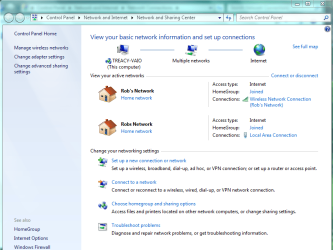
The picture below shows with both connected although the wired connection is the one being used when they are both connected at the same time. Windows doesn't seem to complain about this set up and the connection speed is fast as usual this way. What ever happens seems to occur automatically without me having to do anything.
 

Attachments

  • Rob's Network both connected.PNG
    Rob's Network both connected.PNG
    48.4 KB · Views: 31
Last edited:

My Computer

Computer type
PC/Desktop
Computer Manufacturer/Model Number
Home built
OS
Windows 7 Ult, Windows 8.1 Pro,
CPU
Q9650-4.275GHz, E8600 4.5GHz, E6750-3.8GHz
Motherboard
Evga 780i FTW
Memory
G.Skill PC2 9600 1200Mhz 5 5 5 15 2T
Graphics Card(s)
GTX480
Sound Card
Asus Xonar D2
Monitor(s) Displays
HannsG
Screen Resolution
1680X1050
Hard Drives
GSkill Phoenix Pro 120GB SSD
PSU
ThermalTake Toughpower 1000Watt modular
Case
ThermalTake XaserV
Cooling
Xigmatek S1283
Keyboard
Logitech G15
Mouse
Logitech G9
Internet Speed
T1
Yeah I haven't done it either but I would have assumed that Windows would merely use the connection metric to decide which one to use and behave exactly as you have described chev65...

It's still weird the wording of the original warning which does not match the circumstances of the OPs filled in information... could still be a bug maybe. :/
 

My Computer

Computer Manufacturer/Model Number
Scratch built
OS
Windows 7 x64 Ultimate
CPU
i7 960
Motherboard
Asus P6X58D
Memory
12 Gig Corsair Dominator
Graphics Card(s)
Nvidia 480
Sound Card
Maudio Delta 44 + breakout box
Monitor(s) Displays
Dell UltraSharp U2410 24in and Samsung 21 dual monitors
Screen Resolution
1920x1200 and 1280x1024
Hard Drives
Primary: Intel X-25M G2 160G SSD
Secondary: Segate baracuda 1.0 TB
HDs in AHCI mode.
PSU
Corasair TX850
Case
Cooler Master HAF
Cooling
Corsair H50
Keyboard
Logitech G15 + N52 game pad
Mouse
Logitech MX518
Internet Speed
15kbs down 4.5kbps up
Other Info
WEI 7.6
CPU & RAM 7.6
Graphics 7.9
Hard disk 7.7
I wasn't sure what that warning was about either but I incorrectly assumed it meant there was a problem trying to use both connections at once.

Sometimes it's easier to just test things out yourself to figure it out. I had no problems at all getting this to work so maybe there is an underlying problem here or maybe something else is wrong with the Op's connection.

I never bothered trying both connections at once just because I had no reason to, but Window 7 seems to be very intuative about this process.
 

My Computer

Computer type
PC/Desktop
Computer Manufacturer/Model Number
Home built
OS
Windows 7 Ult, Windows 8.1 Pro,
CPU
Q9650-4.275GHz, E8600 4.5GHz, E6750-3.8GHz
Motherboard
Evga 780i FTW
Memory
G.Skill PC2 9600 1200Mhz 5 5 5 15 2T
Graphics Card(s)
GTX480
Sound Card
Asus Xonar D2
Monitor(s) Displays
HannsG
Screen Resolution
1680X1050
Hard Drives
GSkill Phoenix Pro 120GB SSD
PSU
ThermalTake Toughpower 1000Watt modular
Case
ThermalTake XaserV
Cooling
Xigmatek S1283
Keyboard
Logitech G15
Mouse
Logitech G9
Internet Speed
T1
Looks like it works for me with my particular router and network adaptors using DHCP. I havn't tried using static IP's for this yet but it's working with DHCP with no special TCP/IP set up required. Homegroups also works either way so the network doesn't seem to care one way or the other.

I have no problems connecting to wired and wireless at the same time when I use DHCP. I've had both connected at the same time many times before.

I think I'm just going to give up and deal with un-forwarded ports when I'm on wi-fi.
 

My Computer

Computer Manufacturer/Model Number
Asus
OS
Windows 7 Ultimate 64bit
CPU
Intel Core 2 Duo P7450 @ 2.13GH/z
Memory
4GB
Graphics Card(s)
Nvidia GeForce 9800m GS
Screen Resolution
1366x768
Hard Drives
320GB
Internet Speed
29.94Mb/s down, 2.71Mb/s up.
Yes it seems that doing this with static IP's is the problem for some strange reason. Perhaps using static IP's keeps windows from switching back and forth between network connections so easily. It might work better to set up the static IP's in your router rather than using the Windows IPv4 connection properties window.

In some routers like mine you can reserve an IP for any DHCP enabled machine without using static IP's so that port fowarding still works because the named machine will get the same IP and therefore can always foward the correct ports.

It also seems that other people have had problems setting up dual nics with static IP's using the TCP/IP window. This Technet thread shows this as a problem but the actual solution is still in question.
http://social.technet.microsoft.com...n/thread/545e1a52-61be-46ed-814b-1b6db90e2273
 
Last edited:

My Computer

Computer type
PC/Desktop
Computer Manufacturer/Model Number
Home built
OS
Windows 7 Ult, Windows 8.1 Pro,
CPU
Q9650-4.275GHz, E8600 4.5GHz, E6750-3.8GHz
Motherboard
Evga 780i FTW
Memory
G.Skill PC2 9600 1200Mhz 5 5 5 15 2T
Graphics Card(s)
GTX480
Sound Card
Asus Xonar D2
Monitor(s) Displays
HannsG
Screen Resolution
1680X1050
Hard Drives
GSkill Phoenix Pro 120GB SSD
PSU
ThermalTake Toughpower 1000Watt modular
Case
ThermalTake XaserV
Cooling
Xigmatek S1283
Keyboard
Logitech G15
Mouse
Logitech G9
Internet Speed
T1
Did anyone ever find a resolution for this? I am having the same issue. I want 2 static IP's, one for my wired and one for my wireless, and they connect through the same gateway (although I am not using them simultaneously). I get the same pop up screen if I try to change it from the ipv4 screen but if I change it through the advanced screen, it automatically deletes the gateway from my other adapter! The big issue is, if I don't have the gateway in the adapter settings, I get an "Unidentified Network" in my "Network Connections" page.
 

My Computer

Computer Manufacturer/Model Number
Asus G73JW-X1 ROG
OS
Dual Boot Windows 7 Ultimate 32bit & 64bit
CPU
QuadCore Intel Core i7 740QM, 2800 MHz (21 x 133)
Motherboard
Intel Ibex Peak-M HM55, Intel Lynnfield
Memory
8GB (DDR3-1333 DDR3 SDRAM)
Graphics Card(s)
NVIDIA GeForce GTX 460M (1536 MB)
Sound Card
Realtek High Definition Audio
Monitor(s) Displays
17.3 Hannstar HSD173PUW1 (1920 x 1080)
Hard Drives
Seagate Hybrid ST95005620AS (500 GB/4GB SSD, 7200 RPM, SATA-II)
Back
Top