
Originally SteamMover was developed to help heavy gamers to re-arrange the space on their hard drive. Moving a game from one disk to another, without re-installing it, and risk loosing any saved game data is quite the daunting task. But seeing as moving ANY program from one place to another is just as hard – SteamMover can be used by anyone on any program.
I have tested it with great success on my Windows 7 64bit system. I started out testing it on smaller “not-so-dangerous-if-I-loose it” applications and moved on to bigger ones like Firefox.
How does it work ?
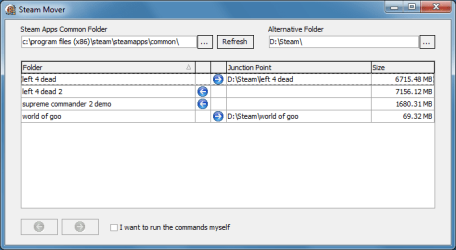
SteamMover use the built-in feature XCopy to move the application from its original place to a location of your choice. From there it creates a shortcut in the original place pointing to the new one.
To move a program
In the SteamMover window, you have to choose your programs folder and the new location folder. The program will then display a list of any programs installed in that folder. All you have to do it to highlight the program to move, and then click on the move button. When it is done working you will see the new site of your program listed in the menu.
To restore a programs location
To undo a move, you simply click the Restore Button and let SteamMover do the rest.
WarningThings may go wrong, so use it with caution. I haven’t dared try it on my OFFICE installation and any really important program. But for moving those smaller applications that I believe this to be a great solution for anyone with a full C-Drive. The author also takes no responsibility what so ever should anything go wrong.
more
download (via Traynier.com)
My Computer
- Computer Manufacturer/Model Number
- self built
- OS
- Windows 7 Professional 64-bit
- CPU
- Intel E8400 3GHz
- Motherboard
- Intel DX48BT2
- Memory
- Kingston PC3-10700H 4Gb
- Graphics Card(s)
- XFX Radeon HD 5850 BlackEd.
- Sound Card
- Asus Xonar DG
- Monitor(s) Displays
- 2x Samsung SM-T220HD 22"
- Screen Resolution
- 1680x1050 on two monitors
- Hard Drives
- OCZ Vertex 2 120gb 3.5" (OS)
Seagate Momentus XT 500gb
Samsung F3 1Tb (games)
2x Samsung F1 1Tb
- PSU
- Thermaltake ToughPower 850w
- Case
- Thermaltake Armor
- Cooling
- Scythe Mugen II
- Keyboard
- Microsoft Comfort Curve USB
- Mouse
- Razer Diamondback 3G
- Internet Speed
- 8128/443

