Solved Stop Application Data folder replicating?

Just finished compiling a Utility called "JunkTidy" for folks who gets anoyed with the "virtual"-folders or "Junctions/Links" as some people call it. Please note it HAS been tested numeroustimes by myself on different Win7 PC's, but it might still be buggy...
USE AT YOUR OWN RISK!
...enjoy :D

Ah, so this only works if someone has changed the permissions and created a mess to begin with. Mine was clean, so I just received the "No junctions found" dialog. Good to know. :)
 

My Computer

Computer Manufacturer/Model Number
HP Pavilion e9110t
OS
Windows 7 Home Premium 64 Bit
CPU
Intel(R) Core(TM)2 Quad CPU Q9550 @ 2.83GHz
Motherboard
Pegatron IPIEL-LA3
Memory
6.00 GB Hundai HMT125U6BFR8C-H9
Graphics Card(s)
ATI Radeon HD 4850
Sound Card
Realtek High Definition Audio/ATI High Definition Audio
Monitor(s) Displays
Acer AL2216W
Screen Resolution
1680x1050
Hard Drives
Hitachi HDP725050GLA360 ATA Device 500 GB
PSU
Unknown/installed by HP
Case
HP generic case
Cooling
Intel Stock Cooling
Keyboard
HP Keyboard
Mouse
HP Mouse
Internet Speed
Download: 19.15 Mbps Upload: 1.67 Mbps
Other Info
Network Adapter Realtek RTL8168D/8111D Family PCI-E Gigabit Ethernet NIC (NDIS 6.20)
Network Adapter 802.11n Wireless PCI Express Card LAN Adapter
Just finished compiling a Utility called "JunkTidy" for folks who gets anoyed with the "virtual"-folders or "Junctions/Links" as some people call it. Please note it HAS been tested numeroustimes by myself on different Win7 PC's, but it might still be buggy...
USE AT YOUR OWN RISK!
...enjoy :D

Ah, so this only works if someone has changed the permissions and created a mess to begin with. Mine was clean, so I just received the "No junctions found" dialog. Good to know. :)
...actualy found a small bug...uploading a new one...gimme 10 min :D
 

My Computer

OS
windows 7
Bug fixed...you will DEF see a decrease in performance as the file first needs to get "Owner Rights", and only THEN can it "seek" for the "tunnel"....
Once youre finished, go to your ""Local Settings""-folder and make SYSTEM the new Owner. This utility makes the "User" the current owner of that directory...will still add that feature in forthcomming versions...so for the time being, please do it "manually"
PS: USE AT OWN RISK!!! ( still need some feedback from Beta-Testers before I can confirm "Stability" :)

PS: The "Backup-Folder" will be in your Home-Drive called "Junk". This program will NEVER delete it...unless YOU want to do it manually ( i did this for security )
 
Last edited:

My Computer

OS
windows 7
Testing... It's nice knowing one has a backup image of the whole system saved in case beta testing of any software has unforeseen consequences. :)
 

My Computer

Computer Manufacturer/Model Number
HP Pavilion e9110t
OS
Windows 7 Home Premium 64 Bit
CPU
Intel(R) Core(TM)2 Quad CPU Q9550 @ 2.83GHz
Motherboard
Pegatron IPIEL-LA3
Memory
6.00 GB Hundai HMT125U6BFR8C-H9
Graphics Card(s)
ATI Radeon HD 4850
Sound Card
Realtek High Definition Audio/ATI High Definition Audio
Monitor(s) Displays
Acer AL2216W
Screen Resolution
1680x1050
Hard Drives
Hitachi HDP725050GLA360 ATA Device 500 GB
PSU
Unknown/installed by HP
Case
HP generic case
Cooling
Intel Stock Cooling
Keyboard
HP Keyboard
Mouse
HP Mouse
Internet Speed
Download: 19.15 Mbps Upload: 1.67 Mbps
Other Info
Network Adapter Realtek RTL8168D/8111D Family PCI-E Gigabit Ethernet NIC (NDIS 6.20)
Network Adapter 802.11n Wireless PCI Express Card LAN Adapter
Testing... It's nice knowing one has a backup image of the whole system saved in case beta testing of any software has unforeseen consequences. :)

...yep...Luckely (unlike some other utilities), JunkTidy creates a backup WITHOUT compressing it, meaning IF you strike a boo-boo, you can always just "copy" the contents of the whole folder (Junk), to the ---> C:\Documents and Settings\<USER>\Local Settings\Application Data folder.....
JUST A REMINDER...ALWAYS DO A BACKUP FIRST...then proceed to the "cleaning" section :D
 

My Computer

OS
windows 7
Glad I don't care too much about my junctions; they are managed just fine by Windows as long as the user does not do anything weird to them. Your utility takes well over an hour to backup and clean. Can't imagine having to run this for multiple users. ;)
 

My Computer

Computer Manufacturer/Model Number
HP Pavilion e9110t
OS
Windows 7 Home Premium 64 Bit
CPU
Intel(R) Core(TM)2 Quad CPU Q9550 @ 2.83GHz
Motherboard
Pegatron IPIEL-LA3
Memory
6.00 GB Hundai HMT125U6BFR8C-H9
Graphics Card(s)
ATI Radeon HD 4850
Sound Card
Realtek High Definition Audio/ATI High Definition Audio
Monitor(s) Displays
Acer AL2216W
Screen Resolution
1680x1050
Hard Drives
Hitachi HDP725050GLA360 ATA Device 500 GB
PSU
Unknown/installed by HP
Case
HP generic case
Cooling
Intel Stock Cooling
Keyboard
HP Keyboard
Mouse
HP Mouse
Internet Speed
Download: 19.15 Mbps Upload: 1.67 Mbps
Other Info
Network Adapter Realtek RTL8168D/8111D Family PCI-E Gigabit Ethernet NIC (NDIS 6.20)
Network Adapter 802.11n Wireless PCI Express Card LAN Adapter
Glad I don't care too much about my junctions; they are managed just fine by Windows as long as the user does not do anything weird to them. Your utility takes well over an hour to backup and clean. Can't imagine having to run this for multiple users. ;)
lol....it al depends what crap the guy has on it...as for each file, it first have to do a "permission-setting"...and only THEN can it do the "copy/delting"-stuff. At least you know whatever the program is doing, is correct. My niece works at a company called "Matrix", and they have encountered a lot of probs with these kind of issues. Virusses usually grants itself "acces" to these folders/junctions...and then "replicates" itself all across th board. He told me once they had to delete over 60 GIG of data, that was in these so caled "virtual"-folders...thereby freeing up 60GIG of data. If the Tech is happy after the Backup and DELETING of the extentions, they can just delete the JUNK-folder...whalla...60GIG more space :D
PS: you dont need to do a backup the 2nd time if everything works 100% after a couple of times, as everything is in actual fact STILL in their correct locations...a backup once in a blue moon is suffice...
 

My Computer

OS
windows 7
PS: I will post "close-to-final" JunkTidy tomorrow that wil be much faster and (hopefully) complete :D
 

My Computer

OS
windows 7
[Snip]

Edit: I am actually leaning toward RobinHood's discovery after reading whocares's post http://www.sevenforums.com/general-...ation-data-folder-replicating.html#post990347 #3 about junctions. I believe that once that folder is given permissions and other programs access it incorrectly as a folder rather than a junction, it creates a long line of folders that can have individual data stored in them, thus taking up space. Though this is not the intention of Application Data, it is what happens once that folder permissions are altered.

[Snip]

What @logicearth has written is usually correct, and what @RobinHood has written is usually wrong. If I gave the impression that the reflected folders could store individual files, I apologize.

I initially did not go into much detail. The Junctions created by Windows should be approached with caution. Microsoft got this right. They attempted to cleanup the mess that they created over the years. Junctions were the solution, but it also created problems. The problems are due to combining the various directory structures of different versions of Windows. A special user as the owner and a combination of security/permissions was the solution. Overriding this setup causes problems.

Different versions of Windows treat Junctions and file operations differently. If you follow the wrong advice, you may be very unhappy. Using a disk image to backup and restore the partition is the safest method. If your backup and restore application does not understand Junctions and Windows version differences, you may be very unhappy.

Junctions are pointers to other folders. Junctions DO NOT contain files or folders. Junctions do not need to be named the same as the destination folder. Multiple Junctions can point to the same folder, but a Junction can only point to one folder. File operations copy, paste, delete, rename, etc. do not work the same as folders. The following is about Windows 7.

C:\Junction1 <=> D:\Target1

Delete Junction1 will only delete the Junction.
Rename Junction1 will only rename the Junction.
Copy Junction1 will copy the contents of Target1 (including subdirs and files).
Paste Junction1 will paste the contents of the Target1 (including subdirs and files).

Any file operations within Junction1 are actually occurring in Target1. Creating a folder in Junction1 will actually create a folder in Target1. Windows will display Target1's folders and files as its own, but it is an illusion. Only Junction1 is in the C partition's MFT. NOT ONE additional byte or bit of data is stored. One could make the case that when Windows Explorer displays Junction1 it takes RAM, but RAM is NOT storage.

If an application or folder or programmer (even a Computer Scientist) does not understand this, you may be unhappy.

The folder "%USERPROFILE%\AppData\Local" contains a Junction "Application Data", and this Junction points to "%USERPROFILE%\AppData\Local".

"%USERPROFILE%\AppData\Local\Application Data" <=> "%USERPROFILE%\AppData\Local"

Each time the "Application Data" folder is displayed, it will contain the parent folder "%USERPROFILE%\AppData\Local", and each time the parent folder is displayed, it will contain the child folder "Application Data"

C:\Target1\Junction1\Target1\Junction1\Target1\ ...

There is a limit for Windows, and at some point it will stop displaying subdirs. I am not sure what the limit is, but 200 "Application Data" folders may be the limit. Junction1 does take up space in the MFT for the partition, but the recursive folders and files do not exist. The are simply an illusion. As @logicearth illustrated, it is like two mirrors pointing at each other. The reflected images do not add one ounce of additional weight.

NOTE: Microsoft eliminated this with Owner security/permissions. In this case, Junction1 cannot be displayed or "read", and the recursion never occurs. An application would think that Junction1 was an empty folder: C:\Target1\Junction1\empty. The problem is solved. When the User takes Ownership and changes the security/permissions, the problem is unsolved.

At this point things can go more wrong than most people imagine (even Computer Scientists). Simply copying the Junction will copy all the contents of the Target folder. If the Target folder contains a Junction, all the contents of that Junction will be copied. For "C:\Target1\Junction1\Target1\Junction1\ ...", the contents of Target1 will be copied until the Windows folder limit is reached. If Target1 contains 3Gb and it regresses 200 times, 603Gb of data will be copied. (3Gb x 200 recursions + original 3Gb) When Target1 is pasted, the result will be 603Gb. What was originally 3Gb has now become 603Gb. If the original folder ("C:\Target1") is deleted, Junction1 will also be deleted. If the folder is restored from the backup copy, the result will be 600Gb, and there will be actual files and folders where there were virtual ones.

Junctions do not copy like regular files, and they are not created like regular files. In this case, the folders could contain different individual files, and since the former Junction is now an actual directory with actual files, the fun really begins. In the Microsoft version, everything was contained in Target1, but applications would not break using Junction1. To the extent that the data will only be accessed by one application in one location, things should work, but if not, you may be unhappy. Upgrading to a new version of a software application may not work correctly. If the new version uses the new AppData folder, it may expect the old data to be present in that folder because the old location was really a Junction. The old data is no longer "in" a Junction. It is in an actual "Application Data" folder, and it is no longer accessible to the application. You may have just created a mess.

To find the Junctions on a partition use the following at a command line:

dir /al /s c:\

Change c:\ to the partition you want to check. You may need to run an elevated command line. You can then check the security/permissions on the Junctions, and you can restore them if needed. You may want to get familiar with the command line (elevated). If you want to play with the big boys, you need to use big boy tools. I'm just sayin'.

I would be very careful when mucking around with the Operating System. I would be very careful when taking advice from an expert (even a Computer Scientist). I would be even more careful before I used a utility he/she developed. I would use what I have written here as a starting point. I only know what I have been able to piece together and what I have tried. Who knows? I may be wrong. On the other hand, I may be right. Proceed at your own risk.

"You buys your ticket. You takes your chances."
 

My Computer

OS
Windows 7 Professional x64
PS: PLEASE NOTE...THIS UTILITY IS STILL IN "BETA" FORM AND NEEDS TO BE TESTED.... ON COMPLETION, IT IS ONLY INTENDED TO BE USED BY ADVANCED-TECHNICIANS TO REMOVE REPLICA OF VIRUSES UNDER --->
"C:\Documents and Settings\<USER>Robin\Local Settings\Application Data"
 

My Computer

OS
windows 7
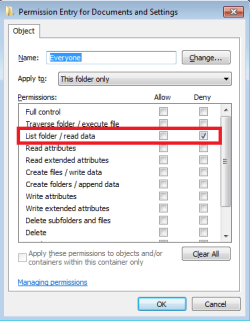
All you need to do is verify the root of each folder is a junction and set the below permission.
That is all there is to it. One single DENY permission.
 

Attachments

  • Untitled.png
    Untitled.png
    14.6 KB · Views: 65

My Computer

Computer type
PC/Desktop
Computer Manufacturer/Model Number
Alienware Aurora ALX R4
OS
Windows 10 Pro (x64)
CPU
Intel Core i7-3930K (3.2GHz - 4.5GHz)
Motherboard
Alienware Aurora-R4 x79
Memory
4x Samsung 4GB PC3-12800 DDR3 (16GB 1600MHz)
Graphics Card(s)
Nvidia Geforce GTX 690
Sound Card
SteelSeries Siberia Elite
Monitor(s) Displays
Dell UltraSharp U3011
Screen Resolution
2560x1600
Hard Drives
Samsung 850 Pro 256 GB, Seagate 1TB Desktop Hybrid HDD, 2x Western Digital 4TB Green HDD
PSU
875W Some Dell PSU <.<
Case
Alienware Aurora ALX
Cooling
Custom Liquid Cooling (EK CPU & GPU blocks) dual EK 480RAD
Keyboard
Logitech G710+ Mechanical
Mouse
Logitech G700s
Internet Speed
Verizon Fios (50 mbps average)
Other Info
Server: Intel NUC D54250WYK: i5-4250U, 16GB, 256 GB mSATA, Windows Server 2012 R2
@writhziden
You probably are not going to like this. You can delete it if you want.

@logicearth
It is not your head that needs to be banged on the desk. You were completely right about Junctions, but I was being nice to @RobinHood.

@RobinHood
I do not care about your credentials. When it comes to Junctions you know nothing, and what you are blathering about is complete and utter NONSENSE. You are so far out of your depth that it is not funny. My dog knows more about Junctions than you do, and he ain't that smart. Actually, my dog is available to work, and the crap that he produces is useful as fertilizer.

[Snip]

PS: the junction is actually "Virtual Folders"...used by "Special Folders"...sometimes just staying on the system as well...read here for more info --->
Special folder - Wikipedia, the free encyclopedia

Another good read ---> ( note the amount of "layers" actually needed...doesnt exceed 3 )
Managing Roaming User Data Deployment Guide

Junctions are one type of "Reparse Point", and they are part of NTFS. There are several other types, but the one that is especially interesting is "Streams". "Streams" should be familiar to someone who is involved with malware (viruses) and computer forensics. For those who are not familiar with them, they can "hide" data. Anybody who is interested can Google it to learn more about them, but "Streams" are useful to both malware and criminals. Anybody trying to catch and/or stop malware or criminals should know about "Streams".

"Special Folders" are actual directories. Junctions may or may not point to them, and the Junction may be using an "alias". Windows uses environment variables to plugin the actual location. These should be used instead of hard coding an actual Path. This is folder redirection, and any comparison to Junctions is silly. Comparing Junctions and folder redirection would be similar to comparing planes and birds. Shell Namespace is similar to environment variables, but there are differences. If anyone would like more information, Google the terms.

My use of an environment variable was intentional. I did not copy something I found on Wikipedia. It is easier than creating a path, and it illustrates how an application should reference "System Folders". I did not detail the process, but when the "Application Data" Junction gets replaced with an actual folder, the environment variable can contribute to the confusion. Again, Google it.

I have no idea of what the "layers" reference and link have to do with anything. If it is in reference to the limit Windows Explorer will display, I see where I could have reworded it for better clarity. Congratulations, you got me. I meant nested folder depth. Various applications have a limit to path length (characters), and I am not sure what it is for Windows Explorer. In addition, I am not sure if Windows Explorer has a limit on the number of nested folders it will display. If the "layers" link is about something else, enlighten me.

The fact that your "utilities NEVR see the outside world" should be continued, and whatever the above utility you created should join the others. For a summary, you should say it will F@*K UP the user's machine. Your entire description is a load of crap. As written, it makes no sense AT ALL. The API calls for Junctions are different than the ones for file operations of actual files and folders. I doubt you know this, and I do not think Wikipedia has an entry for it.

If this post is offensive or violates the forum rules, remove it. My other posts can also be removed, and my user account can be revoked. WhoCares?
 

My Computer

OS
Windows 7 Professional x64
Bwhaa haa haa...nice name...WHO CARES WHAT YOU THINK...suits you :D
You obviously have no CLUE what i'm trying to explain...Talk to some techs that has encountered viruses DELIBERATELY being put in the folders. You are talking 50% the truth, mixed with 50% junk....If youre a tech....get another job :p
..I'm talking about GETTING RID OF OVER 50+ VIRTUAL FOLDERS!!!! HELL, CANT YOU GET IT???
WHO CARES where they go to....those "extra" virtual's must come out...AND the PC must still run 100%....SAVVY???
 

My Computer

OS
windows 7
All you need to do is verify the root of each folder is a junction and set the below permission.
That is all there is to it. One single DENY permission.
i know that thx Logicearth...i'm just trying to get the commands correct in sequence in my app ;)
 

My Computer

OS
windows 7
Bwhaa haa haa...nice name...WHO CARES WHAT YOU THINK...suits you :D
You obviously have no CLUE what i'm trying to explain...Talk to some techs that has encountered viruses DELIBERATELY being put in the folders. You are talking 50% the truth, mixed with 50% junk....If youre a tech....get another job :p
..I'm talking about GETTING RID OF OVER 50+ VIRTUAL FOLDERS!!!! HELL, CANT YOU GET IT???
WHO CARES where they go to....those "extra" virtual's must come out...AND the PC must still run 100%....SAVVY???

What I do is irrelevant. The correctness of what I have written is relevant. If what I have written is "50% junk", please give details. Inquiring minds want to know.

I thought it was obvious that I have no CLUE what you are trying to explain. I do know what you have written, and I do know that you do not have a clue about the subject.

This thread was about the "Application Data" folder being replicated. I stumbled into here from Google. The post was not what I wanted, but I knew what the problem was. I posted to help someone get started solving their problem. You came along with a post:

i went to the 3rd junction of "Application Data" ( had over 200 of them) and just deleted...NO problems. I can understand there can be TWO junctions with the same name, but 100's? NO WAY! :sarc:

I THEN only "added" the EVERYONE = DENY

@logicearth explained that you were wrong and provided an example to illustrate his/her point.

You then started blathering about the non-existent folders taking up space, and you thought that one of these non-existent folders may have a file in it. I assume you meant an existing file in the non-existent folder.

Again, @logicearth explained that you were wrong and provided another example to illustrate his/her point.

Once again, you insisted that a non-existent folder would take space, but you also started using "link" stating that it was short for Junction. A Link can mean a Shortcut when discussing the file system. A Shortcut and a Junction are two different things, and they CANNOT be used interchangeably. I would prefer to use the exact terms, but since you explicitly defined "link", I do not have a problem with it.

@writhziden brought me back into the discussion.

Somebody was not nice to somebody else, and a post(s) was edited. I must have missed something because I did not see any problem with the posts.

@logicearth tried again to illustrate why you were wrong.

You continued to use "link". You then posted a link to a Wikipedia entry about "Special Folders", and you stated that this was the best way to describe (a link?). NEWSFLASH: The thread is about problems with Junctions, and Junctions are NOT "Special Folders". How this is relevant to the thread, I have no CLUE. It looks like you may be straying away from defining a Junction as a "link".

You then went into a story about your cousin having to delete 60GB of data in "these so caled 'virtual'-folders". In the land of Junctions, virtual folders are non-existent, and it is impossible to contain 60GB of data.

I then stepped in to correct any incorrect impressions caused by my previous wording, and I gave a more detailed explanation of Junctions.

You then tried to school me about Junctions, and I had to spank you. Apparently, you are hard headed.

Junctions are actual objects that are in the Master File Table (MFT), and as you noted, they do take up a small bit of space. These objects are pointers to actual folders, and these folder objects also reside in the MFT. The MFT has pointers to the file sequences in the Partition, but if the file is small, it could reside in the MFT.

Windows Explorer displays this data in a user friendly form. When the security/permissions for the "Application Data" Junction have been modified, the folders Windows Explorer displays are "virtual", and these "virtual" folders are non-existent. If "Application Data" is an actual folder, things can become more complicated. Because Junctions are named independently, a folder could contain multiple Junctions pointing to the same folder.

"GETTING RID OF OVER 50+ VIRTUAL FOLDERS!!!!" is impossible. They do not exist. Replace "VIRTUAL FOLDERS" with "PINK UNICORNS", and the sentence has the same thing meaning. In order to keep the "virtual" folders from being displayed, you must change the permissions. This is the only way to make them "go away". This is all based upon the fact that this is a Junction not an actual folder. If it is a folder, you have got other problems.

@logicearth was nice enough to provide the solution and an image. At least this time, you thanked him/her. If you ask nicely, @logicearth might explain the Master Boot Record (MBR) to you.

The reason @RobinHood is receiving this treatment is because claimed to be a "Computer Specialist". (I got it wrong in the previous posts.) As a "Computer Specialist", @RobinHood should know far more than he/she does, but @RobinHood has no idea of what he/she is talking about. Anybody following @RobinHood advice may be very sorry. Deleting things haphazardly is a very bad idea. A backup is only as good as the restoration. If one does not understand Junctions, this can result in a mess.

Finally, NOBODY should care about what I think. They should research what I have posted. I could be a dog tapping the on keyboard.

 

My Computer

OS
Windows 7 Professional x64
Bwhaa haa haa...nice name...WHO CARES WHAT YOU THINK...suits you :D
You obviously have no CLUE what i'm trying to explain...Talk to some techs that has encountered viruses DELIBERATELY being put in the folders. You are talking 50% the truth, mixed with 50% junk....If youre a tech....get another job :p
..I'm talking about GETTING RID OF OVER 50+ VIRTUAL FOLDERS!!!! HELL, CANT YOU GET IT???
WHO CARES where they go to....those "extra" virtual's must come out...AND the PC must still run 100%....SAVVY???

What I do is irrelevant. The correctness of what I have written is relevant. If what I have written is "50% junk", please give details. Inquiring minds want to know.

I thought it was obvious that I have no CLUE what you are trying to explain. I do know what you have written, and I do know that you do not have a clue about the subject.

This thread was about the "Application Data" folder being replicated. I stumbled into here from Google. The post was not what I wanted, but I knew what the problem was. I posted to help someone get started solving their problem. You came along with a post:

i went to the 3rd junction of "Application Data" ( had over 200 of them) and just deleted...NO problems. I can understand there can be TWO junctions with the same name, but 100's? NO WAY! :sarc:

I THEN only "added" the EVERYONE = DENY

@logicearth explained that you were wrong and provided an example to illustrate his/her point.

You then started blathering about the non-existent folders taking up space, and you thought that one of these non-existent folders may have a file in it. I assume you meant an existing file in the non-existent folder.

Again, @logicearth explained that you were wrong and provided another example to illustrate his/her point.

Once again, you insisted that a non-existent folder would take space, but you also started using "link" stating that it was short for Junction. A Link can mean a Shortcut when discussing the file system. A Shortcut and a Junction are two different things, and they CANNOT be used interchangeably. I would prefer to use the exact terms, but since you explicitly defined "link", I do not have a problem with it.

@writhziden brought me back into the discussion.

Somebody was not nice to somebody else, and a post(s) was edited. I must have missed something because I did not see any problem with the posts.

@logicearth tried again to illustrate why you were wrong.

You continued to use "link". You then posted a link to a Wikipedia entry about "Special Folders", and you stated that this was the best way to describe (a link?). NEWSFLASH: The thread is about problems with Junctions, and Junctions are NOT "Special Folders". How this is relevant to the thread, I have no CLUE. It looks like you may be straying away from defining a Junction as a "link".

You then went into a story about your cousin having to delete 60GB of data in "these so caled 'virtual'-folders". In the land of Junctions, virtual folders are non-existent, and it is impossible to contain 60GB of data.

I then stepped in to correct any incorrect impressions caused by my previous wording, and I gave a more detailed explanation of Junctions.

You then tried to school me about Junctions, and I had to spank you. Apparently, you are hard headed.

Junctions are actual objects that are in the Master File Table (MFT), and as you noted, they do take up a small bit of space. These objects are pointers to actual folders, and these folder objects also reside in the MFT. The MFT has pointers to the file sequences in the Partition, but if the file is small, it could reside in the MFT.

Windows Explorer displays this data in a user friendly form. When the security/permissions for the "Application Data" Junction have been modified, the folders Windows Explorer displays are "virtual", and these "virtual" folders are non-existent. If "Application Data" is an actual folder, things can become more complicated. Because Junctions are named independently, a folder could contain multiple Junctions pointing to the same folder.

"GETTING RID OF OVER 50+ VIRTUAL FOLDERS!!!!" is impossible. They do not exist. Replace "VIRTUAL FOLDERS" with "PINK UNICORNS", and the sentence has the same thing meaning. In order to keep the "virtual" folders from being displayed, you must change the permissions. This is the only way to make them "go away". This is all based upon the fact that this is a Junction not an actual folder. If it is a folder, you have got other problems.

@logicearth was nice enough to provide the solution and an image. At least this time, you thanked him/her. If you ask nicely, @logicearth might explain the Master Boot Record (MBR) to you.

The reason @RobinHood is receiving this treatment is because claimed to be a "Computer Specialist". (I got it wrong in the previous posts.) As a "Computer Specialist", @RobinHood should know far more than he/she does, but @RobinHood has no idea of what he/she is talking about. Anybody following @RobinHood advice may be very sorry. Deleting things haphazardly is a very bad idea. A backup is only as good as the restoration. If one does not understand Junctions, this can result in a mess.

Finally, NOBODY should care about what I think. They should research what I have posted. I could be a dog tapping the on keyboard.

What i cant understand is, he keeps on talking about all kinds of stuff, when i'm trying to explain that viruses CAN INFECT those "make believe" folders...Weather its a folder, a junction...a VIRTUAL junction...or whatever...viruses CAN write INTO those "so-called" folders....i have just finished my utility...and boy...if THIS aint proof...then i really dont know. I work with computers on a DAILY basis , PRATICLY....NOT "theoraticly"....I am her not to argue WHAT a folder...junction...loop, or whatever you may call it....i'm here trying to help folks get rid of those long "loops" ( i'll call it loops from now on). The util is finished...works 100x faster than before....Have tested it on 2 PC's ( Windows 7)...i actualy deliberitly created MORE loops....restarted the pc's, and they DIDNT dissapear....i use the utility and it cleansed it up without no hassles....
MY argue is not so much as WHAT you call it, but how viruses actualy INFECTS those loops with 100's of "temp" files....Go BACK to my previous statements....look at the "links" i posted to wikipedia and some other site as proof what it ACTUALLY is ( but thats still not the point)....Do you guys want to try this utility or not? ...easy as that. I'll post it on a site where people already had "issues" with viruses causing these duplication of links...i'll post it there where ppl at least understand what i'm trying to do....CLEAR UP THE MESS OF MULTPLE DUPLICATION LOOPS! ( irrespectfull of WHAT a loop actually is...i'm here to clean it from 100's of duplicates...to a level of 3...
....geez....Try and see WHAT i'm trying to do...AND have achieved....lol
 

My Computer

OS
windows 7
...never mind....just delete me from these forums please, as it seems everyone here knows everything...well, sorry to say...i DONT know everything and take advise and information from anybody....analize it....THEN make a conclusion....A person who cant reason....or listen to what another is ACTUALLY saying....he's no "Pro" on MY eyes...but a wanna-be
......anyways, nice talking to folks that had a bit of "savvy" about what i'm trying to say....
 

My Computer

OS
windows 7
Sorry to see you go RobinHood.
 

My Computer

Computer Manufacturer/Model Number
HP Pavilion e9110t
OS
Windows 7 Home Premium 64 Bit
CPU
Intel(R) Core(TM)2 Quad CPU Q9550 @ 2.83GHz
Motherboard
Pegatron IPIEL-LA3
Memory
6.00 GB Hundai HMT125U6BFR8C-H9
Graphics Card(s)
ATI Radeon HD 4850
Sound Card
Realtek High Definition Audio/ATI High Definition Audio
Monitor(s) Displays
Acer AL2216W
Screen Resolution
1680x1050
Hard Drives
Hitachi HDP725050GLA360 ATA Device 500 GB
PSU
Unknown/installed by HP
Case
HP generic case
Cooling
Intel Stock Cooling
Keyboard
HP Keyboard
Mouse
HP Mouse
Internet Speed
Download: 19.15 Mbps Upload: 1.67 Mbps
Other Info
Network Adapter Realtek RTL8168D/8111D Family PCI-E Gigabit Ethernet NIC (NDIS 6.20)
Network Adapter 802.11n Wireless PCI Express Card LAN Adapter
Keep well writhzin....nice talking to you bud...Just a reminder ---> "weird" i got it right to make 30+ junctions to become 3...INCLUDING backing it up...i never heard about a loop within a loop that had something in it to backup up ( im not talking about deleting the OFFICIAL junctions hey, but the "nested" ones... )....which I just managed to do...Like one guy said...it's just a different angle you go to aproach the same file...which is 100% correct ( somewhere earlier in this thread someone mentioned it )....what i did, i just made Windows "neater"....
PS: some good INFO why you get multiple "nested" junctions ---->

[Gelöst] Trojan.Mayachok/1 - Seite 3 - Viren und andere Sicherheitsrisiken - Avira Support Forum
 
Last edited:

My Computer

OS
windows 7
@RobinHood
What you call something is important. If you call the liquid in a glass water, I expect water when I drink it, and my thirst will be quenched. If instead it is Hydrochloric Acid, I still expect water, but my mouth, throat, esophagus, and stomach will be burned. It would matter to me.

Keep well writhzin....nice talking to you bud...Just a reminder ---> "weird" i got it right to make 30+ junctions to become 3...INCLUDING backing it up...i never heard about a loop within a loop that had something in it to backup up ( im not talking about deleting the OFFICIAL junctions hey, but the "nested" ones... )....which I just managed to do...Like one guy said...it's just a different angle you go to aproach the same file...which is 100% correct ( somewhere earlier in this thread someone mentioned it )....what i did, i just made Windows "neater"....
PS: some good INFO why you get multiple "nested" junctions ---->

[Gelöst] Trojan.Mayachok/1 - Seite 3 - Viren und andere Sicherheitsrisiken - Avira Support Forum

This link provides a clue as to what you are talking about. I am using Google Translate, but it is still hard for me to follow. I will specifically address the file & folder issue. Since there is no way to tell what is an actual folder and what is a Junction, I cannot know for sure what is happening. I will make an educated guess, but I could be very wrong.

The following is Windows 7 specific. There are significant differences between Windows versions, and you will hose an Windows XP machine if you do not know what you are doing.

It appears the Windows User Account is named "user". This is going to become complicated. Also, I am not going to use strict terminology. It is going to be too complicated as it is.

There are 4 files in a Temp folder:
1. "~DFA06C7F2ABC5DDBB9.TMP"
2. "~DFA1EBB77C6D9C4AC3.TMP"
3. "~DF2F4081AA39B0A691.TMP"
4. "~DFB112217E9F34CD1D.TMP"

1 & 2 are always grouped together. 1 & 2 & 3 begin to be grouped, and finally, all four files are grouped. The listing would be better if it started at the beginning of the tree and worked down. I think this would show that the tree starts with the four files, and the number of files diminishes as you go deeper into the tree. At the lowest level, only 1&2 are included.

My guess is that these are actual folders with actual files in them. It is possible that there could be a combination of Junctions and folders, but it would be an even more tangled mess. Furthermore, this was not necessarily caused by a virus, and Trojan.Mayachok/1 indicates it is a trojan not a virus. Google returned a list of sites that did not include any of the major anti-malware vendors. It was a list of mostly Russian sites, and it would take too much time to setup a Virtual Machine to investigate it.

Without knowing which, if any, are Junctions, cleaning up this mess may not work as expected. If it is actual folders you have, you could clean it up and restore the Junctions with security/permissions. "C:\ Documents and Settings" should be a Junction. If you are dealing with a nasty trojan, the creator could have stored the actual data in a different location. One of the "Application Data" folders could be a Junction pointing somewhere else. If the trojan has not been eradicated, it could recreate the Junction, and the original data would still be present.

I do not have enough knowledge of HijackThis to know what is being displayed. I would be wary of doing anything based upon the report, but you may know more. The Wikipedia and MSDN links you provided have little to do with the problem you are trying to solve. I still think you are in over your head, but as you noted, WHO CARES WHAT I THINK.

I cannot provide a single link that details the knowledge I have shared here. There is no single place where this is fully discussed, but this may have changed. I have researched this myself, but I am indebted to several people for some of this. Pulling together bits from different places, I was able to figure it out, but I am not an expert. I would encourage to research some of the "50% junk" to learn more. I would request you post a list of the junk. Even a few entries would be helpful to anybody reading this.
 

My Computer

OS
Windows 7 Professional x64
Back
Top