Bwhaa haa haa...nice name...WHO CARES WHAT YOU THINK...suits you

You obviously have no CLUE what i'm trying to explain...Talk to some techs that has encountered viruses DELIBERATELY being put in the folders. You are talking 50% the truth, mixed with 50% junk....If youre a tech....get another job

..I'm talking about GETTING RID OF OVER 50+ VIRTUAL FOLDERS!!!! HELL, CANT YOU GET IT???
WHO CARES where they go to....those "extra" virtual's must come out...AND the PC must still run 100%....SAVVY???
What I do is irrelevant. The correctness of what I have written is relevant. If what I have written is "50% junk", please give details. Inquiring minds want to know.
I thought it was obvious that I have no CLUE what you are trying to explain. I do know what you have written, and I do know that you do not have a clue about the subject.
This thread was about the "Application Data" folder being replicated. I stumbled into here from Google. The post was not what I wanted, but I knew what the problem was. I posted to help someone get started solving their problem. You came along with a post:
i went to the 3rd junction of "Application Data" ( had over 200 of them) and just deleted...NO problems. I can understand there can be TWO junctions with the same name, but 100's? NO WAY! :sarc:
I THEN only "added" the EVERYONE = DENY
@logicearth explained that you were wrong and provided an example to illustrate his/her point.
You then started blathering about the non-existent folders taking up space, and you thought that one of these non-existent folders may have a file in it. I assume you meant an existing file in the non-existent folder.
Again, @logicearth explained that you were wrong and provided another example to illustrate his/her point.
Once again, you insisted that a non-existent folder would take space, but you also started using "link" stating that it was short for Junction. A Link can mean a Shortcut when discussing the file system. A Shortcut and a Junction are two different things, and they CANNOT be used interchangeably. I would prefer to use the exact terms, but since you explicitly defined "link", I do not have a problem with it.
@writhziden brought me back into the discussion.
Somebody was not nice to somebody else, and a post(s) was edited. I must have missed something because I did not see any problem with the posts.
@logicearth tried again to illustrate why you were wrong.
You continued to use "link". You then posted a link to a Wikipedia entry about "Special Folders", and you stated that this was the best way to describe (a link?). NEWSFLASH: The thread is about problems with Junctions, and Junctions are NOT "Special Folders". How this is relevant to the thread, I have no CLUE. It looks like you may be straying away from defining a Junction as a "link".
You then went into a story about your cousin having to delete 60GB of data in "these so caled 'virtual'-folders". In the land of Junctions, virtual folders are non-existent, and it is impossible to contain 60GB of data.
I then stepped in to correct any incorrect impressions caused by my previous wording, and I gave a more detailed explanation of Junctions.
You then tried to school me about Junctions, and I had to spank you. Apparently, you are hard headed.
Junctions are actual objects that are in the Master File Table (MFT), and as you noted, they do take up a small bit of space. These objects are pointers to actual folders, and these folder objects also reside in the MFT. The MFT has pointers to the file sequences in the Partition, but if the file is small, it could reside in the MFT.
Windows Explorer displays this data in a user friendly form. When the security/permissions for the "Application Data" Junction have been modified, the folders Windows Explorer displays are "virtual", and these "virtual" folders are non-existent. If "Application Data" is an actual folder, things can become more complicated. Because Junctions are named independently, a folder could contain multiple Junctions pointing to the same folder.
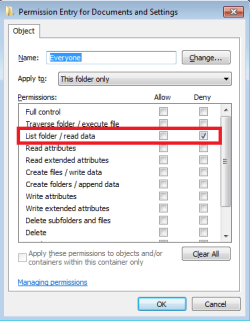
"GETTING RID OF OVER 50+ VIRTUAL FOLDERS!!!!" is impossible. They do not exist. Replace "VIRTUAL FOLDERS" with "PINK UNICORNS", and the sentence has the same thing meaning. In order to keep the "virtual" folders from being displayed, you must change the permissions. This is the only way to make them "go away". This is all based upon the fact that this is a Junction not an actual folder. If it is a folder, you have got other problems.
@logicearth was nice enough to provide the solution and an image. At least this time, you thanked him/her. If you ask nicely, @logicearth might explain the Master Boot Record (MBR) to you.
The reason @RobinHood is receiving this treatment is because claimed to be a "Computer Specialist". (I got it wrong in the previous posts.) As a "Computer Specialist", @RobinHood should know far more than he/she does, but @RobinHood has no idea of what he/she is talking about. Anybody following @RobinHood advice may be very sorry. Deleting things haphazardly is a very bad idea. A backup is only as good as the restoration. If one does not understand Junctions, this can result in a mess.
Finally, NOBODY should care about what I think. They should research what I have posted. I could be a dog tapping the on keyboard.