Solved Stop Application Data folder replicating?

i went to the 3rd junction of "Application Data" ( had over 200 of them) and just deleted...NO problems. I can understand there can be TWO junctions with the same name, but 100's? NO WAY! :sarc:

I THEN only "added" the EVERYONE = DENY
 
Last edited:

My Computer

OS
windows 7
"Possible Compatibility Issue" with Junction Box application

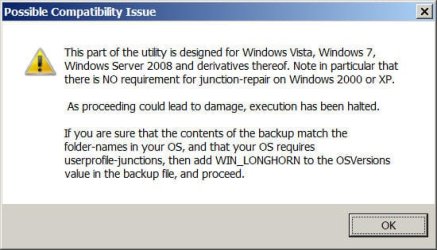
Ok, I am in the same boat with the multiple replicating Application Data folders, most likely due to taking ownership of something I shouldn't have. I downloaded the Junction Box application, made a back up, and then attempted to Restore the default Junctions, but I am getting the attached error about a "Possible Compatibility Issue". However, it's recommended action ("... then add WIN_LONGHORN to the OSVersions value in the backup file, and proceed") appears unnecessary as the 'DefaultJunctions.ntj' file already has this:

[General]


; Displays warning if incompatible OS or system-language is found.
OSVersions=WIN_VISTA,WIN_7,WIN_2008,WIN_2008R2,WIN_LONGHORN
OSLanguages=0409,0809​

BTW, not sure how I have done this, but I also have actual files apparently stored in some of these quasi-folder junction locations, so I am a little leery to just start chopping away at some of these multiple Application Data folders.

I am using Windows 7, 32 bit. Does anyone have any insights into this 'Program Compatibility Issue' with Junction Box or advice on how I should proceed?

Thanks!

Jeff
 

Attachments

  • Junction Box-Msg on 1st use-add WIN_LONGHORN to the OSVersions value in the backup file and proc.jpg
    Junction Box-Msg on 1st use-add WIN_LONGHORN to the OSVersions value in the backup file and proc.jpg
    51 KB · Views: 42
Last edited:

My Computer

Computer Manufacturer/Model Number
Acer
OS
Windows 7
jwsmith, how many "Subs" do you have of Application Data? I would recommend that if it is not THAT much, just add the ("EVERYONE = DENY") - permissions to the remaining subfolders...THIS way youre safe
 

My Computer

OS
windows 7
There are no sub folders to Applications Data. There is only ONE. What you are seeing is a loopback. Application Data is a junction that points to its parent folder. The multiple "Application Data" folders are one in the same. Its like two mirrors fancing each other. they reflect off one another creating an infinite tunnel.
 

My Computer

Computer type
PC/Desktop
Computer Manufacturer/Model Number
Alienware Aurora ALX R4
OS
Windows 10 Pro (x64)
CPU
Intel Core i7-3930K (3.2GHz - 4.5GHz)
Motherboard
Alienware Aurora-R4 x79
Memory
4x Samsung 4GB PC3-12800 DDR3 (16GB 1600MHz)
Graphics Card(s)
Nvidia Geforce GTX 690
Sound Card
SteelSeries Siberia Elite
Monitor(s) Displays
Dell UltraSharp U3011
Screen Resolution
2560x1600
Hard Drives
Samsung 850 Pro 256 GB, Seagate 1TB Desktop Hybrid HDD, 2x Western Digital 4TB Green HDD
PSU
875W Some Dell PSU <.<
Case
Alienware Aurora ALX
Cooling
Custom Liquid Cooling (EK CPU & GPU blocks) dual EK 480RAD
Keyboard
Logitech G710+ Mechanical
Mouse
Logitech G700s
Internet Speed
Verizon Fios (50 mbps average)
Other Info
Server: Intel NUC D54250WYK: i5-4250U, 16GB, 256 GB mSATA, Windows Server 2012 R2
There are no sub folders to Applications Data. There is only ONE. What you are seeing is a loopback. Application Data is a junction that points to its parent folder. The multiple "Application Data" folders are one in the same. Its like two mirrors fancing each other. they reflect off one another creating an infinite tunnel.
...true...although it still takes up space...I just deleted mine starting from the 2nd App Data...I'm busy compiling a Utility to sort it out...have tested it, and works ok. The only thing i'm worried about, is "if" someone has put a file in one of those folders, then you have a problem...but i'm working on a "backup-system" regarding those folders ;-)
 

My Computer

OS
windows 7
...It does not take any SPACE! my god...and their is no second Application Data folder. This cannot be that hard to understand. If you go into "Application Data" you will see a second one, but it is the same one you just entered. Deleting it deletes the first one. Because their is only one! The fact of the matter is, you are not even suppose to be able to enter them so this does not happen. Should return permissions back to what they were previously.

Also putting a file inside is impossible, IMPOSSIBLE! "C:\Users\[username]\AppData\Local\Application Data" points to "C:\Users\[username]\AppData\Local" trying to put a file in it goes to "C:\Users\[username]\AppData\Local\some\sub\directory"
 

My Computer

Computer type
PC/Desktop
Computer Manufacturer/Model Number
Alienware Aurora ALX R4
OS
Windows 10 Pro (x64)
CPU
Intel Core i7-3930K (3.2GHz - 4.5GHz)
Motherboard
Alienware Aurora-R4 x79
Memory
4x Samsung 4GB PC3-12800 DDR3 (16GB 1600MHz)
Graphics Card(s)
Nvidia Geforce GTX 690
Sound Card
SteelSeries Siberia Elite
Monitor(s) Displays
Dell UltraSharp U3011
Screen Resolution
2560x1600
Hard Drives
Samsung 850 Pro 256 GB, Seagate 1TB Desktop Hybrid HDD, 2x Western Digital 4TB Green HDD
PSU
875W Some Dell PSU <.<
Case
Alienware Aurora ALX
Cooling
Custom Liquid Cooling (EK CPU & GPU blocks) dual EK 480RAD
Keyboard
Logitech G710+ Mechanical
Mouse
Logitech G700s
Internet Speed
Verizon Fios (50 mbps average)
Other Info
Server: Intel NUC D54250WYK: i5-4250U, 16GB, 256 GB mSATA, Windows Server 2012 R2
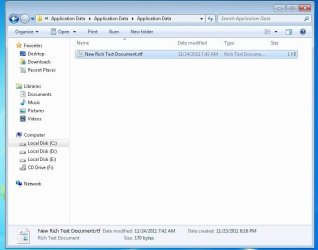
it IS possible to put a file in there...

What i'm TRYINGGGG to say is....even a SYMBOL you type, takes up space...even if it's just ONE BYTE!
If you place ANY file in a Aplication Data directory...it will ONLY reflect when going in VIA "Local Settings"....if you click on the Application Data WITHOUT going through Local Settings...you WONT see the file entered ( ie entering the file in the 4th Application Data, wont show up if you enter the Application Data DIRECT! I KNOW its junctions (or "links" for short")...but even a LINK is data written to the disk....SAVY?
 

Attachments

  • Win7.jpg
    Win7.jpg
    48.9 KB · Views: 43
Last edited:

My Computer

OS
windows 7
RobinHood, I hate to say it, but logicearth may be correct, even with what you think is proof. Until you search and see if "New Rich Text Document" exists in a file inside Local Settings, you have not proved your point. If you are unable to find it within that folder through an extensive search, then you will have proof.

Edit: I am actually leaning toward RobinHood's discovery after reading whocares's post http://www.sevenforums.com/general-...ation-data-folder-replicating.html#post990347 #3 about junctions. I believe that once that folder is given permissions and other programs access it incorrectly as a folder rather than a junction, it creates a long line of folders that can have individual data stored in them, thus taking up space. Though this is not the intention of Application Data, it is what happens once that folder permissions are altered.

This is why robocopy should be used with the /xj (exclude junctions) option when copying user folders. I used robocopy incorrectly once and generated a 20 GB sized Application Data folder that should have only been a few hundred MB.
 
Last edited:

My Computer

Computer Manufacturer/Model Number
HP Pavilion e9110t
OS
Windows 7 Home Premium 64 Bit
CPU
Intel(R) Core(TM)2 Quad CPU Q9550 @ 2.83GHz
Motherboard
Pegatron IPIEL-LA3
Memory
6.00 GB Hundai HMT125U6BFR8C-H9
Graphics Card(s)
ATI Radeon HD 4850
Sound Card
Realtek High Definition Audio/ATI High Definition Audio
Monitor(s) Displays
Acer AL2216W
Screen Resolution
1680x1050
Hard Drives
Hitachi HDP725050GLA360 ATA Device 500 GB
PSU
Unknown/installed by HP
Case
HP generic case
Cooling
Intel Stock Cooling
Keyboard
HP Keyboard
Mouse
HP Mouse
Internet Speed
Download: 19.15 Mbps Upload: 1.67 Mbps
Other Info
Network Adapter Realtek RTL8168D/8111D Family PCI-E Gigabit Ethernet NIC (NDIS 6.20)
Network Adapter 802.11n Wireless PCI Express Card LAN Adapter
RobinHood, I hate to say it, but logicearth may be correct, even with what you think is proof. Until you search and see if "New Rich Text Document" exists in a file inside Local Settings, you have not proved your point. If you are unable to find it within that folder through an extensive search, then you will have proof.
I think you guys understand me wrong...What i'm trying to say is, you CAN put a file in there ( HE says you cant)...this is just proof that you can! Secondly, i KNOW its a reflection back, but even a REFLECTION needs data being written TO the Hard Drive (like a link)...and even a LINK takes up data....thats basicly it...maybe he understood me wrong...dunno...

he quoted this ---> "Also putting a file inside is impossible, IMPOSSIBLE! "C:\Users\[username]\AppData\Local\Application Data" points to "C:\Users\[username]\AppData\Local" trying to put a file in it goes to "C:\Users\[username]\AppData\Local\some\sub\directory"

PS: I put the file in there...
 

My Computer

OS
windows 7
PS: thx writhziden for you info...i have ammended my post :D

BTW....I'm busy compiling a Utility ESPECIALLY for the guys who is "worried" about the "seemingly" duplication...When completed, i'll post the Util here :)
 

My Computer

OS
windows 7
PS: thx writhziden for you info...i have ammended my post :D

BTW....I'm busy compiling a Utility ESPECIALLY for the guys who is "worried" about the "seemingly" duplication...When completed, i'll post the Util here :)

Thank you for abiding by the forum rules. I hope you will continue to do so in the future. The members of this forum appreciate it!
 

My Computer

Computer Manufacturer/Model Number
HP Pavilion e9110t
OS
Windows 7 Home Premium 64 Bit
CPU
Intel(R) Core(TM)2 Quad CPU Q9550 @ 2.83GHz
Motherboard
Pegatron IPIEL-LA3
Memory
6.00 GB Hundai HMT125U6BFR8C-H9
Graphics Card(s)
ATI Radeon HD 4850
Sound Card
Realtek High Definition Audio/ATI High Definition Audio
Monitor(s) Displays
Acer AL2216W
Screen Resolution
1680x1050
Hard Drives
Hitachi HDP725050GLA360 ATA Device 500 GB
PSU
Unknown/installed by HP
Case
HP generic case
Cooling
Intel Stock Cooling
Keyboard
HP Keyboard
Mouse
HP Mouse
Internet Speed
Download: 19.15 Mbps Upload: 1.67 Mbps
Other Info
Network Adapter Realtek RTL8168D/8111D Family PCI-E Gigabit Ethernet NIC (NDIS 6.20)
Network Adapter 802.11n Wireless PCI Express Card LAN Adapter
Ammend it again, please. See my Edit 2 in my previous post.
...done....Sorry writhziden, but i work with viruses, forensics, data retrieving, etc every day of my life...i also do programming....that's why i know what the other guys are talking about...To the normal guy it looks like a "duplication"...where in the meantime its basicly just a shortcut BACK to the beginning...
 

My Computer

OS
windows 7
Yeah, I may have misunderstood initially, as well. I think robocopy did actually create the folders, which is why the folder became so massive, whereas Windows is seemingly smarter with the mirror facing a mirror analogy. This thread has been rather informative.

And I understand your frustrations when people reply as logicearth did. logicearth's response was a frustrated one, and may also be seen as a little rude depending on one's point of view, and you responded in kind. I just wanted you to be aware of the forum rules so that in the future, when someone responds in a manner that irritates you, you do not reap the repercussions for your remarks.
 

My Computer

Computer Manufacturer/Model Number
HP Pavilion e9110t
OS
Windows 7 Home Premium 64 Bit
CPU
Intel(R) Core(TM)2 Quad CPU Q9550 @ 2.83GHz
Motherboard
Pegatron IPIEL-LA3
Memory
6.00 GB Hundai HMT125U6BFR8C-H9
Graphics Card(s)
ATI Radeon HD 4850
Sound Card
Realtek High Definition Audio/ATI High Definition Audio
Monitor(s) Displays
Acer AL2216W
Screen Resolution
1680x1050
Hard Drives
Hitachi HDP725050GLA360 ATA Device 500 GB
PSU
Unknown/installed by HP
Case
HP generic case
Cooling
Intel Stock Cooling
Keyboard
HP Keyboard
Mouse
HP Mouse
Internet Speed
Download: 19.15 Mbps Upload: 1.67 Mbps
Other Info
Network Adapter Realtek RTL8168D/8111D Family PCI-E Gigabit Ethernet NIC (NDIS 6.20)
Network Adapter 802.11n Wireless PCI Express Card LAN Adapter
*bangs head on desk* Seriously? You are going to take me super literal like that? When I said a file cannot be written to a junction I didn't mean you could not, I mean it is not located in that junction but in the location the junction POINTS to.
 

My Computer

Computer type
PC/Desktop
Computer Manufacturer/Model Number
Alienware Aurora ALX R4
OS
Windows 10 Pro (x64)
CPU
Intel Core i7-3930K (3.2GHz - 4.5GHz)
Motherboard
Alienware Aurora-R4 x79
Memory
4x Samsung 4GB PC3-12800 DDR3 (16GB 1600MHz)
Graphics Card(s)
Nvidia Geforce GTX 690
Sound Card
SteelSeries Siberia Elite
Monitor(s) Displays
Dell UltraSharp U3011
Screen Resolution
2560x1600
Hard Drives
Samsung 850 Pro 256 GB, Seagate 1TB Desktop Hybrid HDD, 2x Western Digital 4TB Green HDD
PSU
875W Some Dell PSU <.<
Case
Alienware Aurora ALX
Cooling
Custom Liquid Cooling (EK CPU & GPU blocks) dual EK 480RAD
Keyboard
Logitech G710+ Mechanical
Mouse
Logitech G700s
Internet Speed
Verizon Fios (50 mbps average)
Other Info
Server: Intel NUC D54250WYK: i5-4250U, 16GB, 256 GB mSATA, Windows Server 2012 R2
...no prob. Maybe it's because i'm a Computer Specialist...;)
 

My Computer

OS
windows 7
Understand something. A junction is not a folder, it is not a file. It only exists as an entry in the Master File Table. Explorer and other file system functions make it appear as a folder because it must act like a folder to fool applications into thinking it is a folder. But do not be fooled into thinking it is a folder, IT IS NOT.

Junctions are synonymous with Symbolic and Hard Links.

Edit: Here is a good example of what Application Data does.

There was a better video but I cannot find it now.
 

My Computer

Computer type
PC/Desktop
Computer Manufacturer/Model Number
Alienware Aurora ALX R4
OS
Windows 10 Pro (x64)
CPU
Intel Core i7-3930K (3.2GHz - 4.5GHz)
Motherboard
Alienware Aurora-R4 x79
Memory
4x Samsung 4GB PC3-12800 DDR3 (16GB 1600MHz)
Graphics Card(s)
Nvidia Geforce GTX 690
Sound Card
SteelSeries Siberia Elite
Monitor(s) Displays
Dell UltraSharp U3011
Screen Resolution
2560x1600
Hard Drives
Samsung 850 Pro 256 GB, Seagate 1TB Desktop Hybrid HDD, 2x Western Digital 4TB Green HDD
PSU
875W Some Dell PSU <.<
Case
Alienware Aurora ALX
Cooling
Custom Liquid Cooling (EK CPU & GPU blocks) dual EK 480RAD
Keyboard
Logitech G710+ Mechanical
Mouse
Logitech G700s
Internet Speed
Verizon Fios (50 mbps average)
Other Info
Server: Intel NUC D54250WYK: i5-4250U, 16GB, 256 GB mSATA, Windows Server 2012 R2
Portal? Clever idea to demonstrate the whole junction loopback issue. LOL :)
 

My Computer

Computer type
PC/Desktop
Computer Manufacturer/Model Number
Custom-built
OS
Windows 7 Professional SP1 32-bit
CPU
Intel Core 2 Duo E6600 2.4GHz
Motherboard
Asus PL5D2
Memory
4GB DDR2-667 (4x1GB in dual-channel config)
Graphics Card(s)
nVidia GeForce 9800 GT
Sound Card
Creative X-Fi XtremeMusic
Monitor(s) Displays
Acer P236H
Screen Resolution
1920x1200 (DVI)
Hard Drives
OCZ SSD Vertex Plus 60GB SATA (Firmware 3.55), 64MB cache
Hitachi HD321KJ SATA, 320GB, 7200rpm, 16MB cache
PSU
Antec TruePower 2.0
Case
Cooler Master Centurion
Cooling
Too many fans
Keyboard
Standard
Mouse
Microsoft wireless optical mouse
Internet Speed
AT&T U-verse (18mbit/sec)
Antivirus
Microsoft Security Essentials
Browser
Firefox
Other Info
Other devices:
Compaq CQ-60 laptop
Google Nexus 7 (2012) tablet
Nvidia SHIELD tablet (US/LTE)
Hardkernel ODROID-XU single-board computer (Samsung Exynos 5420)
Understand something. A junction is not a folder, it is not a file. It only exists as an entry in the Master File Table. Explorer and other file system functions make it appear as a folder because it must act like a folder to fool applications into thinking it is a folder. But do not be fooled into thinking it is a folder, IT IS NOT.

Junctions are synonymous with Symbolic and Hard Links.

Edit: Here is a good example of what Application Data does.

There was a better video but I cannot find it now.
...correct...to make people understand it better , i use the term "link"...
 

My Computer

OS
windows 7
Just finished compiling a Utility called "JunkTidy" for folks who gets anoyed with the "virtual"-folders or "Junctions/Links" as some people call it. Please note it HAS been tested numeroustimes by myself on different Win7 PC's, but it might still be buggy...
USE AT YOUR OWN RISK!
...enjoy :D
 
Last edited:

My Computer

OS
windows 7
Back
Top