
Solved Stop Application Data folder replicating?

Keep well writhzin....nice talking to you bud...Just a reminder ---> "weird" i got it right to make 30+ junctions to become 3...INCLUDING backing it up...i never heard about a loop within a loop that had something in it to backup up ( im not talking about deleting the OFFICIAL junctions hey, but the "nested" ones... )....which I just managed to do...Like one guy said...it's just a different angle you go to aproach the same file...which is 100% correct ( somewhere earlier in this thread someone mentioned it )....what i did, i just made Windows "neater"....
PS: some good INFO why you get multiple "nested" junctions ---->

[Gelöst] Trojan.Mayachok/1 - Seite 3 - Viren und andere Sicherheitsrisiken - Avira Support Forum

That virus information you linked to...Its not storing anything in those junctions. It is just that the user opened all of those junctions by changing the PERMISSIONS and now see duplicated data again and again. However the files in question are only located at "C:\Users\[username]\AppData\Local\Temp" That is all. The permissions applied to these junctions are there to prevent this kind of confusion. If you can access "Document and Settings" you have just screwed up.
 

My Computer

Computer type
PC/Desktop
Computer Manufacturer/Model Number
Alienware Aurora ALX R4
OS
Windows 10 Pro (x64)
CPU
Intel Core i7-3930K (3.2GHz - 4.5GHz)
Motherboard
Alienware Aurora-R4 x79
Memory
4x Samsung 4GB PC3-12800 DDR3 (16GB 1600MHz)
Graphics Card(s)
Nvidia Geforce GTX 690
Sound Card
SteelSeries Siberia Elite
Monitor(s) Displays
Dell UltraSharp U3011
Screen Resolution
2560x1600
Hard Drives
Samsung 850 Pro 256 GB, Seagate 1TB Desktop Hybrid HDD, 2x Western Digital 4TB Green HDD
PSU
875W Some Dell PSU <.<
Case
Alienware Aurora ALX
Cooling
Custom Liquid Cooling (EK CPU & GPU blocks) dual EK 480RAD
Keyboard
Logitech G710+ Mechanical
Mouse
Logitech G700s
Internet Speed
Verizon Fios (50 mbps average)
Other Info
Server: Intel NUC D54250WYK: i5-4250U, 16GB, 256 GB mSATA, Windows Server 2012 R2
@RobinHood
What you call something is important. If you call the liquid in a glass water, I expect water when I drink it, and my thirst will be quenched. If instead it is Hydrochloric Acid, I still expect water, but my mouth, throat, esophagus, and stomach will be burned. It would matter to me.

Keep well writhzin....nice talking to you bud...Just a reminder ---> "weird" i got it right to make 30+ junctions to become 3...INCLUDING backing it up...i never heard about a loop within a loop that had something in it to backup up ( im not talking about deleting the OFFICIAL junctions hey, but the "nested" ones... )....which I just managed to do...Like one guy said...it's just a different angle you go to aproach the same file...which is 100% correct ( somewhere earlier in this thread someone mentioned it )....what i did, i just made Windows "neater"....
PS: some good INFO why you get multiple "nested" junctions ---->

[Gelöst] Trojan.Mayachok/1 - Seite 3 - Viren und andere Sicherheitsrisiken - Avira Support Forum

This link provides a clue as to what you are talking about. I am using Google Translate, but it is still hard for me to follow. I will specifically address the file & folder issue. Since there is no way to tell what is an actual folder and what is a Junction, I cannot know for sure what is happening. I will make an educated guess, but I could be very wrong.

The following is Windows 7 specific. There are significant differences between Windows versions, and you will hose an Windows XP machine if you do not know what you are doing.

It appears the Windows User Account is named "user". This is going to become complicated. Also, I am not going to use strict terminology. It is going to be too complicated as it is.

There are 4 files in a Temp folder:
1. "~DFA06C7F2ABC5DDBB9.TMP"
2. "~DFA1EBB77C6D9C4AC3.TMP"
3. "~DF2F4081AA39B0A691.TMP"
4. "~DFB112217E9F34CD1D.TMP"

1 & 2 are always grouped together. 1 & 2 & 3 begin to be grouped, and finally, all four files are grouped. The listing would be better if it started at the beginning of the tree and worked down. I think this would show that the tree starts with the four files, and the number of files diminishes as you go deeper into the tree. At the lowest level, only 1&2 are included.

My guess is that these are actual folders with actual files in them. It is possible that there could be a combination of Junctions and folders, but it would be an even more tangled mess. Furthermore, this was not necessarily caused by a virus, and Trojan.Mayachok/1 indicates it is a trojan not a virus. Google returned a list of sites that did not include any of the major anti-malware vendors. It was a list of mostly Russian sites, and it would take too much time to setup a Virtual Machine to investigate it.

Without knowing which, if any, are Junctions, cleaning up this mess may not work as expected. If it is actual folders you have, you could clean it up and restore the Junctions with security/permissions. "C:\ Documents and Settings" should be a Junction. If you are dealing with a nasty trojan, the creator could have stored the actual data in a different location. One of the "Application Data" folders could be a Junction pointing somewhere else. If the trojan has not been eradicated, it could recreate the Junction, and the original data would still be present.

I do not have enough knowledge of HijackThis to know what is being displayed. I would be wary of doing anything based upon the report, but you may know more. The Wikipedia and MSDN links you provided have little to do with the problem you are trying to solve. I still think you are in over your head, but as you noted, WHO CARES WHAT I THINK.

I cannot provide a single link that details the knowledge I have shared here. There is no single place where this is fully discussed, but this may have changed. I have researched this myself, but I am indebted to several people for some of this. Pulling together bits from different places, I was able to figure it out, but I am not an expert. I would encourage to research some of the "50% junk" to learn more. I would request you post a list of the junk. Even a few entries would be helpful to anybody reading this.
NOW you are talking sense (with all due respect...and i mean it) . THIS was my whole issue...Hope you dont mind, but i'm going to use the word "Virtual"-links and "Virtual" files...call them whatever you like :)
What I'm trying to do is, seeing MS only ( or at least TRY to ) manage these virtual links/files to only about 2-3 levels deep, and i work with an "infected" PC ( only a nut will try this on a PC thats NOT infected...there i agree 100% with you ), the program backs-up the the data up to the 2nd link ( which i call a "level 3" ), then DELETES the remaining link...chances are you might loose "links"...but the data will remain. This way you dont need to do a Format of Win7. A lot of my clients treasure data more than their PC's...therefore i need to ceate a utility, that can AT LEAST HELP me....to recover most of their data. To try and "locate" data, that extends from a link 200 deep, well...now we're talking a day's work. I will rather loose the program and save my data, than save my program and loose my data...if you know what i mean? This utility is also NOT meant to be stuffed-around with as you will do more damage than good....the Utility was/is meant for Techs that needs to recover data on an ALREADY infected PC...
 

My Computer

OS
windows 7
@RobinHood
On a Windows 7 machine, there is no "C:\Documents and Settings" folder. It is a Junction that points to "C\Users". If this is still the case, @logicearth has provided the solution several times. Fix the permissions on "C:\Documents and Settings", and all the files and folders below it will go away. Rinse and repeat for the "Application Data" Junctions, and your problem will be solved. The folders never existed, and therefore, there is nothing to cleanup. If "C:\Documents and Settings" is an actual folder, you have bigger problems, and you should keep reading.

NOW you are talking sense (with all due respect...and i mean it) . THIS was my whole issue...Hope you dont mind, but i'm going to use the word "Virtual"-links and "Virtual" files...call them whatever you like :)
What I'm trying to do is, seeing MS only ( or at least TRY to ) manage these virtual links/files to only about 2-3 levels deep, and i work with an "infected" PC ( only a nut will try this on a PC thats NOT infected...there i agree 100% with you ), the program backs-up the the data up to the 2nd link ( which i call a "level 3" ), then DELETES the remaining link...chances are you might loose "links"...but the data will remain. This way you dont need to do a Format of Win7. A lot of my clients treasure data more than their PC's...therefore i need to ceate a utility, that can AT LEAST HELP me....to recover most of their data. To try and "locate" data, that extends from a link 200 deep, well...now we're talking a day's work. I will rather loose the program and save my data, than save my program and loose my data...if you know what i mean? This utility is also NOT meant to be stuffed-around with as you will do more damage than good....the Utility was/is meant for Techs that needs to recover data on an ALREADY infected PC...

The reason for using technical terms when possible is to avoid confusion. For example, the word "cat" can refer to several different animals, and a house "cat" is vastly different from a lion "cat". Which "cat" you are referring to can make a big difference. What you mean by "Virtual" is important, and I do not think you are using it the way we are.

The "Special Folders" link is a no-technical overview, but technically, it is worthless. The "virtual folders" they are discussing are actually Shell Namespace, and the article does mention this. Shell Namespace can be displayed as a folder, but they are not folders. A better description of Shell Namespace would be "an amalgamated set of data presented as a virtual folder", but that is still not technically adequate. Using this article as a technical reference will lead result in problems at best.

System Folders are not virtual. They are real directories. In Windows 7, Microsoft has changed the locations again, but they have tried to fix the mess they have been causing. All the previous System Folders are included as Junctions, but this has resulted in a tangled web of connections. The "Application Data" Junction points to its parent folder, and this regression results in multiple nested "Application Data" folders. For the end user, it is confusing, and it can be dangerous. Deleting files in the 200th "Application Data" folder also deletes it in all the "Application Data" folders. In addition, Copy/Paste do not understand Junctions, and they are treated as actual folders. As I noted in an earlier post, this will result in an increased storage space used. Backup applications can also duplicate Junctions as folders, and the result is that the backup has more data than the original. Through the use of security/permissions and a special User, Microsoft eliminated this issue.

If "C:\Documents and Settings" is still a Junction, everything being displayed in the it is actually in the "C:\Users" folder, and deleting files in one place will delete them in both. On Windows 7, deleting a Junction in Windows Explorer will not delete the files and folders, but on Windows XP, all the files and folders will be deleted. If you write a utility that deletes a Junction, it needs to be able to identify the Operating System version. Otherwise, it is irresponsible and dangerous. I have a serious problem with that.

Unless you can determine whether "C:\Documents and Settings" is a Junction or an actual folder, your utility will be either useless or dangerous. If you have access to the machine, use the command from my previous post to identify the Junctions, and proceed from there. You could write a script that could do some of this, but it should only be used by someone who understands the technical aspects. Using a HighjackThis report, you cannot determine if you have a Junction or a folder. Furthermore, I know that there should be more files in "Application Data" than four temp files. I do not know why the HighjackThis report is filtering the files, but this could cause problems.

I could be wrong, but my guess is that this is not related to the trojan being discussed in the linked discussion. The user probably took ownership of the C: drive, and he/she gave themselves full permissions. The machine then was infected with the trojan. A HighjackThis report was submitted, or you have access to the machine. In this scenario, the folders and files you are seeing do not exist, and therefore, you cannot delete only the additional subdirs without deleting everything else as well. Here is the command "dir /al /s c:\". Run it without the quotes
 

My Computer

OS
Windows 7 Professional x64
JunkTidy all it does it locks up on me everytime. So I am sticking with JunctionBox at least it works.
 

My Computer

Computer Manufacturer/Model Number
built myself
OS
Windows XP/Windows 7 dual boot
CPU
x64 dual core 4600+
Motherboard
MSI C9A2
All you need to do is verify the root of each folder is a junction and set the below permission.
That is all there is to it. One single DENY permission.

I'm sorry to be the N00b... but I can't find a way to get to that permissions screen.

I've got recursive "Application Data" folders in [C:\Users\All Users\] and [C:\Users\Default\], both of which (I gather) aren't real directories, but are themselves somehow junctions or libraries or something.

I've read through this thread and a bunch of other Google-y helpfulness, but before I run JunkTidy or JunctionBox or anything, I thought it might be easiest to just do the "Everyone - Deny" fix.... But I can't find my way to that screen.

... Actually - I found it w/r/t "Default;" I had to "show hidden files" in Windows-Control Panel-Folder Options....

But I don't know if this actually helped.

I realize this whole thread is almost a year old, but I'm hoping for a pointer (get it!?) to some help.

I'm kinda old school, and when I (for instance) misplace a file, I'll pop into DOS and do a [dir /s *somethingunique*.* >C:\listy.txt], but all I get now is pages and pages of "The directory name..... is too long."

Thanks in advance.

--Bennie
 

My Computer

Computer type
Laptop
Computer Manufacturer/Model Number
HP Pavilion dv7
OS
Windows 7 Home Premium (64 bit) SP1
CPU
AMD A8-4500 APU
Memory
6 Gig
Antivirus
NIS (expired - I know! I'll get it done)
Browser
Chrome, Firefox. IE is still on here, but I never use it
All you need to do is verify the root of each folder is a junction and set the below permission.
That is all there is to it. One single DENY permission.

I'm sorry to be the N00b... but I can't find a way to get to that permissions screen.

I've got recursive "Application Data" folders in [C:\Users\All Users\] and [C:\Users\Default\], both of which (I gather) aren't real directories, but are themselves somehow junctions or libraries or something.

I've read through this thread and a bunch of other Google-y helpfulness, but before I run JunkTidy or JunctionBox or anything, I thought it might be easiest to just do the "Everyone - Deny" fix.... But I can't find my way to that screen.

... Actually - I found it w/r/t "Default;" I had to "show hidden files" in Windows-Control Panel-Folder Options....

But I don't know if this actually helped.

I realize this whole thread is almost a year old, but I'm hoping for a pointer (get it!?) to some help.

I'm kinda old school, and when I (for instance) misplace a file, I'll pop into DOS and do a [dir /s *somethingunique*.* >C:\listy.txt], but all I get now is pages and pages of "The directory name..... is too long."

Thanks in advance.

--Bennie

Actually - it just took a little more digging.
I'm not going to edit the post above, but put my next steps here, in case someone else in my position comes along.

In [Folder Options - View: Hidden files - radio button for 'show...'] AND AND AND
In [Folder Options - View: UNCHECK 'hide protected operating system files']

Then I was able to "see" "All Users" and right click it.

I didn't do the permissions thing, But I shift-right click - open command window here
dir /a showed me the application data junction.
I went down two or three steps, then just did:
rd "Application Data"
Which probably deeply screwed something up. Because now there's NO "all users - Application Data." anywhere.

Probably JunctionBox will fix that... but at least it seems to have relieved the recursive Application Data problem.

Okay - I hope I didn't confuse issues.
--Bennie
 

My Computer

Computer type
Laptop
Computer Manufacturer/Model Number
HP Pavilion dv7
OS
Windows 7 Home Premium (64 bit) SP1
CPU
AMD A8-4500 APU
Memory
6 Gig
Antivirus
NIS (expired - I know! I'll get it done)
Browser
Chrome, Firefox. IE is still on here, but I never use it
There is also a SetACL.exe inside the zip file that downloads JunctionBox. What is that file for ?
 

My Computer

OS
Win7 Home Premium 64bit
JunctionBox's home is Sourceforge, not Rumania

Just wanted to take a minute to encourage people who are downloading JunctionBox to do so from sourceforge: Junction Box | Free Security & Utilities software downloads at SourceForge.net - not softoxi, softonic, softpedia, brothersoft, or any of those other Rumania-based malware peddlers that Microsoft and Google seem to be diverting large amounts of traffic to.
 

My Computer

Computer type
PC/Desktop
Computer Manufacturer/Model Number
Dell
OS
Windows 7 Ultimate x64
JunkTidy all it does it locks up on me everytime. So I am sticking with JunctionBox at least it works.
...soon as i get a chance, i'll look into it. SO far its only for 32-bit systems...
 

My Computer

OS
windows 7
Just wanted to let everyone know I tried that JunctionBox Utility and it seems to have fixed things, even though I still do not understand the Permissions garbage.
My thanks to all contributors.
 

My Computer

Computer type
PC/Desktop
Computer Manufacturer/Model Number
custom
OS
Window 7 64bit, Windows XP 32 bit
Antivirus
AVG
Browser
IE
Keeping it simple for my own sake...

When I look at the folder size of All users/Application Data my system tells me:

Using FeeCommander - this 'tree' is 33,373,432kB (33GB) and the drive has 27.6GB free
Using Explorer the total space reported used is is between 2-3GB and the drive has 27.5GB free.

When I add up the space used by other folders (NOT including the Application Data 'tree') I get ~73GB used which would leave ~29GB free.

Is the consensus that this is "phantom" usage (i.e.; if I were to delete this entire "tree" would I 'recover' any disk space)???

BTW - This is one of the reasons I prefer Linux (RHEL) to the "Bill Gates Virus", a.k.a.; Windows
 

My Computer

Computer type
Laptop
Computer Manufacturer/Model Number
Del L701X
OS
Win 7 Home Premium - 64 bit
CPU
Q740 @ 1.73GHz (i7 Gen 1)
Motherboard
whatever Dell used ??
Memory
16GB
Graphics Card(s)
NVIDIA GeForce GT 445M (3D)
Hard Drives
Many but C is a Kingston 120GB SSD V200+ and D is WD 1TB 7200RPM (currently)
Browser
Anything but Internet Exploder and Bing
You do not need to look inside these junction points. You can access those locations from elsewhere in the file system!
Does anyone know what locations MacGyvr was referring to?
I have some app data / profiles I need to import to win7 and can't see how to get to these locations without messing with permissions.

And if we really can open these folders directly, then why would these hard folder Links NOT allow an admin to simply be forwarded to the right folder.
Anyone with admin rights is obviously going to want to have access to their profiles.
Thanks
 
Last edited:

My Computer

Computer type
PC/Desktop
OS
Windows 7 Ultimate 32bit
d53, depends which location you need.

User specific:
C:/Documents and Setting/(username)/Application Data = C:/Users/(username)/Appdata/Roaming

C:/Documents and Setting/(username)/Local Settings = C:/Users/(username)/Appdata/Local

Everyone:
C:/Documents and Setting/All Users/ = C:/ProgramData

There is no reason or need to change the permissions on anything.
 

My Computer

Computer type
PC/Desktop
Computer Manufacturer/Model Number
Alienware Aurora ALX R4
OS
Windows 10 Pro (x64)
CPU
Intel Core i7-3930K (3.2GHz - 4.5GHz)
Motherboard
Alienware Aurora-R4 x79
Memory
4x Samsung 4GB PC3-12800 DDR3 (16GB 1600MHz)
Graphics Card(s)
Nvidia Geforce GTX 690
Sound Card
SteelSeries Siberia Elite
Monitor(s) Displays
Dell UltraSharp U3011
Screen Resolution
2560x1600
Hard Drives
Samsung 850 Pro 256 GB, Seagate 1TB Desktop Hybrid HDD, 2x Western Digital 4TB Green HDD
PSU
875W Some Dell PSU <.<
Case
Alienware Aurora ALX
Cooling
Custom Liquid Cooling (EK CPU & GPU blocks) dual EK 480RAD
Keyboard
Logitech G710+ Mechanical
Mouse
Logitech G700s
Internet Speed
Verizon Fios (50 mbps average)
Other Info
Server: Intel NUC D54250WYK: i5-4250U, 16GB, 256 GB mSATA, Windows Server 2012 R2
Thanks logicearth,
Will use those locations for direct access and use JunctionBox to restore default Links.
This sure seems strange to me why these Links can't just forward us to where they need to go -- without requiring us to first change permissions for those links.
MS had to know that ppl would want to get to their app data / profiles.
 

My Computer

Computer type
PC/Desktop
OS
Windows 7 Ultimate 32bit
Those links are not for users. They are only there for broken applications that hard code the path. They are not there for you that is why they deny access. Use the real location which was just provided.
 

My Computer

Computer type
PC/Desktop
Computer Manufacturer/Model Number
Alienware Aurora ALX R4
OS
Windows 10 Pro (x64)
CPU
Intel Core i7-3930K (3.2GHz - 4.5GHz)
Motherboard
Alienware Aurora-R4 x79
Memory
4x Samsung 4GB PC3-12800 DDR3 (16GB 1600MHz)
Graphics Card(s)
Nvidia Geforce GTX 690
Sound Card
SteelSeries Siberia Elite
Monitor(s) Displays
Dell UltraSharp U3011
Screen Resolution
2560x1600
Hard Drives
Samsung 850 Pro 256 GB, Seagate 1TB Desktop Hybrid HDD, 2x Western Digital 4TB Green HDD
PSU
875W Some Dell PSU <.<
Case
Alienware Aurora ALX
Cooling
Custom Liquid Cooling (EK CPU & GPU blocks) dual EK 480RAD
Keyboard
Logitech G710+ Mechanical
Mouse
Logitech G700s
Internet Speed
Verizon Fios (50 mbps average)
Other Info
Server: Intel NUC D54250WYK: i5-4250U, 16GB, 256 GB mSATA, Windows Server 2012 R2
I am new to Windows 7, having inherited a laptop from a family member. Up to now I've been happily using Windows XP on my two desktops and a laptop - if it aint broke ...
I'm a retired IT Professional, and when looking for a file, found the 25-times duplication of the Application Data folder.
When I found this thread, I totally agreed with one of the early posts that it's MY computer and I want access to EVERYTHING!
It is a principle I strongly beileve in, but I granted myself access to as much as I could for very practical reasons - I've never liked a single one of the 'Normal' templates that have come with every version of Word, so one of my first tasks with a new PC or version of Word is always to amend the 'Normal' template to MY preferences. When I did this on the Windows 7 HP with Word 2010, it didn't seem to work first time. Thinking I'd somehow cocked it up, I did it again ... and again, but the changes didn't take effect. After a lot of head scratching, I eventually realised why it wasn't working - despite being an Administrator, and only user, I didn't have access to the default location for Templates! Totally, stupidly, ridiculous [IMHO].
As I didn't want to go through File, New, Template every time I wanted a new document, I changed all the permissions, so I wouldn't have the problem with Word or any other part of Office.
It was only by chance today that I discovered the 'Application Data' duplication.
I have now run Junction Box, to solve this problem, but I can't nowcheck whether it has worked because I no longer have access to the Application Data folder! [I think that's what they call "Catch 22".]
I haven't yet verified it, but it seems at first glance that the Junction Box changes have caused Word to somehow revert to the original MS Normal template, but again I can't verify that because I can't access the Templates folder.
If anyone has any suggestions, other than never using any MS software, I'd be pleased to hear them.
 

My Computer

Computer type
Laptop
Computer Manufacturer/Model Number
Dell Inspiron 15R
OS
Windows 7 Home Premium 64bit
Antivirus
MSSE
Browser
Firefox
AppData

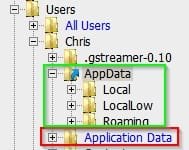
Well the correct way to access Appdata is via the following paths:

Application Data - C:\Users\{user name}\AppData\Roaming
Cookies - C:\Users\{user name}\AppData\Roaming\Microsoft\Windows\Cookies
History - C:\Users\{user name}\AppData\Local\Microsoft\Windows\History
Local Settings - C:\Users\{user name}\AppData\Local
My Documents - C:\Users\{user name}\Documents
NetHood - C:\Users\{user name}\AppData\Roaming\Microsoft\Windows\Network Shortcuts
PrintHood - C:\Users\{user name}\AppData\Roaming\Microsoft\Windows\Printer Shortcuts
Recent - C:\Users\{user name}\AppData\Roaming\Microsoft\Windows\Recent
SendTo - C:\Users\{user name}\AppData\Roaming\Microsoft\Windows\SendTo
Start Menu - C:\Users\{user name}\AppData\Roaming\Microsoft\Windows\Start Menu
Templates - C:\Users\{user name}\AppData\Roaming
Temporary Internet Files - C:\Users\{user name}\AppData\Local\Microsoft\Windows\Temporary Internet Files

What you're not supposed to get access to is:


C:Users\username\Application Data

or

C:/Documents and Settings/

If you try you get "Access Denied" and if you take ownership to get access then you get the replicating folder problem.

My understanding is that to fix it you'd need to delete all of the replicated folders/ subfolders before running Junction Point. If you haven't managed to do that you need to delete folders like this:

C:\Users\Username\AppData\Local\Application Data\Application Data\*

In other words delete the folder shown in Bold Type and any further Application Data subfolders.

The screenshot shows what you're supposed to access in green and avoid in red.

Appdata.jpg
 

My Computer

Computer type
Laptop
Computer Manufacturer/Model Number
ASUS
OS
Microsoft Windows 7 Home Premium 64-bit 7601 Multiprocessor Free Service Pack 1
CPU
AMD C-60 APU with Radeon(tm) HD Graphics
Motherboard
ASUSTeK COMPUTER INC. X501U
Memory
4.00 GB
Graphics Card(s)
AMD Radeon HD 6290 Graphics
Sound Card
(1) AMD High Definition Audio Device (2) Realtek High Defi
Screen Resolution
1366 x 768 x 32 bits (4294967296 colors) @ 60 Hz
Hard Drives
Hitachi HTS545050A7E380 SATA Disk Device
Antivirus
Comodo CIS & FW, SecureAplus App Whitelisting, Threatfire
Browser
Cyberfox 64bit, Opera 64bit, Airfox
Other Info
Spy-The-Spy, HitmanPro.Alert, Norton Connect Safe, MJRegWatcher, BitDefender TrafficLight, Voodoo Shield, Zemana AntiMalware
No! Do not delete anything within "Application Data" that is real data! You should only delete tge root "Application Data" folder only. However, be aware if the Application Data folder does not have what appears to be an "Arrow" in the corner, DO NOT DELETE IT.
 

My Computer

Computer type
PC/Desktop
Computer Manufacturer/Model Number
Alienware Aurora ALX R4
OS
Windows 10 Pro (x64)
CPU
Intel Core i7-3930K (3.2GHz - 4.5GHz)
Motherboard
Alienware Aurora-R4 x79
Memory
4x Samsung 4GB PC3-12800 DDR3 (16GB 1600MHz)
Graphics Card(s)
Nvidia Geforce GTX 690
Sound Card
SteelSeries Siberia Elite
Monitor(s) Displays
Dell UltraSharp U3011
Screen Resolution
2560x1600
Hard Drives
Samsung 850 Pro 256 GB, Seagate 1TB Desktop Hybrid HDD, 2x Western Digital 4TB Green HDD
PSU
875W Some Dell PSU <.<
Case
Alienware Aurora ALX
Cooling
Custom Liquid Cooling (EK CPU & GPU blocks) dual EK 480RAD
Keyboard
Logitech G710+ Mechanical
Mouse
Logitech G700s
Internet Speed
Verizon Fios (50 mbps average)
Other Info
Server: Intel NUC D54250WYK: i5-4250U, 16GB, 256 GB mSATA, Windows Server 2012 R2
I have this same issue, but after reading through this whole thread i'm still unsure where exactly is the "Solved" part in the thread title....

I must have at least 8 levels of "Application Data" folders, and when i try scanning it (i'm trying to use Disk Analyzer) it gets stuck in an endless loop going back and forth reading the same folders....

I'm afraid to use JunctionBox or any other automated solution, because my OS has folders in English and Portuguese and my user folder actually uses special characters (something i regret not changing before i spent huge amounts of time customizing my system). This has actually caused me problems on other occasions, because some programs had trouble accessing that folder. My users folder for instance is a complete mess and i don't have the know-how to clean it up. I have a "Documents" folder sitting on C:\ (instead of C:\Users), i have a "José" user folder, and a "Jos�", and a "José" (the one in use), although the only single user account i have is named "Multivac"! :confused:

So i was very interested in using the alternative option of changing the security settings for those folders:
Deny - Everyone - List folder / read data - <not inherited> - This folder only
Could someone please provide detailed instructions on how to do this?
I have full control for SYSTEM, Multivac, and Administrators. And only "Deny - Special Permissions" for Everyone. Yet when i attempt to edit that i get an access denied error...
 

My Computer

Computer type
Laptop
Computer Manufacturer/Model Number
Clevo P170HM
OS
Windows 7 Ultimate x64 SP1
CPU
i7-2820QM 2.30GHz
Memory
16GB
Graphics Card(s)
Radeon HD 6900M
Hard Drives
Samsung 470 SSD 250GB [System]
Toshiba MK7559 700GB [Secondary]
Antivirus
ESET NOD32
Browser
Firefox 19
I tried to download the program and find it has a tr\agent in it.
 

My Computer

Computer type
PC/Desktop
OS
Windows 7 Professional
CPU
AMD Phenom
Motherboard
Biostar
Memory
4 gig
Back
Top