Solved Stop Application Data folder replicating?

you can try a tool called Tweakingdotcom - Windows Repair, there is a file permissions fix, by default is not checked, if you want fo fix all the junction located in system driver, then click drive c and hit repair. its better to run in safe mode with network. that's all. its not just a bit to fix this also involved other problem through mufti arch. give it a try..
 

My Computer

Computer type
PC/Desktop
Computer Manufacturer/Model Number
custom build
OS
Windows 7 Ultimate 32bit sp1
CPU
Intel(R) Core(TM) i5-2400 CPU @ 3.10GHz
Motherboard
MSI PH61A-P35
Memory
Samsung M378B5273DH0-CH9
Graphics Card(s)
SAPPHIRE HD 6870 1GB GDDR5 PCIE
Hard Drives
Hitachi HDS721010CLA332 @ SATAII
ST3500413AS (Z2A2JX8G) @ SATAIII
Browser
google chrome
I just ran Junctionbox and it fixed almost 400. The backup file from messed up sys
is 46k, backup after repair is 4k. Thanks for the link to JB. Now again I get the
access denied on them dirs again, yahoo.

ps - It didn't work after all, still cannot install stuff. :mad:
 
Last edited:

My Computer

Computer type
PC/Desktop
Computer Manufacturer/Model Number
INtel
OS
Windows 7 Home Premium 32bit.
CPU
intel i5
Memory
4 gigs
Hard Drives
ssd samsung
Antivirus
ashampoo
Browser
firefox
THANKS FOR TELLING ME ABOUT JUNCTIONBOX (SO FAR)! There is a lot of no help at all out there!

MY PROGRESS SO FAR:
I discovered this problem while trying to maintain a OS drive to at least 20% free space with Glary Utilities.

Analysis showed me my User>UserName director was showing the biggest usage in an area that led me to Application Data replication in the hidden AppData directory tree!

The website I used to download JunctionBox from was the Sourceforge.
Link
. There was problems downloading the complete zip! I was able to download the individual files except for the JunctionBox100.zip. Ran a Malwarebytes scan, a McAfee scan, etc on what I was able to download.

I sent a message to [email protected] to let them know there were download issues (Blocked by Google Chrome, would not complete with IE - stopped at 99%). I did get a response from the contributor organization and the are looking into the problem and may provide a download target at their own site.

Uncompressed the JunctionBox.Zip (the smaller JunctionBox named file in the group of files, which could be downloaded), ran a JUNCTION backup (just in case) and then ran the restore defaults option.

Hard drive free space jumped from about 49 GB to over 60 GB in Windows Explore and from 77% to 73% used total in Glary Utilities (just check again and window must still be doing stuff - at 69% now).

Then I went back to the hidden Application Data "folder" to find access was denied to selecting the "folder" (to be expected from a Junction).

I have set up an account with this site to track down stream issues if any...
 

My Computer

Computer type
PC/Desktop
Computer Manufacturer/Model Number
Dell
OS
Win7 Pro 64bit
Hi,

Where can I download the program called JunctionBox?

Thanks,

Dick

You can find it here :  bfy.tw/1SOo :sarc:

That aside, a million thanks for the Junction Box program. I had endless recursive replication of …\Application Data\… folders, and the set of junctions of my system I backed up (for some reason :shock: ) was just over 10× the size of the default set that took its place — thumbs up, well done.    :cool:
 
Last edited:

My Computer

OS
Windows® 7 (64-bit)
CPU
intel® Core™ i5-4690 @ 3.50 GHz
Motherboard
GIGABYTE™ H97-D3H
Memory
8 GB DDR3
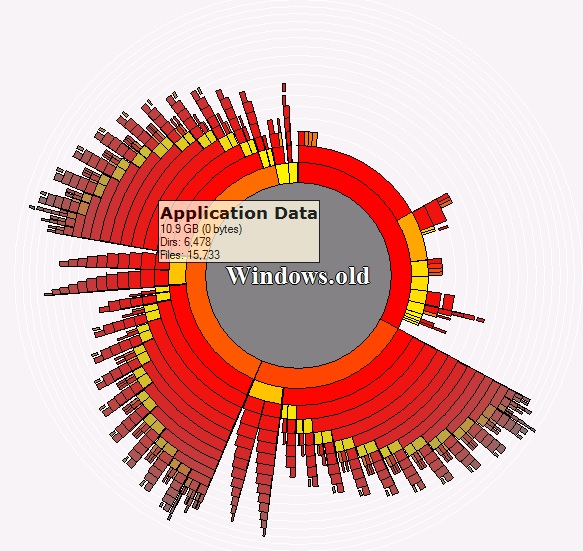
Graphic Illustration from OverDisk

I know this is an old thread, but I just discovered this bug on my machine, and thus discovered this thread.

I felt compelled to share the graphic image of how I found the problem, thanks to a great old utility called OverDisk, which I always turn to when looking to free hard drive space.

AppDataReplication.jpg
 

My Computer

Computer type
PC/Desktop
Computer Manufacturer/Model Number
lenovo
OS
Windows 7 Professional 64bit
CPU
intel core i7
Memory
16gb
Hard Drives
128g ssd
1tb Western Digital
Antivirus
Avast
Browser
Chrome
Why would you fix it and then go take ownership again? That's what caused this in the first place. Eliminate K-M and your instructions look good. You do not need to look inside these junction points. You can access those locations from elsewhere in the file system!
YESSSSSSSSSSSSS!!!!!! It worked!!!!!!!!!!
 

My Computers

System One System Two

  • Computer type
    PC/Desktop
    OS
    win11
  • Computer type
    PC/Desktop
Back
Top