Thanks
Anak 
My bad. I should have included "ClassicShell" with my PC specs.
I have ClassicShell v4.0.4, installed, but only WinExplorer window "breadcrumbs" can be disabled
ie, [Settings for Classic Explorer x.x.x] dialog
Title Bar (tab)
[x] Disable breadcrumbs
----------
Hi
strollin
What is it about them (breadcrumbs) you dislike?
Like ... boiled tripe (pigs stomach), boiled turnip, white sauce, MS ribbons, gravy out of a box, raw eggs, burnt toast, green fruit, Windows-Aero, shoes, soft beds, polyester underwear, lace curtains, synthetic sox/socks, passionfruit seeds, loud TV, cigarettes, drunks, cockroaches, hair on soap, toilet seat down, sand-in-the-budgie-smugglers, comb-overs, flowery wallpaper, hot food on cold dinner plates, 40°C days, beef jerky, MS-Notepad, seedless watermelon, cat-litter-trays, capless thumb-drives, long sleeves, HB pencils, black coffee, sugar-free anything ...
... I don't like them.
I use Xplorer2 instead of WinExplorer ... the former leaves MS WinExp in the darkages
As a developer every half hour I make a incremented copy of a development file.
For me breadcrumbs serve no useful purpose -- like man-boobs. They are just there !
Breadcrumbs are what people feed to pidgeons ... what is left on the plate when we are bloated (like Win8)

----------
lehnerus2000 +2
You know how I feel

----------
Thanks
ThrashZone
Had a look at the extras on
Recent Search Box Suggestions - Enable or Disable ... but no luck
Thanks anyway
----------
Ztruker +1
You and I have done an identical Google search.
I did a search before starting this thread.
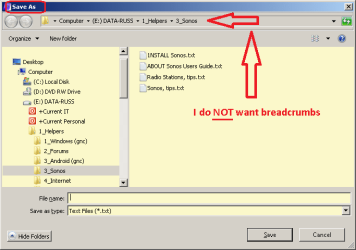
Plenty of Windows Explorer breadcrumbs ... no SaveAs breadcrumbs
Thanks to all for your contributions,