Stopping GWX ConfigManager

GRoston

New member
Power User
VIP
Local time
6:46 PM
Messages
374
All,

While working on some stuff this evening, nothing computer intensive, I noticed that my hard drive started thrashing. A quick check of the Task Manager showed that gwxconfigmanager.exe was the culprit.

I did some digging around and it appears that this program was gifted to us by Microsoft as a part of Windows update KB3035583 and that its function relates to upgrading to Windows 10. Since every other Windows OS is a steaming pile (Windows ME, Windows Vista, Windows 8), Windows 10 may actually turn out to be okay - put I will decide if and when to upgrade - not Microsoft.

None of the posts I found indicated how the program was launched. As such, the first place I checked was Scheduled Tasks and I found four related tasks, all listed in Task Schedule Library->Microsoft->Windows->Setup->GWX.

So, to remove this useless bloatware:

  1. Delete each of the tasks in the above mentioned folder (and then the folder for good measure)
  2. With Windows Explorer, go to c:\Windows\System32. Right click on the folder GWX and select properties. From there, change the owner to an account with admin privileges and give the same user full control. Then delete the folder.
  3. Repeat the same steps in c:\Windows\SysWOW64
It has been suggested that one can simply uninstall the update, however, if this is a critical update, it will keep coming back. I suspect/hope that my approach will be permanent.
 

My Computer

Computer type
PC/Desktop
OS
Windows 7 x64 Pro
CPU
Core i7 860 @ 3.8 GHz
Motherboard
MSI P55-GD80
Memory
16 GB F3-12800CL7D (DDR3 1600 7-7-7-24)
Graphics Card(s)
Sapphire Vapor-X 100283VXL Radeon HD 5770
Monitor(s) Displays
NEC LCD3090WQXi-BK
After you remove the update and recheck for updates and it comes back, just right tick on it and hide it.
Your shouldn't be bothered with it again.
 

My Computer

Computer type
PC/Desktop
Computer Manufacturer/Model Number
Home made Desktop
OS
Windows 10 Pro. 64/ version 1709 Windows 7 Pro/64
CPU
Intel i7-6800K @ 4.3
Motherboard
ASUS X-99 Deluxe II
Memory
Corsair Platinum 16 gig @2400
Graphics Card(s)
EVGA GTX 1070 OC
Monitor(s) Displays
Asus 27" LED LCD/VE278Q
Screen Resolution
1920-1080 or 1280-720 HDMI
Hard Drives
INTEL SSD 730-240 Gb Sata 3.0/
PSU
EVGA Platium 1200W
Case
Phanteks Luxe Tempered Glass 8 fans/ one radiator
Cooling
XSPC/ Water Cooled CPU
Keyboard
Das 4 Professional
Mouse
Logitech M705/MX Anywhere 2-S
Internet Speed
100 mbits
Antivirus
Microsoft Security Essentials/ Malwarebytes Premium 3.0/ SAS
Browser
I.E. 11 default/Firefox/ ISP Time Warner Cable/Spectrum
Other Info
LG BluRay Burner/
Sound system-KLipsch-THX/
Icy Dock ssd Hot Swap bays.
Removing the update works - just confirmed this.
 

My Computer

Computer type
PC/Desktop
OS
Windows 7 x64 Pro
CPU
Core i7 860 @ 3.8 GHz
Motherboard
MSI P55-GD80
Memory
16 GB F3-12800CL7D (DDR3 1600 7-7-7-24)
Graphics Card(s)
Sapphire Vapor-X 100283VXL Radeon HD 5770
Monitor(s) Displays
NEC LCD3090WQXi-BK
un-install the update KB3035583. data was collected for 24 hours Apr 3-4th, log sent Apr 19th the day I found the directory. I have reason to think it has a panic mode if tampered with. I did manage to get a copy of the log, 4139 lines of my browsers activity during that time.

edit: disconnect yourself from the internet before you begin. the log itself is called config.xml there are three such files, you want the one in the cab file.

second edit: A decent firewall can inform you if a GWX directory returns, or whatever parameter you wish to monitor.
 

My Computer

Computer type
PC/Desktop
Computer Manufacturer/Model Number
Mine creation
OS
Win7 but all from NT to Win95 to 7
CPU
i7 - 950
Motherboard
asus p6x58 qpi Three data paths
Memory
well a bit but age is taking it's toll
Graphics Card(s)
EVGA-570
Monitor(s) Displays
SamSung 32F6300 HDTV claims of 240 hz taken as ridiculous
Screen Resolution
From one side to the other
Hard Drives
Yes
Keyboard
Logitech G19
Mouse
lots of G500's gamings my thing and they wear out
Internet Speed
I've honestly never seen it move
Antivirus
Comodo Firewall and common sense.
Browser
Opera 12 yes one can get flash to work with it.
I haven't touched anything with this update and it hasn't bothered me yet. Is it for US only?
 

My Computer

Computer type
PC/Desktop
Computer Manufacturer/Model Number
ASUS X550ZE
OS
Windows 7 Home Premium 64-BIT
CPU
AMD A8 7200P
Motherboard
N/A
Memory
8GB 1600mhz
Graphics Card(s)
Radeon R5 (APU) + Radeon R5 M230 2GB Dual Graphics
Sound Card
Realtek ALC269 with SonicMaster
Monitor(s) Displays
Laptop Display
Screen Resolution
1920 x 1080 @60hz
Hard Drives
WDC WD50 00LPVX-80V0TT0 (500GB)
PSU
Laptop Charger
Mouse
ARMAGGEDON TEXTRON SCORPION 7
Internet Speed
100 mbps DOWN / 50 mbps UP
Antivirus
Windows Defender
Browser
Mozzila FireFox, Valve Steam in-game internet browser
Trax - I what directory was the log file located?
 

My Computer

Computer type
PC/Desktop
OS
Windows 7 x64 Pro
CPU
Core i7 860 @ 3.8 GHz
Motherboard
MSI P55-GD80
Memory
16 GB F3-12800CL7D (DDR3 1600 7-7-7-24)
Graphics Card(s)
Sapphire Vapor-X 100283VXL Radeon HD 5770
Monitor(s) Displays
NEC LCD3090WQXi-BK
Trax - I what directory was the log file located?
Try looking in: C:\Windows\System32, even C:\Windows\SysWOW64, but if you removed KB3035583, and did a reboot you shouldn't find it. Don't forget to hide it the next time it shows up in Win Updates.

I haven't touched anything with this update and it hasn't bothered me yet. Is it for US only?
I've lost track of it, oh here it is; Nope,
So just how big is the eligible Windows 10 upgrade base? It is certainly measured in the hundreds of millions, representing PCs running Windows in 111 languages and 190 countries worldwide.

Source: Get Windows 10: Microsoft's hidden roadmap for the biggest software upgrade in history | ZDNet
Related Links:
http://www.sevenforums.com/windows-...s-additional-capabilities-windows-broken.html

http://www.sevenforums.com/news/366474-microsoft-silently-preparing-your-pc-win-10-a.html

https://support.microsoft.com/en-us/kb/3035583
 

My Computer

Computer type
PC/Desktop
Computer Manufacturer/Model Number
Gateway DX4831-01e (Mid-Tower Desktop)
OS
Originally Win 7 Hm Prem x64 Ver 6.1.7600 Build 7601-SP1 | Upgraded to Windows 10 December 14, 2019
CPU
Intel i3 530 2.93GHz, 2933MHz 2 Cores 4 Logical Processors
Motherboard
Gateway H57M01 133 megahertz
Memory
6GB of 1,333MHz DDR3 SDRAM
Graphics Card(s)
32MB Intel Graphics Media Accelerator HD IGChip
Sound Card
Realtek High Definition Audio
Monitor(s) Displays
Gateway HX2000 20inch TFT active matrix TN
Screen Resolution
1600 x 900 x 59 hertz
Hard Drives
WDC WD10EADS-00M2B0 [HDD] (1000.20 GB) -- drive 0,
HL-DT-ST DVDRAM GH41N [CD-ROM dr]
Four card readers, and Four USB 2.0
PSU
300watts.
Case
Mid-Tower Desktop
Cooling
Stock from Gateway
Keyboard
Natural Ergonomic Keyboard 4000, see Other Info
Mouse
Orig. Gateway wore out now using Insignia USB wired optical
Internet Speed
Vz FIOS 10ms png 57.64Mbps down 65.53Mbps up Speedtest.org
Antivirus
Zamana Anti-logger with Anti-malware, MSE, Windows Firewall,
Browser
IE11.0.9600.19399-Upd ver11.0.135, Firefox 68.0.1 x64
Other Info
System Specs by Belarc.

BIOS: American Megatrends Inc. P01-A0 11/17/2009

Replaced the MS 'Natural' Standard PS/2 Enhanced 101-102 Keyboard with a new Natural Ergonomic Keyboard 4000 on August 1st 2014.

Canon Pixma MG3222 Printer.

Updated to IE11 on 12102015 | Fios Quantum Router g1100

Additional AV: SpywareBlaster, manual Mbam, SAS
Trax - I what directory was the log file located?


My bad for taking so long to get back with you (it took me Google to find this message), This is an edited reply originally posted to Slashdot.org. A giveme, being a post from me has a tendency of being a tad long.

I logged in and joined as a Microsoft Insider, this allows me to beta test Win10, downloaded it but that's all. I can't agree to their TOS and at fist thought was the reason for what I found, the TOS would of allowed it.

First off, I keep all text related to GWX in one directory (GWX), two when I moved to create a boot USB drive. Sometimes it can't be found and then only one, half the time the directory is empty. Coming across as a badly written rootkit, and no finger pointing in any direction other than may haps my system, It's the only problem directory I have.
______

I disable my scanner when not in use as I use it so rarely. I use Autoruns to disable/enable the services that load on start-up. Putting it back online, for the Epson it takes some digging. While doing this I noticed some odd stuff being shown, directory guards(?), sites being accessed that shouldn't, odder the deeper I dug.
I've got the registry keys still, I always back up a key before deleting it, for obvious reasons.

Diectory guards, I'd never seen it before but there were one or two files protecting the directory "Adobe Stock Photos" they didn't take much to remove.

And anyone involved with the Macrovision DRM should be embarrassed.

The entry that led me me to GWX, was due to the entry "refreshgwxconfig"
Note: one script that’s better run from the command-line. The command-line scripting engine Cscript.exe - It requires a double \.

Windows Registry Editor Version 5.00

[HKEY_LOCAL_MACHINE\SOFTWARE\Microsoft\Windows NT\CurrentVersion\Schedule\TaskCache\Tasks\{5C562ABC-8CAB-4882-B48C-24A714B4726C}]
"Path"="\\Microsoft\\Windows\\Setup\\gwx\\refreshgwxconfig"
"Hash"=hex:68,6e,e8,73,f5,a6,d1,46,70,60,cc,52,e2,be,10,7d,b0,5c,28,d6,49,4b,\
a3,5a,de,b1,bc,cd,77,fd,9a,45
"Triggers-

Just last night I found something on refreshgwxconfig Suspicious New Folder: - Microsoft Community

Update notice: https://support.microsoft.com/en-us/kb/3035583/ Opening a + will show you the files involved. Do noticed your told nothing of what it's suppose to do.
Update refference #: KB3035583 Note: you need to hide this file in the update area they've sent it to me a few times since.

The directory in question is located at Windows/System32/GWX and you can't read some of the files where they are, you will get wrong path errors (at least what I was getting).

Disconnect yourself from the internet.

To remove the directory (many ways I'm sure, I just did it the way I always do) boot up with another OS (I use MiniXP supplied with Hiren's boot disk 15, in a pinch you can cobble a Boot CD/pen drive using www.Bootdisk.com). Just boot into MiniXP (or other) go to the GWX directory and move it to a Pen Drive - remove it from your system as it's possible for Win7+ to find and use it from any location (Possible, not likely).

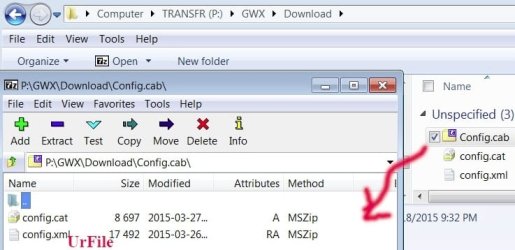
Picture shows location of scanned results Best I could do was place it at the bottom.
It's location on a USB drive. The log file is called Config.xml and you will run across a few of them, it's the one in the cab file I found the scan. Making sense, if one sends more that one file it's best compressed in some manner.

Below is my scan and only 4139 lines in length. No changes- Note only 130+ lines posted.
Some of the middle, but the first part of the scan is important as it' shows it's collected encrypted data, and not sure if the rest is also encrypted as normally I can read these things.

It should be noted that when I went back to get the file for the data collected it had reset to 17K (a basic Config.xml file), I had to get the scan from my clip. I did a forensics check on my system to see exactly what happened, but had waited too long.

After scanning the log what upset me the most, are all of the temp actions were taking place at X:\Windows/Temp, after a fresh install I always set my %Temp% to C:\Temp - it's easier to clean out.

FireFox would of been used to play BF3, Opera for surfing, an Opera update would be for a version greater than 12 which is no problem, it allows Opera 12 to be of use again.

C:\Windows\System32\wdi\{67144949-5132-4859-8036-a737b43825d8}\{31be5828-733a-4ecc-9276-1c8395f96e10}\snapshot.etl 368.00 KB 4/3/2015 4:10:34 PM
C:\Windows\System32\wdi\{86432a0b-3c7d-4ddf-a89c-172faa90485d}\{12c90654-9f6b-43ff-a4da-348dfadf4021}\snapshot.etl 496.00 KB 4/3/2015 4:10:34 PM
C:\Windows\System32\config\systemprofile\AppData\LocalLow\Microsoft\CryptnetUrlCache\Content\43507F87C1453B2187C030286C2D44AB 1.00 KB 4/3/2015 4:11:15 PM
C:\Windows\System32\config\systemprofile\AppData\LocalLow\Microsoft\CryptnetUrlCache\Content\57C8EDB95DF3F0AD4EE2DC2B8CFD4157 7.00 KB 4/3/2015 4:11:15 PM
C:\Windows\System32\config\systemprofile\AppData\LocalLow\Microsoft\CryptnetUrlCache\Content\BE7FFD2FD84D3B32FD43DC8F575A9F28 1.00 KB 4/3/2015 4:11:22 PM
C:\Windows\System32\config\systemprofile\AppData\LocalLow\Microsoft\CryptnetUrlCache\MetaData\4C7F163ED126D5C3CB9457F68EC64E9E 1.00 KB 4/3/2015 4:11:45 PM
C:\Windows\System32\config\systemprofile\AppData\LocalLow\Microsoft\CryptnetUrlCache\MetaData\F90F18257CBB4D84216AC1E1F3BB2C76 1.00 KB 4/3/2015 4:11:45 PM
C:\Windows\System32\wdi\{67144949-5132-4859-8036-a737b43825d8}\{31be5828-733a-4ecc-9276-1c8395f96e10} 4/3/2015 4:11:55 PM
C:\Windows\ServiceProfiles\LocalService\AppData\LocalLow\Microsoft\CryptnetUrlCache\MetaData\57C8EDB95DF3F0AD4EE2DC2B8CFD4157 1.00 KB 4/3/2015 4:13:46 PM
C:\Windows\ServiceProfiles\LocalService\AppData\LocalLow\Microsoft\CryptnetUrlCache\Content\C24EC5BDAF13613245B4CECC3DE91DC6 1.00 KB 4/3/2015 4:13:46 PM
C:\Windows\ServiceProfiles\LocalService\AppData\LocalLow\Microsoft\CryptnetUrlCache\MetaData\C24EC5BDAF13613245B4CECC3DE91DC6 1.00 KB 4/3/2015 4:13:46 PM
C:\Windows\System32\Tasks\Microsoft\Windows\Windows Activation Technologies\ValidationTask 5.00 KB 4/3/2015 4:13:51 PM
C:\Windows\System32\LogFiles\Scm\49e793ed-1166-4fd6-93c6-e2388219a004 1.00 KB 4/3/2015 4:13:52 PM
C:\Windows\System32\LogFiles\Scm\f52df85e-f02c-4b2d-bd33-8e03da228a85 1.00 KB 4/3/2015 4:13:52 PM
C:\Windows\System32\Tasks\Microsoft\Windows\Windows Activation Technologies\ValidationTaskDeadline 5.00 KB 4/3/2015 4:13:52 PM
C:\Documents and Settings\All Users\Comodo\Firewall Pro\cisdata.sdb 20.00 KB 4/3/2015 4:15:54 PM
C:\ProgramData\Comodo\Firewall Pro\cisdata.sdb 20.00 KB 4/3/2015 4:15:54 PM
C:\Users\All Users\Comodo\Firewall Pro\cisdata.sdb 20.00 KB 4/3/2015 4:15:54 PM
C:\Windows\Temp\opera_autoupdate.log 1.00 KB 4/3/2015 4:16:00 PM
C:\Windows\Temp\CProgram Files (x86)Opera15\installing\Opera_Stable_28.0.1750.48-27.0.1689.76_Patch.exe 11,790.00 KB 4/3/2015 4:16:20 PM
C:\Windows\SysWOW64\config\systemprofile\AppData\LocalLow\Microsoft\CryptnetUrlCache\Content\7D266D9E1E69FA1EEFB9699B009B34C8_1D5A876A9113EC07224C45E5A870E3BD 2.00 KB 4/3/2015 4:16:21 PM
C:\Windows\SysWOW64\config\systemprofile\AppData\LocalLow\Microsoft\CryptnetUrlCache\MetaData\7D266D9E1E69FA1EEFB9699B009B34C8_1D5A876A9113EC07224C45E5A870E3BD 1.00 KB 4/3/2015 4:16:21 PM
C:\Windows\SysWOW64\config\systemprofile\AppData\LocalLow\Microsoft\CryptnetUrlCache\Content\B3BB9C1BA2D19E090AE305B2683903A0_6E9A9670139B949E0946278E14EB2FC8 2.00 KB 4/3/2015 4:16:21 PM
C:\Windows\SysWOW64\config\systemprofile\AppData\LocalLow\Microsoft\CryptnetUrlCache\MetaData\B3BB9C1BA2D19E090AE305B2683903A0_6E9A9670139B949E0946278E14EB2FC8 1.00 KB 4/3/2015 4:16:21 PM
C:\Windows\Temp\CProgram Files (x86)Opera15\installing\Assets 4/3/2015 4:16:23 PM
C:\Program Files (x86)\Opera15\28.0.1750.48\ffmpegsumo.dll 947.00 KB 4/3/2015 4:16:31 PM
C:\Windows\Temp\CProgram Files (x86)Opera15\installing\ffmpegsumo.dll 947.00 KB 4/3/2015 4:16:31 PM
-omited-
C:\Documents and Settings\Tone\AppData\Local\Origin\Web Cache\data7\c\1jnyb8ll.d 10.00 KB 4/4/2015 5:37:32 PM
C:\Users\Tone\AppData\Local\Origin\Web Cache\data7\c\1jnyb8ll.d 10.00 KB 4/4/2015 5:37:32 PM
C:\Documents and Settings\All Users\Origin\Logs\IGO_Log.firefox_3864.txt 1.00 KB 4/4/2015 5:37:35 PM
C:\ProgramData\Origin\Logs\IGO_Log.firefox_3864.txt 1.00 KB 4/4/2015 5:37:35 PM
C:\Users\All Users\Origin\Logs\IGO_Log.firefox_3864.txt 1.00 KB 4/4/2015 5:37:35 PM
C:\Documents and Settings\All Users\Origin\Logs\IGO_Log.bf3_3048.txt 13.00 KB 4/4/2015 5:37:41 PM
C:\ProgramData\Origin\Logs\IGO_Log.bf3_3048.txt 13.00 KB 4/4/2015 5:37:41 PM
C:\Users\All Users\Origin\Logs\IGO_Log.bf3_3048.txt 13.00 KB 4/4/2015 5:37:41 PM
C:\Documents and Settings\Tone\AppData\Local\Origin\Web Cache\data7\3\3lz8qou3.d 10.00 KB 4/4/2015 5:37:42 PM
C:\Users\Tone\AppData\Local\Origin\Web Cache\data7\3\3lz8qou3.d 10.00 KB 4/4/2015 5:37:42 PM
C:\Documents and Settings\Tone\AppData\Local\Origin\Web Cache\data7\1\1y408k8q.d 10.00 KB 4/4/2015 5:38:04 PM
C:\Users\Tone\AppData\Local\Origin\Web Cache\data7\1\1y408k8q.d 10.00 KB 4/4/2015 5:38:04 PM
C:\Documents and Settings\Tone\AppData\Local\Origin\Web Cache\data7\b\150pusjk.d 10.00 KB 4/4/2015 5:45:36 PM
C:\Users\Tone\AppData\Local\Origin\Web Cache\data7\b\150pusjk.d 10.00 KB 4/4/2015 5:45:36 PM
C:\Documents and Settings\Tone\AppData\Local\Origin\Web Cache\data7\c\3326e9dl.d 10.00 KB 4/4/2015 5:57:28 PM
C:\Users\Tone\AppData\Local\Origin\Web Cache\data7\c\3326e9dl.d 10.00 KB 4/4/2015 5:57:28 PM
C:\Documents and Settings\All Users\Origin\Logs\IGO_Log.Origin_2072.txt 7.00 KB 4/4/2015 5:57:30 PM
C:\ProgramData\Origin\Logs\IGO_Log.Origin_2072.txt 7.00 KB 4/4/2015 5:57:30 PM
C:\Users\All Users\Origin\Logs\IGO_Log.Origin_2072.txt 7.00 KB 4/4/2015 5:57:30 PM
C:\Documents and Settings\All Users\Origin\Logs\IGO_Log.bf3_3968.txt 16.00 KB 4/4/2015 5:57:49 PM
C:\ProgramData\Origin\Logs\IGO_Log.bf3_3968.txt 16.00 KB 4/4/2015 5:57:49 PM
C:\Users\All Users\Origin\Logs\IGO_Log.bf3_3968.txt 16.00 KB 4/4/2015 5:57:49 PM
C:\Temp\NVIDIA Corporation\NV_Cache\2a0326a08a12848dccfcd16232e70e39_fce8395c8fd8a867_be2aff5f6ce4ea0_0_16.bin 16,384.00 KB 4/4/2015 6:10:08 PM
C:\Temp\NVIDIA Corporation\NV_Cache\2a0326a08a12848dccfcd16232e70e39_fce8395c8fd8a867_be2aff5f6ce4ea0_0_4.toc 4,096.00 KB 4/4/2015 6:22:41 PM
C:\Documents and Settings\Tone\AppData\Local\Origin\Web Cache\data7\d\2gpg2clm.d 10.00 KB 4/4/2015 6:24:53 PM
C:\Users\Tone\AppData\Local\Origin\Web Cache\data7\d\2gpg2clm.d 10.00 KB 4/4/2015 6:24:53 PM
C:\Windows\System32\wdi\{86432a0b-3c7d-4ddf-a89c-172faa90485d}\{3a7e60ea-2ad9-4b16-81d9-981363620441}\snapshot.etl 336.00 KB 4/4/2015 6:26:23 PM
C:\Documents and Settings\Tone\AppData\Local\Origin\Web Cache\data7\3\2rb5ati3.d 10.00 KB 4/4/2015 6:27:48 PM
C:\Users\Tone\AppData\Local\Origin\Web Cache\data7\3\2rb5ati3.d 10.00 KB 4/4/2015 6:27:48 PM
C:\Documents and Settings\All Users\Origin\Logs\IGO_Log.firefox_3740.txt 1.00 KB 4/4/2015 6:27:56 PM
C:\ProgramData\Origin\Logs\IGO_Log.firefox_3740.txt 1.00 KB 4/4/2015 6:27:56 PM
C:\Users\All Users\Origin\Logs\IGO_Log.firefox_3740.txt 1.00 KB 4/4/2015 6:27:56 PM
C:\Documents and Settings\All Users\Origin\Logs\IGO_Log.bf3_3960.txt 49.00 KB 4/4/2015 6:28:02 PM
C:\ProgramData\Origin\Logs\IGO_Log.bf3_3960.txt 49.00 KB 4/4/2015 6:28:02 PM
C:\Users\All Users\Origin\Logs\IGO_Log.bf3_3960.txt 49.00 KB 4/4/2015 6:28:02 PM
C:\Documents and Settings\Tone\AppData\Local\Origin\Web Cache\data7\6\2j83d056.d 10.00 KB 4/4/2015 6:28:03 PM
C:\Users\Tone\AppData\Local\Origin\Web Cache\data7\6\2j83d056.d 10.00 KB 4/4/2015 6:28:03 PM
C:\Windows\System32\wdi\{86432a0b-3c7d-4ddf-a89c-172faa90485d}\{3a7e60ea-2ad9-4b16-81d9-981363620441} 4/4/2015 6:28:18 PM
C:\Documents and Settings\Tone\AppData\Local\Origin\Web Cache\data7\6\2hjxxnuf.d 10.00 KB 4/4/2015 6:28:23 PM
C:\Users\Tone\AppData\Local\Origin\Web Cache\data7\6\2hjxxnuf.d 10.00 KB 4/4/2015 6:28:23 PM
C:\Documents and Settings\All Users\Origin\Logs\IGO_Log.Origin_3192.txt 34.00 KB 4/4/2015 6:28:25 PM
C:\ProgramData\Origin\Logs\IGO_Log.Origin_3192.txt 34.00 KB 4/4/2015 6:28:25 PM
C:\Users\All Users\Origin\Logs\IGO_Log.Origin_3192.txt 34.00 KB 4/4/2015 6:28:25 PM
C:\Documents and Settings\Tone\AppData\Local\Mozilla\Firefox\Profiles\4msw7c4t.default\cache2\entries\317D98DCA3490DB376CD269981418BF7C60B5526 2.00 KB 4/4/2015 6:29:06 PM
C:\Users\Tone\AppData\Local\Mozilla\Firefox\Profiles\4msw7c4t.default\cache2\entries\317D98DCA3490DB376CD269981418BF7C60B5526 2.00 KB 4/4/2015 6:29:06 PM
C:\Documents and Settings\Tone\AppData\Local\Mozilla\Firefox\Profiles\4msw7c4t.default\cache2\entries\FA4F1F40F8B68C506E9F9895466C3302DAACB4E6 4.00 KB 4/4/2015 6:29:06 PM
C:\Users\Tone\AppData\Local\Mozilla\Firefox\Profiles\4msw7c4t.default\cache2\entries\FA4F1F40F8B68C506E9F9895466C3302DAACB4E6 4.00 KB 4/4/2015 6:29:06 PM
C:\Documents and Settings\All Users\Origin\Logs\IGO_Log.bf3_1608.txt 17.00 KB 4/4/2015 7:18:05 PM
C:\ProgramData\Origin\Logs\IGO_Log.bf3_1608.txt 17.00 KB 4/4/2015 7:18:05 PM
C:\Users\All Users\Origin\Logs\IGO_Log.bf3_1608.txt 17.00 KB 4/4/2015 7:18:05 PM
C:\Documents and Settings\Tone\AppData\Local\Origin\Web Cache\data7\3\ie8z9k1c.d 10.00 KB 4/4/2015 7:18:07 PM
C:\Users\Tone\AppData\Local\Origin\Web Cache\data7\3\ie8z9k1c.d 10.00 KB 4/4/2015 7:18:07 PM
C:\Documents and Settings\Tone\AppData\Local\Opera\Opera\icons\http%3A%2F%2Fimg.food.com%2Ffdc%2Fimg%2Fico%2Ffavicon.png 1.00 KB 4/4/2015 7:38:43 PM
C:\Users\Tone\AppData\Local\Opera\Opera\icons\http%3A%2F%2Fimg.food.com%2Ffdc%2Fimg%2Fico%2Ffavicon.png 1.00 KB 4/4/2015 7:38:43 PM
C:\Documents and Settings\Tone\AppData\Local\Opera\Opera\icons\http%3A%2F%2Fwww.joyouslydomestic.com%2Ffavicon.png 1.00 KB 4/4/2015 7:40:05 PM
C:\Users\Tone\AppData\Local\Opera\Opera\icons\http%3A%2F%2Fwww.joyouslydomestic.com%2Ffavicon.png 1.00 KB 4/4/2015 7:40:05 PM
C:\Documents and Settings\Tone\AppData\Local\Opera\Opera\icons\www.joyouslydomestic.com.idx 1.00 KB 4/4/2015 7:40:05 PM
C:\Users\Tone\AppData\Local\Opera\Opera\icons\www.joyouslydomestic.com.idx 1.00 KB 4/4/2015 7:40:05 PM
C:\Documents and Settings\Tone\AppData\Local\Opera\Opera\icons\www.food.com.idx 1.00 KB 4/4/2015 7:50:55 PM
C:\Users\Tone\AppData\Local\Opera\Opera\icons\www.food.com.idx 1.00 KB 4/4/2015 7:50:55 PM
C:\Temp\{C5CE1D95-1711-4589-9FAF-C408CE8E5D9E}\setup.isn 251.00 KB 4/4/2015 8:29:52 PM
C:\Temp\{C5CE1D95-1711-4589-9FAF-C408CE8E5D9E} 4/4/2015 8:30:07 PM
C:\Temp\{DA8C2C8F-4F2F-4573-963F-E5EC96DF7E76} 4/4/2015 8:30:07 PM
C:\Documents and Settings\Tone\AppData\Local\Microsoft\Windows\WER\ReportQueue\NonCritical_setup.exe_221bc96ef39bd1fadf3892e142d858782caa0b5_cab_069db73f\appcompat.txt 5.00 KB 4/4/2015 8:30:12 PM
C:\Users\Tone\AppData\Local\Microsoft\Windows\WER\ReportQueue\NonCritical_setup.exe_221bc96ef39bd1fadf3892e142d858782caa0b5_cab_069db73f\appcompat.txt 5.00 KB 4/4/2015 8:30:12 PM
C:\Temp\{2a95c5f6-58a5-4895-8e25-42207602ef47} 4/4/2015 8:30:13 PM
C:\Temp\{C1BC2C56-4C3F-4C91-8F88-EDEF5A2D3460}\setup.isn 251.00 KB 4/4/2015 8:30:50 PM
C:\Temp\{795B4095-A1D8-44AF-A3A5-392A730C3BDF} 4/4/2015 8:31:03 PM
C:\Temp\{C1BC2C56-4C3F-4C91-8F88-EDEF5A2D3460} 4/4/2015 8:31:03 PM
C:\Temp\{3FFECABD-5BE8-451B-89CB-64A266B8EF68}\setup.isn 251.00 KB 4/4/2015 8:31:32 PM
C:\Temp\{3FFECABD-5BE8-451B-89CB-64A266B8EF68} 4/4/2015 8:31:40 PM
C:\Documents and Settings\Tone\AppData\Local\Opera\Opera\icons\chris.dod.net.idx 1.00 KB 4/4/2015 11:16:19 PM
C:\Users\Tone\AppData\Local\Opera\Opera\icons\chris.dod.net.idx 1.00 KB 4/4/2015 11:16:19 PM
C:\Documents and Settings\Tone\AppData\Local\Opera\Opera\icons\http%3A%2F%2Fchris.dod.net%2Ffavicon.png 1.00 KB 4/4/2015 11:16:19 PM
C:\Users\Tone\AppData\Local\Opera\Opera\icons\http%3A%2F%2Fchris.dod.net%2Ffavicon.png 1.00 KB 4/4/2015 11:16:19 PM
C:\Documents and Settings\Tone\AppData\Local\Opera\Opera\pstorage\00\10\00000004 1.00 KB 4/4/2015 11:29:30 PM
C:\Users\Tone\AppData\Local\Opera\Opera\pstorage\00\10\00000004 1.00 KB 4/4/2015 11:29:30 PM
C:\Documents and Settings\Tone\AppData\Local\Opera\Opera\cache\g_0014 4/4/2015 11:32:08 PM
C:\Users\Tone\AppData\Local\Opera\Opera\cache\g_0014 4/4/2015 11:32:08 PM
C:\Documents and Settings\Tone\AppData\Local\Opera\Opera\cache\g_0015 4/4/2015 11:32:08 PM

 

Attachments

  • SouldWork.jpg
    SouldWork.jpg
    61.8 KB · Views: 11

My Computer

Computer type
PC/Desktop
Computer Manufacturer/Model Number
Mine creation
OS
Win7 but all from NT to Win95 to 7
CPU
i7 - 950
Motherboard
asus p6x58 qpi Three data paths
Memory
well a bit but age is taking it's toll
Graphics Card(s)
EVGA-570
Monitor(s) Displays
SamSung 32F6300 HDTV claims of 240 hz taken as ridiculous
Screen Resolution
From one side to the other
Hard Drives
Yes
Keyboard
Logitech G19
Mouse
lots of G500's gamings my thing and they wear out
Internet Speed
I've honestly never seen it move
Antivirus
Comodo Firewall and common sense.
Browser
Opera 12 yes one can get flash to work with it.
An update: Hiding this update DOES NOT WORK. On every computer it has reappeared in the important list despite having been hidden.
 

My Computer

Computer type
PC/Desktop
OS
Windows 7 x64 Pro
CPU
Core i7 860 @ 3.8 GHz
Motherboard
MSI P55-GD80
Memory
16 GB F3-12800CL7D (DDR3 1600 7-7-7-24)
Graphics Card(s)
Sapphire Vapor-X 100283VXL Radeon HD 5770
Monitor(s) Displays
NEC LCD3090WQXi-BK
So, to remove this useless bloatware:

  1. Delete each of the tasks in the above mentioned folder (and then the folder for good measure)
  2. With Windows Explorer, go to c:\Windows\System32. Right click on the folder GWX and select properties. From there, change the owner to an account with admin privileges and give the same user full control. Then delete the folder.
  3. Repeat the same steps in c:\Windows\SysWOW64

I uninstalled the update, then looked for gwx folders/files. There are no such folders in system32 or syswow64.

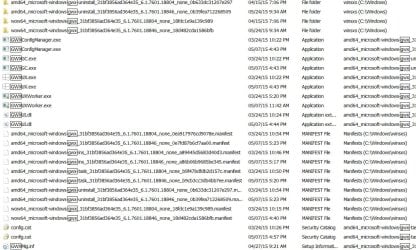
However, there are several folders with gwx in their names (in the WINDOWS folder), they all start with:
amd64_microsoft-windows-gwx
or
wow64_microsoft-windows-gwx

And there are 2 gwx.exe files (both in a wow64... folder). I can't delete them; a message comes up saying permission is required of "TrustedInstaller" whatever that is.

Also, some MANIFEST files that echo the folder names in the WINDOWS\winsxs folder.

Which of these should be removed, and how can I do that?
 

My Computer

Computer type
Laptop
OS
Windows 7 Professional SP1 64-bit
dancing leaves,

Not sure what to recommend. I just searched my C;\Windows folder and the only file or directory with gwx in the name was a log folder that was easily deleted. Have you rebooted since doing the uninstall of the update?

To directly answer your question, do a search for change file owner and follow the procedure to change the ownership of the file from the current owner to your account (assuming your account has administrator privileges). Once you do that, you should be able to delete the file.
 

My Computer

Computer type
PC/Desktop
OS
Windows 7 x64 Pro
CPU
Core i7 860 @ 3.8 GHz
Motherboard
MSI P55-GD80
Memory
16 GB F3-12800CL7D (DDR3 1600 7-7-7-24)
Graphics Card(s)
Sapphire Vapor-X 100283VXL Radeon HD 5770
Monitor(s) Displays
NEC LCD3090WQXi-BK
What are all these amd64... and wow64... folders?
amd64_microsoft-windows-gwx_31bf3856ad364e35_6.1.7601.18804_none_0ea917976cd9078e
amd64_microsoft-windows-gwx_31bf3856ad364e35_6.1.7601.18846_none_0e7fd87b6cf7aa00
amd64_microsoft-windows-gwx-task_31bf3856ad364e35_6.1.7601.18804_none_b9f47bdfdb2d157c
amd64_microsoft-windows-gwx-task_31bf3856ad364e35_6.1.7601.18846_none_b9cb3cc3db4bb7ee
amd64_microsoft-windows-gwx-uninstall_31bf3856ad364e35_6.1.7601.18804_none_0b633dc31207e297
amd64_microsoft-windows-gwx-uninstall_31bf3856ad364e35_6.1.7601.18846_none_0b39fea712268509
wow64_microsoft-windows-gwx_31bf3856ad364e35_6.1.7601.18804_none_18fdc1e9a139c989
wow64_microsoft-windows-gwx_31bf3856ad364e35_6.1.7601.18846_none_18d482cda1586bfb

It looks like there's a MANIFEST file of the same names (plus 2 extra) in the winsxs folder; should they remain?
 

My Computer

Computer type
Laptop
OS
Windows 7 Professional SP1 64-bit
Good grief! I ran another search for 'gwx' and all these other files came up:

Now what?
 

Attachments

  • temp.jpg
    temp.jpg
    166.2 KB · Views: 1

My Computer

Computer type
Laptop
OS
Windows 7 Professional SP1 64-bit
Sorry - no idea
 

My Computer

Computer type
PC/Desktop
OS
Windows 7 x64 Pro
CPU
Core i7 860 @ 3.8 GHz
Motherboard
MSI P55-GD80
Memory
16 GB F3-12800CL7D (DDR3 1600 7-7-7-24)
Graphics Card(s)
Sapphire Vapor-X 100283VXL Radeon HD 5770
Monitor(s) Displays
NEC LCD3090WQXi-BK

My Computer

Computer type
PC/Desktop
Computer Manufacturer/Model Number
Custom Build
OS
Windows 7 Ultimate x64 SP1
CPU
AMD Phenom 2 1090T
Motherboard
Gigabyte GA-890FXA-UD5
Memory
2x8GB Kingston HyperX Fury Black 1600Mhz Unganged
Graphics Card(s)
MSI GTX 970 Gaming 4G
Sound Card
Realtek On-Board HD 7.1 Audio / Logitech G35
Monitor(s) Displays
3xAcer GD245HQ
Screen Resolution
1920x1080
Hard Drives
Samsung 850 Pro 512GB SSD - OS /
WD Caviar Black SATA 3 - 1 TBx2 - Dynamic RAID 0 /
WD Caviar Green SATA 2 - 640GBx2 - Dynamic RAID 0 /
WD Caviar Green SATA 2 - 640GB - Internal Backup /
Seagate Barracude SATA 3 - 3TB - External Backup/ Sync
PSU
HighPower 1000W
Case
Cooler Master HAF 932
Cooling
Noctua NH-D14
Keyboard
Logitech G19
Mouse
Logitech G500
Internet Speed
100/4 Mbit Cable (100GB quota)
Antivirus
ZoneAlarm Extreme Security / MBAM Pro / MBAE Free / SAS Free
Browser
IE 11 - Firefox - Chrome
Other Info
Logitech F710/ G27/ G940/ Z5500 // TrackIR 5 // Nvidia 3D Surround Vision
You're not far off GokAy; If dancing leaves uses your first link (it's still good even though its struck out) s/he can use the list that Tookeri has compiled to uninstall the Win10 updates. There are one or two more threads, one by CarWiz that explains that if you uninstall these updates the uninstall procedure should also remove the gwx folders and files.

dancing leaves; Take note that you need to remove the updates that are not marked with red, those are for win 8/8.1 only.
 

My Computer

Computer type
PC/Desktop
Computer Manufacturer/Model Number
Gateway DX4831-01e (Mid-Tower Desktop)
OS
Originally Win 7 Hm Prem x64 Ver 6.1.7600 Build 7601-SP1 | Upgraded to Windows 10 December 14, 2019
CPU
Intel i3 530 2.93GHz, 2933MHz 2 Cores 4 Logical Processors
Motherboard
Gateway H57M01 133 megahertz
Memory
6GB of 1,333MHz DDR3 SDRAM
Graphics Card(s)
32MB Intel Graphics Media Accelerator HD IGChip
Sound Card
Realtek High Definition Audio
Monitor(s) Displays
Gateway HX2000 20inch TFT active matrix TN
Screen Resolution
1600 x 900 x 59 hertz
Hard Drives
WDC WD10EADS-00M2B0 [HDD] (1000.20 GB) -- drive 0,
HL-DT-ST DVDRAM GH41N [CD-ROM dr]
Four card readers, and Four USB 2.0
PSU
300watts.
Case
Mid-Tower Desktop
Cooling
Stock from Gateway
Keyboard
Natural Ergonomic Keyboard 4000, see Other Info
Mouse
Orig. Gateway wore out now using Insignia USB wired optical
Internet Speed
Vz FIOS 10ms png 57.64Mbps down 65.53Mbps up Speedtest.org
Antivirus
Zamana Anti-logger with Anti-malware, MSE, Windows Firewall,
Browser
IE11.0.9600.19399-Upd ver11.0.135, Firefox 68.0.1 x64
Other Info
System Specs by Belarc.

BIOS: American Megatrends Inc. P01-A0 11/17/2009

Replaced the MS 'Natural' Standard PS/2 Enhanced 101-102 Keyboard with a new Natural Ergonomic Keyboard 4000 on August 1st 2014.

Canon Pixma MG3222 Printer.

Updated to IE11 on 12102015 | Fios Quantum Router g1100

Additional AV: SpywareBlaster, manual Mbam, SAS
Last edited by a moderator:

My Computer

Computer type
PC/Desktop
Computer Manufacturer/Model Number
Custom Build
OS
Windows 7 Ultimate x64 SP1
CPU
AMD Phenom 2 1090T
Motherboard
Gigabyte GA-890FXA-UD5
Memory
2x8GB Kingston HyperX Fury Black 1600Mhz Unganged
Graphics Card(s)
MSI GTX 970 Gaming 4G
Sound Card
Realtek On-Board HD 7.1 Audio / Logitech G35
Monitor(s) Displays
3xAcer GD245HQ
Screen Resolution
1920x1080
Hard Drives
Samsung 850 Pro 512GB SSD - OS /
WD Caviar Black SATA 3 - 1 TBx2 - Dynamic RAID 0 /
WD Caviar Green SATA 2 - 640GBx2 - Dynamic RAID 0 /
WD Caviar Green SATA 2 - 640GB - Internal Backup /
Seagate Barracude SATA 3 - 3TB - External Backup/ Sync
PSU
HighPower 1000W
Case
Cooler Master HAF 932
Cooling
Noctua NH-D14
Keyboard
Logitech G19
Mouse
Logitech G500
Internet Speed
100/4 Mbit Cable (100GB quota)
Antivirus
ZoneAlarm Extreme Security / MBAM Pro / MBAE Free / SAS Free
Browser
IE 11 - Firefox - Chrome
Other Info
Logitech F710/ G27/ G940/ Z5500 // TrackIR 5 // Nvidia 3D Surround Vision
I just did a regedit and remove every thing GWX.
Then I did a sfc /scannow and found no errors.
So far every thing is working okay.

***Do at your own risk.***
 

My Computer

Computer type
PC/Desktop
Computer Manufacturer/Model Number
Home made Desktop
OS
Windows 10 Pro. 64/ version 1709 Windows 7 Pro/64
CPU
Intel i7-6800K @ 4.3
Motherboard
ASUS X-99 Deluxe II
Memory
Corsair Platinum 16 gig @2400
Graphics Card(s)
EVGA GTX 1070 OC
Monitor(s) Displays
Asus 27" LED LCD/VE278Q
Screen Resolution
1920-1080 or 1280-720 HDMI
Hard Drives
INTEL SSD 730-240 Gb Sata 3.0/
PSU
EVGA Platium 1200W
Case
Phanteks Luxe Tempered Glass 8 fans/ one radiator
Cooling
XSPC/ Water Cooled CPU
Keyboard
Das 4 Professional
Mouse
Logitech M705/MX Anywhere 2-S
Internet Speed
100 mbits
Antivirus
Microsoft Security Essentials/ Malwarebytes Premium 3.0/ SAS
Browser
I.E. 11 default/Firefox/ ISP Time Warner Cable/Spectrum
Other Info
LG BluRay Burner/
Sound system-KLipsch-THX/
Icy Dock ssd Hot Swap bays.
These files are part of the Free Win 10 offer. When it first pops up it allows you to reserve your free upgrade to Win 10 when it becomes available at the end of June or July this year . However when you reserve your copy or not it does not go away and loads each time the computer boots. I have 2 files loading, GWX.exe and GWXUX.exe which is the actual popup that allows you reserve win 10 upgrade. Why they have to keep it running after you have reserved your upgrade is beyond me although it is easy to close it via taskmanager. I cannot find how these files are loading at bootup as they are not loading from Services or Startup in Msconfig.

After more research I came across this, Remove the Get Windows 10 icon from the icon tray - Windows 10 a way to shut it down.
 
Last edited:

My Computer

Computer Manufacturer/Model Number
Home Build
OS
Win 7 Ultimate
CPU
Intel QC Q9450
Motherboard
EVGA Nvidia Nforce 780i SLI
Memory
6GB Crucial PC6400 800Mhz
Graphics Card(s)
Evga 8800GTS ACS 640MB's
Sound Card
Creative X-Fi Xtreme Music
Monitor(s) Displays
Samsung Syncmaster 215TW
Screen Resolution
1680x1050
Hard Drives
2 x 74GB Raptors in Raid 0
1 x Samsung F3 1TB
1 x Hitachi Deskstar 250GB
1 x Seagate 250GB
PSU
PC Power&Cooling 750W
Case
Coolermaster Wavemaster
Cooling
Zalman CNPS9700 NT
Keyboard
Dell Quitekey
Mouse
Rocatt Kone
Internet Speed
3MB
I have a GWX folder in system32, I had to use a reg hack to remove it ( no permission ) but if you run sfc it finds corrupted files and keeps replacing GWX

Good Grief :confused:
 

My Computer

Computer type
PC/Desktop
Computer Manufacturer/Model Number
Skylake Special #666
OS
Windows 10 Pro x64
CPU
Intel Core i7 6700K
Motherboard
Asus Sabertooth Z170 Mark 1
Memory
GSkill TridentZ RGB 16GB 3600 16-16-16-36
Graphics Card(s)
EVGA GTX 980 Ti SC x2
Sound Card
Realtek High Definition
Monitor(s) Displays
AOC G2460PG
Screen Resolution
1920 x 1080 144Hz
Hard Drives
Samsung 860 Pro 256GB, Seagate Barracuda 4TB x2
PSU
EVGA 1000 P2, EVGA White Custom Braided Cables
Case
Corsair Vengeance C70 Gunmetal Black
Cooling
Corsair H100i v2, Corsair ML120 x2, Thermal Grizzly Kryonaut
Keyboard
Logitech G910 Orion Spectrum
Mouse
Logitech G700s
Internet Speed
Verizon Fios Quantum Gateway 75/75
Antivirus
Windows Defender, Malwarebytes Free 3.8.3
Browser
Chrome
Other Info
Corsair SP120 x4, LG Blu-ray Drive, Durabrand HT-395 100 Watt Dolby Digital Amp, Corsair H2100 Wireless 7.1 Headset
Back
Top