
Stopping GWX ConfigManager

Of course I did all my regedit edits with admin permission.

I'm running sfc /scannow again at the present time.

Done and found no integrity violations.

Rebooted and checked regedit for GWX and found nothing.

Don't forget that a reboot can do wonders.
 

My Computer

Computer type
PC/Desktop
Computer Manufacturer/Model Number
Home made Desktop
OS
Windows 10 Pro. 64/ version 1709 Windows 7 Pro/64
CPU
Intel i7-6800K @ 4.3
Motherboard
ASUS X-99 Deluxe II
Memory
Corsair Platinum 16 gig @2400
Graphics Card(s)
EVGA GTX 1070 OC
Monitor(s) Displays
Asus 27" LED LCD/VE278Q
Screen Resolution
1920-1080 or 1280-720 HDMI
Hard Drives
INTEL SSD 730-240 Gb Sata 3.0/
PSU
EVGA Platium 1200W
Case
Phanteks Luxe Tempered Glass 8 fans/ one radiator
Cooling
XSPC/ Water Cooled CPU
Keyboard
Das 4 Professional
Mouse
Logitech M705/MX Anywhere 2-S
Internet Speed
100 mbits
Antivirus
Microsoft Security Essentials/ Malwarebytes Premium 3.0/ SAS
Browser
I.E. 11 default/Firefox/ ISP Time Warner Cable/Spectrum
Other Info
LG BluRay Burner/
Sound system-KLipsch-THX/
Icy Dock ssd Hot Swap bays.
I simply zipped the entire contents of C:/Windows/system32/GWX. I kept the zip file just in case, but I deleted all of the original files in that folder. Done.
 

My Computer

Computer type
PC/Desktop
Computer Manufacturer/Model Number
Dell
OS
Windows 10 x64
CPU
i7-7700K
Memory
16 GB 2400 MHz
Graphics Card(s)
GTX 1060
Sound Card
Integrated, plus external Presonus Audiobox USB
Monitor(s) Displays
2x AOC 27"
Screen Resolution
1920x1080
Hard Drives
512 GB M.2 SSD
2 TB 7200 RPM disk
Internet Speed
110 Mbps
Browser
Firefox
So there is another way of getting rid of the advertisement for Windows 10 but still reserve your copy.

Navigate to C:\Windows\System32\GWX

Right click on the folder and Click Properties then click the Security Tab. Find Administrators and give Full Control.

Inside C:\Windows\System32\GWX there is a config file called Config.xml and also in the C:\Windows\System32\GWX\Download folder has the same Config.xml. Open these files in notepad.

Inside you will see the following lines. You can stop the program from running by setting all the values below to false. I reserved my copy before I did this. So you may want to do that before making these changes. So now when you start up Windows GWX.exe will run check at what stage Windows 10 is currently at and then close if below GA (read below)

<Phase name="None">
<AntUXProcess>false</AntUXProcess>
<TrayIcon>false</TrayIcon>
<Advertisement>false</Advertisement>
<ReservationPage>false</ReservationPage>
<Upgrading>false</Upgrading>
<DownloadInProgress>false</DownloadInProgress>
<DownloadComplete>false</DownloadComplete>
<ReadyForSetup>false</ReadyForSetup>
<SetupInProgress>false</SetupInProgress>
<SetupComplete>false</SetupComplete>
</Phase>
<Phase name="AnticipationUX">
<AntUXProcess>false</AntUXProcess>
<TrayIcon>false</TrayIcon>
<Advertisement>false</Advertisement>
<ReservationPage>false</ReservationPage>
<Upgrading>false</Upgrading>
<DownloadInProgress>false</DownloadInProgress>
<DownloadComplete>false</DownloadComplete>
<ReadyForSetup>false</ReadyForSetup>
<SetupInProgress>false</SetupInProgress>
<SetupComplete>false</SetupComplete>
</Phase>
<Phase name="Reservation">
<AntUXProcess>false</AntUXProcess>
<TrayIcon>false</TrayIcon>
<Advertisement>false</Advertisement>
<ReservationPage>false</ReservationPage>
<Upgrading>false</Upgrading>
<DownloadInProgress>false</DownloadInProgress>
<DownloadComplete>false</DownloadComplete>
<ReadyForSetup>false</ReadyForSetup>
<SetupInProgress>false</SetupInProgress>
<SetupComplete>false</SetupComplete>
</Phase>
<Phase name="Reserved">
<AntUXProcess>false</AntUXProcess>
<TrayIcon>false</TrayIcon>
<Advertisement>false</Advertisement>
<ReservationPage>false</ReservationPage>
<Upgrading>false</Upgrading>
<DownloadInProgress>false</DownloadInProgress>
<DownloadComplete>false</DownloadComplete>
<ReadyForSetup>false</ReadyForSetup>
<SetupInProgress>false</SetupInProgress>
<SetupComplete>false</SetupComplete>
</Phase>
<Phase name="RTM">
<AntUXProcess>false</AntUXProcess>
<TrayIcon>false</TrayIcon>
<Advertisement>false</Advertisement>
<ReservationPage>false</ReservationPage>
<Upgrading>false</Upgrading>
<DownloadInProgress>false</DownloadInProgress>
<DownloadComplete>false</DownloadComplete>
<ReadyForSetup>false</ReadyForSetup>
<SetupInProgress>false</SetupInProgress>
<SetupComplete>false</SetupComplete>
</Phase>

I would stop at this point because GA means it is Generally Available.

<Phase name="GA">
<AntUXProcess>true</AntUXProcess>
<TrayIcon>true</TrayIcon>
<Advertisement>false</Advertisement>
<ReservationPage>false</ReservationPage>
<Upgrading>true</Upgrading>
<DownloadInProgress>false</DownloadInProgress>
<DownloadComplete>false</DownloadComplete>
<ReadyForSetup>false</ReadyForSetup>
<SetupInProgress>false</SetupInProgress>
<SetupComplete>false</SetupComplete>
</Phase>
<Phase name="UpgradeDetected">
<AntUXProcess>true</AntUXProcess>
<TrayIcon>true</TrayIcon>
<Advertisement>false</Advertisement>
<ReservationPage>false</ReservationPage>
<Upgrading>true</Upgrading>
<DownloadInProgress>false</DownloadInProgress>
<DownloadComplete>false</DownloadComplete>
<ReadyForSetup>false</ReadyForSetup>
<SetupInProgress>false</SetupInProgress>
<SetupComplete>false</SetupComplete>
</Phase>
<Phase name="UpgradeDownloadInProgress">
<AntUXProcess>true</AntUXProcess>
<TrayIcon>true</TrayIcon>
<Advertisement>false</Advertisement>
<ReservationPage>false</ReservationPage>
<Upgrading>true</Upgrading>
<DownloadInProgress>true</DownloadInProgress>
<DownloadComplete>false</DownloadComplete>
<ReadyForSetup>false</ReadyForSetup>
<SetupInProgress>false</SetupInProgress>
<SetupComplete>false</SetupComplete>
</Phase>
<Phase name="UpgradeDownloaded">
<AntUXProcess>true</AntUXProcess>
<TrayIcon>true</TrayIcon>
<Advertisement>false</Advertisement>
<ReservationPage>false</ReservationPage>
<Upgrading>true</Upgrading>
<DownloadInProgress>false</DownloadInProgress>
<DownloadComplete>true</DownloadComplete>
<ReadyForSetup>false</ReadyForSetup>
<SetupInProgress>false</SetupInProgress>
<SetupComplete>false</SetupComplete>
</Phase>
<Phase name="UpgradeReadyToInstall">
<AntUXProcess>true</AntUXProcess>
<TrayIcon>true</TrayIcon>
<Advertisement>false</Advertisement>
<ReservationPage>false</ReservationPage>
<Upgrading>true</Upgrading>
<DownloadInProgress>false</DownloadInProgress>
<DownloadComplete>false</DownloadComplete>
<ReadyForSetup>true</ReadyForSetup>
<SetupInProgress>false</SetupInProgress>
<SetupComplete>false</SetupComplete>
</Phase>
<Phase name="UpgradeReadySetupInProgress">
<AntUXProcess>true</AntUXProcess>
<TrayIcon>true</TrayIcon>
<Advertisement>false</Advertisement>
<ReservationPage>false</ReservationPage>
<Upgrading>true</Upgrading>
<DownloadInProgress>false</DownloadInProgress>
<DownloadComplete>false</DownloadComplete>
<ReadyForSetup>false</ReadyForSetup>
<SetupInProgress>true</SetupInProgress>
<SetupComplete>false</SetupComplete>
</Phase>
<Phase name="UpgradeSetupCompatBlock">
<AntUXProcess>true</AntUXProcess>
<TrayIcon>true</TrayIcon>
<Advertisement>false</Advertisement>
<ReservationPage>false</ReservationPage>
<Upgrading>true</Upgrading>
<DownloadInProgress>false</DownloadInProgress>
<DownloadComplete>false</DownloadComplete>
<ReadyForSetup>false</ReadyForSetup>
<SetupInProgress>false</SetupInProgress>
<SetupComplete>false</SetupComplete>
</Phase>
<Phase name="UpgradeSetupRolledBack">
<AntUXProcess>true</AntUXProcess>
<TrayIcon>true</TrayIcon>
<Advertisement>false</Advertisement>
<ReservationPage>false</ReservationPage>
<Upgrading>true</Upgrading>
<DownloadInProgress>false</DownloadInProgress>
<DownloadComplete>false</DownloadComplete>
<ReadyForSetup>false</ReadyForSetup>
<SetupInProgress>false</SetupInProgress>
<SetupComplete>false</SetupComplete>
</Phase>
<Phase name="UpgradeSetupFailed">
<AntUXProcess>true</AntUXProcess>
<TrayIcon>true</TrayIcon>
<Advertisement>false</Advertisement>
<ReservationPage>false</ReservationPage>
<Upgrading>true</Upgrading>
<DownloadInProgress>false</DownloadInProgress>
<DownloadComplete>false</DownloadComplete>
<ReadyForSetup>false</ReadyForSetup>
<SetupInProgress>false</SetupInProgress>
<SetupComplete>false</SetupComplete>
</Phase>
<Phase name="UpgradeSetupComplete">
<AntUXProcess>true</AntUXProcess>
<TrayIcon>true</TrayIcon>
<Advertisement>false</Advertisement>
<ReservationPage>false</ReservationPage>
<Upgrading>true</Upgrading>
<DownloadInProgress>false</DownloadInProgress>
<DownloadComplete>false</DownloadComplete>
<ReadyForSetup>false</ReadyForSetup>
<SetupInProgress>false</SetupInProgress>
<SetupComplete>true</SetupComplete>
</Phase>
 

My Computer

Computer type
PC/Desktop
OS
Windows 8.1
I still believe the neatest method is to disable the Scheduled Tasks. :) Unless someone points out something I missed?
 

My Computer

Computer type
PC/Desktop
Computer Manufacturer/Model Number
Custom Build
OS
Windows 7 Ultimate x64 SP1
CPU
AMD Phenom 2 1090T
Motherboard
Gigabyte GA-890FXA-UD5
Memory
2x8GB Kingston HyperX Fury Black 1600Mhz Unganged
Graphics Card(s)
MSI GTX 970 Gaming 4G
Sound Card
Realtek On-Board HD 7.1 Audio / Logitech G35
Monitor(s) Displays
3xAcer GD245HQ
Screen Resolution
1920x1080
Hard Drives
Samsung 850 Pro 512GB SSD - OS /
WD Caviar Black SATA 3 - 1 TBx2 - Dynamic RAID 0 /
WD Caviar Green SATA 2 - 640GBx2 - Dynamic RAID 0 /
WD Caviar Green SATA 2 - 640GB - Internal Backup /
Seagate Barracude SATA 3 - 3TB - External Backup/ Sync
PSU
HighPower 1000W
Case
Cooler Master HAF 932
Cooling
Noctua NH-D14
Keyboard
Logitech G19
Mouse
Logitech G500
Internet Speed
100/4 Mbit Cable (100GB quota)
Antivirus
ZoneAlarm Extreme Security / MBAM Pro / MBAE Free / SAS Free
Browser
IE 11 - Firefox - Chrome
Other Info
Logitech F710/ G27/ G940/ Z5500 // TrackIR 5 // Nvidia 3D Surround Vision
Disabling the Scheduled Tasks stops the program from running which interrupts the intended purpose of GWX.exe that is to install Windows 10 as soon as it is available. If you stop the tasks then the program will not run anymore and will not check if Windows 10 is ready to be installed. By using my method Windows 10 will still install as planned you will just not be annoyed anymore.

If you don't want Windows 10 or would prefer to install it at your own leisure then disabling the tasks is a perfect way.

I personally like shiny new things so I reserved my upgrade and want it to be installed asap :)
 

My Computer

Computer type
PC/Desktop
OS
Windows 8.1
Appreciate the comment, I don't think I would install it straight away and deal with all the possible bugs! :p

I can run the exe anytime to reserve my copy if I so wish, and capable of checking what's going on. It is not like a one time deal that will expire in a week.

I was hoping to get an answer like "you don't notice but it is running this and that, check that event log" and some such. :)
 

My Computer

Computer type
PC/Desktop
Computer Manufacturer/Model Number
Custom Build
OS
Windows 7 Ultimate x64 SP1
CPU
AMD Phenom 2 1090T
Motherboard
Gigabyte GA-890FXA-UD5
Memory
2x8GB Kingston HyperX Fury Black 1600Mhz Unganged
Graphics Card(s)
MSI GTX 970 Gaming 4G
Sound Card
Realtek On-Board HD 7.1 Audio / Logitech G35
Monitor(s) Displays
3xAcer GD245HQ
Screen Resolution
1920x1080
Hard Drives
Samsung 850 Pro 512GB SSD - OS /
WD Caviar Black SATA 3 - 1 TBx2 - Dynamic RAID 0 /
WD Caviar Green SATA 2 - 640GBx2 - Dynamic RAID 0 /
WD Caviar Green SATA 2 - 640GB - Internal Backup /
Seagate Barracude SATA 3 - 3TB - External Backup/ Sync
PSU
HighPower 1000W
Case
Cooler Master HAF 932
Cooling
Noctua NH-D14
Keyboard
Logitech G19
Mouse
Logitech G500
Internet Speed
100/4 Mbit Cable (100GB quota)
Antivirus
ZoneAlarm Extreme Security / MBAM Pro / MBAE Free / SAS Free
Browser
IE 11 - Firefox - Chrome
Other Info
Logitech F710/ G27/ G940/ Z5500 // TrackIR 5 // Nvidia 3D Surround Vision
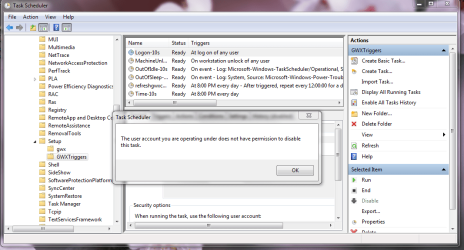
Okay I have deleted all of those two folders system32 and SysWOW64. I have disabled and deleted Tasks of Windows/gwx folder but as you can see I am not allowed to disable these tasks of Windows/GWX Triggers folder. I can't shutdown or restart my laptop as the task eng is preventing it each time. What can I do. This never happened before and I am sleepy. My problems are just as same as dancing leaves .
 

Attachments

  • Capture.PNG
    Capture.PNG
    49.4 KB · Views: 2
Last edited:

My Computer

Computer type
Laptop
Computer Manufacturer/Model Number
HP
OS
Windows 7, 64 bit
Antivirus
Avast
Browser
Chrome
Just an update: Several of the unwanted updates have reappeared despite being hidden. Clearly, MS has a way to ignore the 'hide this update' directive. Be careful!

For those who care, here is my list of updates to eradicate: KB3068708, KB3065987, KB3035583, KB3022345, KB3021917, KB2990214, KB2952664
 

My Computer

Computer type
PC/Desktop
OS
Windows 7 x64 Pro
CPU
Core i7 860 @ 3.8 GHz
Motherboard
MSI P55-GD80
Memory
16 GB F3-12800CL7D (DDR3 1600 7-7-7-24)
Graphics Card(s)
Sapphire Vapor-X 100283VXL Radeon HD 5770
Monitor(s) Displays
NEC LCD3090WQXi-BK
The reason that the updates keep reappearing is that MS, in full evilness mode, republishes them with a new publication date. As such, previous attempts to block the update are bypassed.
 

My Computer

Computer type
PC/Desktop
OS
Windows 7 x64 Pro
CPU
Core i7 860 @ 3.8 GHz
Motherboard
MSI P55-GD80
Memory
16 GB F3-12800CL7D (DDR3 1600 7-7-7-24)
Graphics Card(s)
Sapphire Vapor-X 100283VXL Radeon HD 5770
Monitor(s) Displays
NEC LCD3090WQXi-BK
First time I compressed then deleted, but now thought than probably would need it so uninstalled and reinstalled which kinda got rid of reserving Windows 10 popup on Windows update.
This time, instead of deleting, renamed... On GWX or GWX.exe's Properties, Security, Advanced, and Change link in front of Owner: (which in this case will be TrustedInstaller) and then do whatever you want, I personally renamed GWX.exe to GWX.reserved.exe
To the ones who still have the popup of Windows 10 on Windows Update, try to reserve it, reinstall, it will disappear somehow.
Hope it helps!
 

My Computer

Computer type
Laptop
Computer Manufacturer/Model Number
Asus
OS
Windows 8.1 64-bits
GWX would like more info....

Exclusive: Microsoft exec responds to Windows 10 privacy backlash - Sep. 28, 2015

Microsoft admits to having this software in windows 10. I run a beefy fire wall where i dont allow access to internet to programs im not directly using. GWX in windows 7 asks me every day at least twice to gain access for internet. I understand what the program is said to do/for. Say what you want, but microsoft has crossed that threshold where their business is more important then your privacy.
I read this thread as it got my attention because again today GWX asks for internet access and decided to look into how to get rid of it. Its annoying being asked by microsoft to use my connection i dont care what for. What ever happened to the pc doing what you tell it to? I am concerned and have windows 10 on my laptop that i just bought a few months ago. I will be taking it off, currently looking into what OS is best for me. I dont need to be told that i can take these settings off, i obv know. Microsoft has been dominating the industry for years now, and all it takes for me to jump ship is a OS that runs like xp/7 that is there for me, not a OS that is there for someone else or their agenda. When PC's became mainstream it was advertised as the "personal Computer". Microsoft is taking the P out of C and giving you "C"RAP!
 
Last edited:

My Computer

Computer type
PC/Desktop
Computer Manufacturer/Model Number
Custom build
OS
Windows 7 Home Premium 64 bit
CPU
I7 6700k
Motherboard
MSI Z170a M5
Memory
G.Skill RipJaws 16Gb 3200mhz
Graphics Card(s)
EVGA GTX 980 Ti Hybrid
Hard Drives
Crucial MX200 SSD
Back
Top