Storage drive disappears

iknowjohnny

New member
Power User
VIP
Local time
5:40 PM
Messages
237
Windows 7 64 bit with a SSD C drive and 2 regular storage drives. I think the 1 storage drives is sata and one is IDE but it's been so long since i built this thing i can't remember. And since the one doesn't show up even in device manager now i can't be sure. I suppose i should look in the bios, but i have had this issue before and i want get at why it happens instead of just going into bios only to fix it temporarily.

That said, this time it happened when i installed karen's replicator. I have used it before but it wasn't working rigght so i uninstalled it but recently tried it again to see if i could get it to work. But after i chose my E drive as the destination drive, when i ran the job it did nothing and thats when i looked for my drive and realized it disappeared. Note that it has done this before without karens replicator even being installed. So that app isn't the problem, it simply triggered the problem. Any idea how i can get my drive back and keep this from happening again ?
 

My Computer

OS
windows 7 professional
First, right click computer, select manage and in the left column select Disk Management. Post a screenshot. http://www.sevenforums.com/tutorials/9733-screenshots-files-upload-post-seven-forums.html

If you see the drive in the bottom section but it has no drive letter, right click it, select change drive letter or path, next screen select add, and give it a drive letter. If it wants to format it, do not do it. You will lose everything on the drive.
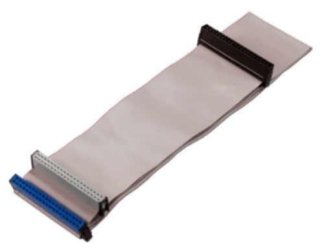
As to why it is happening, there could be several reasons. A loose cable could do it, or the drive could be dying. To determine if it is sata or and IDE drive, look inside your computer. An IDE drive will be connected with a wide ribon cable. Whichever type it is, make sure the cables are properly seated on both ends.

If you do get it back run checkdisk f/r http://www.sevenforums.com/tutorials/433-disk-check.html
Also, go to the manufacturer's web site and download and run their diagnostic tool.
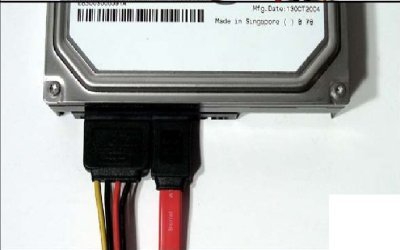
The first picture is an IDE cable the second picture are a Sata cables.
IDE.jpg

sata power and data cables
SATA-cable.jpg
 

My Computers

System One System Two

  • Computer type
    PC/Desktop
    Computer Manufacturer/Model Number
    ALWAYS UNDER CONSTRUCTION
    OS
    Windows 11 Pro
    CPU
    Ryzen 9 5900X
    Motherboard
    Asus X570 Crosshair Viii Hero
    Memory
    32GB G Skill DDR4-3600
    Graphics Card(s)
    EVGA RTX 3080 FTW 3 Ultra
    Sound Card
    On Board/Sennheiser PC37X Headset
    Monitor(s) Displays
    3 X Asus 27"
    Screen Resolution
    2560x1440
    Hard Drives
    2 X 1 TB NVME drives
    PSU
    EVGA 850
    Case
    Phanteks Eclipse P400A
    Cooling
    EVGA 280 AIO
    Keyboard
    Logitech G510s/ Logitech G13
    Mouse
    Logitech G502
    Internet Speed
    24/1
    Antivirus
    ESET/MBAM Pro/SAS Pro
    Browser
    Chrome/ Firefox/ Edge
  • Computer type
    Laptop
    System Manufacturer/Model Number
    Dell 16 Plus
    OS
    Windows 11 Pro
    CPU
    Intel Ultra 9 288V
    Memory
    32 GB LPDDR5X 8533
    Monitor(s) Displays
    16" Mini-LED HDR600 Touch 90 Hz
    Screen Resolution
    2560X1600
    Hard Drives
    1 TB NVME
It doesn't show up there or device manager. I was suspicious of the cable too, but i'll have to get around to that later. I'll post back after a shot of deoxit.
 

My Computer

OS
windows 7 professional
Ok, this should be the clue that will make it obvious to some of you more tech savvy than I. The drive is being seen during startup i think, but the system can't determine what it is or some such thing. First i cleaned the plugs and no go. But the machine is taking forever to start up, so I realized it's not able to determine what the drive is or some such thing and thats what it's trying to do during this 3-4 minute start up. So i disconnected the drive and sure enough the machine starts in under a minute like always. Theres no yellow ? marks in device manager if that matters. Any ideas?
 

My Computer

OS
windows 7 professional
Yes. Sounds like a dead/dying drive. Run the Manufacturer's diagnostic program. It will determine if there are problems. I would also, try to download any data on it you would like to save ASAP. If it survives the diagnostic test, run checkdisk using the f/r switch. If it can do it, it will take several hours probably. It is possible there are bad sectors on the drive, and the drive is salvageable. But, what you describe are indications of a dead or dying drive.
 

My Computers

System One System Two

  • Computer type
    PC/Desktop
    Computer Manufacturer/Model Number
    ALWAYS UNDER CONSTRUCTION
    OS
    Windows 11 Pro
    CPU
    Ryzen 9 5900X
    Motherboard
    Asus X570 Crosshair Viii Hero
    Memory
    32GB G Skill DDR4-3600
    Graphics Card(s)
    EVGA RTX 3080 FTW 3 Ultra
    Sound Card
    On Board/Sennheiser PC37X Headset
    Monitor(s) Displays
    3 X Asus 27"
    Screen Resolution
    2560x1440
    Hard Drives
    2 X 1 TB NVME drives
    PSU
    EVGA 850
    Case
    Phanteks Eclipse P400A
    Cooling
    EVGA 280 AIO
    Keyboard
    Logitech G510s/ Logitech G13
    Mouse
    Logitech G502
    Internet Speed
    24/1
    Antivirus
    ESET/MBAM Pro/SAS Pro
    Browser
    Chrome/ Firefox/ Edge
  • Computer type
    Laptop
    System Manufacturer/Model Number
    Dell 16 Plus
    OS
    Windows 11 Pro
    CPU
    Intel Ultra 9 288V
    Memory
    32 GB LPDDR5X 8533
    Monitor(s) Displays
    16" Mini-LED HDR600 Touch 90 Hz
    Screen Resolution
    2560X1600
    Hard Drives
    1 TB NVME
Damn. Thats the last seagate i will buy. A year or 2 lifespan is pathetic. I suppose i'll go with another SSD, tho i hope prices have gone down since i last looked !
 

My Computer

OS
windows 7 professional
Did you test it? You may try to see if Seagate will RMA the drive. I've had good luck with seagate drives, others have not. Truthfully, I think it really does not matter. You're taking a chance no matter which brand you choose. The name of the game is backup, backup, backup. I have all my data on at least 3 different hard drives and backup to them several times a week, if not daily. I'm so paranoid, I use 1 drive for each computer that I clone my OS to weekly. If my OS drive went out, I'd be back online in 10 minutes, 1 if you have an eSATA dock.
 

My Computers

System One System Two

  • Computer type
    PC/Desktop
    Computer Manufacturer/Model Number
    ALWAYS UNDER CONSTRUCTION
    OS
    Windows 11 Pro
    CPU
    Ryzen 9 5900X
    Motherboard
    Asus X570 Crosshair Viii Hero
    Memory
    32GB G Skill DDR4-3600
    Graphics Card(s)
    EVGA RTX 3080 FTW 3 Ultra
    Sound Card
    On Board/Sennheiser PC37X Headset
    Monitor(s) Displays
    3 X Asus 27"
    Screen Resolution
    2560x1440
    Hard Drives
    2 X 1 TB NVME drives
    PSU
    EVGA 850
    Case
    Phanteks Eclipse P400A
    Cooling
    EVGA 280 AIO
    Keyboard
    Logitech G510s/ Logitech G13
    Mouse
    Logitech G502
    Internet Speed
    24/1
    Antivirus
    ESET/MBAM Pro/SAS Pro
    Browser
    Chrome/ Firefox/ Edge
  • Computer type
    Laptop
    System Manufacturer/Model Number
    Dell 16 Plus
    OS
    Windows 11 Pro
    CPU
    Intel Ultra 9 288V
    Memory
    32 GB LPDDR5X 8533
    Monitor(s) Displays
    16" Mini-LED HDR600 Touch 90 Hz
    Screen Resolution
    2560X1600
    Hard Drives
    1 TB NVME
I do have it backed up. Thats what i was going to use karen's replicator for. I had used it in the past to sync my main storage drive, a 300GB maxtor to the 300GB seagate. But the app was glitchy so i uninstalled it and then just today decided to try it again and see if run as admin and xp compatibility would work. In fact, this is why i'm not 100% sure the drive IS dead....,i think karens R. may have done something to the system that caused it. The seagate has been fine and always spun up fast and then i install and run the app and thats when this all started. So i will consider it dead and get a new drive, but only because i don't know what else to do if it IS a system thing
 

My Computer

OS
windows 7 professional
I don't know how much you know about this so I'll try to see if this works with full details.
Click start. in the search box type cmd, on the cmd entry that appears, right click it and select run as administrator. (called an elevated command prompt)
in the box type diskpart and press enter, it will take a few seconds, but it will answer diskpart
type list disk and press enter - hopefully tour drive will show up with a number assigned to it. example 1
select disk 1 (or whatever number diskpart assigns it) it will reply disk 1 is the selected disk. Be sure you select the corect disk.
type clean all and press enter. go have lunch. it will take several hours, but the drive will be wiped completely. It will look like nothing is happening but it is. There is no progress account until it is finished. It should take 3-5 hours.
Assuming it is a data or storage drive. When it completes
(not really necessary, but to be sure) type select disk 1 again and press enter
type create partition primary press enter -response should be the selected partition was created
type select partition 1 press enter
format fs=ntfs quick and press enter
type assign and press enter. To assign it a drive letter
exit -enter to leave diskpart and go back to the command prompt
exit enter to leave the command prompt
If all that completed your drive should be ready to go. and should show up in disk management and explorer.

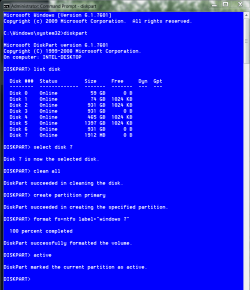
It should look similar to this but, type assign and not active unless you are going to install an operating system on it.

format hard drive clean all.PNG
 

My Computers

System One System Two

  • Computer type
    PC/Desktop
    Computer Manufacturer/Model Number
    ALWAYS UNDER CONSTRUCTION
    OS
    Windows 11 Pro
    CPU
    Ryzen 9 5900X
    Motherboard
    Asus X570 Crosshair Viii Hero
    Memory
    32GB G Skill DDR4-3600
    Graphics Card(s)
    EVGA RTX 3080 FTW 3 Ultra
    Sound Card
    On Board/Sennheiser PC37X Headset
    Monitor(s) Displays
    3 X Asus 27"
    Screen Resolution
    2560x1440
    Hard Drives
    2 X 1 TB NVME drives
    PSU
    EVGA 850
    Case
    Phanteks Eclipse P400A
    Cooling
    EVGA 280 AIO
    Keyboard
    Logitech G510s/ Logitech G13
    Mouse
    Logitech G502
    Internet Speed
    24/1
    Antivirus
    ESET/MBAM Pro/SAS Pro
    Browser
    Chrome/ Firefox/ Edge
  • Computer type
    Laptop
    System Manufacturer/Model Number
    Dell 16 Plus
    OS
    Windows 11 Pro
    CPU
    Intel Ultra 9 288V
    Memory
    32 GB LPDDR5X 8533
    Monitor(s) Displays
    16" Mini-LED HDR600 Touch 90 Hz
    Screen Resolution
    2560X1600
    Hard Drives
    1 TB NVME
Thanks, but it only lists the C drive and the maxtor.
 

My Computer

OS
windows 7 professional

My Computers

System One System Two

  • Computer type
    PC/Desktop
    Computer Manufacturer/Model Number
    ALWAYS UNDER CONSTRUCTION
    OS
    Windows 11 Pro
    CPU
    Ryzen 9 5900X
    Motherboard
    Asus X570 Crosshair Viii Hero
    Memory
    32GB G Skill DDR4-3600
    Graphics Card(s)
    EVGA RTX 3080 FTW 3 Ultra
    Sound Card
    On Board/Sennheiser PC37X Headset
    Monitor(s) Displays
    3 X Asus 27"
    Screen Resolution
    2560x1440
    Hard Drives
    2 X 1 TB NVME drives
    PSU
    EVGA 850
    Case
    Phanteks Eclipse P400A
    Cooling
    EVGA 280 AIO
    Keyboard
    Logitech G510s/ Logitech G13
    Mouse
    Logitech G502
    Internet Speed
    24/1
    Antivirus
    ESET/MBAM Pro/SAS Pro
    Browser
    Chrome/ Firefox/ Edge
  • Computer type
    Laptop
    System Manufacturer/Model Number
    Dell 16 Plus
    OS
    Windows 11 Pro
    CPU
    Intel Ultra 9 288V
    Memory
    32 GB LPDDR5X 8533
    Monitor(s) Displays
    16" Mini-LED HDR600 Touch 90 Hz
    Screen Resolution
    2560X1600
    Hard Drives
    1 TB NVME
Thats ok, but thanks for trying to help. Since i have another drive thats a mirror to it i didn't lose anything. So i'm just going to get a new drive, probably SSD so i won't likely have to worry about this. They seem to have come down quite a bit so i can now afford a 300GB or more.
 

My Computer

OS
windows 7 professional
I think you'll be happy with an SSD. I have 6 of them, and will never run my OS on a mechanical hard drive again.
 

My Computers

System One System Two

  • Computer type
    PC/Desktop
    Computer Manufacturer/Model Number
    ALWAYS UNDER CONSTRUCTION
    OS
    Windows 11 Pro
    CPU
    Ryzen 9 5900X
    Motherboard
    Asus X570 Crosshair Viii Hero
    Memory
    32GB G Skill DDR4-3600
    Graphics Card(s)
    EVGA RTX 3080 FTW 3 Ultra
    Sound Card
    On Board/Sennheiser PC37X Headset
    Monitor(s) Displays
    3 X Asus 27"
    Screen Resolution
    2560x1440
    Hard Drives
    2 X 1 TB NVME drives
    PSU
    EVGA 850
    Case
    Phanteks Eclipse P400A
    Cooling
    EVGA 280 AIO
    Keyboard
    Logitech G510s/ Logitech G13
    Mouse
    Logitech G502
    Internet Speed
    24/1
    Antivirus
    ESET/MBAM Pro/SAS Pro
    Browser
    Chrome/ Firefox/ Edge
  • Computer type
    Laptop
    System Manufacturer/Model Number
    Dell 16 Plus
    OS
    Windows 11 Pro
    CPU
    Intel Ultra 9 288V
    Memory
    32 GB LPDDR5X 8533
    Monitor(s) Displays
    16" Mini-LED HDR600 Touch 90 Hz
    Screen Resolution
    2560X1600
    Hard Drives
    1 TB NVME
Agreed.....my C drive is SSD, albeit a small one. (120GB) I paid $225 a couple years ago but i see that they finally came down to a reasonable price. Much faster and no spin up time, dead quiet, cooler, long life, no need to defrag, what more can u ask for.
 

My Computer

OS
windows 7 professional
A couple more of them? Or maybe a couple of bigger ones?
 

My Computers

System One System Two

  • Computer type
    PC/Desktop
    Computer Manufacturer/Model Number
    ALWAYS UNDER CONSTRUCTION
    OS
    Windows 11 Pro
    CPU
    Ryzen 9 5900X
    Motherboard
    Asus X570 Crosshair Viii Hero
    Memory
    32GB G Skill DDR4-3600
    Graphics Card(s)
    EVGA RTX 3080 FTW 3 Ultra
    Sound Card
    On Board/Sennheiser PC37X Headset
    Monitor(s) Displays
    3 X Asus 27"
    Screen Resolution
    2560x1440
    Hard Drives
    2 X 1 TB NVME drives
    PSU
    EVGA 850
    Case
    Phanteks Eclipse P400A
    Cooling
    EVGA 280 AIO
    Keyboard
    Logitech G510s/ Logitech G13
    Mouse
    Logitech G502
    Internet Speed
    24/1
    Antivirus
    ESET/MBAM Pro/SAS Pro
    Browser
    Chrome/ Firefox/ Edge
  • Computer type
    Laptop
    System Manufacturer/Model Number
    Dell 16 Plus
    OS
    Windows 11 Pro
    CPU
    Intel Ultra 9 288V
    Memory
    32 GB LPDDR5X 8533
    Monitor(s) Displays
    16" Mini-LED HDR600 Touch 90 Hz
    Screen Resolution
    2560X1600
    Hard Drives
    1 TB NVME
at least as big as my dead one, 300gb. maybe more depending on the $
 

My Computer

OS
windows 7 professional
Back
Top