Hello Guys.
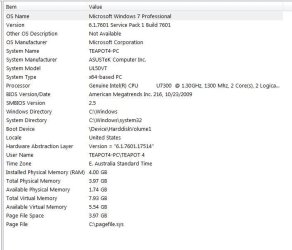
I have an ASUS laptop running Win 7 Service Pack I. When I boot from cold I get this message (Reboot and select proper boot device or insert boot media in selected device and press enter).
I then press Ctrl+ alt+Del and Windows happily starts up.
If I do a hot restart there is no problem.
I tried cloning the boot drive (drive 1) to a backup drive (drive 2), installed this as boot drive and powered up with no problem. The problem did not transfer to drive 2.
At first I thought this was a Bios problem, but I think this experiment eliminates that.
I would be extremely grateful for any thoughts and help for this aggravating problem.
Teaot2
I have an ASUS laptop running Win 7 Service Pack I. When I boot from cold I get this message (Reboot and select proper boot device or insert boot media in selected device and press enter).
I then press Ctrl+ alt+Del and Windows happily starts up.
If I do a hot restart there is no problem.
I tried cloning the boot drive (drive 1) to a backup drive (drive 2), installed this as boot drive and powered up with no problem. The problem did not transfer to drive 2.
At first I thought this was a Bios problem, but I think this experiment eliminates that.
I would be extremely grateful for any thoughts and help for this aggravating problem.
Teaot2
My Computer
At a glance
WINDOWS 7 PROFESSIONAL 64 BITINTEL CORE 2 DUO P7550 2.2GHZ4096 MB
- Computer type
- Laptop
- Computer Manufacturer/Model Number
- HP
- OS
- WINDOWS 7 PROFESSIONAL 64 BIT
- CPU
- INTEL CORE 2 DUO P7550 2.2GHZ
- Memory
- 4096 MB
- Hard Drives
- WD 5OO GIG x2
- Antivirus
- KASPERSKY
- Browser
- FIREFOX 40