Strange display problem on desktop

rsummers618

New member
Local time
2:34 AM
Messages
5
Hello, I've been using Windows 7 since release date. I'm using home premium if it matters. Anyway, I recently decided to upgrade to dual monitors.

I have a 20" in portrait on the left and a 27" on the right.
The 27 is the main display

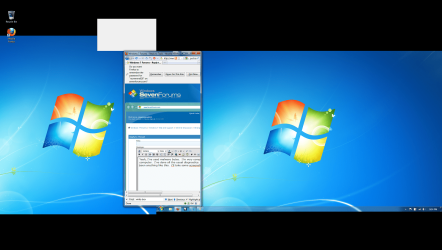
The problem i am having is that a white box, about 400px x 350 px appears on my 20".

The box only appears on the desktop, however, it covers up th wall paper and icons, and cannot be interacted with (no click, no dragging box, no right click), The mouse shows up over it, as does any window.

when I hover over the aero peek show desktop button in the right corner of my screen, it disappears.

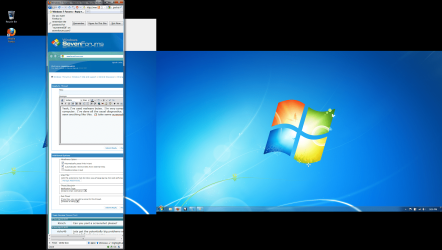
Now the interesting bit that i found out, is that the box is always at the height where my 27 inch starts. For example, because my 20 in portrait is longer than the height of my 27, it hangs over below and above. The white box appears just above the usable pixels from the 27, such that if you drug your mouse from the 27 to the 20, the mouse would be at the very bottom of the box.

I found this out, by moving the monitors around with the screen tool or whatever.

The problem does not occur if the 20" is the main monitor, or if i tell the computer the 20" is on the right.

It would appear that it is just automatically to the upper left of my main monitor no matter what, and i cannot get rid of it.

Any ideas?
 

My Computer

OS
Windows 7 home premium
Lets get the potentially big problems out of the way
Run a full anti virus scan
Download and run malwarebytes. Make a full scan and be sure to update before the scan
http://www.malwarebytes.org/mbam.php
 

My Computer

Computer type
PC/Desktop
Computer Manufacturer/Model Number
Dell XPS 420
OS
Windows 10, Home Clean Install
CPU
Intel Core2 processsor Q8200(2.33Ghz 1333FSB) Quad Core Tech
Motherboard
Dell
Memory
6 gb
Graphics Card(s)
ATI Radeon 256MB HD3650
Sound Card
Intergrated 7.1 Channel Audio
Monitor(s) Displays
Dell SP2009W 20"
Hard Drives
640 GB Serial ATA Hard drive
Cooling
Fan
Keyboard
Dell USB Keyboard
Mouse
Dell Premium Optical USB
Internet Speed
DSL 2.85
Can you post a screenshot please?
 

My Computer

Computer Manufacturer/Model Number
Custom Built
OS
Windows 7 Ultimate
CPU
AMD Athlon II X2 245 2.90Ghz
Motherboard
Some Gigabyte one, dont remember model
Memory
3.00 GB
Graphics Card(s)
8800GTS 512MB
Sound Card
Sound Blaster X-Fi Titanium Fatal1ty
Monitor(s) Displays
Dual 22" widescreen
Hard Drives
250GB internal, 500GB internal
PSU
CORSAIR CMPSU-850TX 850W Power Supply
Case
Thermalkake Tsunami Dream
Cooling
Thermaltake Golden Orb II
Keyboard
Saitek Eclipse 2
Mouse
Logitech MX518
Yeah, I've used malware bytes. I'm very competent on a computer. I've done all the usual diagnostics. I've just never seen anything like this. I've tried googling this before, but as you can imagine its hard to google "white box" windows 7 especially because i don't know whats causing it other than my dual monitors. I'll take some screen shots

Hopefully you can see what i'm talking about, and understand that no matter what height that the right monitor is at, that is the height the box is at, ( i can take pics to explain this, however its annoying to get the alignment just right again)

The first pic, you'll see how when i press the peek button, the box goes away, but otherwise it is impossible to interact with, but is covered by windows but covers icons


EDIT: just in case its not clear, The windows wallpaper does not strech the entire screen vertically, the third picture shows its height. I have been to lazy to get stuff to fit as of late
 

Attachments

  • desktop 1.png
    desktop 1.png
    262.8 KB · Views: 16
  • desktop 2.png
    desktop 2.png
    257 KB · Views: 16
  • desktop 3.png
    desktop 3.png
    250.3 KB · Views: 19
  • desktop 4.png
    desktop 4.png
    254.3 KB · Views: 15

My Computer

OS
Windows 7 home premium
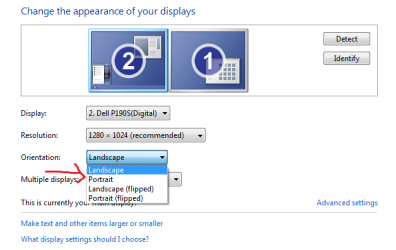
Make sure the left monitor is set to Landscape and not Portrait
 

Attachments

  • monitor.png
    monitor.png
    15.8 KB · Views: 5

My Computer

Computer Manufacturer/Model Number
Custom Built
OS
Windows 7 Ultimate
CPU
AMD Athlon II X2 245 2.90Ghz
Motherboard
Some Gigabyte one, dont remember model
Memory
3.00 GB
Graphics Card(s)
8800GTS 512MB
Sound Card
Sound Blaster X-Fi Titanium Fatal1ty
Monitor(s) Displays
Dual 22" widescreen
Hard Drives
250GB internal, 500GB internal
PSU
CORSAIR CMPSU-850TX 850W Power Supply
Case
Thermalkake Tsunami Dream
Cooling
Thermaltake Golden Orb II
Keyboard
Saitek Eclipse 2
Mouse
Logitech MX518
no. I don't think you understand. I want the left monitor in portrait. it's all set up the way I like it. I just dot know how to get rid of the box in this setup. changing setups can get rid of it (or at least hide it). however I want my monitors set up this way
 

My Computer

OS
Windows 7 home premium
Try using a different program like Display fusion to configure your dual monitor setup and see if that does anything. BTW what video card do you have?
 

My Computer

Computer type
PC/Desktop
Computer Manufacturer/Model Number
Custom Build
OS
Windows 7 Pro 64bit build 7601 SP1
CPU
Intel Core I5 3570K 3.4Ghz w/ Zalman CNPS9900NT RT
Motherboard
MSI Z77A-G45 Gaming
Memory
G.Skill F3-12800CL9D-8GbXL ; 4Gx2
Graphics Card(s)
EVGA Geforce GTX 770 Superclocked
Sound Card
Creative Sound Blaster Z
Monitor(s) Displays
Dual ViewSonic VX2770Smh-LED Black 27"IPS-Panel
Screen Resolution
1920x1080
Hard Drives
Kingston Hyper X 240GB SSD Win8 Pro 64bit 6GB/s Sata III
Intel 335 Series SSD 240GB Win8 Storage 6GB/s Sata III
Intel 320 Series SSD 600GB Storage 3GB/s Sata II
Western Digital Scorpio Black 1TB - Docked via Esata
PSU
Coolermaster GX 750W
Case
Corsair Vengence C70
Cooling
Coolermaster 120mm and Enermax 140mm
Keyboard
Corsair Vengence K70
Mouse
Logitech G500
Internet Speed
22mbps+
Browser
Firefox, Chrome, IE
Other Info
Swan M50W 2.1 speakers
APC UPS
Thermaltake BlacX HDD Dock
Samsung BD Optical Drive
Netgear WNDR4500
I'm actually already using display fusion. I have a nvidia 160gtx
 

My Computer

OS
Windows 7 home premium
Oh, in that case have you tried reverting back to using windows default? I've never seen that issue either.
 

My Computer

Computer type
PC/Desktop
Computer Manufacturer/Model Number
Custom Build
OS
Windows 7 Pro 64bit build 7601 SP1
CPU
Intel Core I5 3570K 3.4Ghz w/ Zalman CNPS9900NT RT
Motherboard
MSI Z77A-G45 Gaming
Memory
G.Skill F3-12800CL9D-8GbXL ; 4Gx2
Graphics Card(s)
EVGA Geforce GTX 770 Superclocked
Sound Card
Creative Sound Blaster Z
Monitor(s) Displays
Dual ViewSonic VX2770Smh-LED Black 27"IPS-Panel
Screen Resolution
1920x1080
Hard Drives
Kingston Hyper X 240GB SSD Win8 Pro 64bit 6GB/s Sata III
Intel 335 Series SSD 240GB Win8 Storage 6GB/s Sata III
Intel 320 Series SSD 600GB Storage 3GB/s Sata II
Western Digital Scorpio Black 1TB - Docked via Esata
PSU
Coolermaster GX 750W
Case
Corsair Vengence C70
Cooling
Coolermaster 120mm and Enermax 140mm
Keyboard
Corsair Vengence K70
Mouse
Logitech G500
Internet Speed
22mbps+
Browser
Firefox, Chrome, IE
Other Info
Swan M50W 2.1 speakers
APC UPS
Thermaltake BlacX HDD Dock
Samsung BD Optical Drive
Netgear WNDR4500
Back
Top