
Strange icon on startup

dejaentendu

New member
Local time
7:41 AM
Messages
5
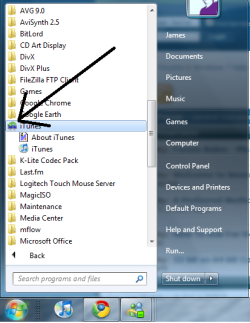
Hi there, bit of a novice but ive just upgraded my windows vista ultimate to windows 7 ultimate and noticed upon the new upgrade that this strange icon appears on the folders on my start menu?

it looks like two monitors and a green arrow pointing at one to the other. anyone know what it is and how to disable it? thanks in advance!
 

Attachments
  • weird.png
    weird.png
    38.5 KB · Views: 47
Last edited:

My Computer

OS
Windows 7

My Computer

Computer Manufacturer/Model Number
HP Pavilion dm3 (netbook) *** 27" iMac (Dual-Boot)
OS
Windows 7 Home Premium (64-bit) *** Windows XP SP3 (32-bit), OSX 10.6
CPU
AMD Athlon Neo X2 1.6GHz *** Intel Core i7 Quad Core 2.8GHz
Memory
4.00 GB *** 4.00 GB
Graphics Card(s)
ATI Radeon HD 3200, 384MB *** ATI Radeon HD 4850, 1GB
Sound Card
ATI High Definition Audio *** ATI High Definition Audio
Monitor(s) Displays
LG Flatron W2053TX
Screen Resolution
1600 x 900 (monitor), 1266 x 768 (laptop) *** 2560 x 1440
Hard Drives
300 GB SATA (internal), 500 GB HP SimpleSave (external) *** 1 TB SATA (internal), 160 GB LaCie (external)
Mouse
Logitech Cordless Optical Mouse for Notebooks
Internet Speed
Broadband
thanks for your help but no joy i'm afraid :/

the weird thing is it only appears once clicking a folder, then it appears when you mouseover any other folders in the startmenu, I also noticed it when going through C:\ folders on the library. really strange, any other tips would be great please!
 

My Computer

OS
Windows 7
Last edited:

My Computer

Computer type
Laptop
Computer Manufacturer/Model Number
ASUS G60-RBBX05
OS
Win7 Home Premium 64x
CPU
Intel Core 2 Duo P7450 / 2.13 GHz (2.29 with Extreme Turbo)
Memory
4 GB PC-6400 Hyundai (2X2) at 800Mhz
Graphics Card(s)
NVIDIA GeForce GTX 260M 1GB DDR3 VRAM
Monitor(s) Displays
16" LED Backlit
Screen Resolution
1366 x 768 on laptop 1600x1050 max res on 22" external mon
Hard Drives
OCZ Agility 3 60GB SSD / 320 GB - Serial ATA-150 - 7200 rpm
PSU
6-cell Lithium ion { lasts 1.5 hours }
Case
ASUS G60 Laptop
Keyboard
Chicklet type back-lit (white light) keyboard
Mouse
Logitech G9 Laser Mouse 3200dpi and 1000 reports per minute
Internet Speed
Comcast 8.60mb/s up - 3.11mb/s down
Antivirus
MSE
Browser
Firefox
Other Info
General mid-budget gaming Comp. Low batterylife - High FrameRates - currently overheating problems :(

2nd Rig: Case: Rosewill BLACKHAWK Gaming ATX Mid Tower Computer Case

Mobo: GIGABYTE GA-990FXA-UD3
CPU: AMD FX-6200 Zambezi 3.8GHz (4.1GHz Turbo)
Heatsink: COOLER MASTER V8 CPU Cooler
RAM: Patriot Viper 3 8GB (2 x 4GB) 240-Pin DDR3 SDRAM 1866 (PC3 15000)
GPU: SAPPHIRE Radeon HD 6850 1GB 2
Most people will tell you that doing a clean install is safer than doing an upgrade, and they have a point. When you upgrade, critical system files are replaced with ones from the version you're upgrading to (in this case 7), but often times files are missed. On top of that, your programs are installed with Vista settings rather than 7. I don't see how it could have caused this, but upgrading has caused problems for a lot of people.

I say copy your files to another hard drive and do a clean install of 7. You can do a clean install even from an upgrade disc. Here's how: http://www.sevenforums.com/tutorials/31402-clean-install-upgrade-windows-7-version.html
 

My Computer

OS
Windows 7 Enterprise 64-bit
CPU
AMD Phenom II X4 3.0GHz
Motherboard
ASUS M5A97
Memory
8GB G-Skill Ripjaws DDR3 1333
Graphics Card(s)
PNY GeForce 460 GTX 1GB OC - Enthusiast Edition
Sound Card
VIA High Definition Audio
Monitor(s) Displays
Dell 19"
Screen Resolution
1280x1024
Hard Drives
1TB - Primary
160GB - Secondary
250GB - External backup for important files
PSU
OCZ Fata1ty 700W Modular PSU
Case
ASUS
Keyboard
Microsoft Wireless Keyboard 2000
Mouse
Microsoft Wireless Mouse 2000
Internet Speed
3 Mbps/768 kbps
tried doing the scan but found no integrity violations, thanks anyway!
i'm using avg 9.0 along with spybot which are both upto date and havent found any problems since the upgrade, so i don't think its a virus

thanks for your help product fred i'll consider your suggestion of a clean install!
 

My Computer

OS
Windows 7
No problem :)
 

My Computer

OS
Windows 7 Enterprise 64-bit
CPU
AMD Phenom II X4 3.0GHz
Motherboard
ASUS M5A97
Memory
8GB G-Skill Ripjaws DDR3 1333
Graphics Card(s)
PNY GeForce 460 GTX 1GB OC - Enthusiast Edition
Sound Card
VIA High Definition Audio
Monitor(s) Displays
Dell 19"
Screen Resolution
1280x1024
Hard Drives
1TB - Primary
160GB - Secondary
250GB - External backup for important files
PSU
OCZ Fata1ty 700W Modular PSU
Case
ASUS
Keyboard
Microsoft Wireless Keyboard 2000
Mouse
Microsoft Wireless Mouse 2000
Internet Speed
3 Mbps/768 kbps
Dejaentendu, let us know if you decide to do a clean install and if so, whether it works to fix the issue! Thanks for your help. Project FRED :)

Walker
Windows Outreach Team
 

My Computer

Computer Manufacturer/Model Number
HP Pavilion dm3 (netbook) *** 27" iMac (Dual-Boot)
OS
Windows 7 Home Premium (64-bit) *** Windows XP SP3 (32-bit), OSX 10.6
CPU
AMD Athlon Neo X2 1.6GHz *** Intel Core i7 Quad Core 2.8GHz
Memory
4.00 GB *** 4.00 GB
Graphics Card(s)
ATI Radeon HD 3200, 384MB *** ATI Radeon HD 4850, 1GB
Sound Card
ATI High Definition Audio *** ATI High Definition Audio
Monitor(s) Displays
LG Flatron W2053TX
Screen Resolution
1600 x 900 (monitor), 1266 x 768 (laptop) *** 2560 x 1440
Hard Drives
300 GB SATA (internal), 500 GB HP SimpleSave (external) *** 1 TB SATA (internal), 160 GB LaCie (external)
Mouse
Logitech Cordless Optical Mouse for Notebooks
Internet Speed
Broadband
Hi there, bit of a novice but ive just upgraded my windows vista ultimate to windows 7 ultimate and noticed upon the new upgrade that this strange icon appears on the folders on my start menu?

it looks like two monitors and a green arrow pointing at one to the other. anyone know what it is and how to disable it? thanks in advance!
Am I missing something here ??..Why is it strange icon ..it is saying Itune ..2 screens and 2 arrow it means download.... I must be getting old !!
 

My Computer

Computer Manufacturer/Model Number
Mesh
OS
win7 ultimate 32 , 64 ,XP
CPU
3.40
Memory
4 GB
Graphics Card(s)
GeForce GTX 480
Sound Card
Realtek
Monitor(s) Displays
LG 28" LCD
Screen Resolution
1600X1024
Hard Drives
2X500GB HDD sata
Western Digital Usb 2TB
PSU
650w
Keyboard
Wireless Logitech
Mouse
Wireless Logitech
Internet Speed
50 MB
Hi there, bit of a novice but ive just upgraded my windows vista ultimate to windows 7 ultimate and noticed upon the new upgrade that this strange icon appears on the folders on my start menu?

it looks like two monitors and a green arrow pointing at one to the other. anyone know what it is and how to disable it? thanks in advance!
Am I missing something here ??..Why is it strange icon ..it is saying Itune ..2 screens and 2 arrow it means download.... I must be getting old !!

Nope its on every folder once clicked unfortunately!
 

My Computer

OS
Windows 7
I recently had this question myself. Chances are pretty good that you recently upgraded or installed a new version of Windows, because the icon described is the one for Windows Easy Transfer, which is a program designed to help you transfer your files, email, pictures, and settings when you're switching to a new PC.
 

My Computer

OS
Windows 7 Home Premium 64 bit
Back
Top