Solved Strange Japanese Symbols when I right click on the Desktop

sutper

New member
Local time
4:03 PM
Messages
3
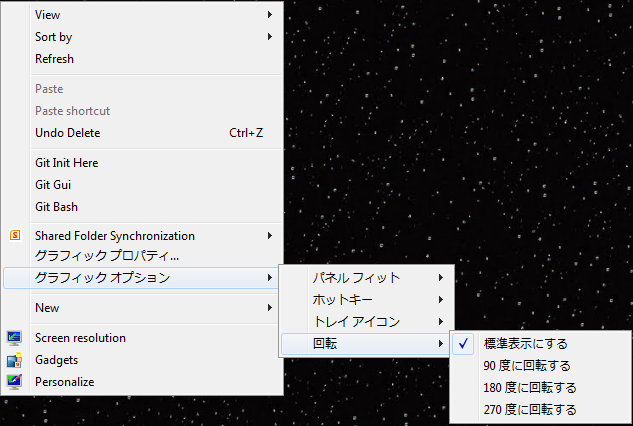
I just noticed that when I right click on my desktop, there are these random Japanese characters.

When I click on them, it seems to be for my graphics properties, and my resolution.

Is there a way to turn them back into English.

Lt3f1VW.png

M83oWdR.png


Toshiba m645 Laptop
Intel i5 M450. So integrated Graphics.

There was this Japanese game that my brother wanted to play. I guess something to do with the installation of it must have done something.
 
Last edited:

My Computer My Computer

At a glance

Windows 7 Professional x64
Computer type
Laptop
Computer Manufacturer/Model Number
Toshiba
OS
Windows 7 Professional x64
Welcome to SF :) .

Can you spend some more details?
What make and model is the laptop?
What GPU software you have installed, i.e. nVidia / AMD ?
Did you change anything, on the software side, before you noticed it?
 

My Computer My Computer

At a glance

Windows 10Intel Core i5 3570K16GB 1600Mhz G.SkillGigabyte GTX 970 G1-Gaming
Computer type
PC/Desktop
OS
Windows 10
CPU
Intel Core i5 3570K
Motherboard
Asus P8Z77V-PRO
Memory
16GB 1600Mhz G.Skill
Graphics Card(s)
Gigabyte GTX 970 G1-Gaming
PSU
Seasonic 1000W Platinum
Case
Fractal Design Define R4
Cooling
Noctua NH-D14
I'm also not sure when this problem first arrived. I just noticed it now, but could have been like that for much longer.

I'm also on Windows 7 Professional 64 bit.
I just looked at my other laptop and I think the characters are for
Graphic Properties and Graphic Options.
 

My Computer My Computer

At a glance

Windows 7 Professional x64
Computer type
Laptop
Computer Manufacturer/Model Number
Toshiba
OS
Windows 7 Professional x64
Yes it does look like the intel hd graphics context menu.

I don't use the intel hd graphics so I can't experiment but if you right-click on the tray icon

trayicon1.jpg


Language setting should be under Options and Support.

Capture.JPG


You could always use Google Translate to make sense of the lettering.
 

My Computer My Computer

At a glance

Windows 10Intel Core i5 3570K16GB 1600Mhz G.SkillGigabyte GTX 970 G1-Gaming
Computer type
PC/Desktop
OS
Windows 10
CPU
Intel Core i5 3570K
Motherboard
Asus P8Z77V-PRO
Memory
16GB 1600Mhz G.Skill
Graphics Card(s)
Gigabyte GTX 970 G1-Gaming
PSU
Seasonic 1000W Platinum
Case
Fractal Design Define R4
Cooling
Noctua NH-D14
Start Menu > Control Panel > Region and Language
Administrative Tab > Change system locale Button
Change to English
 

My Computer My Computer

At a glance

Windows 7 Professional x64
Computer type
Laptop
Computer Manufacturer/Model Number
Toshiba
OS
Windows 7 Professional x64
Thank you posting a solution for future reference :) .
 

My Computer My Computer

At a glance

Windows 10Intel Core i5 3570K16GB 1600Mhz G.SkillGigabyte GTX 970 G1-Gaming
Computer type
PC/Desktop
OS
Windows 10
CPU
Intel Core i5 3570K
Motherboard
Asus P8Z77V-PRO
Memory
16GB 1600Mhz G.Skill
Graphics Card(s)
Gigabyte GTX 970 G1-Gaming
PSU
Seasonic 1000W Platinum
Case
Fractal Design Define R4
Cooling
Noctua NH-D14
Back
Top