Strange overheating problem in windows 7

gordijn

New member
Local time
7:58 PM
Messages
8
Hi!

Recently after installing windows 7, my acer 5715z laptop has been randomly overheating. I've cleaned the heatsink and everything, but the problem seems to be driver- or settings related. Every now and then, the laptop fan stops spinning, causing the cpu temperature to rise until it automaticly shuts off at 100°. Weird thing is, if I put the laptop on battery power when it starts heating up, the laptop fan starts spinning again and cpu temp cools down again. I've looked everywhere in the windows 7 power settings and tried programs such as speedfan but it seems i can't control the fan speed. I've configured 'core temp' to put the laptop in sleep mode when cpu temperature rises above 80° so it doesn't just shut down instantly at 100°. I've contacted the Acer helpdesk about this but they just say to reinstall windows vista... I've updated pretty much everything except the bios. Any help?
 

My Computer

OS
Windows 7
No solutions immediately are apparent to me. So I'll get the ball rolling for ya...how's cpu usage? Behaving normally?

Could be some kind of cpu throttling gone wrong or working incorrectly. Puzzled about this one...

Maybe somebody knows something. Let's see.
 

My Computer

Computer Manufacturer/Model Number
self built
OS
7600.20510 x86
CPU
P4 550 3.4 GHz HT running at 3.5 GHz
Motherboard
MSI PM8M3-V (MS-7211 v1.x) Micro-ATX mainboard
Memory
OCZ 2 GB(2x1GB) DDR400mHz running @ 414 mHz
Graphics Card(s)
HIS Radeon HD 3850 IceQ 3 Turbo HDMI Dual DL-DVI AGP
Sound Card
MOTU Traveler firewire studio interface 192 kHz 24 bit
Monitor(s) Displays
22" widescreen Acer X223W LCD, 17" Compaq P75 CRT
Screen Resolution
1680x1050 and 1280x1024
Hard Drives
SATA I x2 WD, 400 GB and 120 GB, SATA 2 WD Caviar Black 1 TB
PSU
350W generic
Case
Cybertronpc, it glows blue
Cooling
stock cpu fan, Ice-Q 3 gpu and system, many case fans
Keyboard
Logitch Classical Keyboard 200
Mouse
Logitech Mediaplay cordless
Internet Speed
1792/448 kbits/sec
Other Info
SATA II PCI fake RAID adapter, 1 GB Readyboost, original ATI Remote Wonder (even works with WMC perfectly), Logitech Rumblepad 2 game controller x2
I'll keep an eye on it next time the temperature starts to spike.
 

My Computer

OS
Windows 7
funny having a like wise issue. I have the HP 6710b laptop and no drivers exist on the HP site so using all the win7 ones, however since installing win7 i have experienced heat and fan issues. it was from the day i installed win7. I looked in the bios and changed something called 'Vista quick launch' and cleaned the fan out which seemed to have solved the problem.
 

My Computer

Computer Manufacturer/Model Number
SN78SH7 Shuttle
OS
Windows Seven
CPU
AMD Phenom II X4 Quad Core 965 Black Edition
Motherboard
SN78SH7 Shuttle
Memory
Corsair XMS2 4GB PC2-8500C5 DDR2 TwinX Dual Channel
Graphics Card(s)
Zotac 9800GT ECO Edition
Monitor(s) Displays
Samsung SyncMaster 2032BW
Hard Drives
SSD 80GB Intel X25-M -
WDSE16 500GB
Usually fans are handled by the BIOS directly, shouldn't have anything to do with the OS
 

My Computer

OS
Windows 7
CPU
Intel E8400
Motherboard
Gigabyte
Memory
8GB
Graphics Card(s)
Geforce GTX285
Usually fans are handled by the BIOS directly, shouldn't have anything to do with the OS

That is not necessarily true. There are several issues that require a setting in both the bios and Windows 7.... for Example Cool-N-Quiet.
It must be set to enabled in the BIOS, but in Windows 7 the Power option must also be set properly for it to work.

-- if you have your power option (power plan) set to (performance) BALANCED, as opposed to POWER SAVER, you will affect your cooling controller.

you can see the settings in the Control Panel/Powersettings/balanced--Change plan settings.

(not quite sure exactly which settings have effect on the fans themselves in your computer (if any) , but if your computer is overheating you might want to make sure the settings are on performance and not powersaver. I remember seeing a whole post on it in the AMD Cool-N-Quiet forums)
 

My Computer

Computer Manufacturer/Model Number
Custom Built and Maintained...by Me
OS
Windows 7 Ultimate x64
CPU
AMD Phenome x4 965 Black Ed (Lovingly OverClocked.a tad)
Motherboard
Gigabyte GA 890GPA-UD3H
Memory
6 Gb (3 x 2 Gb GSKILL 16000CL9 )
Graphics Card(s)
ASUS EAH5850/2DIS/1GD5 Radeon HD 5850 1GB
Sound Card
Creative SB X-Fi
Monitor(s) Displays
Dual 24" Samsung Wide-Sceens
Screen Resolution
Good Enough.
Hard Drives
5x SATA Seagates (in assorted sizes, shapes, and colors--Variety is the spice of Life)
PSU
790 Watt Enermax Modular
Case
Lian-Li Black Mesh (Love that Mesh !!)
Cooling
Pure Air Baby..Flowin Freely
Keyboard
Microsoft 4000 Natural Ergonomic
Mouse
Multiple Logitech Laser mice....each has its specific use
Internet Speed
Not Fast Enough, it's probably never going to be fast enough
Other Info
This Computer building crap started out years ago as a simple hobby..that has now gotten completely out of hand !!
(It does come in handy though, when everyone in the family wants their own computer)
Yes, that's a good idea. Performance setting should program the fan to spin up faster and more frequently. It might also keep the CPU functioning at high performance too though which is not good for heat. But definitely worth a try.
 

My Computer

Computer Manufacturer/Model Number
HP DV8t quad
OS
Windows 7 Ultimate x64 (Retail)
CPU
i7-Q 720
Motherboard
Motherboard Chipset Intel Ibex Peak-M PM55, Intel Lynnfield
Memory
6 GB
Graphics Card(s)
nVidia GeForce GT 230M (1GB)
Sound Card
IDT High Definition Audio CODEC
Monitor(s) Displays
18.4 inch HP Infinity FHD (Samsung 184HT03-001)
Screen Resolution
1920 x 1080
Hard Drives
Hitachi 500GB 7200 rpm (x2)
Seagate FreeAgent 1.5 TB External USB (x2)
Thermaltake BlacX eSATA/USB 2.0 3.5/2.5 HD dock
Cooling
Zalman NC-2000 notebook cooling pad
Keyboard
laptop
Mouse
Logitech VX Revolution
Other Info
Backup Unit: Lenovo T61p
tried different power settings, i still have the same problem in performance mode etc. checked bios options, nothing to be found. when the laptop came out of sleep mode the fan didn't start spinning, temp spiked to 90°, putting it on battery power didn't work either, had to reboot, now it's back to 50°.
also i checked cpu usage but it was only at 10%
i really have no idea what's causing this or what the problem could be.
only thing i can think of now is updating the bios, but apparently acer and bios flashing is risky business so i'd rather not risk it. i can't be the only one with this problem...?
 
Last edited:

My Computer

OS
Windows 7
Hi!
I have the same problem!! After installing w7 my laptop started to overheating and turning off by itself, mostly while watching movies but not only then. I have Acer 5720zg. I've tried almost everything without luck. Here are some diagnostics i've made:

Core temp:


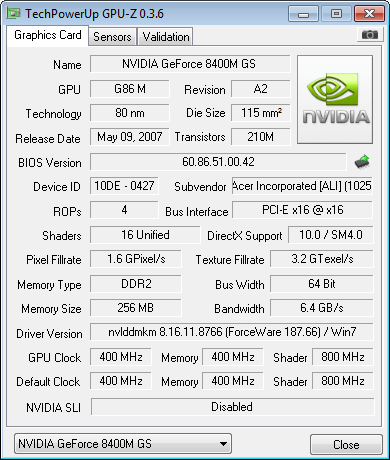
GPU-Z


OCCT:


Any ideas? I would really appreciate some help with this...
 

My Computer

OS
Windows 7
i had the same problem a couple months ago dell stuido desktop 64 bit vista now windows 7 64 bit with ati hd 3870 graphics card.the problem with mine desktop was windows defender kept running would not shut off kept scanning and scanning. but the task manager showed nothing was running.so i started turning things off turned windows defender on to manual scan and fixed the problem it just a thought.my desktop would get hot and shut off.
 

My Computer

Computer Manufacturer/Model Number
dell studio
OS
windows 7
Memory
8.0
Unfortunately its not this kind of the problem. It looks like the fans does not change its speed correctly - it should go faster while the processor heats up, and slowe while its cooled down, and i think it just works the same all the time... Anyone have some ideas about it? I really need some help:(
 

My Computer

OS
Windows 7
There is a known problem between some laptops and 64bit win 7. There seems to be an overheating issue. The most apparent remedy is a BIOS upgrade if available.

Ken J
 

My Computer

Computer Manufacturer/Model Number
HP Pavillion dv-7 1005 Tx
OS
Win 8 Release candidate 8400
CPU
[email protected]
Memory
4 gigs
Graphics Card(s)
Nvidia 9600M
Sound Card
HD built-in
Monitor(s) Displays
17" Wxga
Screen Resolution
1440x900
Cooling
none
Internet Speed
45Mb down 5Mb up
Well, i'm using 32bit windows, and i've already did a Bios upgrade to 1.45 (the newest i could find)... So... Any other ideas?:) maybe some drivers issue? Or some software to increase fan speeds?
 

My Computer

OS
Windows 7
update time:
i still have no idea what's causing this, i installed windows vista on my d: drive and i still have the same problem. laptop fan goes quiet, temperature spikes to 80+°, only way to get the fan spinning again is rebooting. i've looked around and there doesn't seem to be a way to control the fan speed with software, speedfan and similar apps don't have any control over it, and there's no options in bios for it either.
also, like the previous poster i'm using a 32bit win 7 & vista. have not upgraded yet to bios 1.45 but apparently that didn't fix it either.
i'm completely lost here...
 

My Computer

OS
Windows 7
update time:
i still have no idea what's causing this, i installed windows vista on my d: drive and i still have the same problem. laptop fan goes quiet, temperature spikes to 80+°, only way to get the fan spinning again is rebooting. i've looked around and there doesn't seem to be a way to control the fan speed with software, speedfan and similar apps don't have any control over it, and there's no options in bios for it either.
also, like the previous poster i'm using a 32bit win 7 & vista. have not upgraded yet to bios 1.45 but apparently that didn't fix it either.
i'm completely lost here...

I'd have a look inside the machine to see if any dust or debris is affecting the fan usage. Clean out if necessary.
 

My Computer

Computer Manufacturer/Model Number
self built
OS
7600.20510 x86
CPU
P4 550 3.4 GHz HT running at 3.5 GHz
Motherboard
MSI PM8M3-V (MS-7211 v1.x) Micro-ATX mainboard
Memory
OCZ 2 GB(2x1GB) DDR400mHz running @ 414 mHz
Graphics Card(s)
HIS Radeon HD 3850 IceQ 3 Turbo HDMI Dual DL-DVI AGP
Sound Card
MOTU Traveler firewire studio interface 192 kHz 24 bit
Monitor(s) Displays
22" widescreen Acer X223W LCD, 17" Compaq P75 CRT
Screen Resolution
1680x1050 and 1280x1024
Hard Drives
SATA I x2 WD, 400 GB and 120 GB, SATA 2 WD Caviar Black 1 TB
PSU
350W generic
Case
Cybertronpc, it glows blue
Cooling
stock cpu fan, Ice-Q 3 gpu and system, many case fans
Keyboard
Logitch Classical Keyboard 200
Mouse
Logitech Mediaplay cordless
Internet Speed
1792/448 kbits/sec
Other Info
SATA II PCI fake RAID adapter, 1 GB Readyboost, original ATI Remote Wonder (even works with WMC perfectly), Logitech Rumblepad 2 game controller x2
update time:
i still have no idea what's causing this, i installed windows vista on my d: drive and i still have the same problem. laptop fan goes quiet, temperature spikes to 80+°, only way to get the fan spinning again is rebooting. i've looked around and there doesn't seem to be a way to control the fan speed with software, speedfan and similar apps don't have any control over it, and there's no options in bios for it either.
also, like the previous poster i'm using a 32bit win 7 & vista. have not upgraded yet to bios 1.45 but apparently that didn't fix it either.
i'm completely lost here...

I'd have a look inside the machine to see if any dust or debris is affecting the fan usage. Clean out if necessary.

cleaned it out completely when the problems started so i doubt that's whats causing it, cleaned it out again just now, and it was completely clean apart from some minimal dust. i've had it overheat before, but that was due to dust, and the laptop fan was spinning at high speed, and the laptop itself felt hot. now the fan just seems to stop spinning, and even when it shuts down because the cpu temperature is at 90-95°, the laptop doesn't feel hot at all. so it's not so much the laptop fan that can't handle cooling down the heat, it just stops cooling altoghether, causing the temperature to gradually rise and rise until it quietly overheats. same problem in win 7 as in win vista as i discovered today.
 

My Computer

OS
Windows 7
cleaned it out completely when the problems started so i doubt that's whats causing it, cleaned it out again just now, and it was completely clean apart from some minimal dust. i've had it overheat before, but that was due to dust, and the laptop fan was spinning at high speed, and the laptop itself felt hot. now the fan just seems to stop spinning, and even when it shuts down because the cpu temperature is at 90-95°, the laptop doesn't feel hot at all. so it's not so much the laptop fan that can't handle cooling down the heat, it just stops cooling altoghether, causing the temperature to gradually rise and rise until it quietly overheats. same problem in win 7 as in win vista as i discovered today.

Seems like you took all the necessary steps to troubleshoot and attempt to fix this. Good on you for that. Otherwise, I don't really know why that's happening either. Do you have any utilities for the mainboard running with Windows at all?

If you can find a cheap replacement fan to test, that may be worth a shot.
 

My Computer

Computer Manufacturer/Model Number
self built
OS
7600.20510 x86
CPU
P4 550 3.4 GHz HT running at 3.5 GHz
Motherboard
MSI PM8M3-V (MS-7211 v1.x) Micro-ATX mainboard
Memory
OCZ 2 GB(2x1GB) DDR400mHz running @ 414 mHz
Graphics Card(s)
HIS Radeon HD 3850 IceQ 3 Turbo HDMI Dual DL-DVI AGP
Sound Card
MOTU Traveler firewire studio interface 192 kHz 24 bit
Monitor(s) Displays
22" widescreen Acer X223W LCD, 17" Compaq P75 CRT
Screen Resolution
1680x1050 and 1280x1024
Hard Drives
SATA I x2 WD, 400 GB and 120 GB, SATA 2 WD Caviar Black 1 TB
PSU
350W generic
Case
Cybertronpc, it glows blue
Cooling
stock cpu fan, Ice-Q 3 gpu and system, many case fans
Keyboard
Logitch Classical Keyboard 200
Mouse
Logitech Mediaplay cordless
Internet Speed
1792/448 kbits/sec
Other Info
SATA II PCI fake RAID adapter, 1 GB Readyboost, original ATI Remote Wonder (even works with WMC perfectly), Logitech Rumblepad 2 game controller x2
Back
Top