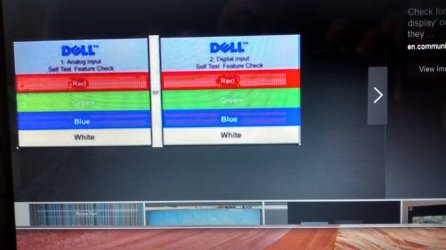
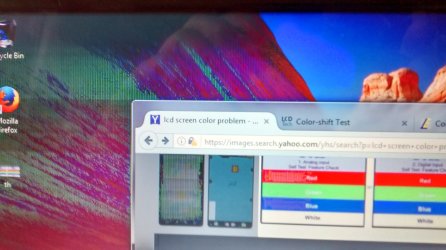
strange problem with LCD display on laptop

ruggb

New member
Member
Local time
10:20 PM
Messages
79
Problem appears to be hardware related. Windows 7 is fully installed and activated. It is an Inspiron N1710
Pressing D and power shows problem on display. Problem is normally hardly visible on the Windows desktop.
1/3 of the left side of the screen is involved. The remainder is perfect. When screen changes abruptly it is very obvious probably because it goes to black before showing next screen.
It is not visible on a white screen. The displayed color changes as a color block is moved from left to right till it crosses the 1/3 point. Black is the most obvious and changed from black to gray to streaking to black to streaking to various shades of gray then abruptly to black at 1/3.
Cyan shows no change at all. Green, red, magenta, and blue are light colors but not just a solid light color. You can see vertical strips.
Moving a windows around will also show smears on the background.

I have reseated the MB connectors and tapped on the screen and the inside back of the screen and screen connector with no change or flashing seen.

Attached are 3 files showing a windows on left & right sides and also of the smearing to the left of the window. You can see where the problem stops on the right picture in the black block at the top left 1/2 way thru. Also in the lft picture in the bottom black strip about 1/5 way thru. Interestingly the edges of the red block are solid red and only strips appear in the center - the right end of that block is outside the affected area.

So can you tell me what the issue is?
 

Attachments
  • right side.jpg
    right side.jpg
    371.9 KB · Views: 1
  • left side.jpg
    left side.jpg
    436.4 KB · Views: 1
  • smearing.jpg
    smearing.jpg
    330.3 KB · Views: 1

My Computer My Computer

OS
windows 7
Hi I would hook up an external monitor to it and see if it shows same thing on the external. if showing same on external then you will know its the graphics chip and not the screen. if ok on external then most likely the laptop screen is faulty.
 

My Computer My Computer

Computer type
PC/Desktop
Computer Manufacturer/Model Number
dell xps 9000
OS
win 10
It may be a driver problem.
Right click on the desktop - screen resolution - set to recommended.
Open device manager - Display adapters - right click - update driver -serach automatically.
 

My Computers My Computers

System One System Two

  • Computer type
    PC/Desktop
    Computer Manufacturer/Model Number
    custom build
    OS
    Windows 7 HP 64
    CPU
    i5 6600K - 800MHz to 4200MHz
    Motherboard
    GA-Z170-HD3P
    Memory
    4+4G GSkill DDR4 3000
    Graphics Card(s)
    IG - Intel 530
    Monitor(s) Displays
    Samsung 226BW
    Screen Resolution
    1680x1050
    Hard Drives
    (1) -1 SM951 – 128GB M.2 AHCI PCIe SSD drive for Windows 7 and Lubuntu
    (2) -1 WD SATA 3 - 1T for Data
    (3) -1 WD SATA 3 - 1T for backup
    PSU
    Thermaltake 450W TR2 gold
    Keyboard
    Old and good Chicony mechanical keyboard
    Mouse
    Logitech mX performance - 9 buttons (had to disable some)
    Internet Speed
    500Mb/s
    Browser
    Firefox 64
    Other Info
    TinyWall firewall
  • Computer type
    Laptop
    System Manufacturer/Model Number
    Asus Q550LF
    OS
    Windows 7 Pro
    CPU
    i7-4500U 800MHz to 3.0GHz
    Motherboard
    Asus Q550LF
    Memory
    (4+4)G DDR3 1600
    Graphics Card(s)
    IG intel 4400 + NVIDIA GeForce GT 745M
    Sound Card
    Realtek
    Monitor(s) Displays
    LG Display LP156WF4-SPH1
    Screen Resolution
    1920 x 1080
    Hard Drives
    BX500 120G SSD for Windows and programs +
    1T HDD for data
    Internet Speed
    500 Mb/s
    Browser
    Firefox
    Other Info
    TinyWall firewall
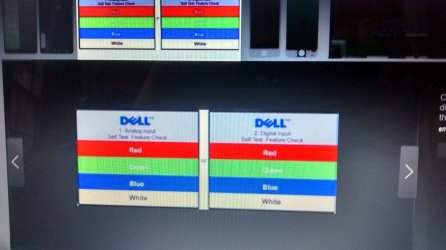
If I go to this page:

en.community.dell.com/.../19458888

the color bars do not change at all. It looks the same on any part of the screen.

ext monitor is fine, so it is the display ...... BUT how can it look fine for something and not others?

if I change the res on the LT it looks ok - same as before but lower 800. If the monitor is connected it fills the screen on the monitor (wide screen) but there is a band on left and right of laptop, left side being maybe 60hz flickering horiz bands of gray/black, right side all black. Looks like a bad capacitor.

But why only when monitor is plugged in?

This problem gets stranger all the time. --- well now the vertical band is only on the left side as described.
 

My Computer My Computer

OS
windows 7
it is an i5 with integrated video, so I used the driver direct from Intel when I reinstalled the OS.
 

My Computer My Computer

OS
windows 7
I would at least try the driver from laptop manufacturer support page
 

My Computer My Computer

Computer type
PC/Desktop
Computer Manufacturer/Model Number
dell xps 9000
OS
win 10
Do you have any yellow alert on device manager?
 

My Computers My Computers

System One System Two

  • Computer type
    PC/Desktop
    Computer Manufacturer/Model Number
    custom build
    OS
    Windows 7 HP 64
    CPU
    i5 6600K - 800MHz to 4200MHz
    Motherboard
    GA-Z170-HD3P
    Memory
    4+4G GSkill DDR4 3000
    Graphics Card(s)
    IG - Intel 530
    Monitor(s) Displays
    Samsung 226BW
    Screen Resolution
    1680x1050
    Hard Drives
    (1) -1 SM951 – 128GB M.2 AHCI PCIe SSD drive for Windows 7 and Lubuntu
    (2) -1 WD SATA 3 - 1T for Data
    (3) -1 WD SATA 3 - 1T for backup
    PSU
    Thermaltake 450W TR2 gold
    Keyboard
    Old and good Chicony mechanical keyboard
    Mouse
    Logitech mX performance - 9 buttons (had to disable some)
    Internet Speed
    500Mb/s
    Browser
    Firefox 64
    Other Info
    TinyWall firewall
  • Computer type
    Laptop
    System Manufacturer/Model Number
    Asus Q550LF
    OS
    Windows 7 Pro
    CPU
    i7-4500U 800MHz to 3.0GHz
    Motherboard
    Asus Q550LF
    Memory
    (4+4)G DDR3 1600
    Graphics Card(s)
    IG intel 4400 + NVIDIA GeForce GT 745M
    Sound Card
    Realtek
    Monitor(s) Displays
    LG Display LP156WF4-SPH1
    Screen Resolution
    1920 x 1080
    Hard Drives
    BX500 120G SSD for Windows and programs +
    1T HDD for data
    Internet Speed
    500 Mb/s
    Browser
    Firefox
    Other Info
    TinyWall firewall
no, all the drivers appear to be happy. B4 I reinstalled the OS, the video driver was from Dell. So the issue is the same. It is likely the display itself, but the problem is so strange I want to find some way to verify it b4 I plunck down $70. for a new LCD.
If it is the display why does the problem show different depending on the background or open windows??? I would think it would show the same defect regardless.
The BIST produces horiz and vertical bars. The horiz bars look pretty much normal. The vert bars show the problem. The "D" with power on screens all show it clearly except the white & gray.
 

My Computer My Computer

OS
windows 7
For what you wrote, I don't think is a hardware issue. I would bet it's a software / config problem.
Wrong resolution, wrong display driver.
Did you look for Dell support Support | Dell US
Add a Service Tag or other product ID
 

My Computers My Computers

System One System Two

  • Computer type
    PC/Desktop
    Computer Manufacturer/Model Number
    custom build
    OS
    Windows 7 HP 64
    CPU
    i5 6600K - 800MHz to 4200MHz
    Motherboard
    GA-Z170-HD3P
    Memory
    4+4G GSkill DDR4 3000
    Graphics Card(s)
    IG - Intel 530
    Monitor(s) Displays
    Samsung 226BW
    Screen Resolution
    1680x1050
    Hard Drives
    (1) -1 SM951 – 128GB M.2 AHCI PCIe SSD drive for Windows 7 and Lubuntu
    (2) -1 WD SATA 3 - 1T for Data
    (3) -1 WD SATA 3 - 1T for backup
    PSU
    Thermaltake 450W TR2 gold
    Keyboard
    Old and good Chicony mechanical keyboard
    Mouse
    Logitech mX performance - 9 buttons (had to disable some)
    Internet Speed
    500Mb/s
    Browser
    Firefox 64
    Other Info
    TinyWall firewall
  • Computer type
    Laptop
    System Manufacturer/Model Number
    Asus Q550LF
    OS
    Windows 7 Pro
    CPU
    i7-4500U 800MHz to 3.0GHz
    Motherboard
    Asus Q550LF
    Memory
    (4+4)G DDR3 1600
    Graphics Card(s)
    IG intel 4400 + NVIDIA GeForce GT 745M
    Sound Card
    Realtek
    Monitor(s) Displays
    LG Display LP156WF4-SPH1
    Screen Resolution
    1920 x 1080
    Hard Drives
    BX500 120G SSD for Windows and programs +
    1T HDD for data
    Internet Speed
    500 Mb/s
    Browser
    Firefox
    Other Info
    TinyWall firewall
I redid the drivers from Dell, so it is probably a display issue but not the display itself. It must be in the display driver board. When I ran the complete diagnostics for the display I get real strange results. The SMPTE test only shows the 2nd box from the left on the bottom with lines and flickering-the rest is perfect. The gray box only shows about 1/4" on the left edge and the bottom&top edge 1/3 from left with a problem. The rest of the screen is perfect. Solid colors clearly show the left 1/3 with a problem except for cyan and black just shows a slightly different black in that area. In Geometry, the left 1/3 of each line has another gray line below it about 3x as wide (about 1/8 inch) and the black boxes are as the black screen on that side.
 

My Computer My Computer

OS
windows 7
I would try reseating cable for screen connected to motherboard. Me personally do not think it is software issue as external monitor is working good
 

My Computer My Computer

Computer type
PC/Desktop
Computer Manufacturer/Model Number
dell xps 9000
OS
win 10

My Computers My Computers

System One System Two

  • Computer type
    PC/Desktop
    Computer Manufacturer/Model Number
    custom build
    OS
    Windows 7 HP 64
    CPU
    i5 6600K - 800MHz to 4200MHz
    Motherboard
    GA-Z170-HD3P
    Memory
    4+4G GSkill DDR4 3000
    Graphics Card(s)
    IG - Intel 530
    Monitor(s) Displays
    Samsung 226BW
    Screen Resolution
    1680x1050
    Hard Drives
    (1) -1 SM951 – 128GB M.2 AHCI PCIe SSD drive for Windows 7 and Lubuntu
    (2) -1 WD SATA 3 - 1T for Data
    (3) -1 WD SATA 3 - 1T for backup
    PSU
    Thermaltake 450W TR2 gold
    Keyboard
    Old and good Chicony mechanical keyboard
    Mouse
    Logitech mX performance - 9 buttons (had to disable some)
    Internet Speed
    500Mb/s
    Browser
    Firefox 64
    Other Info
    TinyWall firewall
  • Computer type
    Laptop
    System Manufacturer/Model Number
    Asus Q550LF
    OS
    Windows 7 Pro
    CPU
    i7-4500U 800MHz to 3.0GHz
    Motherboard
    Asus Q550LF
    Memory
    (4+4)G DDR3 1600
    Graphics Card(s)
    IG intel 4400 + NVIDIA GeForce GT 745M
    Sound Card
    Realtek
    Monitor(s) Displays
    LG Display LP156WF4-SPH1
    Screen Resolution
    1920 x 1080
    Hard Drives
    BX500 120G SSD for Windows and programs +
    1T HDD for data
    Internet Speed
    500 Mb/s
    Browser
    Firefox
    Other Info
    TinyWall firewall
oscer1
thanks -- done that already. Have not taken the display back off but I tapped around in there and saw no changes. Pointing to a h/w issue with the electronics on the back of the display. It almost looks like there is 2 layers being displayed and the top layer looks fine. If only one layer is displayed, it is bad. If there is a hole in the top layer you can see the bottom one and you see a problem. Very strange.
MegaHertZ7
tried that also. problem exhibits the same. Linux screen is perfect as is windows screen, but problem appears as it does in Windows. - like on lower layer.
 

My Computer My Computer

OS
windows 7
Back
Top