Strange USB Drive Showing in Device Manager

Boozad

Better Call Saul
VIP
SF Team
Local time
11:27 PM
Messages
6,633
Location
Wolverhampton, England
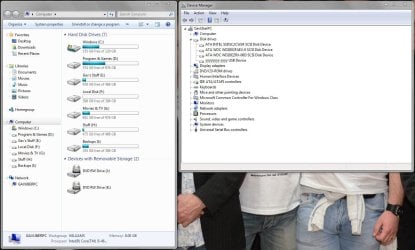
I was just farting around earlier doing a bit of maintenance and the usual checks when I expanded Disk drives in Device Manager. My SSD, Caviar Black, Caviar Green and Hitachi USB external drive all showed up fine, but I also have a weird 'ghost' drive showing up in there too which has a very strange name.
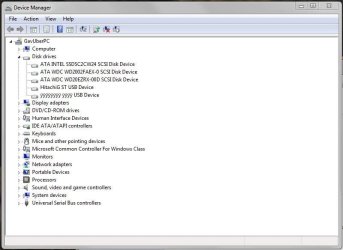
Capture.JPG

I have no other storage device attached via USB at all for definite, and the only thing I can think of is whether this is a leftover from when I tried to apply ASUS USB 3.0 Boost to a Kingston Data Traveler while trying to get USB 3.0 speeds out of my front ports (which didn't work). That may or may not be the case, and I've no idea how long that weird drive has been showing up as I haven't checked the Disk drives expanded for a while, I was just wondering if anybody had any idea as to what could have caused that to be showing up?
 

My Computer My Computer

At a glance

W7 Pro x64 SP1 | W10 Pro IP x64 | W8.1 Pro x6...i7-4790k @ 4GHz (4.4GHz Boost)16GB DDR3 Kingston HyperX Fury @ 1600MHz CL 9...EVGA GTX 980 Classified
Computer type
PC/Desktop
Computer Manufacturer/Model Number
Custom Build
OS
W7 Pro x64 SP1 | W10 Pro IP x64 | W8.1 Pro x64 VM | Linux Mint VM
CPU
i7-4790k @ 4GHz (4.4GHz Boost)
Motherboard
ASUS Sabertooth Z87 (BIOS Rev 2004)
Memory
16GB DDR3 Kingston HyperX Fury @ 1600MHz CL 9-9-9-27
Graphics Card(s)
EVGA GTX 980 Classified
Sound Card
Realtek Onboard
Monitor(s) Displays
Samsung S27D390
Screen Resolution
1920 x 1080
Hard Drives
240GB Intel 520 Series SSD |
Samsung 850 EVO 120GB SSD |
2TB WD Caviar Black |
2TB WD Caviar Green
PSU
Corsair HX850-80 Gold Modular
Case
Cooler Master Silencio 650
Cooling
Corsair H80i w/2 x Corsair SP120 | 2 x 120mm Noctua NF-S12B
Keyboard
Microsoft Sidewinder X4
Mouse
Gigabyte M6900 optical
Internet Speed
152mb
Antivirus
F-Secure
Browser
Firefox 38.0
Other Info
Backup Rig: Win 7 Pro 64-bit | AMD A10-5800k | ASUS F2A85-V Pro | 8GB Samsung DDR3 @1600MHz | 120GB Toshiba SDD | 2TB Seagate HDD | Cooler Master Silencio 550
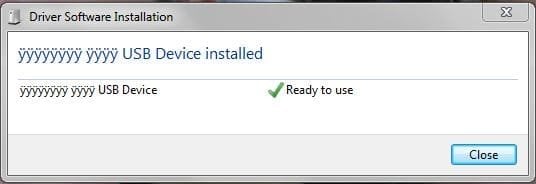
I decided to uninstall the drive as it couldn't be real, so I made a Restore Point and uninstalled it through Device Manager. I rebooted and Windows installed the weird drive again.

Capture.JPG

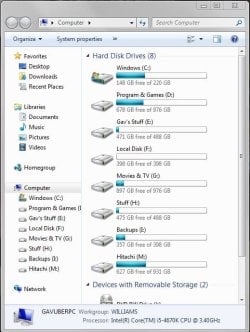
Now I'm really confused. I can account for every USB peripheral that's plugged into the rig and they're all accounted for in Device Manager too. Opening Computer doesn't show an extra drive either. This is going to bug me until I get to the bottom of it.

Capture 2.JPG
 

My Computer My Computer

At a glance

W7 Pro x64 SP1 | W10 Pro IP x64 | W8.1 Pro x6...i7-4790k @ 4GHz (4.4GHz Boost)16GB DDR3 Kingston HyperX Fury @ 1600MHz CL 9...EVGA GTX 980 Classified
Computer type
PC/Desktop
Computer Manufacturer/Model Number
Custom Build
OS
W7 Pro x64 SP1 | W10 Pro IP x64 | W8.1 Pro x64 VM | Linux Mint VM
CPU
i7-4790k @ 4GHz (4.4GHz Boost)
Motherboard
ASUS Sabertooth Z87 (BIOS Rev 2004)
Memory
16GB DDR3 Kingston HyperX Fury @ 1600MHz CL 9-9-9-27
Graphics Card(s)
EVGA GTX 980 Classified
Sound Card
Realtek Onboard
Monitor(s) Displays
Samsung S27D390
Screen Resolution
1920 x 1080
Hard Drives
240GB Intel 520 Series SSD |
Samsung 850 EVO 120GB SSD |
2TB WD Caviar Black |
2TB WD Caviar Green
PSU
Corsair HX850-80 Gold Modular
Case
Cooler Master Silencio 650
Cooling
Corsair H80i w/2 x Corsair SP120 | 2 x 120mm Noctua NF-S12B
Keyboard
Microsoft Sidewinder X4
Mouse
Gigabyte M6900 optical
Internet Speed
152mb
Antivirus
F-Secure
Browser
Firefox 38.0
Other Info
Backup Rig: Win 7 Pro 64-bit | AMD A10-5800k | ASUS F2A85-V Pro | 8GB Samsung DDR3 @1600MHz | 120GB Toshiba SDD | 2TB Seagate HDD | Cooler Master Silencio 550
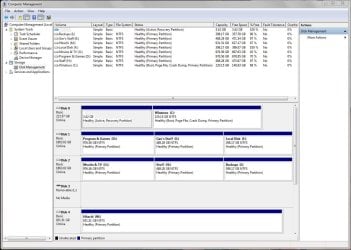
The drive also shows up as Disk 3 in disk management. Now I'm pretty sure it's to do with one of my USB sticks, but how it's showing up when the drive isn't even plugged in is beyond me.

Capture 3.JPG
 

My Computer My Computer

At a glance

W7 Pro x64 SP1 | W10 Pro IP x64 | W8.1 Pro x6...i7-4790k @ 4GHz (4.4GHz Boost)16GB DDR3 Kingston HyperX Fury @ 1600MHz CL 9...EVGA GTX 980 Classified
Computer type
PC/Desktop
Computer Manufacturer/Model Number
Custom Build
OS
W7 Pro x64 SP1 | W10 Pro IP x64 | W8.1 Pro x64 VM | Linux Mint VM
CPU
i7-4790k @ 4GHz (4.4GHz Boost)
Motherboard
ASUS Sabertooth Z87 (BIOS Rev 2004)
Memory
16GB DDR3 Kingston HyperX Fury @ 1600MHz CL 9-9-9-27
Graphics Card(s)
EVGA GTX 980 Classified
Sound Card
Realtek Onboard
Monitor(s) Displays
Samsung S27D390
Screen Resolution
1920 x 1080
Hard Drives
240GB Intel 520 Series SSD |
Samsung 850 EVO 120GB SSD |
2TB WD Caviar Black |
2TB WD Caviar Green
PSU
Corsair HX850-80 Gold Modular
Case
Cooler Master Silencio 650
Cooling
Corsair H80i w/2 x Corsair SP120 | 2 x 120mm Noctua NF-S12B
Keyboard
Microsoft Sidewinder X4
Mouse
Gigabyte M6900 optical
Internet Speed
152mb
Antivirus
F-Secure
Browser
Firefox 38.0
Other Info
Backup Rig: Win 7 Pro 64-bit | AMD A10-5800k | ASUS F2A85-V Pro | 8GB Samsung DDR3 @1600MHz | 120GB Toshiba SDD | 2TB Seagate HDD | Cooler Master Silencio 550
Hi there ... Have seen this before some USB sticks show up as Drives .. Nothing can be done about that .. How ever when its not plugged in that is a different matter
 

My Computer My Computer

At a glance

windows 7 home 64bitINTEL-CORE I716GB
Computer Manufacturer/Model Number
W530-3630QM1
OS
windows 7 home 64bit
CPU
INTEL-CORE I7
Memory
16GB
Hard Drives
750GB
Browser
Chrome
I'm pretty sure this will have happened when I was messing around trying to get my front USB 3.0 ports working at 3.0 speeds. I wonder if I uninstall my eXtensible Host Controller it will stop seeing the drive?
 

My Computer My Computer

At a glance

W7 Pro x64 SP1 | W10 Pro IP x64 | W8.1 Pro x6...i7-4790k @ 4GHz (4.4GHz Boost)16GB DDR3 Kingston HyperX Fury @ 1600MHz CL 9...EVGA GTX 980 Classified
Computer type
PC/Desktop
Computer Manufacturer/Model Number
Custom Build
OS
W7 Pro x64 SP1 | W10 Pro IP x64 | W8.1 Pro x64 VM | Linux Mint VM
CPU
i7-4790k @ 4GHz (4.4GHz Boost)
Motherboard
ASUS Sabertooth Z87 (BIOS Rev 2004)
Memory
16GB DDR3 Kingston HyperX Fury @ 1600MHz CL 9-9-9-27
Graphics Card(s)
EVGA GTX 980 Classified
Sound Card
Realtek Onboard
Monitor(s) Displays
Samsung S27D390
Screen Resolution
1920 x 1080
Hard Drives
240GB Intel 520 Series SSD |
Samsung 850 EVO 120GB SSD |
2TB WD Caviar Black |
2TB WD Caviar Green
PSU
Corsair HX850-80 Gold Modular
Case
Cooler Master Silencio 650
Cooling
Corsair H80i w/2 x Corsair SP120 | 2 x 120mm Noctua NF-S12B
Keyboard
Microsoft Sidewinder X4
Mouse
Gigabyte M6900 optical
Internet Speed
152mb
Antivirus
F-Secure
Browser
Firefox 38.0
Other Info
Backup Rig: Win 7 Pro 64-bit | AMD A10-5800k | ASUS F2A85-V Pro | 8GB Samsung DDR3 @1600MHz | 120GB Toshiba SDD | 2TB Seagate HDD | Cooler Master Silencio 550
Cannot say for sure mate .. I guess its worth a try though
 

My Computer My Computer

At a glance

windows 7 home 64bitINTEL-CORE I716GB
Computer Manufacturer/Model Number
W530-3630QM1
OS
windows 7 home 64bit
CPU
INTEL-CORE I7
Memory
16GB
Hard Drives
750GB
Browser
Chrome

My Computer My Computer

At a glance

Windows 7 Home Premium 32 bit
OS
Windows 7 Home Premium 32 bit
Thanks Jumanji, I'll give that a try later. There are just a couple of things I want to try first that I think may have caused the issue on the first place.
 

My Computer My Computer

At a glance

W7 Pro x64 SP1 | W10 Pro IP x64 | W8.1 Pro x6...i7-4790k @ 4GHz (4.4GHz Boost)16GB DDR3 Kingston HyperX Fury @ 1600MHz CL 9...EVGA GTX 980 Classified
Computer type
PC/Desktop
Computer Manufacturer/Model Number
Custom Build
OS
W7 Pro x64 SP1 | W10 Pro IP x64 | W8.1 Pro x64 VM | Linux Mint VM
CPU
i7-4790k @ 4GHz (4.4GHz Boost)
Motherboard
ASUS Sabertooth Z87 (BIOS Rev 2004)
Memory
16GB DDR3 Kingston HyperX Fury @ 1600MHz CL 9-9-9-27
Graphics Card(s)
EVGA GTX 980 Classified
Sound Card
Realtek Onboard
Monitor(s) Displays
Samsung S27D390
Screen Resolution
1920 x 1080
Hard Drives
240GB Intel 520 Series SSD |
Samsung 850 EVO 120GB SSD |
2TB WD Caviar Black |
2TB WD Caviar Green
PSU
Corsair HX850-80 Gold Modular
Case
Cooler Master Silencio 650
Cooling
Corsair H80i w/2 x Corsair SP120 | 2 x 120mm Noctua NF-S12B
Keyboard
Microsoft Sidewinder X4
Mouse
Gigabyte M6900 optical
Internet Speed
152mb
Antivirus
F-Secure
Browser
Firefox 38.0
Other Info
Backup Rig: Win 7 Pro 64-bit | AMD A10-5800k | ASUS F2A85-V Pro | 8GB Samsung DDR3 @1600MHz | 120GB Toshiba SDD | 2TB Seagate HDD | Cooler Master Silencio 550
Right, I've looked at both suggestions (thanks Jumanji and Maxie) but neither solved the problem. RemoveDisk didn't find anything to be removed and the drive isn't showing up in Explorer as a Local Disk.

I've looked into ASUS USB 3.0 Boost (turned it off in Task Scheduler) and even tried uninstalling the drive through Device Manager with both of my Data Travelers plugged into my front USB ports then removing them but it still remains.
I've plugged my Touro Mobile into my front USB 3.0 ports and everything worked fine (the last time I plugged it in there it said the disk needed formatting which I obviously didn't do as it's my backup disk).

My Data Travelers don't open Autoplay when I insert them and don't show in Windows Explorer either, but I can Safely Remove (labelled ASUS BOT) them so that's a bit weird but I'm no longer convinced they're anything to do with the non-existant drive.
I will persevere but this one really has fried my grey matter.
 

My Computer My Computer

At a glance

W7 Pro x64 SP1 | W10 Pro IP x64 | W8.1 Pro x6...i7-4790k @ 4GHz (4.4GHz Boost)16GB DDR3 Kingston HyperX Fury @ 1600MHz CL 9...EVGA GTX 980 Classified
Computer type
PC/Desktop
Computer Manufacturer/Model Number
Custom Build
OS
W7 Pro x64 SP1 | W10 Pro IP x64 | W8.1 Pro x64 VM | Linux Mint VM
CPU
i7-4790k @ 4GHz (4.4GHz Boost)
Motherboard
ASUS Sabertooth Z87 (BIOS Rev 2004)
Memory
16GB DDR3 Kingston HyperX Fury @ 1600MHz CL 9-9-9-27
Graphics Card(s)
EVGA GTX 980 Classified
Sound Card
Realtek Onboard
Monitor(s) Displays
Samsung S27D390
Screen Resolution
1920 x 1080
Hard Drives
240GB Intel 520 Series SSD |
Samsung 850 EVO 120GB SSD |
2TB WD Caviar Black |
2TB WD Caviar Green
PSU
Corsair HX850-80 Gold Modular
Case
Cooler Master Silencio 650
Cooling
Corsair H80i w/2 x Corsair SP120 | 2 x 120mm Noctua NF-S12B
Keyboard
Microsoft Sidewinder X4
Mouse
Gigabyte M6900 optical
Internet Speed
152mb
Antivirus
F-Secure
Browser
Firefox 38.0
Other Info
Backup Rig: Win 7 Pro 64-bit | AMD A10-5800k | ASUS F2A85-V Pro | 8GB Samsung DDR3 @1600MHz | 120GB Toshiba SDD | 2TB Seagate HDD | Cooler Master Silencio 550
Gandalf; said:
Boozad - suggest you first try deleting the questionable items and rebooting.
Maybe Microsoft will fix them on reboot.

If not, please remove any Flash Drive and reboot.
Post another Device Manager image without the Flash Drive connected.

Thanks

Hi Gandalf, I've tried deleting the strangely named drive but Windows just reinstalls it upon rebooting. I'm not even sure when the Windows Portable Device appeared and I haven't tried uninstalling that yet. As mentioned previously in the thread I'm pretty sure this all initiated when I tried to apply USB3.0 Boost to one of my Kingston Data Travellers, and any time I plug a USB stick into my front ports now they are assigned the L: path.

Just as a note there were no flash drives attached to the rig when that screenshot in Layback's thread was taken, only my Hitachi Touro Mobile external HDD which is accounted for as drive H:.
 

My Computer My Computer

At a glance

W7 Pro x64 SP1 | W10 Pro IP x64 | W8.1 Pro x6...i7-4790k @ 4GHz (4.4GHz Boost)16GB DDR3 Kingston HyperX Fury @ 1600MHz CL 9...EVGA GTX 980 Classified
Computer type
PC/Desktop
Computer Manufacturer/Model Number
Custom Build
OS
W7 Pro x64 SP1 | W10 Pro IP x64 | W8.1 Pro x64 VM | Linux Mint VM
CPU
i7-4790k @ 4GHz (4.4GHz Boost)
Motherboard
ASUS Sabertooth Z87 (BIOS Rev 2004)
Memory
16GB DDR3 Kingston HyperX Fury @ 1600MHz CL 9-9-9-27
Graphics Card(s)
EVGA GTX 980 Classified
Sound Card
Realtek Onboard
Monitor(s) Displays
Samsung S27D390
Screen Resolution
1920 x 1080
Hard Drives
240GB Intel 520 Series SSD |
Samsung 850 EVO 120GB SSD |
2TB WD Caviar Black |
2TB WD Caviar Green
PSU
Corsair HX850-80 Gold Modular
Case
Cooler Master Silencio 650
Cooling
Corsair H80i w/2 x Corsair SP120 | 2 x 120mm Noctua NF-S12B
Keyboard
Microsoft Sidewinder X4
Mouse
Gigabyte M6900 optical
Internet Speed
152mb
Antivirus
F-Secure
Browser
Firefox 38.0
Other Info
Backup Rig: Win 7 Pro 64-bit | AMD A10-5800k | ASUS F2A85-V Pro | 8GB Samsung DDR3 @1600MHz | 120GB Toshiba SDD | 2TB Seagate HDD | Cooler Master Silencio 550
Please post a fresh image of your Device Manager, so we don't have to jump back and forth between threads.
Suggest removing all USB devices before posting the Device Manager.

Thanks
 

My Computer My Computer

At a glance

Microsoft Windows 7 Ultimate 64-bit 7601 Mult...Intel(R) Core(TM) i7 CPU 950 @ 3.07GHz16.0GB Dual-Channel DDR3 @ 534MHz (8-8-8-20)1023MB NVIDIA GeForce GTX 650 (EVGA)
Computer type
PC/Desktop
Computer Manufacturer/Model Number
Custome Built
OS
Microsoft Windows 7 Ultimate 64-bit 7601 Multiprocessor Free Service Pack 1
CPU
Intel(R) Core(TM) i7 CPU 950 @ 3.07GHz
Motherboard
ASUSTeK Computer INC. SABERTOOTH X58 (LGA1366)
Memory
16.0GB Dual-Channel DDR3 @ 534MHz (8-8-8-20)
Graphics Card(s)
1023MB NVIDIA GeForce GTX 650 (EVGA)
Sound Card
(1) NVIDIA High Definition Audio (2) High Definition Audio
Monitor(s) Displays
HP W2072a LED Backlit
Screen Resolution
1920x1080@60Hz
Hard Drives
(1) SAMSUNG MMCRE28G5MXP-0VB SCSI Disk Device
(2) ST1000DM 003-1CH162 SCSI Disk Device
(3) WDC WD10EURX-73FH1Y0 SCSI Disk Device
PSU
XION XON-1000P14F
Cooling
Fans
Antivirus
Windows Security Essentials
Browser
Mozilla Firefox
Other Info
BIOS Version/Date
American Megatrends Inc. 1402, 8/9/2012
SMBIOS Version 2.5
occasionally the hub thats part of my keyboard (usb pass through thingy) shows up as a drive that cannot be accessed by me so basically a ghost drive.

it normally disappears if I flick the keyboard profile switch back and forth lol
 

My Computer My Computer

At a glance

Windows 7 Ultimate x64, & Mac OS X 10.9.2Intel Core i5 2500kCorsair Vengence 8gb 1866mhzNvidia GTX 770 OC
Computer type
PC/Desktop
Computer Manufacturer/Model Number
Built by badgers!!!
OS
Windows 7 Ultimate x64, & Mac OS X 10.9.2
CPU
Intel Core i5 2500k
Motherboard
Asus P8z68 LE
Memory
Corsair Vengence 8gb 1866mhz
Graphics Card(s)
Nvidia GTX 770 OC
Monitor(s) Displays
2x ASUS LED 22" IPS
Screen Resolution
3840x1080
Hard Drives
240GB Crucial M500 SSD
120gb Corsair Force 3 SSD
1TB Western Digital
PSU
Corsair HX650w Modular
Case
Corsair Air 540
Cooling
Corsair H60 Push/Pull
Keyboard
Corsair K70/ Logitech G27 wheel
Mouse
Saitek R.A.T 9
Internet Speed
Too slow!
Other Info
AMD fusion E350N Home server-Windows Home Server 2011 (also made by badgers!)
2011 Macbook 2.4ghz Core2Duo, 4gb ddr3, 120gb Ocz Vertex SSD
Badger - I have a VAKOSS USB 2.0.7-PortHUB and when connected my Device Manager doesn't show any devices like are the issues here.

Recommend doing a Microsoft Update while the HUB is connected. You might need a driver or two.
 

My Computer My Computer

At a glance

Microsoft Windows 7 Ultimate 64-bit 7601 Mult...Intel(R) Core(TM) i7 CPU 950 @ 3.07GHz16.0GB Dual-Channel DDR3 @ 534MHz (8-8-8-20)1023MB NVIDIA GeForce GTX 650 (EVGA)
Computer type
PC/Desktop
Computer Manufacturer/Model Number
Custome Built
OS
Microsoft Windows 7 Ultimate 64-bit 7601 Multiprocessor Free Service Pack 1
CPU
Intel(R) Core(TM) i7 CPU 950 @ 3.07GHz
Motherboard
ASUSTeK Computer INC. SABERTOOTH X58 (LGA1366)
Memory
16.0GB Dual-Channel DDR3 @ 534MHz (8-8-8-20)
Graphics Card(s)
1023MB NVIDIA GeForce GTX 650 (EVGA)
Sound Card
(1) NVIDIA High Definition Audio (2) High Definition Audio
Monitor(s) Displays
HP W2072a LED Backlit
Screen Resolution
1920x1080@60Hz
Hard Drives
(1) SAMSUNG MMCRE28G5MXP-0VB SCSI Disk Device
(2) ST1000DM 003-1CH162 SCSI Disk Device
(3) WDC WD10EURX-73FH1Y0 SCSI Disk Device
PSU
XION XON-1000P14F
Cooling
Fans
Antivirus
Windows Security Essentials
Browser
Mozilla Firefox
Other Info
BIOS Version/Date
American Megatrends Inc. 1402, 8/9/2012
SMBIOS Version 2.5
yeah I understand :) I was just saying its a quirky thing that happens to me with my specific keyboard.
I have hubs that dont do this, just my keyboard.

maybe my keyboards inbuilt usb hub has a very small amount of readable and writeable memory as part of the multi bios setup my keyboard has.. that small amount of memory for all intense purposes could be seen by Windows in some rare instances say just after unblugging a device as a storage device.
 

My Computer My Computer

At a glance

Windows 7 Ultimate x64, & Mac OS X 10.9.2Intel Core i5 2500kCorsair Vengence 8gb 1866mhzNvidia GTX 770 OC
Computer type
PC/Desktop
Computer Manufacturer/Model Number
Built by badgers!!!
OS
Windows 7 Ultimate x64, & Mac OS X 10.9.2
CPU
Intel Core i5 2500k
Motherboard
Asus P8z68 LE
Memory
Corsair Vengence 8gb 1866mhz
Graphics Card(s)
Nvidia GTX 770 OC
Monitor(s) Displays
2x ASUS LED 22" IPS
Screen Resolution
3840x1080
Hard Drives
240GB Crucial M500 SSD
120gb Corsair Force 3 SSD
1TB Western Digital
PSU
Corsair HX650w Modular
Case
Corsair Air 540
Cooling
Corsair H60 Push/Pull
Keyboard
Corsair K70/ Logitech G27 wheel
Mouse
Saitek R.A.T 9
Internet Speed
Too slow!
Other Info
AMD fusion E350N Home server-Windows Home Server 2011 (also made by badgers!)
2011 Macbook 2.4ghz Core2Duo, 4gb ddr3, 120gb Ocz Vertex SSD
Understood badger. If it is just the one off HUB, recommend replacing the HUB. If it is just the one off keyboard, the turn the keyboard into a boat anchor. ;)
 

My Computer My Computer

At a glance

Microsoft Windows 7 Ultimate 64-bit 7601 Mult...Intel(R) Core(TM) i7 CPU 950 @ 3.07GHz16.0GB Dual-Channel DDR3 @ 534MHz (8-8-8-20)1023MB NVIDIA GeForce GTX 650 (EVGA)
Computer type
PC/Desktop
Computer Manufacturer/Model Number
Custome Built
OS
Microsoft Windows 7 Ultimate 64-bit 7601 Multiprocessor Free Service Pack 1
CPU
Intel(R) Core(TM) i7 CPU 950 @ 3.07GHz
Motherboard
ASUSTeK Computer INC. SABERTOOTH X58 (LGA1366)
Memory
16.0GB Dual-Channel DDR3 @ 534MHz (8-8-8-20)
Graphics Card(s)
1023MB NVIDIA GeForce GTX 650 (EVGA)
Sound Card
(1) NVIDIA High Definition Audio (2) High Definition Audio
Monitor(s) Displays
HP W2072a LED Backlit
Screen Resolution
1920x1080@60Hz
Hard Drives
(1) SAMSUNG MMCRE28G5MXP-0VB SCSI Disk Device
(2) ST1000DM 003-1CH162 SCSI Disk Device
(3) WDC WD10EURX-73FH1Y0 SCSI Disk Device
PSU
XION XON-1000P14F
Cooling
Fans
Antivirus
Windows Security Essentials
Browser
Mozilla Firefox
Other Info
BIOS Version/Date
American Megatrends Inc. 1402, 8/9/2012
SMBIOS Version 2.5
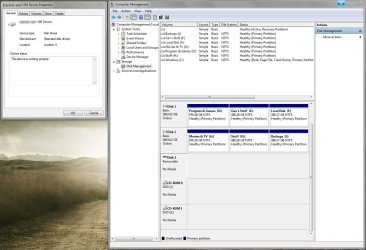
Right, here's a fresh screenshot of Device Manager and my drives with my Hitachi external drive removed, the only USB components left connected are my mouse and keyboard. As you can see in Device Manager the weird drive is still there, although the Windows Portable Device has disappeared as I uninstalled it. I'll check on a reboot whether that reinstalls itself and report back shortly.
Also the drive is still showing in Disk Management as Drive 3, I've included the screenshot of that with the Properties tab for it open on the left.

It's worth noting that none of this is affecting my system performance and is more an annoyance not being able to find out what they are than a problem of any kind.

Capture.JPG

Capture 2.JPG
 

My Computer My Computer

At a glance

W7 Pro x64 SP1 | W10 Pro IP x64 | W8.1 Pro x6...i7-4790k @ 4GHz (4.4GHz Boost)16GB DDR3 Kingston HyperX Fury @ 1600MHz CL 9...EVGA GTX 980 Classified
Computer type
PC/Desktop
Computer Manufacturer/Model Number
Custom Build
OS
W7 Pro x64 SP1 | W10 Pro IP x64 | W8.1 Pro x64 VM | Linux Mint VM
CPU
i7-4790k @ 4GHz (4.4GHz Boost)
Motherboard
ASUS Sabertooth Z87 (BIOS Rev 2004)
Memory
16GB DDR3 Kingston HyperX Fury @ 1600MHz CL 9-9-9-27
Graphics Card(s)
EVGA GTX 980 Classified
Sound Card
Realtek Onboard
Monitor(s) Displays
Samsung S27D390
Screen Resolution
1920 x 1080
Hard Drives
240GB Intel 520 Series SSD |
Samsung 850 EVO 120GB SSD |
2TB WD Caviar Black |
2TB WD Caviar Green
PSU
Corsair HX850-80 Gold Modular
Case
Cooler Master Silencio 650
Cooling
Corsair H80i w/2 x Corsair SP120 | 2 x 120mm Noctua NF-S12B
Keyboard
Microsoft Sidewinder X4
Mouse
Gigabyte M6900 optical
Internet Speed
152mb
Antivirus
F-Secure
Browser
Firefox 38.0
Other Info
Backup Rig: Win 7 Pro 64-bit | AMD A10-5800k | ASUS F2A85-V Pro | 8GB Samsung DDR3 @1600MHz | 120GB Toshiba SDD | 2TB Seagate HDD | Cooler Master Silencio 550
Tool Tip: Use DevManager to view devices by connection (see how they connect to one another)
Open DevMgr. Click View->Devices by connection. Expand the ACPI device. Now, expand the 2nd ACPI child device you see. Next, expand the PCI bus.
> Can you find the device(s) in question? How are they connected? Post a screen shot

Also, Run 32- or 64- bit version of DevManView depending on if you run a 32 or 64 bit Windows OS. In DevManView, click Options
> select Show Non-Plug and Play Drivers
> Select Show Header Line
Now click Ctl-A to select all, Ctl-S to save. BEFORE saving you MUST change the file Save As type pull down menu (towards bottom of the window) to: Tab Delimited Text. Save the file and upload to your next post

/* EDIT */
Let the snapshot capture the parent/child relationship of your mystery device back up to it reaches the PCI bus (and/ or any other type of bus enumerator it may be connected to)
 

My Computer My Computer

At a glance

Desk 1: Win 7 Pro x32; Desk 2: Windows 10 x64
Computer type
PC/Desktop
Computer Manufacturer/Model Number
Dell Optiplex 360 and Optiplex 755
OS
Desk 1: Win 7 Pro x32; Desk 2: Windows 10 x64
Hard Drives
500GB Crucial SSD in both Desktops
Other Info
Buffalo 6TB NAS, Raid 1
Thanks for the data. It really helps.
An item in interest is the Computer Management top item. It has no name.
Can you enter a name and see if it effects the USB Device.
It shouldn't, but it looks different without one. :)

Since you have removed all USB devices, I'm a little confused.
One thing I am thinking, what about a printer? They some time have a Disk capability to them.
Do you have a printer connect? If so what is its Make/Model?
 

My Computer My Computer

At a glance

Microsoft Windows 7 Ultimate 64-bit 7601 Mult...Intel(R) Core(TM) i7 CPU 950 @ 3.07GHz16.0GB Dual-Channel DDR3 @ 534MHz (8-8-8-20)1023MB NVIDIA GeForce GTX 650 (EVGA)
Computer type
PC/Desktop
Computer Manufacturer/Model Number
Custome Built
OS
Microsoft Windows 7 Ultimate 64-bit 7601 Multiprocessor Free Service Pack 1
CPU
Intel(R) Core(TM) i7 CPU 950 @ 3.07GHz
Motherboard
ASUSTeK Computer INC. SABERTOOTH X58 (LGA1366)
Memory
16.0GB Dual-Channel DDR3 @ 534MHz (8-8-8-20)
Graphics Card(s)
1023MB NVIDIA GeForce GTX 650 (EVGA)
Sound Card
(1) NVIDIA High Definition Audio (2) High Definition Audio
Monitor(s) Displays
HP W2072a LED Backlit
Screen Resolution
1920x1080@60Hz
Hard Drives
(1) SAMSUNG MMCRE28G5MXP-0VB SCSI Disk Device
(2) ST1000DM 003-1CH162 SCSI Disk Device
(3) WDC WD10EURX-73FH1Y0 SCSI Disk Device
PSU
XION XON-1000P14F
Cooling
Fans
Antivirus
Windows Security Essentials
Browser
Mozilla Firefox
Other Info
BIOS Version/Date
American Megatrends Inc. 1402, 8/9/2012
SMBIOS Version 2.5
Tool Tip: Use DevManager to view devices by connection (see how they connect to one another)
Open DevMgr. Click View->Devices by connection. Expand the ACPI device. Now, expand the 2nd ACPI child device you see. Next, expand the PCI bus.
> Can you find the device(s) in question? How are they connected? Post a screen shot

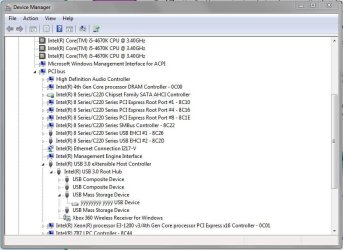
Right, here's the drive showing as connected.

Capture Device Manager 1.JPG

Also, Run 32- or 64- bit version of DevManView depending on if you run a 32 or 64 bit Windows OS. In DevManView, click Options
> select Show Non-Plug and Play Drivers
> Select Show Header Line
Now click Ctl-A to select all, Ctl-S to save. BEFORE saving you MUST change the file Save As type pull down menu (towards bottom of the window) to: Tab Delimited Text. Save the file and upload to your next post

/* EDIT */
Let the snapshot capture the parent/child relationship of your mystery device back up to it reaches the PCI bus (and/ or any other type of bus enumerator it may be connected to)

I've included the file below. Having looked at DevManView's report it has confirmed that the WPD that was showing up was indeed a Kingston flash drive (the one I mentioned earlier), it also shows up as drive L: which is the drive letter assigned to the weird drive. So it does indeed appear that all of this is a result of me toying around with applying ASUS' AI Suite III's USB3.0 Boost feature to a flash drive that was attached at the time.

I'm still baffled as to why these still show as connected when the drive isn't actually plugged in though. I have a couple of workarounds in mind that I'll have to try.

DevManView Screen 1.JPG

DevManView Screen 2.JPG

View attachment DevManView Screenshot.txt
 

My Computer My Computer

At a glance

W7 Pro x64 SP1 | W10 Pro IP x64 | W8.1 Pro x6...i7-4790k @ 4GHz (4.4GHz Boost)16GB DDR3 Kingston HyperX Fury @ 1600MHz CL 9...EVGA GTX 980 Classified
Computer type
PC/Desktop
Computer Manufacturer/Model Number
Custom Build
OS
W7 Pro x64 SP1 | W10 Pro IP x64 | W8.1 Pro x64 VM | Linux Mint VM
CPU
i7-4790k @ 4GHz (4.4GHz Boost)
Motherboard
ASUS Sabertooth Z87 (BIOS Rev 2004)
Memory
16GB DDR3 Kingston HyperX Fury @ 1600MHz CL 9-9-9-27
Graphics Card(s)
EVGA GTX 980 Classified
Sound Card
Realtek Onboard
Monitor(s) Displays
Samsung S27D390
Screen Resolution
1920 x 1080
Hard Drives
240GB Intel 520 Series SSD |
Samsung 850 EVO 120GB SSD |
2TB WD Caviar Black |
2TB WD Caviar Green
PSU
Corsair HX850-80 Gold Modular
Case
Cooler Master Silencio 650
Cooling
Corsair H80i w/2 x Corsair SP120 | 2 x 120mm Noctua NF-S12B
Keyboard
Microsoft Sidewinder X4
Mouse
Gigabyte M6900 optical
Internet Speed
152mb
Antivirus
F-Secure
Browser
Firefox 38.0
Other Info
Backup Rig: Win 7 Pro 64-bit | AMD A10-5800k | ASUS F2A85-V Pro | 8GB Samsung DDR3 @1600MHz | 120GB Toshiba SDD | 2TB Seagate HDD | Cooler Master Silencio 550
Back
Top