Stuck at "setup is starting services"

Shizalpop

New member
Local time
10:54 PM
Messages
3
Hello all, and thanks in advance for helping.
About 2-3 weeks ago i purchased a toshiba satellite L500D laptop, all went smoothly through the setup etc, and it was running fine untill, a couple of days ago i turned it on and whilst starting up a screen came up saying "setup is starting services" after a couple of minutes it was still on this screen so i left it running thinking it would start eventually, but when about 9-10 hours later it was still on this screen i decided to turn it off and retry. But now everytime i try and start it up it goes to that same screen, and then a little box pops up saying "the computer restarted unexpectadly or encountered an unexpected error. Windows instalation cannot proceed. To install Windows, click "OK" to restart the computer, and then restart the instalation" so i press ok and it just returns to the same thing.
Any help would be greatly appreciated, as i am not the best when it comes to computers.
Thanks again
 

My Computer My Computer

Computer Manufacturer/Model Number
Toshiba Satellite L500D
OS
Windows 7

My Computer My Computer

Computer Manufacturer/Model Number
tw33k
OS
Windows 7 Ultimate (x64) SP1
CPU
Intel 3770k 4.6GHz
Motherboard
ASUS Maximus V Formula
Memory
8GB (2x 4GB) Crucial Ballistix
Graphics Card(s)
Sapphire 7950 (1060/1600)
Sound Card
On Board Realtek HD Audio
Monitor(s) Displays
27" Acer B273HU (via HDMI)
Screen Resolution
2048 x 1152
Hard Drives
Crucial M4 128GB
2TB WD Black
1TB Samsung F3 SATA
1TB WD Elite External
2TB WD USB 3.0
PSU
Corsair AX750 Gold
Case
Corsair Obsidian 800DW
Cooling
Corsair H100 (2x AP-121/2x UK-3000 push/pull)
Keyboard
Microsoft Wireless 5000
Mouse
Microsoft Wireless 5000
Internet Speed
5mb/s
Other Info
Logitech z-2300 2.1 speakers
Lamptron FC-5 v2
Thanks, but i tried that and it said it couldnt find any problems or something along those lines
 

My Computer My Computer

Computer Manufacturer/Model Number
Toshiba Satellite L500D
OS
Windows 7
When you boot up the DVD Repair console or Repair CD, it will scan to find an OS. Is it finding Win7?

If so, try clicking through to Recovery Tools list to run Startup Repair a few times to see if the MBR needs repair.

Try also using System Restore from list to revert to before the problem occurred.

It sounds like you have a Setup instance which is still running. Open a Command Line from the tools list, type:

DISKPART
LIST DISK
SELECT DISK # (for Win7 HD)
LIST PARTITION
SELECT PARTITION # (for Win7 partition, judging by size. Is there another unknown partition?)
DETAIL (make sure Win7 partition is marked Active, if not continue:)
ACTIVE
EXIT

Now return to tools list to run Startup Repair up to 3 separate times to write the MBR back to Win7.

Admittedly these are longshots, but at least you will know you tried everything before finally Clean Reinstalling. Use Custom install Drive Tools to delete all, create New partitions, format before install.
 
Thanks for that, i will try them all now and see how it goes =)
 

My Computer My Computer

Computer Manufacturer/Model Number
Toshiba Satellite L500D
OS
Windows 7
Hey.
Just over a week ago, I got a new computer from PC specialists. It came, and was working fine for 2-3 days. The only problem it had was a Sysprep failed error or something when it first started each day.
It seemed pretty minor, and in my hurry to get playing again, i simply ignored.

After 2-3 days, I started it up, and it got to the Setup is starting services screen. I waited about 2 hours, then decided to restart computer. I then got the exact same problem as Shizalpop, and endless restarting cycle.

I went on the laptop, browsed the internet,Found this forum and another forum with the advice gregrocker gave, The cmd line etc.
I tried the repair tools, no problems were found. So i then tried the command line.

Now, I admit, What happened next was caused by my lack of, I don't know, patience mixed with lack of knowledge i suppose.

DETAIL (make sure Win7 partition is marked Active, if not continue:)
ACTIVE

I cant remember exactly, but i got to one of these stages, everything else was going fine, and then it gave me some sort of error message. I cant remember what it was im afraid.
I think it gave me the error on the detail stage, and i pressed Active anyway.

This turned out to be a bad move. I exited command window, Restarted computer, And it gave me a black screen with error message saying something along the lines of "Missing operating system"

I didnt really know what i was doing, so i popped in the Windows 7 cd, and installed Windows 7 again from boot to cd option.

This worked fine.I installed drivers etc, Installed Crysis and played it max graphics absolutely no problems. I think i had one graphical error,some stuff went odd colours etc.
Im on the computer typing this message at the moment,listening to music etc, everything fine. Been about 5 or 6 days since the reinstall.

My problem is, The computer just doesn't seem right.

Most of my downloads tell me they are corrupted after ive downloaded them.This varies from windows messenger download, Game patch download etc, and i tried the messenger one several times
I have searched google, and it seems quite a few people have this, related with Network cards it seems. Ive been unable to fix.

My avg wont update, Invalid binary update file is the error. I have googled this, Seems quite a few people get this, But ive tried everything they say fixes it, and still no luck.

My Wow game updater sometimes wont work, "Failed to update" error just pops over and over. Other times it works, but then after 10-50 mb dl/ed it says its blocked by a firewall. Tried disabling firewalls etc, no fix. I had this on my old computer also though.

Another game crashes when playing often. Could just be the game to be honest.
Another ingame account registration just refuses to work.Refuses to accept my email address to make account. Could just be game as well.

My graphics card was working fine,still is, but after 4 days i get a message saying the drivers are missing, yet i try to update and it says they are already installed.
The card is and was still working, and the message is now gone, Random error maybe.

I have MS paint in my windows start task bar. If i right click it, pc stops responding for about a minute, then continues working fine. Not a major problem, just odd on brand new computer.

Youtube will not stream videos properly. It works, just they seem sorta stuttery. Not tryed another other stream sites.

Now, What i want to know is, Am i just really unlucky, and can most of these just be put down as a coincidence that they wont work? Or, did i cause all of this by whatever i done in the command window with the error?

I did consider sending the computer back to Pc specialists for them to look at, But i was thinking that as there doesnt seem to be an exact hardware problem really, They wouldnt see anything wrong, and just send it back anyway.

I know its probably hard to say without know what the error i got was but Im just wondering whether it is worth me risking trying to do a total wipe of computer and OS, and reinstall it all again to see if it fixes everything?

And on a scale of 1-10, 10 being hardest, How hard would that be?

Hope someone can help :)

Edit- Hmm, i should probably of made a new thread for this i think, Just posted in here as it was same problem as Shizalpop. Sorry

 
Last edited:

My Computer My Computer

OS
Windows 7
Shizalpop, can you hit CTRL+ALT+DEL and open anything while it is giving you the error message, or hit Shift+F10 to get a command window?

Can you turn off any devices, like the network adapter, in the bios? Is there anything you can unplug or remove?
 

My Computer My Computer

Computer Manufacturer/Model Number
Homebuilt
OS
Windows 7 x64
CPU
i7-2600K
Motherboard
Asus P8Z77-v Pro
Memory
8 G
Graphics Card(s)
GTX 480
Sound Card
Onboard
Monitor(s) Displays
LG W2753V
Screen Resolution
1920x1080
Hard Drives
Crucial M4 128 G SSD
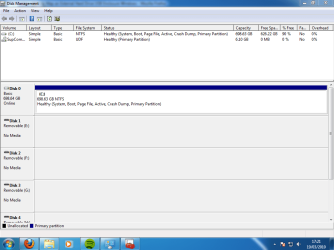
CThomson, can you post back a screenshot of your full Disk management drive map, using Snipping Tool in Start menu and attaching file using paper clip in reply box?

I would myself run full HD diagnostics/repair CD scan then zero HD to clean reinstall: Hard Drive Diagnostics Tools and Utilities (Storage) - TACKtech Corp.

Run also a Windows Memory Diagnostic test for two passes.

Don't switch out any drivers given by Win7 installer or Updates unless missing in Device Manager or performance issues.

Work through errors in Event Viewer>Administrative View and Diagnostics-Performance log. At the same link for D-P log reached by clicking WEI score at Control Panel>System, then Advanced Tools, Generate a System Health Report.

AVG fell out of favor with tech enthusiasts after bloating up and never slmming back down to Avast size. Now MS Security Essentials is the favorite free app, lightest and most effective, installs in seconds and never bothers you again.
 
Thanks for replying

Did i get picture of the right thing?

I ran the windows memory checker, No problems were found.
I also generated system health report, Looked like no problems found there either.

I did look through some of the error reports etc, But i only have them from the 13th, 20:46 time onwards. That would be about when i reinstalled windows, So any errors relating to the command line and "setup is starting services" etc must of got wiped when i installed.

I have still to do the HD scan cd, Gonna give that a shot now.
 

Attachments

  • Diskmanagement.PNG
    Diskmanagement.PNG
    31.9 KB · Views: 368

My Computer My Computer

OS
Windows 7
Well, to be honest, From the list of things i gave in first post, There didnt seem to be any specific problems i could put down to being Windows itself for definite.
What i was wondering most was, Is my stuff just not working due to other reasons? meaning they wouldn't of worked before i done the command line thing to wipe the OS. Or did that cause all these problems.

Anyway, There seems to be no specific problem, So what im thinking now is... This is a fresh computer, I dont have alot of stuff on it yet.

Is it any way harmful to wipe the computer totally clean and start from fresh?

If theres no harm in it, I think i might give it a shot. If it does actually fix it, Good, But if it doesnt.. i dont really lose anything, and then i can focus on other ways of fixing the stuff.

But if it is harmfull, Id probably be better trying to fix stuff in other ways? If there is :\
 

My Computer My Computer

OS
Windows 7
In fact if you feel you don't have the cleanest possible install, or may have a virus, then deep cleaning the HD is a good idea to give you the cleanest possible slate.

Back up your files, unplug other HD's and peripherals, boot Win7 DVD Repair console, click through to Recovery tools list, open Command Line, type:

DISKPART
LIST DISK
SELECT DISK # (for Win7 HD)
CLEAN ALL (zeroes HD, takes awhile)
create partition primary
select partition 1
assign letter=c:
active
format
exit

Now boot back into Win7 DVD to Custom install to created partition.

After install, check Windows Update for newer drivers. Find any drivers missing in Device Manager on Support Downloads webpage for your model computer.

Take your time installing programs to test performance after each install, with option to roll back via System Restore if there is any performance hit. Ditto Windows Update.

Run msconfig to uncheck everything in Startup tab except AV and what absolutely MUST start up with computer - others are freeloaders that suck up RAM/CPU and don't need to be started until you click on them.

Use CCleaner "Run Cleaner" and Registry tab, then Auslogics Disk Defragger to clean and order HD.
 
Last edited:
Will give that a go on Sunday, Will have more time then.
Just hope the command lines dont come up with another error this time ^^

Thanks for your help, Hopefully i dont need to come back :)
 

My Computer My Computer

OS
Windows 7
If CLEAN ALL command returns error, then LIST PARTITION on the disk in focus, type INACTIVE on Win7 partition first.
 
Back
Top