Stuck in "checking for updates"

canu49

New member
Local time
5:33 AM
Messages
5
I have two PCs, Dell laptop and desktop, both with windows 7 sp1 and both with the same problem. I've read other post and followed the instructions and nothing helps. Downloaded SURT but it wasn't applicable for my computer. I've stopped the update services, switched to manual and all updates I've been told to download are already on the computer. I tried booting in safe mode, but couldn't see how to check for updates from safe mode. Neither PC is used for internet surfing so if I have to live with it I can, but it's sort of bugging me and I'd like to fix it.
 

My Computer

OS
windows 7 64 bit

My Computer

Computer type
PC/Desktop
Computer Manufacturer/Model Number
Custom Built
OS
Windows 10 Pro x64, Windows 8.1 Pro x64, Windows 7 Ultimate x64 SP1,
CPU
INTEL i9-7920X LGA 2066
Motherboard
Gigabyte X299-WU8 F3
Memory
64 GB (4 X 16 GB) G-Skill V Series DDR4 3200 Quad Channel
Graphics Card(s)
EVGA GTX 1060 SC 3 GB
Sound Card
Realtek Onboard ALC1220
Monitor(s) Displays
2 x Samsung S27E310
Screen Resolution
1920x1080
Hard Drives
Samsung 2 x 970 EVO Plus 500 GB NVMe
1 x 6TB WD 6003FZBX SATA
1 x 6TB WD 60EFRX SATA
12 x 3TB WD 30EFRX SATA
PSU
Seasonic X-1050
Case
Thermaltake Armor+
Cooling
Corsair H80i V2 Liquid AOI Cooler
Keyboard
Logitech G510s
Mouse
Logitech MX Master 2S
Internet Speed
200 Mb/s
Antivirus
ESET NOD32 13.1
Browser
EDGE (Dev, Canary, Beta), Chrome
Other Info
ASUS RT-AC68U router
Malwarebytes 4.0.4
Already tried that. Everything is turned off and when I downloaded the update I got a message that it was already installed on the computer.
 

My Computer

OS
windows 7 64 bit
Sorry, I misread your post. I'm installing the second update no. I'll let you know how it works out.
 

My Computer

OS
windows 7 64 bit
You're welcome.
 

My Computer

Computer type
PC/Desktop
Computer Manufacturer/Model Number
Custom Built
OS
Windows 10 Pro x64, Windows 8.1 Pro x64, Windows 7 Ultimate x64 SP1,
CPU
INTEL i9-7920X LGA 2066
Motherboard
Gigabyte X299-WU8 F3
Memory
64 GB (4 X 16 GB) G-Skill V Series DDR4 3200 Quad Channel
Graphics Card(s)
EVGA GTX 1060 SC 3 GB
Sound Card
Realtek Onboard ALC1220
Monitor(s) Displays
2 x Samsung S27E310
Screen Resolution
1920x1080
Hard Drives
Samsung 2 x 970 EVO Plus 500 GB NVMe
1 x 6TB WD 6003FZBX SATA
1 x 6TB WD 60EFRX SATA
12 x 3TB WD 30EFRX SATA
PSU
Seasonic X-1050
Case
Thermaltake Armor+
Cooling
Corsair H80i V2 Liquid AOI Cooler
Keyboard
Logitech G510s
Mouse
Logitech MX Master 2S
Internet Speed
200 Mb/s
Antivirus
ESET NOD32 13.1
Browser
EDGE (Dev, Canary, Beta), Chrome
Other Info
ASUS RT-AC68U router
Malwarebytes 4.0.4
You're welcome and welcome to the forum.
 

My Computer

Computer type
PC/Desktop
Computer Manufacturer/Model Number
Custom Built
OS
Windows 10 Pro x64, Windows 8.1 Pro x64, Windows 7 Ultimate x64 SP1,
CPU
INTEL i9-7920X LGA 2066
Motherboard
Gigabyte X299-WU8 F3
Memory
64 GB (4 X 16 GB) G-Skill V Series DDR4 3200 Quad Channel
Graphics Card(s)
EVGA GTX 1060 SC 3 GB
Sound Card
Realtek Onboard ALC1220
Monitor(s) Displays
2 x Samsung S27E310
Screen Resolution
1920x1080
Hard Drives
Samsung 2 x 970 EVO Plus 500 GB NVMe
1 x 6TB WD 6003FZBX SATA
1 x 6TB WD 60EFRX SATA
12 x 3TB WD 30EFRX SATA
PSU
Seasonic X-1050
Case
Thermaltake Armor+
Cooling
Corsair H80i V2 Liquid AOI Cooler
Keyboard
Logitech G510s
Mouse
Logitech MX Master 2S
Internet Speed
200 Mb/s
Antivirus
ESET NOD32 13.1
Browser
EDGE (Dev, Canary, Beta), Chrome
Other Info
ASUS RT-AC68U router
Malwarebytes 4.0.4
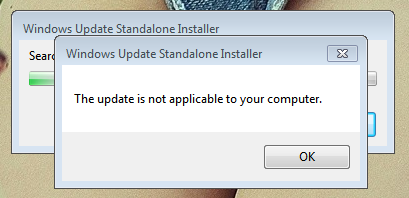
I'm having this issue but cannot fix. I followed pbcopter's instructions but it tells me his files are not applicable to my computer?

nB7b9Wd.png
 

My Computer

Computer type
PC/Desktop
OS
Windows 7 x64
I don't know what else you followed but

Follow these instructions exactly.
First, set Windows Updates to never check for Updates.
Next restart your computer, then install KB3020369, if not installed.
Then install KB3172605.

Windows updates should return to normal. You can then reset your updates to automatically check for updates if desired

https://support.microsoft.com/en-us/kb/3020369

https://support.microsoft.com/en-us/kb/3172605


Thank you for this, for almost two weeks I have tried everything, and I mean everything. I don't know how I missed this, but thank you, as this was literally the only way to fix the update problem that mysteriously happened this month, and after everything I have done to try and fix it I am amazed that it was so ridiculously simple. I only needed the July/September update, so I am wondering, which kb should I look for to hang onto in case this happens again? And again, thank you!
 

My Computer

OS
currently 7 Pro 64, 10 Pro 32
I'm really frustrated with this. I have freshly installed Windows 7 on my laptop and I can not get the updates to come. I've tried everything including this post, but no success. Any suggestions?
 

My Computer

Computer type
PC/Desktop
OS
Windows 7 x64
Post deleted -- it looks like something's working now....
 

My Computer

Computer type
PC/Desktop
Computer Manufacturer/Model Number
Generic (BIY)
OS
Windows 7 Pro 64-bit
CPU
Intel Core i5-3570K
Motherboard
Gigabyte GA-Z77-DS3H
Memory
Corsair 2x4gb
Graphics Card(s)
Intel HD Graphics 4000, on motherboard, 1gb
Sound Card
Realtek Audio on motherboard
Monitor(s) Displays
HP Pavillion 22bw
Screen Resolution
1920x1080
Hard Drives
Crucial MX200, Toshiba 3tb spinning (data) drive
Case
Corsair something-or-other
Cooling
CPU fan, 2 x case fans
Keyboard
Microsoft wired keyboard
Mouse
Logitech wireless
Antivirus
Avast free
Browser
IE11, Chrome
Back
Top