stuck in reboot loop

chamjiee

Banned
Local time
10:52 PM
Messages
58
i have tried it but its stuck in reboot loop .. i boot from usb it shows the first screen loading windows then it reboots ..
background of the problem:
mine is dell 755 c2d 8gb ram home pc . it has 250gb hdd with three partitions . initialy it had wind xp 32 bit later i upgraded ram and installed win 7 ultimate 64bit as a dual boot . for some reason i didnt liked the windows 7 .. though i wanted to retain it just in case i can get used to it as i have been using xp since day 1 and have no issue with it and love it . ... so i in love of win xp wanted to install xp 64 bit on it .. not as a triple boot system . but i wanted to formate the xp drive and install the 64bit xp . since i have no cd/dvd i wanted to create a usb setup and downloaded wintoflash program
after reading about it on this site
WinToFlash Guide - Install Windows XP from USB Flash drive

as i ran it it gave me some warning that it cant access the usb drive .. do i wnat to force unmount it . at that time i was not doing anything on usb . so i clicked yes and voila my system immediatley rebooted .(all of this was being done in win 7) and it gave me error 0xc000000e .. and also when i tried to boot to xp i got ntldr error ..i.e. both oses were rendered useless.. so in the boot entries i had xp system recovery mode and i issued fixboot command and now in the boot menu i only see xp .. and able to boot successfully into it..

but inside xp only c drive is shown other 2 partitions (one was for windows 7 installation and other for all my of data ) is not shown. . i opened diskmanagement and i see only c drive and a long space .. earlier iw ould see all other partitions there ..


so i downloaded and played with easybcd and other apps inside xp and had no luck ..

so i got windows 7 recovery disk and prepared a usb for it and copied that recovery disk contents onto usb .and rebooted and booted from usb .. it would only display the loading screen and then reboot .. what should i do ?
 

My Computer

Computer type
PC/Desktop
Computer Manufacturer/Model Number
Dell Optiplex 755
OS
Windows 7 Ultimate x64 SP1 Dual Boot with Windows Serve 2012 R2
CPU
E6550
Motherboard
Q35
Memory
8GB
Graphics Card(s)
ATI Radeon 2400 Pro
Sound Card
Intel HD Audio Stereo
Monitor(s) Displays
1
Screen Resolution
1280 x 1024
Hard Drives
250GB SATAIII
PSU
Stock 280 Watt
Case
Stock Desktop Case
Cooling
Stock
Keyboard
Microsoft Ergonomic keyboard usb
Mouse
Microsoft Mouse
Internet Speed
1Mbps Down/ 256 Kbps up
Antivirus
None
Browser
Opera
Write the Win7 ISO for your licensed version to stick using the tool in Step 6 of Troubleshooting Windows 7 Failure to Start.

Boot it to Mark 7 Partition as Active (Method Two)

then run Startup Repair - Run up to 3 Separate Times.

Once Win7 starts install EasyBCD to add XP.

I downloaded it from torrents as i neither have cd nor I can login into windows 7 sp1.

I tried many things which I sadly didn't documented so current situation is that i neither can boot into xp nor 7.
EDIT Begins
somehow i miaculasly got the boot menu .. earlier i wont get it .. the menu which shows which os i want to load .. and it is showing windows xp and windows 7 and one entry created by easybcd which points to windows 7 recovery environment iso .(which i can boot too .. so sweet) ..
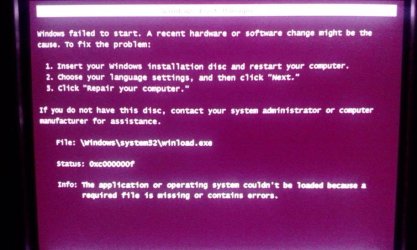
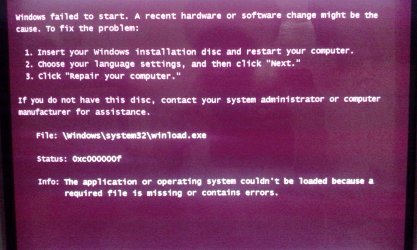
now i can boot xp and i am editing this from xp . but i cant load windows 7 . it gives me error winload.exe .. (let me reboot and will post its pic) . it is pertinent to mention that i had earlier applied a lot of bootrect.exe commands and one more boot sector command which i dont remember .. and that gave me the no boot menu list situation..

EDIT Closes.

also inside my xp two partitions are not shown .. one of those is holding all my DATA and another is holding the windows 7 installation.
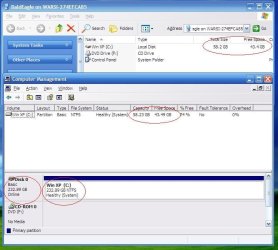
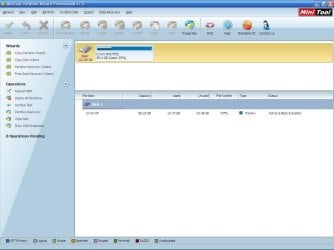
here is the screen shot of my computer and the diskmanagement from windows xp on this machine.. i am concerned why my other two partitons are not shown . i am too much worried about my data. i cannot die another digital death..


Though I had some snaps of the errors displayed on screen but don't remember from which step/action /command I got those as a consequence.

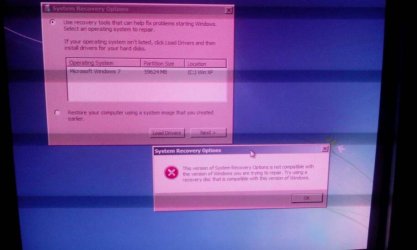
Currently that boot recovery usb is able to start in re copied it. So unlike my previous reply where it won't let me start it. This time I can start it and it d detects I have windows 7.but clicking next I get error that the system recovery options is not compatible with the version of windows you are trying to repair.
the command set processor architecture. Shows amd64 . And my Windows 7 is 64 bit. What could be the reason? Could it be that my Windows 7 is 64 bit sp1 and the recovery disk is of simple. Windows 7 64 bit I. E. No service pack.? Here are few snaps. The one is when I select windows 7 to boot. Winload.exe error.
 

Attachments

  • uploadfromtaptalk1366030623265.jpg
    uploadfromtaptalk1366030623265.jpg
    35.9 KB · Views: 15
  • disk space anomaly.JPG
    disk space anomaly.JPG
    57.8 KB · Views: 12
  • disk space anomaly minitools.JPG
    disk space anomaly minitools.JPG
    68.8 KB · Views: 11
Last edited:

My Computer

Computer type
PC/Desktop
Computer Manufacturer/Model Number
Dell Optiplex 755
OS
Windows 7 Ultimate x64 SP1 Dual Boot with Windows Serve 2012 R2
CPU
E6550
Motherboard
Q35
Memory
8GB
Graphics Card(s)
ATI Radeon 2400 Pro
Sound Card
Intel HD Audio Stereo
Monitor(s) Displays
1
Screen Resolution
1280 x 1024
Hard Drives
250GB SATAIII
PSU
Stock 280 Watt
Case
Stock Desktop Case
Cooling
Stock
Keyboard
Microsoft Ergonomic keyboard usb
Mouse
Microsoft Mouse
Internet Speed
1Mbps Down/ 256 Kbps up
Antivirus
None
Browser
Opera
Here is the error that i get when i selected windows 7 to be booted
 

Attachments

  • uploadfromtaptalk1366034505339.jpg
    uploadfromtaptalk1366034505339.jpg
    60.7 KB · Views: 8

My Computer

Computer type
PC/Desktop
Computer Manufacturer/Model Number
Dell Optiplex 755
OS
Windows 7 Ultimate x64 SP1 Dual Boot with Windows Serve 2012 R2
CPU
E6550
Motherboard
Q35
Memory
8GB
Graphics Card(s)
ATI Radeon 2400 Pro
Sound Card
Intel HD Audio Stereo
Monitor(s) Displays
1
Screen Resolution
1280 x 1024
Hard Drives
250GB SATAIII
PSU
Stock 280 Watt
Case
Stock Desktop Case
Cooling
Stock
Keyboard
Microsoft Ergonomic keyboard usb
Mouse
Microsoft Mouse
Internet Speed
1Mbps Down/ 256 Kbps up
Antivirus
None
Browser
Opera
If you would have even bothered to read Troubleshooting Windows 7 Failure to Start
you'd see that the official Win7 installer with SP1 is also provided in Step 6.

Now start at the top of the steps and work through them, reporting back results as you go.

Thanks for your advice. I m downloading windows 7 ultimate x64 sp1 u (media refresh) x17-59465.iso
.
Would it work in my case? As I had earlier windows 7 ultimate 7 64 bit English version with all updates applied as of yesterday.?
I am on very slow Internet connection its just 512kbits per second. And ibam getting 45kBps speed its taking ages. I hope someone has uploaded the sp1 recovery disc.
Thanks
 

My Computer

Computer type
PC/Desktop
Computer Manufacturer/Model Number
Dell Optiplex 755
OS
Windows 7 Ultimate x64 SP1 Dual Boot with Windows Serve 2012 R2
CPU
E6550
Motherboard
Q35
Memory
8GB
Graphics Card(s)
ATI Radeon 2400 Pro
Sound Card
Intel HD Audio Stereo
Monitor(s) Displays
1
Screen Resolution
1280 x 1024
Hard Drives
250GB SATAIII
PSU
Stock 280 Watt
Case
Stock Desktop Case
Cooling
Stock
Keyboard
Microsoft Ergonomic keyboard usb
Mouse
Microsoft Mouse
Internet Speed
1Mbps Down/ 256 Kbps up
Antivirus
None
Browser
Opera
i got a weired situation,,

i had initialy win xp 32 bit on my dell optiplex 755 core2duo . later i upgraged its ram from 2gb to 8gb as i need to run VMware and Vbox and GNS3 so i need a lot of ram . so for that i installed windows 7 ultimate 64bit on another partition of same harddisk . now i am homesick of windows xp and i do not like 7. windows xp is very simple and elegant . so i am thinking to have this system run as xp 64bit and windows 7 64bit (though i would like to retain 7 for my little sister as she likes it ) .

so how should i proceed ?
is it possible to convert the already running xp 32 bit into 64 bit ? like we can issue a command to convert fat32 into ntfs ?

if its not possible what is the least dangrous way .. i mean apart from formating xp partition and then reinstalling 64bit xp .. ? or its the only way ? i do not want triple boot (is it possible btw ?) and suppose i install xp 64 bit over all these then its obvious that i will be locked out of windows 7 and wont see it in boot entries . so in that case can i follow the commands in original tutorial to fix it ?

thanks
 

My Computer

Computer type
PC/Desktop
Computer Manufacturer/Model Number
Dell Optiplex 755
OS
Windows 7 Ultimate x64 SP1 Dual Boot with Windows Serve 2012 R2
CPU
E6550
Motherboard
Q35
Memory
8GB
Graphics Card(s)
ATI Radeon 2400 Pro
Sound Card
Intel HD Audio Stereo
Monitor(s) Displays
1
Screen Resolution
1280 x 1024
Hard Drives
250GB SATAIII
PSU
Stock 280 Watt
Case
Stock Desktop Case
Cooling
Stock
Keyboard
Microsoft Ergonomic keyboard usb
Mouse
Microsoft Mouse
Internet Speed
1Mbps Down/ 256 Kbps up
Antivirus
None
Browser
Opera
You can add a new HD and install the desired OS to it with the other HD unplugged, then boot your choice via the BIOS Boot menu.

You can reinstall XP in 64 bit either as a third multi-boot on the same HD, or over the old XP after backing up your files. Then you can reinstall Win7 if it won't start which will create the Dual or Multi-boot menu with the XP(s).

If you are able to repair Win7 you can install EasyBCD to add either or both XP's to a multi-boot menu.

Here is a link to the Win7 repair disks if you'd prefer downloading those to run the repairs given: http://neosmart.net/blog/2009/windows-7-system-repair-discs/
 
You can add a new HD and install the desired OS to it with the other HD unplugged, then boot your choice via the BIOS Boot menu.

You can reinstall XP in 64 bit either as a third multi-boot on the same HD, or over the old XP after backing up your files. Then you can reinstall Win7 if it won't start which will create the Dual or Multi-boot menu with the XP(s).

If you are able to repair Win7 you can install EasyBCD to add either or both XP's to a multi-boot menu.

Here is a link to the Win7 repair disks if you'd prefer downloading those to run the repairs given: http://neosmart.net/blog/2009/windows-7-system-repair-discs/

I am trying that one and getting the above error of not supported.

I also downloaded the windows 7 sp1 u from The above links and still is am getting the same error. I. E. The version of recovery is not compatible with blabla bla

Also when I tried to install windows it showed me only one drive. The one which holds my xp installation. It didn't showed my two other partitions one which is holding all of my data other which is holding windows 7 and some of my personal data. Heck what should i do


EDIT
I downloaded many data recovery softwares and one tool partition find and mount did found my two partitions and i was/am able to mount them in xp. And see all my data and read it as well.


But that's it. It can't make them permenantly mount like Windows. It mounts them as usb device or of the like.


Where could be the issue how can I fix it? What is the way to make them visible by Windows?
 
Last edited:

My Computer

Computer type
PC/Desktop
Computer Manufacturer/Model Number
Dell Optiplex 755
OS
Windows 7 Ultimate x64 SP1 Dual Boot with Windows Serve 2012 R2
CPU
E6550
Motherboard
Q35
Memory
8GB
Graphics Card(s)
ATI Radeon 2400 Pro
Sound Card
Intel HD Audio Stereo
Monitor(s) Displays
1
Screen Resolution
1280 x 1024
Hard Drives
250GB SATAIII
PSU
Stock 280 Watt
Case
Stock Desktop Case
Cooling
Stock
Keyboard
Microsoft Ergonomic keyboard usb
Mouse
Microsoft Mouse
Internet Speed
1Mbps Down/ 256 Kbps up
Antivirus
None
Browser
Opera
Does your Win7 have SP1 installed as it should?

If you're trying to reinstall now make sure you're booting the installer, then delete all other partitions besides XP, create New Win7 partition and Format it before install.
How to Boot A Computer from CD or DVD - YouTube
Clean Install Windows 7

If booting the installer still doesn't show the Win7 partition, boot free Partition Wizard bootable CD, take a camera snap of the maximized drive, post it back using paper clip in reply box.

Then rightclick on Win7 partition to Set Active partition -Partition Wizard Video Help.

then Partition Wizard Rebuild MBR - Video Help.

If Win7 doesn't start run Startup Repair - Run up to 3 Separate Times.

If Win7 won't start and you have tried everything else to start it from Troubleshooting Steps for Windows 7
then rescue your files as shown in Step 10.

If Win7 installer still won't see it's partition then boot back into PW CD to delete the 7 partition, create a new one using Partition Wizard Create Partition - Video Help, mark it Active, then reboot into Win7 installer to install to the partition.
 
Does your Win7 have SP1 installed as it should?

If you're trying to reinstall now make sure you're booting the installer, then delete all other partitions besides XP, create New Win7 partition and Format it before install.
How to Boot A Computer from CD or DVD - YouTube
Clean Install Windows 7

If booting the installer still doesn't show the Win7 partition, boot free Partition Wizard bootable CD, take a camera snap of the maximized drive, post it back using paper clip in reply box.

Then rightclick on Win7 partition to Set Active partition -Partition Wizard Video Help.

then Partition Wizard Rebuild MBR - Video Help.

If Win7 doesn't start run Startup Repair - Run up to 3 Separate Times.

If Win7 won't start and you have tried everything else to start it from Troubleshooting Steps for Windows 7
then rescue your files as shown in Step 10.

If Win7 installer still won't see it's partition then boot back into PW CD to delete the 7 partition, create a new one using Partition Wizard Create Partition - Video Help, mark it Active, then reboot into Win7 installer to install to the partition.

Thanks for such a detailed reply. I think I have done it. I googled this issue and found many people have no luck with it. At least I got the already installed Windows 7 to boot and show all partitions and hence got no data loss.

I used Hiren boot cd and it it i used the software TestDisk (free software) and it solved the issue if lost partition then i used windows 7 recovery environment and did repair three times in a row until it found no Problem.

But I still cannot boot into xp as Windows 7 is not showing ig and i have yet to find a way to add XP to the list of oses shown at startup. Though easybcd would do but I m searching for some Microsoft way of making 7 show xp in the list of oses to boot.


EDIT
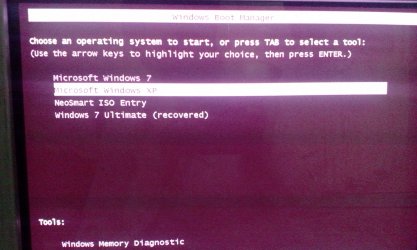
after some more tinkering with diskpart and active option now my boot screen is showing four entries here is a snap of them

Out of these four only two are working. One is the XP one other is the windows 7 ultimate recovered entry.

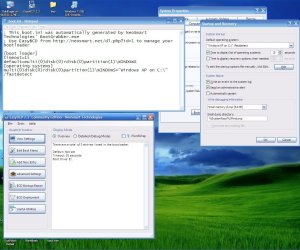
Also here are screen shots of startup and recovery tab from both oses.


It is pertinent to mention that i had earlier installed easybcd on xp machine and had played with it in order to get Windows 7 in the list of available oses. And in the process I also added iso of windows 7 recovery environment to the boot entry.

Why is this so. I just want two entries on the list and both working. How to bring those two entries?

Who the hell is showing me these four entries? In windows 7 in startup and recovery it only shows one entry that labelled as windows 7 ultimate recovered. And the boot menu displayed at the beginning of system boot is obviously generated by 7 as xp can't do that i mean it can't boot 7.

And inside xp there is just one entry which is labelled windows xp which is working.
The two un needed entries are
One is of windows 7
Secondly is created by the easybcd which has its installed in xp. But opening easy bcd in xp shows that I have no entry. And u have also used the write windows 7 vista MBR option from it in order to stop it from overtaking the task of displaying the oses to boot
 

Attachments

  • IMG_20130417_003103.jpg
    IMG_20130417_003103.jpg
    874.1 KB · Views: 56
  • IMG_20130417_003134.jpg
    IMG_20130417_003134.jpg
    958.2 KB · Views: 55
  • startup and recovery from xp and easybcd on xo.JPG
    startup and recovery from xp and easybcd on xo.JPG
    135.7 KB · Views: 10
  • win7list of oses to boot.png
    win7list of oses to boot.png
    79 KB · Views: 8
Last edited:

My Computer

Computer type
PC/Desktop
Computer Manufacturer/Model Number
Dell Optiplex 755
OS
Windows 7 Ultimate x64 SP1 Dual Boot with Windows Serve 2012 R2
CPU
E6550
Motherboard
Q35
Memory
8GB
Graphics Card(s)
ATI Radeon 2400 Pro
Sound Card
Intel HD Audio Stereo
Monitor(s) Displays
1
Screen Resolution
1280 x 1024
Hard Drives
250GB SATAIII
PSU
Stock 280 Watt
Case
Stock Desktop Case
Cooling
Stock
Keyboard
Microsoft Ergonomic keyboard usb
Mouse
Microsoft Mouse
Internet Speed
1Mbps Down/ 256 Kbps up
Antivirus
None
Browser
Opera
Thanks
As us obvious from above post easybcd is showing no entry in xp and in windows 7 it was showing just one entry that for Windows 7.
What I did is that i installed easybcd on Win7 and went to bcd backup repair tab checked reset bcd configuration clicked performance action. Then I. Add new entry tab I added xp and 7.now all is well.


Except that windows 7 is very slow to boot now.
 

My Computer

Computer type
PC/Desktop
Computer Manufacturer/Model Number
Dell Optiplex 755
OS
Windows 7 Ultimate x64 SP1 Dual Boot with Windows Serve 2012 R2
CPU
E6550
Motherboard
Q35
Memory
8GB
Graphics Card(s)
ATI Radeon 2400 Pro
Sound Card
Intel HD Audio Stereo
Monitor(s) Displays
1
Screen Resolution
1280 x 1024
Hard Drives
250GB SATAIII
PSU
Stock 280 Watt
Case
Stock Desktop Case
Cooling
Stock
Keyboard
Microsoft Ergonomic keyboard usb
Mouse
Microsoft Mouse
Internet Speed
1Mbps Down/ 256 Kbps up
Antivirus
None
Browser
Opera
Visual BCD comes with the tool "Dual-boot Repair".

1. Run Dual-boot Repair, click on "Automatic Repair" - this will fix Windows 7 boot files.
2. Copy ntldr, ntdetect.com and boot.ini to active partition.
3. Use ArcPaths tool to get exact ARC path for XP. Correct boot.ini (on active) if necessary.

Reboot.

In Windows 7 run Visual BCD Editor.
Right-Click and select "Create missing Windows loaders". This will add XP to boot menu.

Done.
 

My Computer

Computer Manufacturer/Model Number
Acer Notebook
OS
Win 8 RP, Win 7, XP
CPU
Intel
All of my problems are solved . Now boot entries are okay.


Only problem left is that prior to this problem and the repairs I did my windows would boot in under a minute but now it takes something like 3 minutes.

I used ccleaner. Also defreagemented it. No antivurs installed. Same settings. Why it boots late
 

My Computer

Computer type
PC/Desktop
Computer Manufacturer/Model Number
Dell Optiplex 755
OS
Windows 7 Ultimate x64 SP1 Dual Boot with Windows Serve 2012 R2
CPU
E6550
Motherboard
Q35
Memory
8GB
Graphics Card(s)
ATI Radeon 2400 Pro
Sound Card
Intel HD Audio Stereo
Monitor(s) Displays
1
Screen Resolution
1280 x 1024
Hard Drives
250GB SATAIII
PSU
Stock 280 Watt
Case
Stock Desktop Case
Cooling
Stock
Keyboard
Microsoft Ergonomic keyboard usb
Mouse
Microsoft Mouse
Internet Speed
1Mbps Down/ 256 Kbps up
Antivirus
None
Browser
Opera
Back
Top