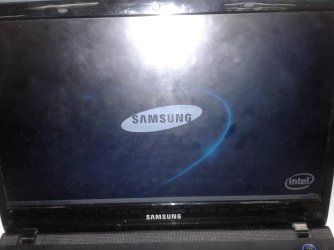
Stuck in Samsung logo screen Windows 7

Joji

New member
Local time
11:35 AM
Messages
9
Hi,

Good day!

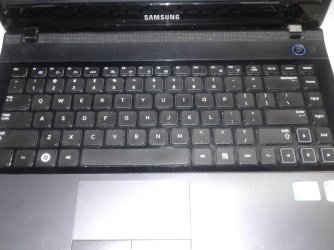
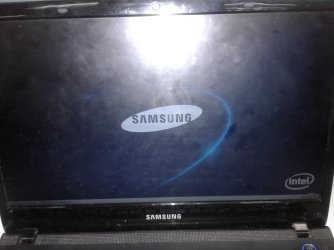
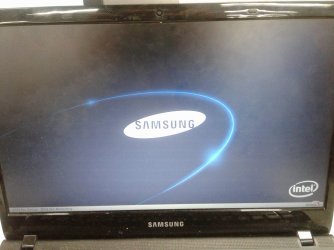
This is my first time to post a concern here. I am currently using a Samsung laptop; NP300E4A-A04PH Core i3 2350M 2.30GHz 2GB RAM DDR3 Windows 7 Ultimate for 5years. It used to work last 2 days ago, no problem at all, no any updates. Earlier today it suddenly stuck in Samsung icon. I can't access DEL, F2 (setup), F4 (recovery) and F8 as well (safe mode) or any key.

My last option would be reformatting the OS, and try reinstalling the windows. But as I’ve said a while ago, I can’t access any functions in my keyboard as it gets stuck in Samsung icon.

I really need this as I need to skype with my grandmother in our province. :cry:

Sorry for my poor English. :confused: Please help me. Thank you
 

Attachments

  • 15419401_10206679357656007_1966558708_o.jpg
    15419401_10206679357656007_1966558708_o.jpg
    257.9 KB · Views: 1
  • 15515591_10206679355815961_1721881980_o.jpg
    15515591_10206679355815961_1721881980_o.jpg
    263.5 KB · Views: 0
  • 15536976_10206679356975990_1611687383_o.jpg
    15536976_10206679356975990_1611687383_o.jpg
    189.7 KB · Views: 0
Last edited:

My Computer My Computer

At a glance

Windows 7 Ultimate 64bit2.30GHz2GBIntel HD Graphics 3000
Computer type
Laptop
Computer Manufacturer/Model Number
SAMSUNG Core i3 2350M NP300E4A
OS
Windows 7 Ultimate 64bit
CPU
2.30GHz
Memory
2GB
Graphics Card(s)
Intel HD Graphics 3000
Hard Drives
DDR3
Samsung support advises to:

  1. Remove any CD's, DVD's, or Flash Drives from the device.

  1. Force the laptop to shut down by Pressing and Holding the Power button.
    • Don’t worry; forcing a shutdown will not harm the laptop.

  1. Power On the laptop and access the BIOS Setup Utility by Pressing F2. You need to do this immediately and repeatedly or the boot process will continue past the point where the command is available!
    • If you fail to access the BIOS Setup Utility, shut down the laptop and try again.

  1. Once you have accessed the BIOS Setup Utility, Press F9 to "Load default configuration now", and then Enter to select Yes.
  2. Press F10 then Enter to "Save configuration changes and exit now".
  3. Allow the laptop to restart normally, and then Restart the laptop.
 

My Computer My Computer

At a glance

windows 7 ultimate x64
Computer type
PC/Desktop
OS
windows 7 ultimate x64
Thanks sir/maam for your response. but i tried several times. Still can't accessed F2. :(
 

My Computer My Computer

At a glance

Windows 7 Ultimate 64bit2.30GHz2GBIntel HD Graphics 3000
Computer type
Laptop
Computer Manufacturer/Model Number
SAMSUNG Core i3 2350M NP300E4A
OS
Windows 7 Ultimate 64bit
CPU
2.30GHz
Memory
2GB
Graphics Card(s)
Intel HD Graphics 3000
Hard Drives
DDR3
Try Esc or F10 instead
 

My Computer My Computer

At a glance

windows 7 ultimate x64
Computer type
PC/Desktop
OS
windows 7 ultimate x64
not working either. for the record my keyboard is working fine, as i tried to adjust the brightness using Function key. Thank you cyanna for assisting and having patience with my problem.
 
Last edited:

My Computer My Computer

At a glance

Windows 7 Ultimate 64bit2.30GHz2GBIntel HD Graphics 3000
Computer type
Laptop
Computer Manufacturer/Model Number
SAMSUNG Core i3 2350M NP300E4A
OS
Windows 7 Ultimate 64bit
CPU
2.30GHz
Memory
2GB
Graphics Card(s)
Intel HD Graphics 3000
Hard Drives
DDR3
anyone? please. :sick:
 

My Computer My Computer

At a glance

Windows 7 Ultimate 64bit2.30GHz2GBIntel HD Graphics 3000
Computer type
Laptop
Computer Manufacturer/Model Number
SAMSUNG Core i3 2350M NP300E4A
OS
Windows 7 Ultimate 64bit
CPU
2.30GHz
Memory
2GB
Graphics Card(s)
Intel HD Graphics 3000
Hard Drives
DDR3
Hi,
You might remove the battery and hold down the power button for about or at least 1 minute to drain the power out of the machine and after you can leave it over night might be a good thing to try too.
Then the next day insert the battery and once you power on start tapping the F2 key as already described.
 

My Computer My Computer

At a glance

Win-7-Pro64bit 7-H-Prem-64biti7-5930K 2nd i9-9940x both water blocked VRM'...Trident-z 3200C14 2nd Trident-z 3600C16EVGA 1080ti ftw3 2nd Titan Xp both water blocked
Computer type
PC/Desktop
Computer Manufacturer/Model Number
Custom assembled by me :}
OS
Win-7-Pro64bit 7-H-Prem-64bit
CPU
i7-5930K 2nd i9-9940x both water blocked VRM's too
Motherboard
ASUS SABERTOOTH X99 2nd ASUS x299 Apex
Memory
Trident-z 3200C14 2nd Trident-z 3600C16
Graphics Card(s)
EVGA 1080ti ftw3 2nd Titan Xp both water blocked
Sound Card
Built-in Realtek
Monitor(s) Displays
1-AOC G2460PG 24"G-Sync 144Hz/ 2nd 1-ASUS VG248QE 24" 144Hz
Screen Resolution
1920 x 1080 144Hz
Hard Drives
2-Samsung M.2 Evo & Evo Plus
2-Samsung 850 EVO 500GB SSD's/ 3-2.5 W.D. Black 1tb-&3-1tb/3-3.5 WD Black 1tb hdd's
PSU
EVGA SuperNOVA 1000-P2 2nd 1200-P2
Case
2-Corsair Obsidian Series 450D Black ATX Mid Tower
Cooling
Custom water loops
Keyboard
Logitech G710+/ 2nd Logitech G910
Mouse
2-RedDragon M901 Perdition 16400 dpi Gaming mouse = wired
Internet Speed
Comcast Ping 19ms 89.31mbps download speed 6.12mbps upload
Antivirus
Malwarebytes Pro/ Superantispyware Pro
Browser
FireFox & Pale moon
Other Info
2nd ASUS X299 Apex/Intel i9-9940x with Custom water loop/7H-Prem-x64/Corsair 450D case/Ram Trident-z 3600C16 4x8gb / Samsung970Evo plus 500gb SSD/Dual ssd EZ swap evo/PSU EVGA SuperNova 1200w-P2 80+Platinum/GPU Titan Xp /8-ML-140 on push-pull on 2-280GTX rads
Ill try that later today. Thanks for your assistance ThrashZone.
 

My Computer My Computer

At a glance

Windows 7 Ultimate 64bit2.30GHz2GBIntel HD Graphics 3000
Computer type
Laptop
Computer Manufacturer/Model Number
SAMSUNG Core i3 2350M NP300E4A
OS
Windows 7 Ultimate 64bit
CPU
2.30GHz
Memory
2GB
Graphics Card(s)
Intel HD Graphics 3000
Hard Drives
DDR3
Hi,
No problem hope it works out please let us know
If you have a FN key try holding it down while you hold down or tap the esc... key process ?
 

My Computer My Computer

At a glance

Win-7-Pro64bit 7-H-Prem-64biti7-5930K 2nd i9-9940x both water blocked VRM'...Trident-z 3200C14 2nd Trident-z 3600C16EVGA 1080ti ftw3 2nd Titan Xp both water blocked
Computer type
PC/Desktop
Computer Manufacturer/Model Number
Custom assembled by me :}
OS
Win-7-Pro64bit 7-H-Prem-64bit
CPU
i7-5930K 2nd i9-9940x both water blocked VRM's too
Motherboard
ASUS SABERTOOTH X99 2nd ASUS x299 Apex
Memory
Trident-z 3200C14 2nd Trident-z 3600C16
Graphics Card(s)
EVGA 1080ti ftw3 2nd Titan Xp both water blocked
Sound Card
Built-in Realtek
Monitor(s) Displays
1-AOC G2460PG 24"G-Sync 144Hz/ 2nd 1-ASUS VG248QE 24" 144Hz
Screen Resolution
1920 x 1080 144Hz
Hard Drives
2-Samsung M.2 Evo & Evo Plus
2-Samsung 850 EVO 500GB SSD's/ 3-2.5 W.D. Black 1tb-&3-1tb/3-3.5 WD Black 1tb hdd's
PSU
EVGA SuperNOVA 1000-P2 2nd 1200-P2
Case
2-Corsair Obsidian Series 450D Black ATX Mid Tower
Cooling
Custom water loops
Keyboard
Logitech G710+/ 2nd Logitech G910
Mouse
2-RedDragon M901 Perdition 16400 dpi Gaming mouse = wired
Internet Speed
Comcast Ping 19ms 89.31mbps download speed 6.12mbps upload
Antivirus
Malwarebytes Pro/ Superantispyware Pro
Browser
FireFox & Pale moon
Other Info
2nd ASUS X299 Apex/Intel i9-9940x with Custom water loop/7H-Prem-x64/Corsair 450D case/Ram Trident-z 3600C16 4x8gb / Samsung970Evo plus 500gb SSD/Dual ssd EZ swap evo/PSU EVGA SuperNova 1200w-P2 80+Platinum/GPU Titan Xp /8-ML-140 on push-pull on 2-280GTX rads
hmm i just tried the FN key while tapping and/or holding the esc key. but still no response.
 

My Computer My Computer

At a glance

Windows 7 Ultimate 64bit2.30GHz2GBIntel HD Graphics 3000
Computer type
Laptop
Computer Manufacturer/Model Number
SAMSUNG Core i3 2350M NP300E4A
OS
Windows 7 Ultimate 64bit
CPU
2.30GHz
Memory
2GB
Graphics Card(s)
Intel HD Graphics 3000
Hard Drives
DDR3
Hi,
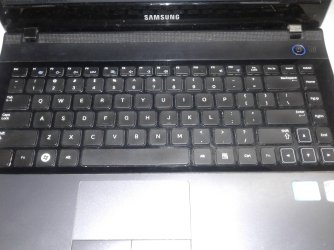
All FN keys are usually colored
Other keys with the same color will do functions with the FN key
How many same color F keys are there and what do they look like
A photograph might help use see what the symbols look like and possibly identify which F key to use
Use the Go Advanced button under the reply box to see a paper clip symbol to search for and upload files here you take.
Then use the paper clip icon again to insert the images in your reply.
 

My Computer My Computer

At a glance

Win-7-Pro64bit 7-H-Prem-64biti7-5930K 2nd i9-9940x both water blocked VRM'...Trident-z 3200C14 2nd Trident-z 3600C16EVGA 1080ti ftw3 2nd Titan Xp both water blocked
Computer type
PC/Desktop
Computer Manufacturer/Model Number
Custom assembled by me :}
OS
Win-7-Pro64bit 7-H-Prem-64bit
CPU
i7-5930K 2nd i9-9940x both water blocked VRM's too
Motherboard
ASUS SABERTOOTH X99 2nd ASUS x299 Apex
Memory
Trident-z 3200C14 2nd Trident-z 3600C16
Graphics Card(s)
EVGA 1080ti ftw3 2nd Titan Xp both water blocked
Sound Card
Built-in Realtek
Monitor(s) Displays
1-AOC G2460PG 24"G-Sync 144Hz/ 2nd 1-ASUS VG248QE 24" 144Hz
Screen Resolution
1920 x 1080 144Hz
Hard Drives
2-Samsung M.2 Evo & Evo Plus
2-Samsung 850 EVO 500GB SSD's/ 3-2.5 W.D. Black 1tb-&3-1tb/3-3.5 WD Black 1tb hdd's
PSU
EVGA SuperNOVA 1000-P2 2nd 1200-P2
Case
2-Corsair Obsidian Series 450D Black ATX Mid Tower
Cooling
Custom water loops
Keyboard
Logitech G710+/ 2nd Logitech G910
Mouse
2-RedDragon M901 Perdition 16400 dpi Gaming mouse = wired
Internet Speed
Comcast Ping 19ms 89.31mbps download speed 6.12mbps upload
Antivirus
Malwarebytes Pro/ Superantispyware Pro
Browser
FireFox & Pale moon
Other Info
2nd ASUS X299 Apex/Intel i9-9940x with Custom water loop/7H-Prem-x64/Corsair 450D case/Ram Trident-z 3600C16 4x8gb / Samsung970Evo plus 500gb SSD/Dual ssd EZ swap evo/PSU EVGA SuperNova 1200w-P2 80+Platinum/GPU Titan Xp /8-ML-140 on push-pull on 2-280GTX rads
Hi,

See attached. hope that helps

Thank you
 

Attachments

  • 15419401_10206679357656007_1966558708_o.jpg
    15419401_10206679357656007_1966558708_o.jpg
    257.9 KB · Views: 1
  • 15515591_10206679355815961_1721881980_o.jpg
    15515591_10206679355815961_1721881980_o.jpg
    263.5 KB · Views: 2
  • 15536976_10206679356975990_1611687383_o.jpg
    15536976_10206679356975990_1611687383_o.jpg
    189.7 KB · Views: 0

My Computer My Computer

At a glance

Windows 7 Ultimate 64bit2.30GHz2GBIntel HD Graphics 3000
Computer type
Laptop
Computer Manufacturer/Model Number
SAMSUNG Core i3 2350M NP300E4A
OS
Windows 7 Ultimate 64bit
CPU
2.30GHz
Memory
2GB
Graphics Card(s)
Intel HD Graphics 3000
Hard Drives
DDR3
That picture says F2 or F4 shoud get you to either bios or recovery. If neither key works it is likely this is a hardware problem. If taking out the battery and leaving the laptop for a while doesn't fix it it is probable you'll need a repair shop and/or a new laptop.
 

My Computer My Computer

At a glance

windows 7 ultimate x64
Computer type
PC/Desktop
OS
windows 7 ultimate x64
i already removed the battery overnight and tried to checked it again with and without the batt but still doesnt worked. Thanks so much cyanna! :shock: :cry:
 

My Computer My Computer

At a glance

Windows 7 Ultimate 64bit2.30GHz2GBIntel HD Graphics 3000
Computer type
Laptop
Computer Manufacturer/Model Number
SAMSUNG Core i3 2350M NP300E4A
OS
Windows 7 Ultimate 64bit
CPU
2.30GHz
Memory
2GB
Graphics Card(s)
Intel HD Graphics 3000
Hard Drives
DDR3
Hi,
I'd also use F10 as already suggested earlier
Hold down the FN key and just keep tapping the F10 key
You can also try the FN lock so you can press the power button while tapping the F10 key.
 

My Computer My Computer

At a glance

Win-7-Pro64bit 7-H-Prem-64biti7-5930K 2nd i9-9940x both water blocked VRM'...Trident-z 3200C14 2nd Trident-z 3600C16EVGA 1080ti ftw3 2nd Titan Xp both water blocked
Computer type
PC/Desktop
Computer Manufacturer/Model Number
Custom assembled by me :}
OS
Win-7-Pro64bit 7-H-Prem-64bit
CPU
i7-5930K 2nd i9-9940x both water blocked VRM's too
Motherboard
ASUS SABERTOOTH X99 2nd ASUS x299 Apex
Memory
Trident-z 3200C14 2nd Trident-z 3600C16
Graphics Card(s)
EVGA 1080ti ftw3 2nd Titan Xp both water blocked
Sound Card
Built-in Realtek
Monitor(s) Displays
1-AOC G2460PG 24"G-Sync 144Hz/ 2nd 1-ASUS VG248QE 24" 144Hz
Screen Resolution
1920 x 1080 144Hz
Hard Drives
2-Samsung M.2 Evo & Evo Plus
2-Samsung 850 EVO 500GB SSD's/ 3-2.5 W.D. Black 1tb-&3-1tb/3-3.5 WD Black 1tb hdd's
PSU
EVGA SuperNOVA 1000-P2 2nd 1200-P2
Case
2-Corsair Obsidian Series 450D Black ATX Mid Tower
Cooling
Custom water loops
Keyboard
Logitech G710+/ 2nd Logitech G910
Mouse
2-RedDragon M901 Perdition 16400 dpi Gaming mouse = wired
Internet Speed
Comcast Ping 19ms 89.31mbps download speed 6.12mbps upload
Antivirus
Malwarebytes Pro/ Superantispyware Pro
Browser
FireFox & Pale moon
Other Info
2nd ASUS X299 Apex/Intel i9-9940x with Custom water loop/7H-Prem-x64/Corsair 450D case/Ram Trident-z 3600C16 4x8gb / Samsung970Evo plus 500gb SSD/Dual ssd EZ swap evo/PSU EVGA SuperNova 1200w-P2 80+Platinum/GPU Titan Xp /8-ML-140 on push-pull on 2-280GTX rads
Ill try that too. Thanks for your time ThrashZone
 

My Computer My Computer

At a glance

Windows 7 Ultimate 64bit2.30GHz2GBIntel HD Graphics 3000
Computer type
Laptop
Computer Manufacturer/Model Number
SAMSUNG Core i3 2350M NP300E4A
OS
Windows 7 Ultimate 64bit
CPU
2.30GHz
Memory
2GB
Graphics Card(s)
Intel HD Graphics 3000
Hard Drives
DDR3
Hi Joli,
have you solved the Problem? How?
I have the same Problem! It's :mad:

Hi Joli,
have you solved the Problem? I have the same!
 
Last edited by a moderator:

My Computer My Computer

At a glance

WIN10 x64
Computer type
PC/Desktop
Computer Manufacturer/Model Number
Samsung
OS
WIN10 x64
You would probably get better response to your question If you started a new thread stating your issue in detail, (similar issues may have different causes), and link to this one as a lot of members check for new threads rather than scan random older threads.

Also "Joli" is no longer visiting the forum so is unlikely to respond
 

My Computers My Computers

  • At a glance

    Windows 11 Pro x64 [Latest Release and Releas...Ryzen 9 5950X, 3.8 - 5.2 MHz64GB [2 x 32GB] DDR4 3200MHz4GB NVIDIA GEFORCE GTX 1650 Ti
    Computer type
    PC/Desktop
    Computer Manufacturer/Model Number
    ChillBlast - Custom to my design
    OS
    Windows 11 Pro x64 [Latest Release and Release Preview]
    CPU
    Ryzen 9 5950X, 3.8 - 5.2 MHz
    Motherboard
    Asus Prime X570-Pro
    Memory
    64GB [2 x 32GB] DDR4 3200MHz
    Graphics Card(s)
    4GB NVIDIA GEFORCE GTX 1650 Ti
    Sound Card
    On-board SPDIF to 5.1 System + HDMI [5.1 system]
    Monitor(s) Displays
    32" UHD 32 Bit HDR Monitor + 43" UHD 4K 32Bit HDR TV
    Screen Resolution
    2 x 3840 x 2160 @60Hz
    Hard Drives
    1TB M2 SSD OS, 500GB Fast Access SSD, 2 x 8TB Data + Various Externals from 1TB to 4TB, 10TB NAS
    PSU
    NZXT C750 80 PLUS Gold 750W Modular PSU
    Case
    Workstation Case [Matt Black]
    Cooling
    NZXT Kraken X63 280mm CPU Cooler +2x Quiet Case fans
    Keyboard
    Logitech Wireless MX Keys & K400 + others
    Mouse
    Logitech Wireless MX Master 3S
    Internet Speed
    920 MB Down 50 MB Up
    Antivirus
    BitDefender Total Security Pro
    Browser
    Chrome (always run latest Non-Beta)
    Other Info
    Also run ...
    Laptop - Quad 8GB - Windows 10 Pro x64
    Nexus 7 Android tablet x2
    Samsung 10.2" tablet
    Blackview TAB 8 4G Android Tablet c/w Keyboard
    Wacom Intuos Pro Medium Pen Pad
    Wacom Intuos Pro Small Pen Pad
    Wacom Expresskeys Remote
    Loopdeck+ Graphics Controller
    Shuttle Pro v2 Control
  • At a glance

    Windows 11 Pro x64 Latest RPIntel I7 10750H 5.0GHz32GB [2x16GB] DDR4 2933 MHznVidia GTX1650Ti 4 GB GDDR6
    Computer type
    Laptop
    System Manufacturer/Model Number
    Dell XPS 17 10750H
    OS
    Windows 11 Pro x64 Latest RP
    CPU
    Intel I7 10750H 5.0GHz
    Motherboard
    Dell XPS
    Memory
    32GB [2x16GB] DDR4 2933 MHz
    Graphics Card(s)
    nVidia GTX1650Ti 4 GB GDDR6
    Sound Card
    Stock [Realtek] 4 Speaker
    Monitor(s) Displays
    17" IPS UHD+ Infinity Edge Touchscreen
    Screen Resolution
    3840 x 2400
    Hard Drives
    2TB M2 NVMe, 4TB External + various 500GB & 1TB External NVMe (also have access to spinner HDD from
    PSU
    Stock
    Case
    Stock XPS Aluminium & Carbon Fibre
    Cooling
    Stock - Active Fan Control
    Keyboard
    Backlit + Various Logitech
    Mouse
    Stock Track Pad + Logitech MX Trackball
    Internet Speed
    72 MB Down 18MB Up
    Browser
    Chrome
    Other Info
    Also run ...
    Laptop - Quad 8GB - Windows 10 Pro x64
    Nexus 7 Android tablet x2
    10.2" tablet
    Sony Z3 Android Smartphone
    Wacom Intuos Pro Medium Pen Pad
    Wacom Intuos Pro Small Pen Pad
    Wacom Expresskeys Remote
    Loopdeck+ Graphics Controller
    Shuttle Pro v2 Control Pad
    10TB NAS
Don’t worry; forcing a shutdown will not harm the laptop? NOT TRUE, I DID THAT TOO MANY TIMES AND IT MESSED UP MY 1 TB HARD DRIVE ONCE. IT CAN IN FACT CAUSE HARM.
 

My Computer My Computer

At a glance

windows 7intel core i3 4150 @ 3.5GHZ16GBnvidia Geforce GT 730
Computer type
PC/Desktop
Computer Manufacturer/Model Number
Custom built
OS
windows 7
CPU
intel core i3 4150 @ 3.5GHZ
Motherboard
Gigabyte H81M-S2PV
Memory
16GB
Graphics Card(s)
nvidia Geforce GT 730
Hard Drives
1TB WD SATA Internal, 500GB My Book, & 2TB Passport
Antivirus
AVG, AVAST, Microsoft Security Essentials
Browser
Internet Explorer, Firefox, Google Chrome
Back
Top