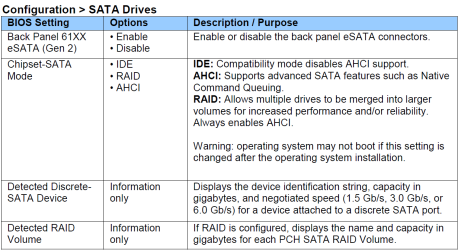
Stuck on Starting Windows screen + XP only installs with non-ACPI

SheldonLFC

New member
Local time
9:18 AM
Messages
9
So my PC crashes the other day, and I figure its just one of those routine crashes. I reboot the machine but on loading it gets stuck on the 'Starting Windows' screen (The one where the four colored balls join to form the Windows logo). I try to run Start-up recovery from the Win7 cd and once again it freezes on the same place. Finally I decide a format may be required and I boot from the CD and yet again it gets stuck on 'starting windows'.
By now Im really concerned, so I decide to try installing another OS. I try XP, Vista and even Fedora Linux and they all get stuck about the time when setup should normally be loading files.
I've tried all sorts of tests using the Ultimate boot CD and they all come out passed.
I've also read in another forum that probably the PSU could be faulty so I try to boot up my pc with another PSU but its still the same problem.
Then I read in this one forum where a user is facing the similar problem with XP, that I gotta hit F5 when it says installing RAID drivers and select 'Standard PC with c-step i486'. After I do this, the installation proceeds fine and I'm able to use XP now.
However, on further reading, I realize that this installed XP on my PC without ACPI. And perhaps, Windows 7, Vista and Fedora Linux didn't install because they need ACPI support. However my motherboard does have support for ACPI, as I've used Windows 7, plus I had installed Vista and Fedora Linux in the past with no glitch.

Is it normal for ACPI support to just disappear like that? What could be the problem with my PC? Do I need to upgrade the BIOS or anything of the such?

Thanks!
 

My Computer My Computer

At a glance

Windows 7 Ultimate 32bitIntel Core 2 Quad Q8200Kingston 2x2048MB DDR2-SDRAM 400 MhzIntel GMA 4500(M)(HD)
OS
Windows 7 Ultimate 32bit
CPU
Intel Core 2 Quad Q8200
Motherboard
Intel DG41RQ
Memory
Kingston 2x2048MB DDR2-SDRAM 400 Mhz
Graphics Card(s)
Intel GMA 4500(M)(HD)
Sound Card
Realtek High Definition Audio
Monitor(s) Displays
LG W1941S
Screen Resolution
1360x768
Hard Drives
MAXTOR STM3320613AS (320 GB)
PSU
ACTech CPU-24550W (550W)
Case
Mercury
Keyboard
Logitech K100
Internet Speed
512 Kbps
Sounds like your BIOS was reset from IDE mode to SATA mode. Try resetting the BIOS to default setting.

For Win XP not installing in Sata mode, you would need to load Sata drivers at F6.
http://www.sevenforums.com/tutorials/66010-sata-drivers-load-windows-xp-setup-dual-boot.html

For better help with problems, Can you post your specs.
http://www.sevenforums.com/general-discussion/22550-filling-out-system-specs.html
http://www.sevenforums.com/hardware-devices/6936-dont-know-what-hardware-you-have.html
VistaForums SysInfo Tool - Vista Forums
 

My Computer My Computer

At a glance

ME/XP/Vista/Win7
OS
ME/XP/Vista/Win7
Thanks for the reply theog,

I've resetted the BIOS settings to default by hitting F9 or something at the BIOS screen.
It still gets stuck on the same place.

About the Windows XP SATA drivers, yeah I'll probably need to try that out.
Whats baffling however is that I never needed to load any SATA drivers or such while installing any OS previously, it would just install seamlessly.
Also, I do remember reading something about changing the SATA controller to AHCI or IDE or something in another forum where a user was facing a similar problem.

So all in all, is this a problem with my SATA drivers? Have they gotten corrupt or something?

Thanks again...
 
Last edited:

My Computer My Computer

At a glance

Windows 7 Ultimate 32bitIntel Core 2 Quad Q8200Kingston 2x2048MB DDR2-SDRAM 400 MhzIntel GMA 4500(M)(HD)
OS
Windows 7 Ultimate 32bit
CPU
Intel Core 2 Quad Q8200
Motherboard
Intel DG41RQ
Memory
Kingston 2x2048MB DDR2-SDRAM 400 Mhz
Graphics Card(s)
Intel GMA 4500(M)(HD)
Sound Card
Realtek High Definition Audio
Monitor(s) Displays
LG W1941S
Screen Resolution
1360x768
Hard Drives
MAXTOR STM3320613AS (320 GB)
PSU
ACTech CPU-24550W (550W)
Case
Mercury
Keyboard
Logitech K100
Internet Speed
512 Kbps
As your spec's are unknown.

In your BIOS there are modes for the Sata Controller, reset to the same mode you used when installing Windows 7.

Types of modes the BIOS may have
IDE
SATA
RAID
 

My Computer My Computer

At a glance

ME/XP/Vista/Win7
OS
ME/XP/Vista/Win7
Yeah sorry for not posting the specs, I'm currently using the internet at my workplace as somehow installing XP with non-acpi has made my default LAN driver a little weird.
I get a 'cable unplugged' message even though everything is plugged in, the cable is working fine, and the modem is working fine. It just gives me a single orange light pulse when I remove and reinsert the cable.

Anyway, once I get home I'll probably try the different SATA modes and see if it makes a difference. I'll post back with what I find.

Thanks!
 

My Computer My Computer

At a glance

Windows 7 Ultimate 32bitIntel Core 2 Quad Q8200Kingston 2x2048MB DDR2-SDRAM 400 MhzIntel GMA 4500(M)(HD)
OS
Windows 7 Ultimate 32bit
CPU
Intel Core 2 Quad Q8200
Motherboard
Intel DG41RQ
Memory
Kingston 2x2048MB DDR2-SDRAM 400 Mhz
Graphics Card(s)
Intel GMA 4500(M)(HD)
Sound Card
Realtek High Definition Audio
Monitor(s) Displays
LG W1941S
Screen Resolution
1360x768
Hard Drives
MAXTOR STM3320613AS (320 GB)
PSU
ACTech CPU-24550W (550W)
Case
Mercury
Keyboard
Logitech K100
Internet Speed
512 Kbps
You have now installed Win XP, YES. So you now have a dual boot setup.

Use EasyBCD is best used in Windows 7.
How to dual Windows 7 & Win XP:
http://www.sevenforums.com/tutorials/8057-dual-boot-installation-windows-7-xp.html?ltr=D
Use EasyBCD 2.0 in Win 7.
Download EasyBCD 2.1 - NeoSmart Technologies

Boot up using the Startup disk CD or Windows 7 DVD. (not the OEM manufacturer's Recovery Disk) If you have a Netbook, you will need a CD/DVD drive.
Make sure no USB drives are plugged in.

Do a Strartup Repair to get Windows 7 booting:
http://www.sevenforums.com/tutorials/681-startup-repair.html?ltr=S
Note: You may need to do startup repair 3 to 4 times.
http://www.sevenforums.com/tutorials/105541-startup-repair-run-3-separate-times.html

If you have not made your Startup Repair
http://www.sevenforums.com/tutorials/2083-system-repair-disc-create.html
Do you have a mate with Windows 7 & CD/DVD RW Drive, how could burn one off.
 

My Computer My Computer

At a glance

ME/XP/Vista/Win7
OS
ME/XP/Vista/Win7
Sorry for the late reply but I just managed to get the internet working at my home.
Anyway, I don't have a dual boot setup. As I mentioned, my Windows 7 wouldnt even get past the 'Starting Windows screen' so I installed the XP over the Windows7. So I can't exactly create the System repair disc or anything of the such.

Also, after installing XP only with ACPI my PC has become terribly slow. It takes 10-15 seconds just for the My Computer window to load. So if anyone can help me with what exactly is it that ACPI disables maybe I'll know what's causing it to be so slow.
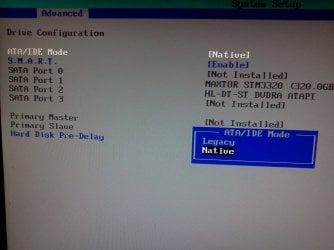
I also got into the BIOS but I cant see any SATA controller settings besides Legacy and Native. I tried both these settings and I'm still facing the same problem. Any further help would be greatly appreciated.
 

My Computer My Computer

At a glance

Windows 7 Ultimate 32bitIntel Core 2 Quad Q8200Kingston 2x2048MB DDR2-SDRAM 400 MhzIntel GMA 4500(M)(HD)
OS
Windows 7 Ultimate 32bit
CPU
Intel Core 2 Quad Q8200
Motherboard
Intel DG41RQ
Memory
Kingston 2x2048MB DDR2-SDRAM 400 Mhz
Graphics Card(s)
Intel GMA 4500(M)(HD)
Sound Card
Realtek High Definition Audio
Monitor(s) Displays
LG W1941S
Screen Resolution
1360x768
Hard Drives
MAXTOR STM3320613AS (320 GB)
PSU
ACTech CPU-24550W (550W)
Case
Mercury
Keyboard
Logitech K100
Internet Speed
512 Kbps

My Computer My Computer

At a glance

ME/XP/Vista/Win7
OS
ME/XP/Vista/Win7
Thanks for that info theog.
I tried to find for that SATA setting in the BIOS so that I could change it. But this is all I find in the BIOS related to SATA(attached image).

So is there any way I can find out what Chipset mode my SATA is operating on without going to the BIOS?

Thanks!
 

Attachments

  • IMG229.jpg
    IMG229.jpg
    241.5 KB · Views: 17

My Computer My Computer

At a glance

Windows 7 Ultimate 32bitIntel Core 2 Quad Q8200Kingston 2x2048MB DDR2-SDRAM 400 MhzIntel GMA 4500(M)(HD)
OS
Windows 7 Ultimate 32bit
CPU
Intel Core 2 Quad Q8200
Motherboard
Intel DG41RQ
Memory
Kingston 2x2048MB DDR2-SDRAM 400 Mhz
Graphics Card(s)
Intel GMA 4500(M)(HD)
Sound Card
Realtek High Definition Audio
Monitor(s) Displays
LG W1941S
Screen Resolution
1360x768
Hard Drives
MAXTOR STM3320613AS (320 GB)
PSU
ACTech CPU-24550W (550W)
Case
Mercury
Keyboard
Logitech K100
Internet Speed
512 Kbps
1. hmmm... not sure about that. There are four SATA slots on the motherboard, I just inserted the CD Drive and the hard disk in two of them. Didn't have the slave-master problem with this before...
2. Yes Im sure the specs are right. I've checked it with CPU-Z and HWinfo32. Why? Is there something wrongly mentioned?

Thanks.
 

My Computer My Computer

At a glance

Windows 7 Ultimate 32bitIntel Core 2 Quad Q8200Kingston 2x2048MB DDR2-SDRAM 400 MhzIntel GMA 4500(M)(HD)
OS
Windows 7 Ultimate 32bit
CPU
Intel Core 2 Quad Q8200
Motherboard
Intel DG41RQ
Memory
Kingston 2x2048MB DDR2-SDRAM 400 Mhz
Graphics Card(s)
Intel GMA 4500(M)(HD)
Sound Card
Realtek High Definition Audio
Monitor(s) Displays
LG W1941S
Screen Resolution
1360x768
Hard Drives
MAXTOR STM3320613AS (320 GB)
PSU
ACTech CPU-24550W (550W)
Case
Mercury
Keyboard
Logitech K100
Internet Speed
512 Kbps
Would you like to troubleshoot the Win7 install, as it seems we didn't have a chance to help you with that? It is our specialty, after all.

Start by resetting the CMOS: Clear CMOS - 3 Ways to Clear the CMOS - Reset BIOS

While in BIOS setup, set SATA controller to AHCI. Unplug all other HD's and peripherals.

Boot the WIn7 DVD, choose Custom Install, use Drive options to delete all partitions, create New ones, format before install. Illustrated steps here: Clean Install Windows 7

If install fails, remove all but 2gb of RAM to try install, Swap RAM sticks, test RAM: RAM - Test with Memtest86+

If this fails, test your HD using maker's extended CD scan: HD Diagnostic. Then boot Win7 DVD Repair console to open a Command Prompt to run Disk Check with /r switch on all partitions.

Next try wiping the HD using Diskpart from DVD Command Line to overwrite possible boot sector corruption:
DISKPART At PC Startup Clean and Clean All with Diskpart Command
Report back on each of these steps and if necessary we will have more.
 
Thanks Greg, regarding the second step, I don't see any option in my BIOS to change the SATA Chipset mode. I've attached an image in a previous post. All I see is 'Legacy' and 'Native', and I've tried booting Win7 with both these options but it still gets stuck on 'Starting Windows'. So is there any way to detect the SATA Chipset mode without going to the BIOS?

I've also resetted the BIOS by removing the CMOS battery but that didn't help.

Besides that, I'll try the rest of the steps that you've mentioned and report back with what I find.

Thanks again!
 

My Computer My Computer

At a glance

Windows 7 Ultimate 32bitIntel Core 2 Quad Q8200Kingston 2x2048MB DDR2-SDRAM 400 MhzIntel GMA 4500(M)(HD)
OS
Windows 7 Ultimate 32bit
CPU
Intel Core 2 Quad Q8200
Motherboard
Intel DG41RQ
Memory
Kingston 2x2048MB DDR2-SDRAM 400 Mhz
Graphics Card(s)
Intel GMA 4500(M)(HD)
Sound Card
Realtek High Definition Audio
Monitor(s) Displays
LG W1941S
Screen Resolution
1360x768
Hard Drives
MAXTOR STM3320613AS (320 GB)
PSU
ACTech CPU-24550W (550W)
Case
Mercury
Keyboard
Logitech K100
Internet Speed
512 Kbps
Ok so memtest86+ clears with 6 passes (left it overnight), and I ran the long generic test of Seagate's Seatools for my Maxtor HDD, and that came out as a pass as well...

Do I still need to try the 'diskpart' step? Cause it seems my HDD is functioning as it should.

Thanks!
 

My Computer My Computer

At a glance

Windows 7 Ultimate 32bitIntel Core 2 Quad Q8200Kingston 2x2048MB DDR2-SDRAM 400 MhzIntel GMA 4500(M)(HD)
OS
Windows 7 Ultimate 32bit
CPU
Intel Core 2 Quad Q8200
Motherboard
Intel DG41RQ
Memory
Kingston 2x2048MB DDR2-SDRAM 400 Mhz
Graphics Card(s)
Intel GMA 4500(M)(HD)
Sound Card
Realtek High Definition Audio
Monitor(s) Displays
LG W1941S
Screen Resolution
1360x768
Hard Drives
MAXTOR STM3320613AS (320 GB)
PSU
ACTech CPU-24550W (550W)
Case
Mercury
Keyboard
Logitech K100
Internet Speed
512 Kbps

My Computer My Computer

At a glance

W 7 64-bit UltimateIntel Q9550 Yorkfield8GB Dominator 8500C5DATI : XFX 5870
Computer Manufacturer/Model Number
* BFK Customs *
OS
W 7 64-bit Ultimate
CPU
Intel Q9550 Yorkfield
Motherboard
ASUS P5Q Pro
Memory
8GB Dominator 8500C5D
Graphics Card(s)
ATI : XFX 5870
Sound Card
Realtek HD Audio 7-1
Monitor(s) Displays
1x 47" LCD HDMI & 3x 26" LCD HDMI
Screen Resolution
1920x1080P & 1920x1200
Hard Drives
1x 80GB Intel X25-M G2 SSD : 1x 500GB & 1x 640GB WD Caviar Black(s)
PSU
Corsair 620HX
Case
Cooler Master RC-690
Cooling
Tuniq Tower 120, 2x 140mm and 3x 120mm case fans
Keyboard
Microsoft 500
Mouse
Razer Diamondback 3G
Internet Speed
14 Mb/s
Other Info
1x Koutech 3Gb/s SATA HDD Hot Swap Rack
Is there a newer BIOS update for your mobo? Is the BIOS set to optimal defaults?

After running Diskpart "Clean" follow the commands in Step 2.2 of the tutorial to create a partition with Diskpart and mark it Active, then try install.

Where did you get Win7? If you burned the DVD yourself, eliminate the ISO and burn as possible cause by verifying integrity of ISO, writing to flash stick using this tool with Win7 in dropdown: Universal USB Installer – Easy as 1 2 3

If you have a retail DVD, eliminate DVD drive as cause by writing installer to flash stick using Ultra ISO trial version: On File tab select Open DVD, on Bootable Tab select Write Disk Image, Format, Write. Boot under USB's or HD's.

When I run out of time to troubleshoot failing installs, I move the HD to another computer to install with all other HD's unplugged, then SysPrep the HD before moving it back to problem computer: SysPrep to move HD to another computer
 
Yes I've updated my BIOS to the latest available version and everything is set to the optimal defaults...

I have a retail DVD of Windows 7, so I will try out installing with the flash stick...

Anyway, I downloaded the trial version of VMWare Workstation 7 today, just to see if my Windows 7 installs on it, so I pop in the DVD, select all the settings in VMWare and the installation works without a glitch!.... This was really odd considering VMWare pretty much 'borrows' from your Physical PC's hardware to create a Virtual PC.

Any thoughts?

Thanks!
 

My Computer My Computer

At a glance

Windows 7 Ultimate 32bitIntel Core 2 Quad Q8200Kingston 2x2048MB DDR2-SDRAM 400 MhzIntel GMA 4500(M)(HD)
OS
Windows 7 Ultimate 32bit
CPU
Intel Core 2 Quad Q8200
Motherboard
Intel DG41RQ
Memory
Kingston 2x2048MB DDR2-SDRAM 400 Mhz
Graphics Card(s)
Intel GMA 4500(M)(HD)
Sound Card
Realtek High Definition Audio
Monitor(s) Displays
LG W1941S
Screen Resolution
1360x768
Hard Drives
MAXTOR STM3320613AS (320 GB)
PSU
ACTech CPU-24550W (550W)
Case
Mercury
Keyboard
Logitech K100
Internet Speed
512 Kbps
Back
Top