Stupid Newbie Question

Propwash Pete

New member
Local time
8:27 PM
Messages
7
I recently purchased a new Dell Inspiron N7010, 64 bit laptop running Windows 7. My hard drive was partitioned by Dell with 58.5 GB on Drive C and 527 GB on Drive D. My C drive is almost full with only 1.58 GB remaining. There is nothing on my D Drive, but I can't figure out how to use it or how to transfer some of my programs and files to the D drive. I considered Partition Magic, but their "free" verson will not handle 64 bit. I hate to have to spend $40 if there is another way to work around this. Any help? (Keep it simple!)


Joe
:confused:
 

My Computer

OS
Windows 7 64 bit

My Computer

Computer Manufacturer/Model Number
Over Clockers Ultima Viper 2.80Ghz
OS
Windows 7 Ultimate 64 - OEM Service Pack 1
CPU
Intel Core i7 930 2.80Ghz Bloomfield Socket LGA 1366
Motherboard
Gigabyte GA-X58A-UD3R Intel X58 Socket 1366 DDR3
Memory
Patriot Viper 6GB 3x2GB DDR3 PC3-1200C9 1600Mhz Tri Channel
Graphics Card(s)
Asus ATI Radeon HD 5770 CuCore 1024MB GDDR5 PCI Express
Sound Card
Realtek ALC889 @ Intel 82801JB ICH10 - High Definition Audio
Monitor(s) Displays
Samsung SyncMaster 920N 19"
Screen Resolution
1280*1024
Hard Drives
1 x OCZ Vertex2 Series 120GB 2.5" SATA-II SSD
1 x Seagate Barracuda 7200.12 1TB SATA-II 32MB Cache
1 x Western Digital Caviar Green 2TB SATA-II 64 MB Cache
PSU
Corsair TX 650W ATX SLi
Case
Antec 902 Ultimate Gaming Case Black
Cooling
Prolimatech Megahalems Rev B CPU Cooler Socket 775/1156/1366
Keyboard
Microsoft Comfort Curve Keyboard
Mouse
Microsoft Optical USB
Internet Speed
ADSL24 FTTC 34.2 Mbps Down 7.1Mbps Up
Other Info
OcUK 22x DVDSATA ReWriter Black
Akasa AK-FN058 Apache Black Super Silent 120mm Fan
Printer Epson Stylus Photo R300
Scanner Canon Canoscan 8000F
Your D drive should be your recovery drive ... you don't want to back up to that drive. Are you sure about you drive letters and the amount of space on each one?
 

My Computer

Computer type
PC/Desktop
Computer Manufacturer/Model Number
Bruce ... somewhere in his 40's
OS
Windows 7 Ultimate 32bit SP1
CPU
Intel(R) Core(TM)2 Quad CPU @ 2.40GHz, 2400 MHz
Motherboard
INTEL/D975XBX2
Memory
4 GB
Graphics Card(s)
ATI Radeon HD 2600 Pro
Monitor(s) Displays
Samsung SyncMaster 914v
Screen Resolution
1280 x 1024
Hard Drives
2/500GB each ... ST3500630AS ATA Device.
One is not connected
PSU
Rocketfish 700 W
Case
G.Skill Gigabyte Chassis
Keyboard
Standard PS/2 Keyboard
Mouse
Microsoft PS/2 Mouse
Internet Speed
DSL
Antivirus
Avira Internet Security
Browser
IE 11
Other Info
ATI HDMI Audio
If the D drive is formatted you can open it and create new folders to place you personal files in. You can also redirect some folders (like downloads, my videos, my music) to folders on the D drive. This tutorial from Microsoft will explain how:
Redirect a folder to a new location
 

My Computer

Computer type
Laptop
Computer Manufacturer/Model Number
Toshiba P775-S7100
OS
Windows 7 Professional SP1 64-bit
CPU
Intel Core i5-2450M @2.5 GHz
Memory
6 GB DDR3 1333MHz
Graphics Card(s)
Intel HD 3000
Monitor(s) Displays
Built-in 17.3" LED; 22" Insignia NS-L22Q-10A
Screen Resolution
1600x900; 1360x768
Hard Drives
750 GB Hitachi
1TB Seagate FreeAgent External
Internet Speed
Verizon DSL Speed(Down/Up): 3360 Kbps / 800 Kbps
Antivirus
MSE and MBAM Pro
Browser
IE10

My Computer

Computer Manufacturer/Model Number
* BFK Customs *
OS
W 7 64-bit Ultimate
CPU
Intel Q9550 Yorkfield
Motherboard
ASUS P5Q Pro
Memory
8GB Dominator 8500C5D
Graphics Card(s)
ATI : XFX 5870
Sound Card
Realtek HD Audio 7-1
Monitor(s) Displays
1x 47" LCD HDMI & 3x 26" LCD HDMI
Screen Resolution
1920x1080P & 1920x1200
Hard Drives
1x 80GB Intel X25-M G2 SSD : 1x 500GB & 1x 640GB WD Caviar Black(s)
PSU
Corsair 620HX
Case
Cooler Master RC-690
Cooling
Tuniq Tower 120, 2x 140mm and 3x 120mm case fans
Keyboard
Microsoft 500
Mouse
Razer Diamondback 3G
Internet Speed
14 Mb/s
Other Info
1x Koutech 3Gb/s SATA HDD Hot Swap Rack
Boy, that was quick! My thanks to all of you for what appears to be some very helpful information. I'll let you know how things turn out in case anyone is interested.

Propwash Pete
 

My Computer

OS
Windows 7 64 bit
Trust me, we all always interested in how things go.
 

My Computer

Computer type
Laptop
Computer Manufacturer/Model Number
Toshiba P775-S7100
OS
Windows 7 Professional SP1 64-bit
CPU
Intel Core i5-2450M @2.5 GHz
Memory
6 GB DDR3 1333MHz
Graphics Card(s)
Intel HD 3000
Monitor(s) Displays
Built-in 17.3" LED; 22" Insignia NS-L22Q-10A
Screen Resolution
1600x900; 1360x768
Hard Drives
750 GB Hitachi
1TB Seagate FreeAgent External
Internet Speed
Verizon DSL Speed(Down/Up): 3360 Kbps / 800 Kbps
Antivirus
MSE and MBAM Pro
Browser
IE10
Boy, that was quick! My thanks to all of you for what appears to be some very helpful information. I'll let you know how things turn out in case anyone is interested.

Propwash Pete


Yes, do post back to keep us informed.
 

My Computer

Computer Manufacturer/Model Number
* BFK Customs *
OS
W 7 64-bit Ultimate
CPU
Intel Q9550 Yorkfield
Motherboard
ASUS P5Q Pro
Memory
8GB Dominator 8500C5D
Graphics Card(s)
ATI : XFX 5870
Sound Card
Realtek HD Audio 7-1
Monitor(s) Displays
1x 47" LCD HDMI & 3x 26" LCD HDMI
Screen Resolution
1920x1080P & 1920x1200
Hard Drives
1x 80GB Intel X25-M G2 SSD : 1x 500GB & 1x 640GB WD Caviar Black(s)
PSU
Corsair 620HX
Case
Cooler Master RC-690
Cooling
Tuniq Tower 120, 2x 140mm and 3x 120mm case fans
Keyboard
Microsoft 500
Mouse
Razer Diamondback 3G
Internet Speed
14 Mb/s
Other Info
1x Koutech 3Gb/s SATA HDD Hot Swap Rack
Your D drive should be your recovery drive ... you don't want to back up to that drive. Are you sure about you drive letters and the amount of space on each one?
At 527GBs, that is certainly not the recovery partition.

For a data partition; have a look at my video tutorial.
 

My Computer

Computer Manufacturer/Model Number
HP, Dell, Gateway, Toshiba - 4 laptops and 2 desktops
OS
Vista, Windows7, Mint Mate, Zorin, Windows 8
CPU
from 1.6GHz Duo to i7
Monitor(s) Displays
2x HP w2207
Hard Drives
5x HDD, 7x SSD, 12x Externals
Keyboard
with trackball - no mices
Mouse
Trackball mice
Internet Speed
DSL 6000
Yes, consider using D as your Data Partition by separating your User files into it. It will then act as a data vault in case your Win7 won't start. You can just reimage your OS and programs back to C and your data will be waiting on D.

Watch whs's video and read this tutorial: http://www.sevenforums.com/tutorials/18629-user-folders-change-default-location.html

If you decide to resize D to make C bigger, then be sure to back up your files and a system image as resizing operations can fail with 3rd party apps although they almost never do with PW.

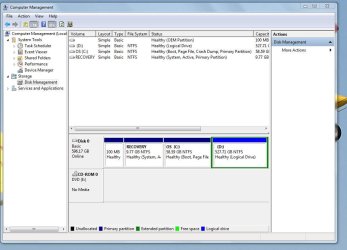
Where exactly is your Recovery partition? Can you post back a screenshot of your full Disk Mgmt drive map and listings, using Snipping Tool in Start Menu, so we can have a look for you?
 

My Computer

Computer Manufacturer/Model Number
* BFK Customs *
OS
W 7 64-bit Ultimate
CPU
Intel Q9550 Yorkfield
Motherboard
ASUS P5Q Pro
Memory
8GB Dominator 8500C5D
Graphics Card(s)
ATI : XFX 5870
Sound Card
Realtek HD Audio 7-1
Monitor(s) Displays
1x 47" LCD HDMI & 3x 26" LCD HDMI
Screen Resolution
1920x1080P & 1920x1200
Hard Drives
1x 80GB Intel X25-M G2 SSD : 1x 500GB & 1x 640GB WD Caviar Black(s)
PSU
Corsair 620HX
Case
Cooler Master RC-690
Cooling
Tuniq Tower 120, 2x 140mm and 3x 120mm case fans
Keyboard
Microsoft 500
Mouse
Razer Diamondback 3G
Internet Speed
14 Mb/s
Other Info
1x Koutech 3Gb/s SATA HDD Hot Swap Rack
Here's a screenshot of my disk managament. Is this what you need?

Propwash Pete
 

Attachments

  • Computer Management.JPG
    Computer Management.JPG
    78.7 KB · Views: 33

My Computer

OS
Windows 7 64 bit
You should be able to just move files to you D partition. Look at my previous post for a guide on how to set your normal My Ducument, My Music, etc. folders to be on your D drive.
 

My Computer

Computer type
Laptop
Computer Manufacturer/Model Number
Toshiba P775-S7100
OS
Windows 7 Professional SP1 64-bit
CPU
Intel Core i5-2450M @2.5 GHz
Memory
6 GB DDR3 1333MHz
Graphics Card(s)
Intel HD 3000
Monitor(s) Displays
Built-in 17.3" LED; 22" Insignia NS-L22Q-10A
Screen Resolution
1600x900; 1360x768
Hard Drives
750 GB Hitachi
1TB Seagate FreeAgent External
Internet Speed
Verizon DSL Speed(Down/Up): 3360 Kbps / 800 Kbps
Antivirus
MSE and MBAM Pro
Browser
IE10
Yeah, all is well. The recovery partition is hidden (no drive letter). That's where the confusion came from because usually it is the D partition. You can go ahead and move the data to your D. You may even want to subdivide D. Just make sure you create an extended partition and not another primary.
 

My Computer

Computer Manufacturer/Model Number
HP, Dell, Gateway, Toshiba - 4 laptops and 2 desktops
OS
Vista, Windows7, Mint Mate, Zorin, Windows 8
CPU
from 1.6GHz Duo to i7
Monitor(s) Displays
2x HP w2207
Hard Drives
5x HDD, 7x SSD, 12x Externals
Keyboard
with trackball - no mices
Mouse
Trackball mice
Internet Speed
DSL 6000
Were you provided with any Recovery Disks or Win7 OS DVD by Dell? I understand they have recently stopped doing this. On clean reinstalls, we normally wipe the OEM partition which provides the useless Dell utilities and the Recovery partition if there are disks instead.

However Dell's Recovery Partition works unusually well, although it would have to be carefully studied during reimaging to see if it wants to overwrite your D data partition or allows you to choose only to reimage C. It is likely better to make your own image of C stored externally so you can reimage C easily should WIn7 become irreparable.

First get it all set up as you want, with the bloatware programs removed using Revo uninstaller, all startup freeloaders (besides AV and gadgets) removed from msconfig>startup list, HD perfectly cleaned and ordered using CCleaner ("Run Cleaner" and Registry tabs) and Auslogics Disk and Registry defraggers, google repeat errors in Event Viewer>Admin View to eventual resolution.


Since the Recovery partition is marked System Active, it will want to include it if you use the built-in Win7 imaging app, so consider using free Macrium Reflect or Paragon which allow more flexibility to choose.

Keep a set of your active User folders also backed up externally in case of HD failure or the forced need to restore to factory condition using the Recovery partition.
 
Try this:
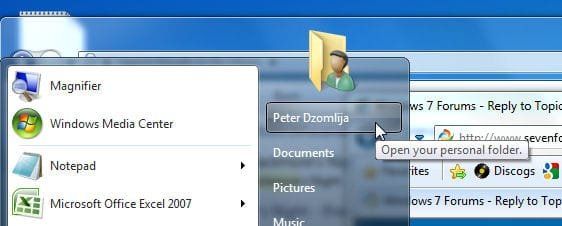
1) Click the Start Button, then click on you user-name at the top right:
Image01.jpg

2) Right-click on "Documents", then select "Properties":
Image02.jpg

3) In the "Documents Properties" window, click the "Location" tab, then click "Move". Browse to your D:, select the folder where you want "Documents" to be located (create a new folder, if necessary). Click "Select Folder":
Image03.jpg
4) When you have changed the location, click "Apply" to confirm the change, and allow Windows to move ALL the files.

5) When done copying, click "OK"

6) The above procedure will work for "Contacts", "Desktop", "Documents", "Downloads", "Favourites", "Links", "Music", "Pictures", "Videos", "Saved Games" and "Searches", although the folders most often relocated by users are "Documents", "Pictures", "Videos" and "Downloads", because those folders usually take up the most space with user files.


You can also read the User Folders - Change Default Location tutorial (written by Brink) for more information.
 

My Computer

Computer type
PC/Desktop
Computer Manufacturer/Model Number
Virtual Machine
OS
Windows 7 Professional 32-bit SP1
CPU
AMD A4/A6
Motherboard
Intel Corporation 440BX Desktop Reference Platform
Memory
3.00GB EDO
Graphics Card(s)
VMware SVGA 3D
Sound Card
High Definition Audio Device
Monitor(s) Displays
Generic Non-PnP Monitor on VMware SVGA 3D
Screen Resolution
1440x900
Hard Drives
1 x 60GB VMware Virtual SATA Hard Drive ATA Device
Antivirus
Kaspersky Total Security
Status Update

Here's where I am so far. I have not re-sized the D drive or the C drive yet because it seems a little above my pay grade. I have moved things over from C to D to free up space on the C drive. I'm going to approach this one step at a time because I can see where I am trodding on trecherous soil. One mistake and it's all over. Stay tuned.

Propowash Pete
:p
 

Attachments

  • System Snapshot.JPG
    System Snapshot.JPG
    45.9 KB · Views: 12

My Computer

OS
Windows 7 64 bit
You may not need to resize either drive if you succeed in moving your User folders to the D data drive.
 
I wouldn't make any more changes since you can move your stuff over now. Just keep 20GB free on the C drive and you'll be fine from here on.
 

My Computer

Computer type
Laptop
Computer Manufacturer/Model Number
Toshiba P775-S7100
OS
Windows 7 Professional SP1 64-bit
CPU
Intel Core i5-2450M @2.5 GHz
Memory
6 GB DDR3 1333MHz
Graphics Card(s)
Intel HD 3000
Monitor(s) Displays
Built-in 17.3" LED; 22" Insignia NS-L22Q-10A
Screen Resolution
1600x900; 1360x768
Hard Drives
750 GB Hitachi
1TB Seagate FreeAgent External
Internet Speed
Verizon DSL Speed(Down/Up): 3360 Kbps / 800 Kbps
Antivirus
MSE and MBAM Pro
Browser
IE10
My hard drive was partitioned by Dell with 58.5 GB on Drive C and 527 GB on Drive D

Drive D is normally the recovery drive for the operating system. Your user manual should tell you what Drive D is for. You should also make the recovery disks for your pc unless it came with the install disk.

527 GB on Drive D would be insane for a recovery drive. A recovery drive is normally only a few gb.

I would give Dell a call; they should be able to help you without any charges if the computer is less than a year old.
 

My Computer

OS
Windows 7 Pro
CPU
Intel(R) Pentium(R) Duel CPU E2200 2.20 Ghz
Motherboard
GA-G41M-ES2L
Memory
4 gb 2.96 Usable
Graphics Card(s)
Onboard
Sound Card
Onboard
Hard Drives
2 - 1TB WD Sata Drives
Back
Top