Stuttering after upgrading to Win 7 Pro

Start a new thread - and then post a screenshot of HWInfo32's summary screen. A Pentium isn't a good choice for gaming regardless.


Sorry but that's what is in my vista system and i'm not sure how to start a new thread. It took me 1.6 hrs to find this post again, so, sorry if i stepped on any toes out there. I'm new to this and just want to fly on a system that doesn't have the bull windows 7 makes u deal with.
~S~

What games are you playing? There are probably a few tweaks we can run to get you on track. Windows7 is far better than vista with performance.

First off with your games issue. If you disable your sound card, does the problem persist? If a valve game have your tried playing with multicore rendering disabled, if so does the problem persist?

Let us know.


The only games I have on here are IL 2 Sturmovik 1946 and CoD: MW2. both of which I have to set video at 800 x 600 on a machine that has 1366 x 768. Even at best, both are sometimes chopy and have a 1 sec. lag between input and reaction.
I really haop you can help. I miss the game. It's my only retreat from where I'm at.
~S~
 

My Computer My Computer

At a glance

windows 7 Home Premiun 64bit
OS
windows 7 Home Premiun 64bit
Ok.

Here is what I want you to do first.

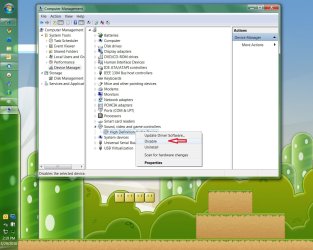
  1. Go to device manager and locate your sound card.
  2. Right click it and disable the card.
  3. Reboot.
  4. Play your games with out sound.
  5. Does the problem still exist?
If yes go ahead and re-enable the sound card and report back.
 

My Computer My Computer

At a glance

Windows 7; Server 08; Window Home Server; Vis...Intel E8400 @ 3.4Ghz8 Gb Patriot DDr2 800NVidia GTX460 OC
Computer Manufacturer/Model Number
Home Built
OS
Windows 7; Server 08; Window Home Server; Vista; XP
CPU
Intel E8400 @ 3.4Ghz
Motherboard
Gigabyte P35 DS3L
Memory
8 Gb Patriot DDr2 800
Graphics Card(s)
NVidia GTX460 OC
Sound Card
Onboard
Monitor(s) Displays
Samsung 21"
Screen Resolution
1920x1080
Hard Drives
Seagate 160Gb x2
Samsung 250Gb
PSU
Cooler Master 650w 52a on 12v
Case
Antec 300
Cooling
Stock
Keyboard
HP Standard USB
Mouse
Logitech 518
Internet Speed
25Mbit Down 1.5Mbit up
Other Info
http://www.speedtest.net/result/723924362.png
stuttering

yes it still lags and stutters. I also want to state that i don't have 7 pro, windows 7 Home Premium 64bit.
even CoD: Modern Warfare 2 stutters so bad i can't play it.
any ideas? and why do i have sound even though i disabled the sound card?
 

My Computer My Computer

At a glance

windows 7 Home Premiun 64bit
OS
windows 7 Home Premiun 64bit
yes it still lags and stutters. I also want to state that i don't have 7 pro, windows 7 Home Premium 64bit.
even CoD: Modern Warfare 2 stutters so bad i can't play it.
any ideas? and why do i have sound even though i disabled the sound card?

if you have sound when it is disabled then it was not disabled properly. If you have a sound card and are comfortable doing so, remove it. If you have onboard sound and are comfortable doing so, disable it in the bios. Then rerun the games. There should be no sound what so ever. Does the stutter still exist?

If you have sound then the sound card is not disabled.

H.
 

My Computer My Computer

At a glance

Windows 7; Server 08; Window Home Server; Vis...Intel E8400 @ 3.4Ghz8 Gb Patriot DDr2 800NVidia GTX460 OC
Computer Manufacturer/Model Number
Home Built
OS
Windows 7; Server 08; Window Home Server; Vista; XP
CPU
Intel E8400 @ 3.4Ghz
Motherboard
Gigabyte P35 DS3L
Memory
8 Gb Patriot DDr2 800
Graphics Card(s)
NVidia GTX460 OC
Sound Card
Onboard
Monitor(s) Displays
Samsung 21"
Screen Resolution
1920x1080
Hard Drives
Seagate 160Gb x2
Samsung 250Gb
PSU
Cooler Master 650w 52a on 12v
Case
Antec 300
Cooling
Stock
Keyboard
HP Standard USB
Mouse
Logitech 518
Internet Speed
25Mbit Down 1.5Mbit up
Other Info
http://www.speedtest.net/result/723924362.png
Stuttering games

How do I disable all sound through win 7 home. not used to the system because I've got my main com in the shop for dvd repairs.
Do I go into device manager or what. can't mess with bios cause it's a loner computer until mine comes back?

P.S. Thanks for all the help regardless of the outcome.

~S~
 

My Computer My Computer

At a glance

windows 7 Home Premiun 64bit
OS
windows 7 Home Premiun 64bit
How do I disable all sound through win 7 home. not used to the system because I've got my main com in the shop for dvd repairs.
Do I go into device manager or what. can't mess with bios cause it's a loner computer until mine comes back?

P.S. Thanks for all the help regardless of the outcome.

~S~

let me see if I can put an image in here for you.
Disable it, do not reboot, just run your game and see if the issues still exists.
 

Attachments

  • disablesound.jpg
    disablesound.jpg
    127.2 KB · Views: 22

My Computer My Computer

At a glance

Windows 7; Server 08; Window Home Server; Vis...Intel E8400 @ 3.4Ghz8 Gb Patriot DDr2 800NVidia GTX460 OC
Computer Manufacturer/Model Number
Home Built
OS
Windows 7; Server 08; Window Home Server; Vista; XP
CPU
Intel E8400 @ 3.4Ghz
Motherboard
Gigabyte P35 DS3L
Memory
8 Gb Patriot DDr2 800
Graphics Card(s)
NVidia GTX460 OC
Sound Card
Onboard
Monitor(s) Displays
Samsung 21"
Screen Resolution
1920x1080
Hard Drives
Seagate 160Gb x2
Samsung 250Gb
PSU
Cooler Master 650w 52a on 12v
Case
Antec 300
Cooling
Stock
Keyboard
HP Standard USB
Mouse
Logitech 518
Internet Speed
25Mbit Down 1.5Mbit up
Other Info
http://www.speedtest.net/result/723924362.png
stutter/lag issues

I have disabled the sound and yes it still does it so in a few days i hope to have my system back home where it belongs and will never run 7 again. it's not worth the hastle.

Thanks to all that tried to help. I ~S~ you all.
 

My Computer My Computer

At a glance

windows 7 Home Premiun 64bit
OS
windows 7 Home Premiun 64bit
How do I disable all sound through win 7 home. not used to the system because I've got my main com in the shop for dvd repairs.
Do I go into device manager or what. can't mess with bios cause it's a loner computer until mine comes back?

P.S. Thanks for all the help regardless of the outcome.

~S~

I have disabled the sound and yes it still does it so in a few days i hope to have my system back home where it belongs and will never run 7 again. it's not worth the hastle.

Thanks to all that tried to help. I ~S~ you all.

wow 2+ weeks and still your computer is being repaired, must be some extensive DVD repairs :shock:
 

My Computer My Computer

At a glance

Windows 8 Professional x64Intel Core i7-3770K @4.5 GHz16GB G.Skill Ripjaws DDR3-1600Gigabyte GeForce GTX 670 OC
OS
Windows 8 Professional x64
CPU
Intel Core i7-3770K @4.5 GHz
Motherboard
Asus Sabertooth Z77
Memory
16GB G.Skill Ripjaws DDR3-1600
Graphics Card(s)
Gigabyte GeForce GTX 670 OC
Sound Card
Realtek
Monitor(s) Displays
HP 2711x 27" LED
Screen Resolution
1920 X 1080p
Hard Drives
Crucial m4 256GB SSD (system)
Seagate Barracuda XT 2TB 7200 RPM (storage)
PSU
Strider Gold Evolution ST1000-G
Case
Raven RV01
Cooling
Noctua NH-D14
Keyboard
Logitech K800
Mouse
Logitech Performance Mouse MX
Internet Speed
FIOS - 75/35 Mbps
Other Info
Pioneer black internal CD/DVD/BD read/write
Logitech Z506 5.1 speakers
--------------------------------------------------
Alienware X51/i7-3770/EVGA GTX 660ti FTW/16GB 1600/Blu-ray/2TB SATA III HD
Back
Top