
Sudden Catastrophic Hard Disc Crash -- Any Options?

cooltouch

Clueless Oldtimer
Member
VIP
Local time
3:18 AM
Messages
123
Location
Houston, Texas
Howdy folks,

Whenever I run into a problem with my Win7 machine that I can't solve, I come here and usually one or more of you have an answer. This time, however, I don't hold out much hope.

I walked away from a normally functioning Win7 system early this afternoon (I'd left it on as I frequently do) only to come back to it a few hours later to a screen informing me that the system was unable to boot properly -- I didn't write down the message, but it's one I've seen before. Basically, it can't find the boot sector on the hard drive.

So I start going through the "Repair" process and keep getting stymied. Well since I've had the system set to dual boot to WinXP as well, I finally booted XP, took a look in Windows Explorer, only to find that one of my system's two hard drives was missing. It was a 2TB drive I had installed barely a year before -- a year and 3 months, actually, to replace a 750 GB drive that had suddenly started tossing error codes, warning me of an eminent failure. Which is why I bought the 2TB drive. Can I name names? A Seagate. Never have cared for Seagates. Guess what brand of drive the used one that failed was. Uhhuh.

So, still unwilling to face the fact that my primary partition (and largest extendedl partition) had disappeared, I tossed my Linux Parted Magic (and other useful utilities) CD into the machine and had a look around. Yep, the Linux utilities found the 2nd hard drive, no problem. But they could find no trace of the 2TB drive.

I figured I'd give things one more try before I give up and write off this drive, which I know has only a 1 yr warranty, and toss it out to you folks, see if you might know of something else I could try. The Windows Repair disk is saying the Boot configuration is corrupt, that the repair action taken was partition table repair, and that the result was failed with an error code given as 0x490.

You're not gonna hurt my feelings if you tell me there's no hope. But it isn't gonna stop me from getting pissed off. I mean, tell me this -- how on earth, short of backing up your files to an online storage source, does a person back up a 2TB drive? I have a 1 TB backup drive that is full to capacity with as many backup files as it can hold from the last scare I had. Fortunately because I was able to clear a lot of "old files" off the remaining disk's partitions, this allowed me to move many more current files onto this disk's partitions, so that the crash will result in a lot of time spent reinstalling and reconfiguring software, but I don't think I lost all that much. And in case you're wondering why I have so many files -- I'm a photographer, and one moderately sized .tif file can easily take up 100MB or more. So it doesn't take all that long to fill up a really big drive. The files I've lost, though -- well, it does sting a bit cuz I dunno if I'll ever have a chance to replace them.

Oh Well. Tomorrow I shop for a NON Seagate replacement.
 

My Computer My Computer

At a glance

Win7 Ulitmate x64AMD Phenom II X4 840 3.2 GHz16 GBATI Radion HD 4290 on the MoBo
Computer type
PC/Desktop
Computer Manufacturer/Model Number
Home built
OS
Win7 Ulitmate x64
CPU
AMD Phenom II X4 840 3.2 GHz
Motherboard
ASRock 890GX Pro3
Memory
16 GB
Graphics Card(s)
ATI Radion HD 4290 on the MoBo
Sound Card
M-Audio Delta 66, AMD on MoBo
Monitor(s) Displays
LG 34", AOC 22" flat screens
Screen Resolution
2560x1080, 1680x1050
Hard Drives
3 TB, 750 gig, 500 gig
PSU
500w
Case
no-name
Cooling
ps fan, case fan, cpu fan
Keyboard
Logitech
Mouse
Logitech
Internet Speed
45+Mbps
Antivirus
Microsoft Security Essentials
Browser
Mozilla SeaMonkey, Chrome
Other Info
I'm a musician and a composer, so this PC is used primarily as a digital audio workstation (DAW), so sound is king. I'm also a photographer, so I also make use of it for image processing. I find the ATI Radion on the MoBo to be perfectly adequate in this respect and the AOC 22" monitor to be respectable. It's about time for an upgrade, though.
Well Seagate happens to my favoured brand but however. You could try these to see if you can open the drive and or scan it.


BOOTABLEUBUNTU

Make a bootable Ubuntu disk http://www.ubuntu.com/download

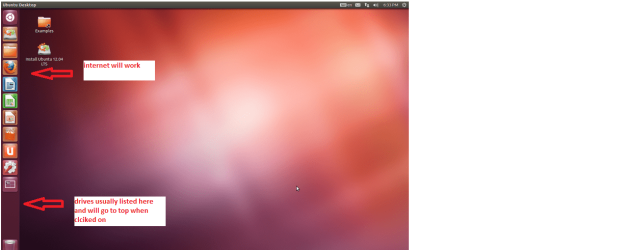
Set the BIOS to boot from theoptical when the machine boots it will show you a screen with TRY or INSTALL> select TRY

When it is finished - it takes verylittle time you will get a screen like in the pic .

Open the drive you want > Userand dig down until you get to the data / settings you may be able to copy /paste the material you want to an external source or other installed drive doingthis.

I am not sure if it will but I haverecovered tons of data etc using this method both on "dead" or justplain drives that you cannot get data from using Windows.
To scan
Use Partition Wizard to surface test the drive
Best Free Partition Manager Freeware and free partition magic for Windows 7, Windows 8, Windows Vista and Windows XP 32 bit & 64 bit. MiniTool Free Partition Manager Software Home Edition.
 

Attachments

  • PW SURFACE.PNG
    PW SURFACE.PNG
    39.4 KB · Views: 2
  • Ubuntu screen.PNG
    Ubuntu screen.PNG
    123.3 KB · Views: 2

My Computer My Computer

At a glance

Desk1 7 Home Prem / Desk2 10 Pro / Main lap A...Desk1 i5 3750K / Laptop i7 GTX 860M / Desk2 i...Desk1 8GB (1866) / Desk2 16GB (1333) / Laptop...Desk 1& 2NVidia GTX 650 & Laptops on board Intel
Computer type
PC/Desktop
Computer Manufacturer/Model Number
Own build (new) Desk1 / Asus ROG Win 7 / Desk2 1st build
OS
Desk1 7 Home Prem / Desk2 10 Pro / Main lap Asus ROG 10 Pro 2 laptop Toshiba 7 Pro Asus P2520 7 & 10
CPU
Desk1 i5 3750K / Laptop i7 GTX 860M / Desk2 i5 2500
Motherboard
Desk1 Asus P877-V / Desk2 Gigabyte H67 UD3H / Laptop ?
Memory
Desk1 8GB (1866) / Desk2 16GB (1333) / Laptop 8Gb DDR3
Graphics Card(s)
Desk 1& 2NVidia GTX 650 & Laptops on board Intel
Sound Card
Desk 1 & 2 -XONAR DG Realtek High Def audio Laptop
Monitor(s) Displays
Desk 1 Benq HD 2450 / Desk2 Philips 24" / Laptop 17.5"
Screen Resolution
1920x1080 D1 & D2 & Laptop 1
Hard Drives
Desk1 Samsung 120GB 830 SSD
Asus ROG 256GB 850 Pro SSD
Desk2 Samsung 840 256 SSD
Toshiba 120GB EVO
PSU
Desk 1 Corsair HX 1050/ Laptop ? / Desk 2 Corsair HX 650
Case
Desk 1 Cooler HAF XM ? Toshiba laptop / Desk2 Coolermaster
Cooling
Fans on all Desk1 -2 Desk2 - all Coolermasters 5 Laptop ?
Keyboard
Desk 1 MS Sidewinder X6 Desk 2 MS Sidewinder X 4
Mouse
Desk 1&2 - Gigabyte MS 900 gamer - laptop - Logitec wireless
Internet Speed
ADSL2+
Other Info
One other Desktop (tester) and spare Toshba laptop both with SSD's
Running Kaspersky 2016 ISS on all machines config'd identically
Logitec audio stereo systems on each machine (x3)
Canon MG5250MFC
Router/modem TP-Link running WPA2SK
how on earth, short of backing up your files to an online storage source, does a person back up a 2TB drive?

Personal cloud storage, WD My Cloud.

I added a 3tb My Cloud to my router, quick and easy setup, I later added a usb 3 2 tb external drive to the My Cloud for a total of 5TB of NSA storage I can excess from any devise I own.

Seagate has been taking a beating about failure rates lately. You can't predict sudden catastrophic failure of HDD's, a monthly check of the SMART report can sometimes tell you things are not well. I assume you have double checked all connections, tried a different SATA cable?
 

My Computer My Computer

At a glance

Win8/8.1,Win7-U64, Vista U64, uncounted Linux...AMD and Intell, 9590, 8350, i5 3570kCorsair G SkillCrossfired Sapphire HD 7950 Vapor-X, ASUS R9 ...
Computer type
PC/Desktop
Computer Manufacturer/Model Number
Custom, Dell and Lenono LT's
OS
Win8/8.1,Win7-U64, Vista U64, uncounted Linux distor's
CPU
AMD and Intell, 9590, 8350, i5 3570k
Motherboard
CFVFZ, GA990FXA, Z77e-itx
Memory
Corsair G Skill
Graphics Card(s)
Crossfired Sapphire HD 7950 Vapor-X, ASUS R9 280X TOP
Sound Card
Realtek ALC889
Monitor(s) Displays
ViewSonic VX2770SMH 27" / ViewSonic VX2433 LCD 24"
Screen Resolution
1080i HD
Hard Drives
Samsung SSD 840 Pro
OCZ Agility 3's
OCZ Vector's
WD's Blue, red, green, Velociraptors
Seagate USB3 & Hybrid's
ASUS Blu-Ray
ASUS DVD
PSU
Corsair AX1200i, Seasonice 850 Gold
Case
Cooler Master HAF 922 & HAF 932, Lian Li Train case.
Cooling
Air, Glacer 240L expanded, custom EK loop with duel D5's
Keyboard
Microsoft SideWinder X4 USB Keyboard / Logitech 250 PS2
Mouse
Logitech G500 / MS wireless 5000
Internet Speed
Best of 5ms / 75+ dn / 12+ up More or less.
Antivirus
MS esentials-MalwareBytes
Browser
Firefox Chromebook
Well, you folks don't disappoint. I knew it would be worthwhile checking in here. Never hurts to ask, I always say.

Well Seagate happens to my favoured brand but however. You could try these to see if you can open the drive and or scan it.

BOOTABLEUBUNTU

Make a bootable Ubuntu disk http://www.ubuntu.com/download

< . . . >

Use Partition Wizard to surface test the drive
Best Free Partition Manager Freeware and free partition magic for Windows 7, Windows 8, Windows Vista and Windows XP 32 bit & 64 bit. MiniTool Free Partition Manager Software Home Edition.

I will give these a try. I can also do a surface test with the Linux-based Parted Magic. Do you think Partition Wizard will do a better, more thorough job?

how on earth, short of backing up your files to an online storage source, does a person back up a 2TB drive?
Personal cloud storage, WD My Cloud.

I added a 3tb My Cloud to my router, quick and easy setup, I later added a usb 3 2 tb external drive to the My Cloud for a total of 5TB of NSA storage I can excess from any devise I own.

Seagate has been taking a beating about failure rates lately. You can't predict sudden catastrophic failure of HDD's, a monthly check of the SMART report can sometimes tell you things are not well. I assume you have double checked all connections, tried a different SATA cable?

Interesting -- seems like "cloud" is the new buzzword in computing these days, although I'm still on the periphery as to its usability. My 1TB exernal drive is on my local ethernet already. So what's the difference between it and your 3TB My Cloud, other than physical size? Software? Back-up Options, or? If the latter, I guess it reminds me of an old SCSI Tape drive I still own (2GB, 4GB compressed), where I was able to set all sorts of backup options with the software that came with it. Haven't used that thing in over 15 years.

So, answer me this -- is there a substantial difference between your My Cloud setup and what I could manage just by buying a big hard drive and an enclosure for it? Probably software, I'm guessing?

I guess I was avoiding the notion of additional backup storage devices after seeing how quickly that 1TB drive got filled up. But I suppose the answer, short of an online backup source, is to do just as you are doing. It's a significant added expense, but the alternative is not worth considering anymore. I suppose my luck couldn't hold forever. This is only the 2nd time in 20 years that I had a drive fail on me without any sort of warning.

No, I haven't been running the SMART tests on my drives. I guess I should have learned to do this after the failure of my 750 GB drive, which was at least polite enough to warn me of an impending failure. And it was thanks to folks here at Sevenforums that I became aware of the SMART tests and specifically what the error was that my 750 GB drive was tossing.

As a matter of fact, I have not yet checked my drive's connections. I don't hold out much hope in that regard. I do have spare SATA cables, however -- both power and data -- so I may as well give them a try. Won't hurt anything, I reckon.

Thanks again, and I'll report back with any additional findings.
 

My Computer My Computer

At a glance

Win7 Ulitmate x64AMD Phenom II X4 840 3.2 GHz16 GBATI Radion HD 4290 on the MoBo
Computer type
PC/Desktop
Computer Manufacturer/Model Number
Home built
OS
Win7 Ulitmate x64
CPU
AMD Phenom II X4 840 3.2 GHz
Motherboard
ASRock 890GX Pro3
Memory
16 GB
Graphics Card(s)
ATI Radion HD 4290 on the MoBo
Sound Card
M-Audio Delta 66, AMD on MoBo
Monitor(s) Displays
LG 34", AOC 22" flat screens
Screen Resolution
2560x1080, 1680x1050
Hard Drives
3 TB, 750 gig, 500 gig
PSU
500w
Case
no-name
Cooling
ps fan, case fan, cpu fan
Keyboard
Logitech
Mouse
Logitech
Internet Speed
45+Mbps
Antivirus
Microsoft Security Essentials
Browser
Mozilla SeaMonkey, Chrome
Other Info
I'm a musician and a composer, so this PC is used primarily as a digital audio workstation (DAW), so sound is king. I'm also a photographer, so I also make use of it for image processing. I find the ATI Radion on the MoBo to be perfectly adequate in this respect and the AOC 22" monitor to be respectable. It's about time for an upgrade, though.
The Cloud method is very slow compared to a local 2nd internal drive or a USB attached drive (USB 3 especially).
 

My Computer My Computer

At a glance

Windows 10 Pro X64Intel Quad Core i7-4770 @ 3.4Ghz16.0GB PC3-12800 DDR3 SDRAM 1600 MHzIntel Integrated HD Graphics
Computer type
PC/Desktop
Computer Manufacturer/Model Number
Lenovo IdeaCenter 450
OS
Windows 10 Pro X64
CPU
Intel Quad Core i7-4770 @ 3.4Ghz
Memory
16.0GB PC3-12800 DDR3 SDRAM 1600 MHz
Graphics Card(s)
Intel Integrated HD Graphics
Sound Card
Realtek HD Audio
Monitor(s) Displays
HP 22" LCD
Screen Resolution
1680 x 1050
Hard Drives
250GB Samsung EVO SATA-3 SSD
2TB Seagate ST2000DM001 SATA-2
1.5TB Seagate ST3150041AS SATA
Keyboard
Dell USB
Mouse
Lenovo USB
Internet Speed
Cable via Road Runner 3MB Upload, 30MB Download
Antivirus
Windows Defender, MBAM Pro, MBAE
Browser
Seamonkey
Other Info
UEFI/GPT
PLDS DVD-RW DH16AERSH
I probably would have eventually given another SATA data cable a try, but I'm glad Madcratebuilder reminded me to check. I replaced it and I'll be dinged if the computer didn't boot. In fact, the computer made a chime kind of noise when it first booted. Never heard that before. *whew* Dodged a bullet on that one.

All of a sudden I'm interested in having a personal cloud storage device. Ztrucker, is cloud storage slow when it's being used on a gigabit switch?
 

My Computer My Computer

At a glance

Win7 Ulitmate x64AMD Phenom II X4 840 3.2 GHz16 GBATI Radion HD 4290 on the MoBo
Computer type
PC/Desktop
Computer Manufacturer/Model Number
Home built
OS
Win7 Ulitmate x64
CPU
AMD Phenom II X4 840 3.2 GHz
Motherboard
ASRock 890GX Pro3
Memory
16 GB
Graphics Card(s)
ATI Radion HD 4290 on the MoBo
Sound Card
M-Audio Delta 66, AMD on MoBo
Monitor(s) Displays
LG 34", AOC 22" flat screens
Screen Resolution
2560x1080, 1680x1050
Hard Drives
3 TB, 750 gig, 500 gig
PSU
500w
Case
no-name
Cooling
ps fan, case fan, cpu fan
Keyboard
Logitech
Mouse
Logitech
Internet Speed
45+Mbps
Antivirus
Microsoft Security Essentials
Browser
Mozilla SeaMonkey, Chrome
Other Info
I'm a musician and a composer, so this PC is used primarily as a digital audio workstation (DAW), so sound is king. I'm also a photographer, so I also make use of it for image processing. I find the ATI Radion on the MoBo to be perfectly adequate in this respect and the AOC 22" monitor to be respectable. It's about time for an upgrade, though.
You're not gonna hurt my feelings if you tell me there's no hope. But it isn't gonna stop me from getting pissed off. I mean, tell me this -- how on earth, short of backing up your files to an online storage source, does a person back up a 2TB drive? I have a 1 TB backup drive that is full to capacity with as many backup files as it can hold from the last scare I had.
This is one reason I am wary of super huge hard drives. My daily drivers are a pair 160GB WD's, and I use a 1TB Seagate (crosses fingers) for backup and archive purposes, as well as a stack of DVD+RW discs. Losing a 160 isn't a huge problem so long as my backups are available. But if the 1TB backup drive fails, I'm going to be in a world of hurt... 450GB of irreplaceable movies and TV shows, 135GB of Internet video, and 90GB of Macrium system images.
 

My Computer My Computer

At a glance

Win10 Pro 64-bitAMD Ryzen 7 3800X32 GB Kingston DDR4-2666MSI nVidia GT 710 (2GB)
Computer type
PC/Desktop
Computer Manufacturer/Model Number
Self-Built
OS
Win10 Pro 64-bit
CPU
AMD Ryzen 7 3800X
Motherboard
Gigabyte X570 UD
Memory
32 GB Kingston DDR4-2666
Graphics Card(s)
MSI nVidia GT 710 (2GB)
Sound Card
Creative Audigy FX 5.1
Monitor(s) Displays
ViewSonic VG2439Smh 24"
Screen Resolution
1920x1080
Hard Drives
3xWD1TB; 1xSeagate 1TB... all spinning rust
PSU
EVGA 100-W1-0500-KR (500w)
Case
SilverStone PS10 (modified)
Cooling
CPU:AMD Wraith Prism. Case:3x Noctua 120mm
Keyboard
Compaq Professional PS/2
Mouse
Microsoft Basic Optical Mouse 2.0
Internet Speed
Fiber 1Gbit/sec down/up
Antivirus
Avast Free
Browser
FF, Chrome
Other Info
2x LG GH24NSC0 DVD burners, Mackie CR3 monitor speakers
is cloud storage slow when it's being used on a gigabit switch?

Compared to a local internal or USB attached hard drive yes, it's painfully slow because it's limited by your upload bandwidth which is normally capped at 1/10 of you download speed. For me, download is 30Mbs but upload is 3Mbs.

When I tried it a year or two ago using Carbonite, it took 7 days running 24 hours a day to backup my entire boot drive which was around 21GB if I remember correctly.

It has some definite pluses though.
1. Offsite backup
2. Continuous backup
3. Accessible from anywhere
 

My Computer My Computer

At a glance

Windows 10 Pro X64Intel Quad Core i7-4770 @ 3.4Ghz16.0GB PC3-12800 DDR3 SDRAM 1600 MHzIntel Integrated HD Graphics
Computer type
PC/Desktop
Computer Manufacturer/Model Number
Lenovo IdeaCenter 450
OS
Windows 10 Pro X64
CPU
Intel Quad Core i7-4770 @ 3.4Ghz
Memory
16.0GB PC3-12800 DDR3 SDRAM 1600 MHz
Graphics Card(s)
Intel Integrated HD Graphics
Sound Card
Realtek HD Audio
Monitor(s) Displays
HP 22" LCD
Screen Resolution
1680 x 1050
Hard Drives
250GB Samsung EVO SATA-3 SSD
2TB Seagate ST2000DM001 SATA-2
1.5TB Seagate ST3150041AS SATA
Keyboard
Dell USB
Mouse
Lenovo USB
Internet Speed
Cable via Road Runner 3MB Upload, 30MB Download
Antivirus
Windows Defender, MBAM Pro, MBAE
Browser
Seamonkey
Other Info
UEFI/GPT
PLDS DVD-RW DH16AERSH
Back
Top