Solved Sudden memory lose

egozi44

New member
Member
VIP
Local time
4:16 AM
Messages
207
hi there, it kinda long story but i think that it will be import to tell it all...

i had a black out something like 3 months ago that killed my old PSU, i end up replaced the PSU (Thermaltake Toughpower 750W) and the GPU (Geforce 295 GTX Gigabyte) to solve my issue and don't had pc for some long time. eventaully i replaced them with Geforce 295 GTX from XFX and AcBel R88 1100W. after that i planned to formatted my pc cause the OS was out of stability anyway but i wanted to try some stuff before, when i tried video games they all suddenly crushed for me with TDRs, black screens, and made the win7 Aero to turn off randomly no matter which driver i tried (and yea... i done clean install to them before) so i thought to myself that it probably the OS that out of stability and since i planned to format it anyway i don't really was worried about it, then i decided to try some win7 updates that i ignored so far because i saw in posts that they gave users hard time, when i tried update ‏KB2607576 (i assume it was it name at least cause i tried 2 system updates) i notice that my monitor enter to power saving mode for 1 sec each time i start up the pc, i thought that when i format and reinstall it this update will be fine since that how it happened to me so far with MC updates.

i finally formatted the pc, installed all the updates, and had this power saving mode issue+ black desktop issue for 5 secs randomly.

after that i notice that my video games still TDRs and BSOD so i re-send my GPU to replacment assuming that this card don't want to get along with any driver i tried (the last driver btw did fix alot of stuff like alot of BSOD (i even had them when i told Win7 to scan for my spec points for god sake) and fix the random Areo issues that was turning off, but still had alot of issues here and there)

anyway i replaced one of my HDDs that had 160 GB to one with 1TB and change my card to some MSI 9400 GT card temporary, deleted update ‏KB2607576 in safe mode since it was too late to do system restore, and before 4 days ago when i downloaded alot of stuff i've notice that my ram ran up to 60%, which can be pretty normal, however after i turn off all of my download programs the ram still was on 60%! after i restart it was on 45%-50% and not was on it usual 37% like it allways was when i don't use the pc.

for the last 4 days my ram don't want to go back to 37%, only when i refresh the virtual memory and do restart it goes back to 37% for 5 mins and then jump again to 45+ for no dam reason.... i can't determinate what is the process that start to take so much ram.. but i think that it only system process. i also notice that the ram take more time to go down when i close any applications that used it....

i check in the Bios and don't saw anything wrong but i rest it to default anyway just to be sure (and no, i don't OC)

what going on? there is any way that someone here can help me find the cause for that issue? : O

i had that pc for 2 years , i've formatted it really alot and installed on it the total same programs and never had this kind of issue. could this be hardware issue and not software issue? or even realte to my new HDD or the temporary GPU?


my build

OS: WIN7 32 BIT ULTIMATE

Motherbord: Asus P7P55D with last Bios version v2003 bios is on default settings, i never OC and never "played" with the bios settings.

GPU:Geforce 295 GTX 1792mb GDDR3 was from Gigabye, Now from XFX, the GV-N295-18I-B rev 2.0 version
you can see more info here
http://forums.nvidia.com/index.php?...attach&attach_rel_module=post&attach_id=29111

CPU: INTEL I7 860

RAM: Patriot memory 1333EL serise 2GB x2 (means i have 4 GB ram)

PSU: HAD Thermaltake Toughpower 750W
Now have AcBel R88 1100W


HDDs

WESTERN DIGITAL Caviar Black 1TB 7200RPM, 64MB, SATA III WD1002FAEX‎

HAD WESTERN DIGITAL 160GB WD1600AAJS-08PSA0
Now have Hitachi HDS721010CLA332 1TB SATA 2-3Gb/s 7200 RPM

Western Digital WD2500KS-00MJB0

CPU Fan: EVERCOOL Buffalo

PC Case: Thermaltake M5

Mouse: HAD SteelSeries XAI, Now have SteelSeries Sensei

Monitor: Dell U2410 REV A08
 

My Computer

Computer type
PC/Desktop
Computer Manufacturer/Model Number
Self built custom
OS
Windows 7 SP1 Ultimate x64 bit
CPU
Intel I7 3770
Motherboard
Asus maximus v gene BIOS Version 1903
Memory
G.Skill Ares Quad Channel Low Profile 16 GB (4x4GB) DDR3
Graphics Card(s)
Asus GTX980 Ti 6GB STRIX-GTX980TI-DC3OC-6GD5-GAMING DirectCU
Monitor(s) Displays
AOC 24G2U/BK + DELL U2410 A010
Screen Resolution
1920x1080
Hard Drives
Samsung SSD 860 EVO 1TB


TOSHIBA MK1002TSKB 1TB 24/7, 7200 RPM, 64MB, SATA II


TOSHIBA MK1002TSKB 1TB 24/7, 7200 RPM, 64MB, SATA II
PSU
AcBel R88 1100W
Case
Corsair Carbide Series 500R White Mid-Tower Case
Cooling
ZALMAN CPU COOLER CNPS9900A LED + 2 more fans in the case
Keyboard
SteelSeries APEX 7
Mouse
SteelSeries Sensei 310

My Computer

Computer Manufacturer/Model Number
HP Pavilion e9110t
OS
Windows 7 Home Premium 64 Bit
CPU
Intel(R) Core(TM)2 Quad CPU Q9550 @ 2.83GHz
Motherboard
Pegatron IPIEL-LA3
Memory
6.00 GB Hundai HMT125U6BFR8C-H9
Graphics Card(s)
ATI Radeon HD 4850
Sound Card
Realtek High Definition Audio/ATI High Definition Audio
Monitor(s) Displays
Acer AL2216W
Screen Resolution
1680x1050
Hard Drives
Hitachi HDP725050GLA360 ATA Device 500 GB
PSU
Unknown/installed by HP
Case
HP generic case
Cooling
Intel Stock Cooling
Keyboard
HP Keyboard
Mouse
HP Mouse
Internet Speed
Download: 19.15 Mbps Upload: 1.67 Mbps
Other Info
Network Adapter Realtek RTL8168D/8111D Family PCI-E Gigabit Ethernet NIC (NDIS 6.20)
Network Adapter 802.11n Wireless PCI Express Card LAN Adapter
thanks for the replay Writhziden =)

no i don't change the pagefile size and i allready have Malwarebytes + nod 32 + spayware doctor and done full scan with all of them (don't worry, i set them all up so they won't conflict each other, and i done it many times allready for years... so they not the cause of it)

+ this computer just been formatted.. virus not even had the chance to come nearby xD
 
Last edited:

My Computer

Computer type
PC/Desktop
Computer Manufacturer/Model Number
Self built custom
OS
Windows 7 SP1 Ultimate x64 bit
CPU
Intel I7 3770
Motherboard
Asus maximus v gene BIOS Version 1903
Memory
G.Skill Ares Quad Channel Low Profile 16 GB (4x4GB) DDR3
Graphics Card(s)
Asus GTX980 Ti 6GB STRIX-GTX980TI-DC3OC-6GD5-GAMING DirectCU
Monitor(s) Displays
AOC 24G2U/BK + DELL U2410 A010
Screen Resolution
1920x1080
Hard Drives
Samsung SSD 860 EVO 1TB


TOSHIBA MK1002TSKB 1TB 24/7, 7200 RPM, 64MB, SATA II


TOSHIBA MK1002TSKB 1TB 24/7, 7200 RPM, 64MB, SATA II
PSU
AcBel R88 1100W
Case
Corsair Carbide Series 500R White Mid-Tower Case
Cooling
ZALMAN CPU COOLER CNPS9900A LED + 2 more fans in the case
Keyboard
SteelSeries APEX 7
Mouse
SteelSeries Sensei 310
Update:
i've marked the three process that seem to take most of my memory.

one of the process svchost.exe take 60,000 to 71,540 K

explorer start at 30,000 when i just turn on the pc and reach 50,000 and sometimes can even reach 80,000 k

last is ekrn.exe which belong to Nod 32, it reach to 70,000-80,000 k.

since i never monitors these process before i don't know if they suppose to react like that, i know that explorer suppose to go back to the way it was after i close it though....

and i had Nod really long time... i reinstalled it each time i formatted my pc...

is it a memory leak or something? :o
 

My Computer

Computer type
PC/Desktop
Computer Manufacturer/Model Number
Self built custom
OS
Windows 7 SP1 Ultimate x64 bit
CPU
Intel I7 3770
Motherboard
Asus maximus v gene BIOS Version 1903
Memory
G.Skill Ares Quad Channel Low Profile 16 GB (4x4GB) DDR3
Graphics Card(s)
Asus GTX980 Ti 6GB STRIX-GTX980TI-DC3OC-6GD5-GAMING DirectCU
Monitor(s) Displays
AOC 24G2U/BK + DELL U2410 A010
Screen Resolution
1920x1080
Hard Drives
Samsung SSD 860 EVO 1TB


TOSHIBA MK1002TSKB 1TB 24/7, 7200 RPM, 64MB, SATA II


TOSHIBA MK1002TSKB 1TB 24/7, 7200 RPM, 64MB, SATA II
PSU
AcBel R88 1100W
Case
Corsair Carbide Series 500R White Mid-Tower Case
Cooling
ZALMAN CPU COOLER CNPS9900A LED + 2 more fans in the case
Keyboard
SteelSeries APEX 7
Mouse
SteelSeries Sensei 310
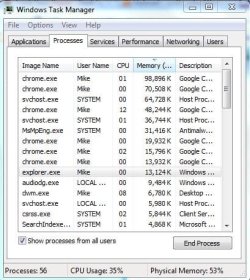
My explorer runs at around 10,000-20,000 k, so yours definitely seems a bit high. I am also running 32-bit on my system, by the way. My antivirus, Microsoft Security Essentials, uses around 30,000 k. svchost.exe takes up between 10,000 to 40,000 k. I posted a screenshot of my task manager. Also, make sure you click on "Show processes from all users" so you can see if there are other memory hogs on the system.

One thing you can do is see if another program is causing the memory usage you are seeing. Perhaps there is a program or service that has written itself into Windows and is causing your Windows processes to need more memory for that program. You can http://www.sevenforums.com/tutorial...ation-conflicts-performing-clean-startup.html to see whether the memory usage drops. Also, try starting the system without your internet connected and see if that makes a difference.
 

Attachments

  • taskManagerMemory.JPG
    taskManagerMemory.JPG
    49.6 KB · Views: 25

My Computer

Computer Manufacturer/Model Number
HP Pavilion e9110t
OS
Windows 7 Home Premium 64 Bit
CPU
Intel(R) Core(TM)2 Quad CPU Q9550 @ 2.83GHz
Motherboard
Pegatron IPIEL-LA3
Memory
6.00 GB Hundai HMT125U6BFR8C-H9
Graphics Card(s)
ATI Radeon HD 4850
Sound Card
Realtek High Definition Audio/ATI High Definition Audio
Monitor(s) Displays
Acer AL2216W
Screen Resolution
1680x1050
Hard Drives
Hitachi HDP725050GLA360 ATA Device 500 GB
PSU
Unknown/installed by HP
Case
HP generic case
Cooling
Intel Stock Cooling
Keyboard
HP Keyboard
Mouse
HP Mouse
Internet Speed
Download: 19.15 Mbps Upload: 1.67 Mbps
Other Info
Network Adapter Realtek RTL8168D/8111D Family PCI-E Gigabit Ethernet NIC (NDIS 6.20)
Network Adapter 802.11n Wireless PCI Express Card LAN Adapter
thanks again for the replay Writhziden, i wanted to post earlier today that i test it on safe mode but the site done some maintenance, in safe mode it seem that only 26% of my memory is been taken, and i allready tested it without internet connection... there is no differents = \,

today one of my svchost.exe process took 109,956 k!

my pc just been formatted and i installed on it the total same stuff that i all the time installed for the last 3 years.... i only not installed few things, installed Photoshop CS 5 over 4, and change one of my HDDs to 1 TB from 160 gb,
also my GPU had some issues so i send my Geforce 295 gtx to replacment and mainwhile use some geforce 9400 gt...

i don't think that the card relate.. but this issue started something like 5 days ago.. 1 day after i replace my GPU...

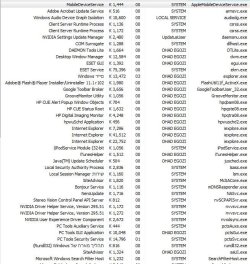
btw i included screenshots from my task manager. i have Hebrew language system so some of the process are written in Hebrew ... only a few though so don't worry xD
 

Attachments

  • 1.JPG
    1.JPG
    98 KB · Views: 32
  • 2.JPG
    2.JPG
    105.2 KB · Views: 30

My Computer

Computer type
PC/Desktop
Computer Manufacturer/Model Number
Self built custom
OS
Windows 7 SP1 Ultimate x64 bit
CPU
Intel I7 3770
Motherboard
Asus maximus v gene BIOS Version 1903
Memory
G.Skill Ares Quad Channel Low Profile 16 GB (4x4GB) DDR3
Graphics Card(s)
Asus GTX980 Ti 6GB STRIX-GTX980TI-DC3OC-6GD5-GAMING DirectCU
Monitor(s) Displays
AOC 24G2U/BK + DELL U2410 A010
Screen Resolution
1920x1080
Hard Drives
Samsung SSD 860 EVO 1TB


TOSHIBA MK1002TSKB 1TB 24/7, 7200 RPM, 64MB, SATA II


TOSHIBA MK1002TSKB 1TB 24/7, 7200 RPM, 64MB, SATA II
PSU
AcBel R88 1100W
Case
Corsair Carbide Series 500R White Mid-Tower Case
Cooling
ZALMAN CPU COOLER CNPS9900A LED + 2 more fans in the case
Keyboard
SteelSeries APEX 7
Mouse
SteelSeries Sensei 310
If you swapped nVidia cards, try uninstalling all nVidia software and drivers and then re-installing. It is possible the software/drivers for both cards are conflicting.
 

My Computer

Computer Manufacturer/Model Number
HP Pavilion e9110t
OS
Windows 7 Home Premium 64 Bit
CPU
Intel(R) Core(TM)2 Quad CPU Q9550 @ 2.83GHz
Motherboard
Pegatron IPIEL-LA3
Memory
6.00 GB Hundai HMT125U6BFR8C-H9
Graphics Card(s)
ATI Radeon HD 4850
Sound Card
Realtek High Definition Audio/ATI High Definition Audio
Monitor(s) Displays
Acer AL2216W
Screen Resolution
1680x1050
Hard Drives
Hitachi HDP725050GLA360 ATA Device 500 GB
PSU
Unknown/installed by HP
Case
HP generic case
Cooling
Intel Stock Cooling
Keyboard
HP Keyboard
Mouse
HP Mouse
Internet Speed
Download: 19.15 Mbps Upload: 1.67 Mbps
Other Info
Network Adapter Realtek RTL8168D/8111D Family PCI-E Gigabit Ethernet NIC (NDIS 6.20)
Network Adapter 802.11n Wireless PCI Express Card LAN Adapter
but the task manger shows that it clearly the svchost.exe process :\
what it doing that it take so much k? can it be relate to nVidia's software ?
there is a program that called Process Monitor v2.96, it may help me find the issue, however i don't really know how to use it xD
 
Last edited:

My Computer

Computer type
PC/Desktop
Computer Manufacturer/Model Number
Self built custom
OS
Windows 7 SP1 Ultimate x64 bit
CPU
Intel I7 3770
Motherboard
Asus maximus v gene BIOS Version 1903
Memory
G.Skill Ares Quad Channel Low Profile 16 GB (4x4GB) DDR3
Graphics Card(s)
Asus GTX980 Ti 6GB STRIX-GTX980TI-DC3OC-6GD5-GAMING DirectCU
Monitor(s) Displays
AOC 24G2U/BK + DELL U2410 A010
Screen Resolution
1920x1080
Hard Drives
Samsung SSD 860 EVO 1TB


TOSHIBA MK1002TSKB 1TB 24/7, 7200 RPM, 64MB, SATA II


TOSHIBA MK1002TSKB 1TB 24/7, 7200 RPM, 64MB, SATA II
PSU
AcBel R88 1100W
Case
Corsair Carbide Series 500R White Mid-Tower Case
Cooling
ZALMAN CPU COOLER CNPS9900A LED + 2 more fans in the case
Keyboard
SteelSeries APEX 7
Mouse
SteelSeries Sensei 310
I am not familiar with the program. Anyone else with advice?

I still think it is worth trying to do clean startup (if you have not already done so, and no, this is not the same as Safe Mode) and the nVidia suggestion.
 

My Computer

Computer Manufacturer/Model Number
HP Pavilion e9110t
OS
Windows 7 Home Premium 64 Bit
CPU
Intel(R) Core(TM)2 Quad CPU Q9550 @ 2.83GHz
Motherboard
Pegatron IPIEL-LA3
Memory
6.00 GB Hundai HMT125U6BFR8C-H9
Graphics Card(s)
ATI Radeon HD 4850
Sound Card
Realtek High Definition Audio/ATI High Definition Audio
Monitor(s) Displays
Acer AL2216W
Screen Resolution
1680x1050
Hard Drives
Hitachi HDP725050GLA360 ATA Device 500 GB
PSU
Unknown/installed by HP
Case
HP generic case
Cooling
Intel Stock Cooling
Keyboard
HP Keyboard
Mouse
HP Mouse
Internet Speed
Download: 19.15 Mbps Upload: 1.67 Mbps
Other Info
Network Adapter Realtek RTL8168D/8111D Family PCI-E Gigabit Ethernet NIC (NDIS 6.20)
Network Adapter 802.11n Wireless PCI Express Card LAN Adapter
i will try to delete and do a clean install to the nvidia driver when i will get my GPU back soon =P but i think that this issue is relate to some MC update since i notice that it suddenly happened to me in other PCs that i formatted too... i really think that it update ‏KB2607576 but not sure.. do you know any other update that may cause the ram to leak? : o
 

My Computer

Computer type
PC/Desktop
Computer Manufacturer/Model Number
Self built custom
OS
Windows 7 SP1 Ultimate x64 bit
CPU
Intel I7 3770
Motherboard
Asus maximus v gene BIOS Version 1903
Memory
G.Skill Ares Quad Channel Low Profile 16 GB (4x4GB) DDR3
Graphics Card(s)
Asus GTX980 Ti 6GB STRIX-GTX980TI-DC3OC-6GD5-GAMING DirectCU
Monitor(s) Displays
AOC 24G2U/BK + DELL U2410 A010
Screen Resolution
1920x1080
Hard Drives
Samsung SSD 860 EVO 1TB


TOSHIBA MK1002TSKB 1TB 24/7, 7200 RPM, 64MB, SATA II


TOSHIBA MK1002TSKB 1TB 24/7, 7200 RPM, 64MB, SATA II
PSU
AcBel R88 1100W
Case
Corsair Carbide Series 500R White Mid-Tower Case
Cooling
ZALMAN CPU COOLER CNPS9900A LED + 2 more fans in the case
Keyboard
SteelSeries APEX 7
Mouse
SteelSeries Sensei 310
I have all updates installed and am not experiencing the memory leaks. I imagine this is related to something else. If you think the update caused the problem, I wonder whether your system is running as it should be. You could try http://www.sevenforums.com/tutorials/1538-sfc-scannow-command-system-file-checker.html up to three times to fix all errors. Post back if it continues to show errors after a fourth run or if the first run comes back with no integrity violations.
 

My Computer

Computer Manufacturer/Model Number
HP Pavilion e9110t
OS
Windows 7 Home Premium 64 Bit
CPU
Intel(R) Core(TM)2 Quad CPU Q9550 @ 2.83GHz
Motherboard
Pegatron IPIEL-LA3
Memory
6.00 GB Hundai HMT125U6BFR8C-H9
Graphics Card(s)
ATI Radeon HD 4850
Sound Card
Realtek High Definition Audio/ATI High Definition Audio
Monitor(s) Displays
Acer AL2216W
Screen Resolution
1680x1050
Hard Drives
Hitachi HDP725050GLA360 ATA Device 500 GB
PSU
Unknown/installed by HP
Case
HP generic case
Cooling
Intel Stock Cooling
Keyboard
HP Keyboard
Mouse
HP Mouse
Internet Speed
Download: 19.15 Mbps Upload: 1.67 Mbps
Other Info
Network Adapter Realtek RTL8168D/8111D Family PCI-E Gigabit Ethernet NIC (NDIS 6.20)
Network Adapter 802.11n Wireless PCI Express Card LAN Adapter
actually... i done sfc /verifyonly allready even before i start my thread 0.0 zero errors was found... and it not the first time when i have critical system error that sfc not able to detect -.-

i will try it again though just to be sure
 

My Computer

Computer type
PC/Desktop
Computer Manufacturer/Model Number
Self built custom
OS
Windows 7 SP1 Ultimate x64 bit
CPU
Intel I7 3770
Motherboard
Asus maximus v gene BIOS Version 1903
Memory
G.Skill Ares Quad Channel Low Profile 16 GB (4x4GB) DDR3
Graphics Card(s)
Asus GTX980 Ti 6GB STRIX-GTX980TI-DC3OC-6GD5-GAMING DirectCU
Monitor(s) Displays
AOC 24G2U/BK + DELL U2410 A010
Screen Resolution
1920x1080
Hard Drives
Samsung SSD 860 EVO 1TB


TOSHIBA MK1002TSKB 1TB 24/7, 7200 RPM, 64MB, SATA II


TOSHIBA MK1002TSKB 1TB 24/7, 7200 RPM, 64MB, SATA II
PSU
AcBel R88 1100W
Case
Corsair Carbide Series 500R White Mid-Tower Case
Cooling
ZALMAN CPU COOLER CNPS9900A LED + 2 more fans in the case
Keyboard
SteelSeries APEX 7
Mouse
SteelSeries Sensei 310
ok i run it 4 times...
no integrity violations in all of them...
 

My Computer

Computer type
PC/Desktop
Computer Manufacturer/Model Number
Self built custom
OS
Windows 7 SP1 Ultimate x64 bit
CPU
Intel I7 3770
Motherboard
Asus maximus v gene BIOS Version 1903
Memory
G.Skill Ares Quad Channel Low Profile 16 GB (4x4GB) DDR3
Graphics Card(s)
Asus GTX980 Ti 6GB STRIX-GTX980TI-DC3OC-6GD5-GAMING DirectCU
Monitor(s) Displays
AOC 24G2U/BK + DELL U2410 A010
Screen Resolution
1920x1080
Hard Drives
Samsung SSD 860 EVO 1TB


TOSHIBA MK1002TSKB 1TB 24/7, 7200 RPM, 64MB, SATA II


TOSHIBA MK1002TSKB 1TB 24/7, 7200 RPM, 64MB, SATA II
PSU
AcBel R88 1100W
Case
Corsair Carbide Series 500R White Mid-Tower Case
Cooling
ZALMAN CPU COOLER CNPS9900A LED + 2 more fans in the case
Keyboard
SteelSeries APEX 7
Mouse
SteelSeries Sensei 310

My Computer

Computer Manufacturer/Model Number
HP Pavilion e9110t
OS
Windows 7 Home Premium 64 Bit
CPU
Intel(R) Core(TM)2 Quad CPU Q9550 @ 2.83GHz
Motherboard
Pegatron IPIEL-LA3
Memory
6.00 GB Hundai HMT125U6BFR8C-H9
Graphics Card(s)
ATI Radeon HD 4850
Sound Card
Realtek High Definition Audio/ATI High Definition Audio
Monitor(s) Displays
Acer AL2216W
Screen Resolution
1680x1050
Hard Drives
Hitachi HDP725050GLA360 ATA Device 500 GB
PSU
Unknown/installed by HP
Case
HP generic case
Cooling
Intel Stock Cooling
Keyboard
HP Keyboard
Mouse
HP Mouse
Internet Speed
Download: 19.15 Mbps Upload: 1.67 Mbps
Other Info
Network Adapter Realtek RTL8168D/8111D Family PCI-E Gigabit Ethernet NIC (NDIS 6.20)
Network Adapter 802.11n Wireless PCI Express Card LAN Adapter
interesting news, when i restart my pc and don't connect to the net, the RAM suddenly go back to be 37%, however after something like 10 mins it going to 40%, and when i connect to the internet it going back to be 46-50%

i guess that means that it relate to some process that use the internet right? ... but all that seem to be out of ordinary is the svchost.exe process ...
 
Last edited:

My Computer

Computer type
PC/Desktop
Computer Manufacturer/Model Number
Self built custom
OS
Windows 7 SP1 Ultimate x64 bit
CPU
Intel I7 3770
Motherboard
Asus maximus v gene BIOS Version 1903
Memory
G.Skill Ares Quad Channel Low Profile 16 GB (4x4GB) DDR3
Graphics Card(s)
Asus GTX980 Ti 6GB STRIX-GTX980TI-DC3OC-6GD5-GAMING DirectCU
Monitor(s) Displays
AOC 24G2U/BK + DELL U2410 A010
Screen Resolution
1920x1080
Hard Drives
Samsung SSD 860 EVO 1TB


TOSHIBA MK1002TSKB 1TB 24/7, 7200 RPM, 64MB, SATA II


TOSHIBA MK1002TSKB 1TB 24/7, 7200 RPM, 64MB, SATA II
PSU
AcBel R88 1100W
Case
Corsair Carbide Series 500R White Mid-Tower Case
Cooling
ZALMAN CPU COOLER CNPS9900A LED + 2 more fans in the case
Keyboard
SteelSeries APEX 7
Mouse
SteelSeries Sensei 310
i replaced the whole mobo (that why i don't was here for two days)
and the issue still there, i notice that i also had it when svchost.exe took only 50,000 k
explorer was at 30,000
and ekrn.exe was on 50,000 k, so i think that the issue may come from process that not showed on the task manger...
 

My Computer

Computer type
PC/Desktop
Computer Manufacturer/Model Number
Self built custom
OS
Windows 7 SP1 Ultimate x64 bit
CPU
Intel I7 3770
Motherboard
Asus maximus v gene BIOS Version 1903
Memory
G.Skill Ares Quad Channel Low Profile 16 GB (4x4GB) DDR3
Graphics Card(s)
Asus GTX980 Ti 6GB STRIX-GTX980TI-DC3OC-6GD5-GAMING DirectCU
Monitor(s) Displays
AOC 24G2U/BK + DELL U2410 A010
Screen Resolution
1920x1080
Hard Drives
Samsung SSD 860 EVO 1TB


TOSHIBA MK1002TSKB 1TB 24/7, 7200 RPM, 64MB, SATA II


TOSHIBA MK1002TSKB 1TB 24/7, 7200 RPM, 64MB, SATA II
PSU
AcBel R88 1100W
Case
Corsair Carbide Series 500R White Mid-Tower Case
Cooling
ZALMAN CPU COOLER CNPS9900A LED + 2 more fans in the case
Keyboard
SteelSeries APEX 7
Mouse
SteelSeries Sensei 310

My Computer

Computer Manufacturer/Model Number
HP Pavilion e9110t
OS
Windows 7 Home Premium 64 Bit
CPU
Intel(R) Core(TM)2 Quad CPU Q9550 @ 2.83GHz
Motherboard
Pegatron IPIEL-LA3
Memory
6.00 GB Hundai HMT125U6BFR8C-H9
Graphics Card(s)
ATI Radeon HD 4850
Sound Card
Realtek High Definition Audio/ATI High Definition Audio
Monitor(s) Displays
Acer AL2216W
Screen Resolution
1680x1050
Hard Drives
Hitachi HDP725050GLA360 ATA Device 500 GB
PSU
Unknown/installed by HP
Case
HP generic case
Cooling
Intel Stock Cooling
Keyboard
HP Keyboard
Mouse
HP Mouse
Internet Speed
Download: 19.15 Mbps Upload: 1.67 Mbps
Other Info
Network Adapter Realtek RTL8168D/8111D Family PCI-E Gigabit Ethernet NIC (NDIS 6.20)
Network Adapter 802.11n Wireless PCI Express Card LAN Adapter
i want to try it as last resort, since i have the exact same programs and process that i had on my pc even before i formated it i think that it 80% come from some windows 7 update, my memory not coming back till i reboot (can't even watch a movie that contain more then 2 hours =( )

i found some user who had the same issue.. though he also have a "soundglich" which i don't seem to have

Windows 7 Update caused sound glitch

i must to narrow down the list and find this update... any ideas what the update that can cause such a thing ? :O
 

My Computer

Computer type
PC/Desktop
Computer Manufacturer/Model Number
Self built custom
OS
Windows 7 SP1 Ultimate x64 bit
CPU
Intel I7 3770
Motherboard
Asus maximus v gene BIOS Version 1903
Memory
G.Skill Ares Quad Channel Low Profile 16 GB (4x4GB) DDR3
Graphics Card(s)
Asus GTX980 Ti 6GB STRIX-GTX980TI-DC3OC-6GD5-GAMING DirectCU
Monitor(s) Displays
AOC 24G2U/BK + DELL U2410 A010
Screen Resolution
1920x1080
Hard Drives
Samsung SSD 860 EVO 1TB


TOSHIBA MK1002TSKB 1TB 24/7, 7200 RPM, 64MB, SATA II


TOSHIBA MK1002TSKB 1TB 24/7, 7200 RPM, 64MB, SATA II
PSU
AcBel R88 1100W
Case
Corsair Carbide Series 500R White Mid-Tower Case
Cooling
ZALMAN CPU COOLER CNPS9900A LED + 2 more fans in the case
Keyboard
SteelSeries APEX 7
Mouse
SteelSeries Sensei 310
Considering you are in a minority of people having this problem, it is difficult to determine the cause. If it is a Windows Update, it may be a driver update that caused it. It may also be that one of the Windows updates did not install properly and that is why it is causing problems.
Event ID 10 is logged in the Application log after you install Service Pack 1 for Windows 7 or Windows Server 2008 R2
and
Event ID 4107 or Event ID 11 is logged in the Application log in Windows and in Windows Server
are common update errors.
 

My Computer

Computer Manufacturer/Model Number
HP Pavilion e9110t
OS
Windows 7 Home Premium 64 Bit
CPU
Intel(R) Core(TM)2 Quad CPU Q9550 @ 2.83GHz
Motherboard
Pegatron IPIEL-LA3
Memory
6.00 GB Hundai HMT125U6BFR8C-H9
Graphics Card(s)
ATI Radeon HD 4850
Sound Card
Realtek High Definition Audio/ATI High Definition Audio
Monitor(s) Displays
Acer AL2216W
Screen Resolution
1680x1050
Hard Drives
Hitachi HDP725050GLA360 ATA Device 500 GB
PSU
Unknown/installed by HP
Case
HP generic case
Cooling
Intel Stock Cooling
Keyboard
HP Keyboard
Mouse
HP Mouse
Internet Speed
Download: 19.15 Mbps Upload: 1.67 Mbps
Other Info
Network Adapter Realtek RTL8168D/8111D Family PCI-E Gigabit Ethernet NIC (NDIS 6.20)
Network Adapter 802.11n Wireless PCI Express Card LAN Adapter
the thing is that i don't install drivers from windows update , i prefer to install them manually from the manufacturer's site/CD, i done it all these years and never had a issue from that so you can mark a X on the driver issue : P (and Also, even if i use the provided CD which not include the very last version of the drivers, they all WIN7 support so there's no OS support issue)

also all the win7 updates that i installed was installed fine, i don't got any errors and don't got the "Update failed" message.

my guess is that it simply some update that recently (and secretly) was re-released by MS and start to cause the issue, people who formatted their pc before half year don't get this issue, But people who just formatted their pc last week (or month) may notice it right away : (

also i just can't ignore update ‏KB2607576 which seem to cause alot of other issues, maybe it was the culprit that cause the leak, even after it been deleted. did you ever installed this update after format and got any issue? it optional update...
 

My Computer

Computer type
PC/Desktop
Computer Manufacturer/Model Number
Self built custom
OS
Windows 7 SP1 Ultimate x64 bit
CPU
Intel I7 3770
Motherboard
Asus maximus v gene BIOS Version 1903
Memory
G.Skill Ares Quad Channel Low Profile 16 GB (4x4GB) DDR3
Graphics Card(s)
Asus GTX980 Ti 6GB STRIX-GTX980TI-DC3OC-6GD5-GAMING DirectCU
Monitor(s) Displays
AOC 24G2U/BK + DELL U2410 A010
Screen Resolution
1920x1080
Hard Drives
Samsung SSD 860 EVO 1TB


TOSHIBA MK1002TSKB 1TB 24/7, 7200 RPM, 64MB, SATA II


TOSHIBA MK1002TSKB 1TB 24/7, 7200 RPM, 64MB, SATA II
PSU
AcBel R88 1100W
Case
Corsair Carbide Series 500R White Mid-Tower Case
Cooling
ZALMAN CPU COOLER CNPS9900A LED + 2 more fans in the case
Keyboard
SteelSeries APEX 7
Mouse
SteelSeries Sensei 310
Back
Top