Suddenly giant browsing IE8

JonJacobs

New member
Member
Local time
3:23 PM
Messages
46
My browser has been getting larger and larger.
Now it is almost unusable it is so large.

The text is half an inch tall.
The icons and graphics are huge!

Everything on my desktop is still normal.
(I keep my text, etc. rather small)

I am typing short lines in this message
because my browser area is WAY
larger than my screen.
It takes 3 scrolls to see the right edge.
HELP!
Jon
 

My Computer

Computer Manufacturer/Model Number
HP Touchsmart tm2
OS
Windows 7 Pro
hold down control and mouse wheel down
 

My Computer

Computer type
PC/Desktop
Computer Manufacturer/Model Number
CyberPower PC / Custom Intel X79 PC
OS
Windows 8.1 Professional x64
CPU
Intel Core i7-3930K 3.2 gHz Hex-Core (Turbo Boost 3.8 gHz)
Motherboard
ASUS P9X79 Pro (BIOS rev 4801)
Memory
8GB Corsair Vengeance DDR3-1600MHz 8-8-8-24
Graphics Card(s)
EVGA Superclocked GeForce GTX-580 1536MB
Sound Card
On-board 7.1 Realtek ALC898 HD Audio
Monitor(s) Displays
ASUS 27" 1080p MT276E
Screen Resolution
1920 x 1080
Hard Drives
Intel Cherryville 520 SSD 120GB (Main drive for OS)
WD Caviar Black 1TB 7200RPM 64MB Cache SATA 6
WD Caviar Blue 1TB 7200RPM 64MB Cache SATA 6
PSU
Corsair Professional Series AX850 80+ Gold
Case
Corsair Carbide 400R
Cooling
Corsair Hydro Series H60 / 9 x 120mm Thunderblade case fans
Keyboard
Microsoft Wireless Keyboard 3000 v2
Mouse
Microsoft Wireless Mouse 5000 - BlueTrack
Internet Speed
TWC Road Runner 30 Mbps
Antivirus
MS Security Essentials / Malwarebytes
Browser
IE 11
Other Info
LG Black 12X SATA BD-RW
Sony Optiarc Black 24X SATA DVD Burner
Logitech Web Cam Pro 9000
Panasonic 5.1 Surround System
Epson XP-310 Color Printer
Xbox One Controller
Xbox 360 PC Controller
Thank you! Thank you! Thank you!
 

My Computer

Computer Manufacturer/Model Number
HP Touchsmart tm2
OS
Windows 7 Pro
No probs - done that by accident myself a few times ;)
 

My Computer

Computer type
PC/Desktop
Computer Manufacturer/Model Number
CyberPower PC / Custom Intel X79 PC
OS
Windows 8.1 Professional x64
CPU
Intel Core i7-3930K 3.2 gHz Hex-Core (Turbo Boost 3.8 gHz)
Motherboard
ASUS P9X79 Pro (BIOS rev 4801)
Memory
8GB Corsair Vengeance DDR3-1600MHz 8-8-8-24
Graphics Card(s)
EVGA Superclocked GeForce GTX-580 1536MB
Sound Card
On-board 7.1 Realtek ALC898 HD Audio
Monitor(s) Displays
ASUS 27" 1080p MT276E
Screen Resolution
1920 x 1080
Hard Drives
Intel Cherryville 520 SSD 120GB (Main drive for OS)
WD Caviar Black 1TB 7200RPM 64MB Cache SATA 6
WD Caviar Blue 1TB 7200RPM 64MB Cache SATA 6
PSU
Corsair Professional Series AX850 80+ Gold
Case
Corsair Carbide 400R
Cooling
Corsair Hydro Series H60 / 9 x 120mm Thunderblade case fans
Keyboard
Microsoft Wireless Keyboard 3000 v2
Mouse
Microsoft Wireless Mouse 5000 - BlueTrack
Internet Speed
TWC Road Runner 30 Mbps
Antivirus
MS Security Essentials / Malwarebytes
Browser
IE 11
Other Info
LG Black 12X SATA BD-RW
Sony Optiarc Black 24X SATA DVD Burner
Logitech Web Cam Pro 9000
Panasonic 5.1 Surround System
Epson XP-310 Color Printer
Xbox One Controller
Xbox 360 PC Controller
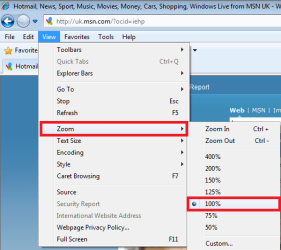
You can also control zoom level from View menu.

IE_Zoom.png
 

My Computer

Computer type
Laptop
Computer Manufacturer/Model Number
HP ENVY 17-1150eg
OS
Windows 10 Pro x64 EN-GB
CPU
1.6 GHz Intel Core i7-720QM Processor
Memory
6 GB
Graphics Card(s)
ATI Mobility Radeon HD 5850 Graphics
Sound Card
Beats sound system with integrated subwoofer
Monitor(s) Displays
17" laptop display, 22" LED and 32" Full HD TV through HDMI
Screen Resolution
1600*900 (1), 1920*1080 (2&3)
Hard Drives
Internal: 2 x 500 GB SATA Hard Disk Drive 7200 rpm
External: 2TB for backups, 3TB USB3 network drive for media
Cooling
As Envy runs a bit warm, I have it on a Cooler Master pad
Keyboard
Logitech diNovo Media Desktop Laser (bluetooth)
Mouse
Logitech Performance Mouse MX
Internet Speed
50/10 Mbps VDSL
Antivirus
Windows Defender 4.3.9431.0
Browser
Maxthon 3.5.2., IE11
Back
Top