Suddenly long boot times

var14ble

New member
Local time
2:49 PM
Messages
5
I've been experiencing crazy long boot times recently. I've always had this problem to a certain extent, but it's getting way worse now. When I first got this and until a couple weeks ago, it had been rising from about 60-70 seconds to a minute and a half and up to two. Suddenly, today it skyrocketed to 270 seconds - almost 5 minutes. I rebooted 3 times and all of them took upwards of 200 seconds. I have no idea what is going on, as the only event log I have without code 100 is for a program that took 4 extra seconds to start. I'm leaving the details below, and I can see that prefetch, explorer, and the postboot times seem to be the culprits, but I'm not sure how to deal with that, especially since my previous 2 reboots yielded results different to both this one and each-other. I have a quad-core AMD FX-4100 running at 4.1 GHz and 8 gigs of ram, so I don't think it's a hardware issue. I do have an HDD so I expect slower boot times than brand-new SSDs, but this is ridiculous. I do have quite a bit of files in it, but it's relatively defragmented and I have trouble believing that's the reason for it taking almost 5 minutes to boot. Any help would be greatly appreciated, and I'd like to avoid formatting as much as possible, as it would take forever to back up all my files.


  • BootTsVersion: 2
  • BootStartTime: 2014-07-13T22:20:03.780800500Z
  • BootEndTime: 2014-07-13T22:25:00.752203700Z
  • SystemBootInstance: 696
  • UserBootInstance: 672
  • BootTime: 251999
  • MainPathBootTime: 94899
  • BootKernelInitTime: 35
  • BootDriverInitTime: 316
  • BootDevicesInitTime: 4996
  • BootPrefetchInitTime: 44268
  • BootPrefetchBytes: 313401344
  • BootAutoChkTime: 0
  • BootSmssInitTime: 7008
  • BootCriticalServicesInitTime: 3500
  • BootUserProfileProcessingTime: 2892
  • BootMachineProfileProcessingTime: 0
  • BootExplorerInitTime: 62725
  • BootNumStartupApps: 12
  • BootPostBootTime: 157100
  • BootIsRebootAfterInstall: false
  • BootRootCauseStepImprovementBits: 0
  • BootRootCauseGradualImprovementBits: 0
  • BootRootCauseStepDegradationBits: 0
  • BootRootCauseGradualDegradationBits: 0
  • BootIsDegradation: false
  • BootIsStepDegradation: false
  • BootIsGradualDegradation: false
  • BootImprovementDelta: 0
  • BootDegradationDelta: 0
  • BootIsRootCauseIdentified: false
  • OSLoaderDuration: 3465
  • BootPNPInitStartTimeMS: 35
  • BootPNPInitDuration: 5029
  • OtherKernelInitDuration: 3980
  • SystemPNPInitStartTimeMS: 8970
  • SystemPNPInitDuration: 283
  • SessionInitStartTimeMS: 9294
  • Session0InitDuration: 655
  • Session1InitDuration: 160
  • SessionInitOtherDuration: 6192
  • WinLogonStartTimeMS: 16302
  • OtherLogonInitActivityDuration: 12978
  • UserLogonWaitDuration: 3900
 
Last edited:

My Computer

Computer type
PC/Desktop
Computer Manufacturer/Model Number
Custom Modified CyberpowerPC
OS
Windows 7 Home Premium 64bit
CPU
AMD FX-4100 @ 4.1GHz
Memory
8GB DDR3
Graphics Card(s)
Nvidia GTX 610, looking to upgrade to an AMD 250x
Internet Speed
~30 MBs
Browser
Chrome
Hello and welcome var14ble mate there are several things you can do for starters try the following


http://www.sevenforums.com/tutorials/1538-sfc-scannow-command-system-file-checker.html

http://www.sevenforums.com/tutorials/433-disk-check.html < use the /f option in Option 2 ifnecessary

http://www.superantispyware.com/

http://www.malwarebytes.org/products/malwarebytes_free/

http://www.bleepingcomputer.com/download/adwcleaner/

download from bleeping computer – delete any rubbishthese find.

Then there is this
http://www.sevenforums.com/tutorials/11728-optimize-windows-7-a.html > point 8 is a good place to begin with
but try the other stuff first mate.
 

My Computer

Computer type
PC/Desktop
Computer Manufacturer/Model Number
Own build (new) Desk1 / Asus ROG Win 7 / Desk2 1st build
OS
Desk1 7 Home Prem / Desk2 10 Pro / Main lap Asus ROG 10 Pro 2 laptop Toshiba 7 Pro Asus P2520 7 & 10
CPU
Desk1 i5 3750K / Laptop i7 GTX 860M / Desk2 i5 2500
Motherboard
Desk1 Asus P877-V / Desk2 Gigabyte H67 UD3H / Laptop ?
Memory
Desk1 8GB (1866) / Desk2 16GB (1333) / Laptop 8Gb DDR3
Graphics Card(s)
Desk 1& 2NVidia GTX 650 & Laptops on board Intel
Sound Card
Desk 1 & 2 -XONAR DG Realtek High Def audio Laptop
Monitor(s) Displays
Desk 1 Benq HD 2450 / Desk2 Philips 24" / Laptop 17.5"
Screen Resolution
1920x1080 D1 & D2 & Laptop 1
Hard Drives
Desk1 Samsung 120GB 830 SSD
Asus ROG 256GB 850 Pro SSD
Desk2 Samsung 840 256 SSD
Toshiba 120GB EVO
PSU
Desk 1 Corsair HX 1050/ Laptop ? / Desk 2 Corsair HX 650
Case
Desk 1 Cooler HAF XM ? Toshiba laptop / Desk2 Coolermaster
Cooling
Fans on all Desk1 -2 Desk2 - all Coolermasters 5 Laptop ?
Keyboard
Desk 1 MS Sidewinder X6 Desk 2 MS Sidewinder X 4
Mouse
Desk 1&2 - Gigabyte MS 900 gamer - laptop - Logitec wireless
Internet Speed
ADSL2+
Other Info
One other Desktop (tester) and spare Toshba laptop both with SSD's
Running Kaspersky 2016 ISS on all machines config'd identically
Logitec audio stereo systems on each machine (x3)
Canon MG5250MFC
Router/modem TP-Link running WPA2SK
Hello and thank you! I probably should've mentioned it in my post, but I've tried most of the things you suggested. The only two links in there that I wasn't aware of were adwcleaner and superantispyware. I highly doubt I have malware and/or spyware, as I've run malwarebytes in the past and I don't really visit sketchy websites. I ran almost everything again just for good measure, though. The only thing I haven't tried so far is disk check because a) it is going to take forever and b) I've also run it in the past and it didn't yield any noticeable speedup.

I've noticed that in almost all of my reboots my postboot time is around 2 minutes, my mainpath boot time can range from 1-2 minutes, and my explorer init time can be anywhere between 20 seconds and 1 minute. Those seem to be the biggest time hogs, but I'm not sure what that means in terms of how to fix it.

Another thing I noticed, after doing some digging and finding out about process monitor, is that there's about 3 million events at startup. That seems insanely high, but I checked for cpu usage and nothing really seems to hog the cpu, and I'm not sure if the sheer amount is even related to the slowdown at all.
Any more guidance would be greatly appreciated and, again, thank you for your time!
 

My Computer

Computer type
PC/Desktop
Computer Manufacturer/Model Number
Custom Modified CyberpowerPC
OS
Windows 7 Home Premium 64bit
CPU
AMD FX-4100 @ 4.1GHz
Memory
8GB DDR3
Graphics Card(s)
Nvidia GTX 610, looking to upgrade to an AMD 250x
Internet Speed
~30 MBs
Browser
Chrome
Boot Time too long

Hi. Here are my thoughts.

You could consider temporarily installing software that measures boot time and displays what's taking up time and from there you can probably work out what could be disabled or updated.

There are quite a few programs that fit the bill one that I've personally used and liked is:

Soluto: Displays each application that runs on boot and what it costs you in boot time. This software should be uninstalled once you've used it to fix problems as you don't want it running on every boot.

Download Soluto 1.3.1323.0 - FileHippo.com

Other than that if you want to get a little more technical and use Event Viewer to see if your Antivirus program is acting up (or something else) you might want to follow the steps listed in the following article:

Use Windows 7 Event Viewer to track down issues that cause slower boot times - TechRepublic

Hint: Don't forget to repeat the steps and create a second custom view as shown in the text underneath Figure C (below the image). Also not everything that's listed will be a problem. you should look at anything that seems to take an unusually long time and focus on those issues.
 
Last edited:

My Computer

Computer type
Laptop
Computer Manufacturer/Model Number
ASUS
OS
Microsoft Windows 7 Home Premium 64-bit 7601 Multiprocessor Free Service Pack 1
CPU
AMD C-60 APU with Radeon(tm) HD Graphics
Motherboard
ASUSTeK COMPUTER INC. X501U
Memory
4.00 GB
Graphics Card(s)
AMD Radeon HD 6290 Graphics
Sound Card
(1) AMD High Definition Audio Device (2) Realtek High Defi
Screen Resolution
1366 x 768 x 32 bits (4294967296 colors) @ 60 Hz
Hard Drives
Hitachi HTS545050A7E380 SATA Disk Device
Antivirus
Comodo CIS & FW, SecureAplus App Whitelisting, Threatfire
Browser
Cyberfox 64bit, Opera 64bit, Airfox
Other Info
Spy-The-Spy, HitmanPro.Alert, Norton Connect Safe, MJRegWatcher, BitDefender TrafficLight, Voodoo Shield, Zemana AntiMalware
Hi Callender, thanks for your reply.
I remember trying soluto for a couple of days in the past, and I didn't notice any significant change in my speed so I uninstalled it. I'm currently running a disk check since I was going to be away from my computer for a while and I figured I might as well, but I'll try it and let you know if anything changes when I get back.
As for the event viewer, I already used it and listed the details of my boot time in the first post. I don't have any other events besides the one code 100 for each boot, so I can't really pinpoint specific programs. I'm hoping soluto will help with this, but my hopes aren't very high.
Thanks for replying, though, and I hope your recommendation works for me.
 

My Computer

Computer type
PC/Desktop
Computer Manufacturer/Model Number
Custom Modified CyberpowerPC
OS
Windows 7 Home Premium 64bit
CPU
AMD FX-4100 @ 4.1GHz
Memory
8GB DDR3
Graphics Card(s)
Nvidia GTX 610, looking to upgrade to an AMD 250x
Internet Speed
~30 MBs
Browser
Chrome

Attachments

  • MINI TOOL SURFACE.PNG
    MINI TOOL SURFACE.PNG
    35.1 KB · Views: 0

My Computer

Computer type
PC/Desktop
Computer Manufacturer/Model Number
Own build (new) Desk1 / Asus ROG Win 7 / Desk2 1st build
OS
Desk1 7 Home Prem / Desk2 10 Pro / Main lap Asus ROG 10 Pro 2 laptop Toshiba 7 Pro Asus P2520 7 & 10
CPU
Desk1 i5 3750K / Laptop i7 GTX 860M / Desk2 i5 2500
Motherboard
Desk1 Asus P877-V / Desk2 Gigabyte H67 UD3H / Laptop ?
Memory
Desk1 8GB (1866) / Desk2 16GB (1333) / Laptop 8Gb DDR3
Graphics Card(s)
Desk 1& 2NVidia GTX 650 & Laptops on board Intel
Sound Card
Desk 1 & 2 -XONAR DG Realtek High Def audio Laptop
Monitor(s) Displays
Desk 1 Benq HD 2450 / Desk2 Philips 24" / Laptop 17.5"
Screen Resolution
1920x1080 D1 & D2 & Laptop 1
Hard Drives
Desk1 Samsung 120GB 830 SSD
Asus ROG 256GB 850 Pro SSD
Desk2 Samsung 840 256 SSD
Toshiba 120GB EVO
PSU
Desk 1 Corsair HX 1050/ Laptop ? / Desk 2 Corsair HX 650
Case
Desk 1 Cooler HAF XM ? Toshiba laptop / Desk2 Coolermaster
Cooling
Fans on all Desk1 -2 Desk2 - all Coolermasters 5 Laptop ?
Keyboard
Desk 1 MS Sidewinder X6 Desk 2 MS Sidewinder X 4
Mouse
Desk 1&2 - Gigabyte MS 900 gamer - laptop - Logitec wireless
Internet Speed
ADSL2+
Other Info
One other Desktop (tester) and spare Toshba laptop both with SSD's
Running Kaspersky 2016 ISS on all machines config'd identically
Logitec audio stereo systems on each machine (x3)
Canon MG5250MFC
Router/modem TP-Link running WPA2SK
Event ID's

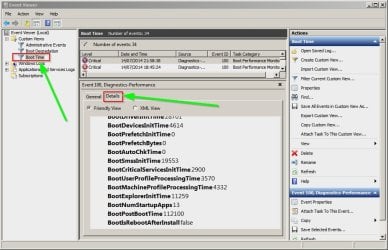
Hi again, sorry - I missed the additional details in your first post (javascript was disabled). However I think that those details are not really helpful to you. What you might like to see is details like the following. I'll use my machine as an example.

View and details similar to your post:

Event Viewer.jpg

Would like to see the following event ID's in custom view:

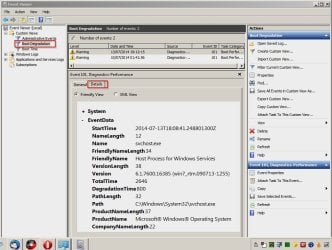
Boot Degradation plus custom view set up to include Event ID's 101 to 110. You're only showing Event ID 100.

Event Viewer 2.jpg

And the details:

Event Viewer 3.jpg

Soluto: They make a few products. The one I mention is not supposed to speed up anything. It's supposed to measure boot time and provide a report like this one:

2030__Soluto1_1.png


From there you can choose to disable anything that's not actually needed:

2031__Soluto1_2.png


That only helps with processes though rather than other stuff.

Other than that go with the other suggestions!

Best of luck!
 

My Computer

Computer type
Laptop
Computer Manufacturer/Model Number
ASUS
OS
Microsoft Windows 7 Home Premium 64-bit 7601 Multiprocessor Free Service Pack 1
CPU
AMD C-60 APU with Radeon(tm) HD Graphics
Motherboard
ASUSTeK COMPUTER INC. X501U
Memory
4.00 GB
Graphics Card(s)
AMD Radeon HD 6290 Graphics
Sound Card
(1) AMD High Definition Audio Device (2) Realtek High Defi
Screen Resolution
1366 x 768 x 32 bits (4294967296 colors) @ 60 Hz
Hard Drives
Hitachi HTS545050A7E380 SATA Disk Device
Antivirus
Comodo CIS & FW, SecureAplus App Whitelisting, Threatfire
Browser
Cyberfox 64bit, Opera 64bit, Airfox
Other Info
Spy-The-Spy, HitmanPro.Alert, Norton Connect Safe, MJRegWatcher, BitDefender TrafficLight, Voodoo Shield, Zemana AntiMalware
Hi, sorry it took me a while to reply, I've been away from the computer. Callender, I know how soluto works, what I meant by not noticing increased speed is that it didn't find any programs that significantly affected my boot speed, nor did it change anything when I disabled them. I'll give it another try in a now, though.

About the event viewer, this is a direct quote from my first post: "the only event log I have without code 100 is for a program that took 4 extra seconds to start," and another from a previous reply: "I don't have any other events besides the one code 100 for each boot, so I can't really pinpoint specific programs." I don't know if that wasn't clear enough, but I'm trying to say there aren't any other events besides the one I mentioned in the first post. They're just not there. With a couple of exceptions, since after running disk check and sfc scannow there have been one or two program events a couple of times, but the degradation time never adds up to more than 7 or 8 seconds. Again, I'll try soluto, but I'm not sure it's going to help. Better to try everything though.

ICit, I already deleted as many programs as I could from the startup folder, and the system seems to get stuck before the loading screen for windows shows up, so I doubt this is the problem. I'm starting to fear it might be a hardware issue like you suggested, since even in the boot event it doesn't show any degradation time. Before running to buy a new hard drive, though, I'll do as much as I can to fix it without formatting, and if nothing works I'll back everything up and format my computer. I just really hope I don't have to buy a new drive, but it does seem like a possibility at this point.
 

My Computer

Computer type
PC/Desktop
Computer Manufacturer/Model Number
Custom Modified CyberpowerPC
OS
Windows 7 Home Premium 64bit
CPU
AMD FX-4100 @ 4.1GHz
Memory
8GB DDR3
Graphics Card(s)
Nvidia GTX 610, looking to upgrade to an AMD 250x
Internet Speed
~30 MBs
Browser
Chrome
Boot Time Issues

Like you said - Soluto just checks for processes running on boot that you can choose to get rid of but if it's a hardware issue it won't help.

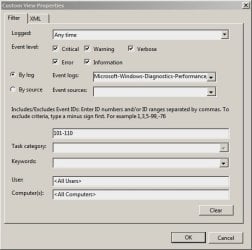
Have you got Diagnostics enabled in Services? If not then the following filter will remain empty.

Custom View Properties.jpg

Hardware problems isn't something that I'm comfortable on helping diagnose!
 

My Computer

Computer type
Laptop
Computer Manufacturer/Model Number
ASUS
OS
Microsoft Windows 7 Home Premium 64-bit 7601 Multiprocessor Free Service Pack 1
CPU
AMD C-60 APU with Radeon(tm) HD Graphics
Motherboard
ASUSTeK COMPUTER INC. X501U
Memory
4.00 GB
Graphics Card(s)
AMD Radeon HD 6290 Graphics
Sound Card
(1) AMD High Definition Audio Device (2) Realtek High Defi
Screen Resolution
1366 x 768 x 32 bits (4294967296 colors) @ 60 Hz
Hard Drives
Hitachi HTS545050A7E380 SATA Disk Device
Antivirus
Comodo CIS & FW, SecureAplus App Whitelisting, Threatfire
Browser
Cyberfox 64bit, Opera 64bit, Airfox
Other Info
Spy-The-Spy, HitmanPro.Alert, Norton Connect Safe, MJRegWatcher, BitDefender TrafficLight, Voodoo Shield, Zemana AntiMalware
I'm not sure what you mean by having diagnostics enabled in services?
Although I'm guessing I do, since I do get a couple of events in that filter every now and then, just not something consistently sucking up time.
 

My Computer

Computer type
PC/Desktop
Computer Manufacturer/Model Number
Custom Modified CyberpowerPC
OS
Windows 7 Home Premium 64bit
CPU
AMD FX-4100 @ 4.1GHz
Memory
8GB DDR3
Graphics Card(s)
Nvidia GTX 610, looking to upgrade to an AMD 250x
Internet Speed
~30 MBs
Browser
Chrome

My Computer

Computer type
Laptop
Computer Manufacturer/Model Number
ASUS
OS
Microsoft Windows 7 Home Premium 64-bit 7601 Multiprocessor Free Service Pack 1
CPU
AMD C-60 APU with Radeon(tm) HD Graphics
Motherboard
ASUSTeK COMPUTER INC. X501U
Memory
4.00 GB
Graphics Card(s)
AMD Radeon HD 6290 Graphics
Sound Card
(1) AMD High Definition Audio Device (2) Realtek High Defi
Screen Resolution
1366 x 768 x 32 bits (4294967296 colors) @ 60 Hz
Hard Drives
Hitachi HTS545050A7E380 SATA Disk Device
Antivirus
Comodo CIS & FW, SecureAplus App Whitelisting, Threatfire
Browser
Cyberfox 64bit, Opera 64bit, Airfox
Other Info
Spy-The-Spy, HitmanPro.Alert, Norton Connect Safe, MJRegWatcher, BitDefender TrafficLight, Voodoo Shield, Zemana AntiMalware
Back
Top