Suddenly Slow at Everything

The MoBo and or CPU can run at a slow clock if temperature is very high. As during boot you have a high task demand, it can be possible that the temperatures are reaching high values, and slowing down the CPU.
Enter bios and set a temperature alarm. 80ºC for CPU and 60ºC for System / MoBo.
Once windows is loaded launch this hardware monitor https://www.hwinfo.com/
 

My Computers My Computers

System One System Two

  • Computer type
    PC/Desktop
    Computer Manufacturer/Model Number
    custom build
    OS
    Windows 7 HP 64
    CPU
    i5 6600K - 800MHz to 4200MHz
    Motherboard
    GA-Z170-HD3P
    Memory
    4+4G GSkill DDR4 3000
    Graphics Card(s)
    IG - Intel 530
    Monitor(s) Displays
    Samsung 226BW
    Screen Resolution
    1680x1050
    Hard Drives
    (1) -1 SM951 – 128GB M.2 AHCI PCIe SSD drive for Windows 7 and Lubuntu
    (2) -1 WD SATA 3 - 1T for Data
    (3) -1 WD SATA 3 - 1T for backup
    PSU
    Thermaltake 450W TR2 gold
    Keyboard
    Old and good Chicony mechanical keyboard
    Mouse
    Logitech mX performance - 9 buttons (had to disable some)
    Internet Speed
    500Mb/s
    Browser
    Firefox 64
    Other Info
    TinyWall firewall
  • Computer type
    Laptop
    System Manufacturer/Model Number
    Asus Q550LF
    OS
    Windows 7 Pro
    CPU
    i7-4500U 800MHz to 3.0GHz
    Motherboard
    Asus Q550LF
    Memory
    (4+4)G DDR3 1600
    Graphics Card(s)
    IG intel 4400 + NVIDIA GeForce GT 745M
    Sound Card
    Realtek
    Monitor(s) Displays
    LG Display LP156WF4-SPH1
    Screen Resolution
    1920 x 1080
    Hard Drives
    BX500 120G SSD for Windows and programs +
    1T HDD for data
    Internet Speed
    500 Mb/s
    Browser
    Firefox
    Other Info
    TinyWall firewall

My Computers My Computers

System One System Two

  • Computer type
    PC/Desktop
    Computer Manufacturer/Model Number
    custom build
    OS
    Windows 7 HP 64
    CPU
    i5 6600K - 800MHz to 4200MHz
    Motherboard
    GA-Z170-HD3P
    Memory
    4+4G GSkill DDR4 3000
    Graphics Card(s)
    IG - Intel 530
    Monitor(s) Displays
    Samsung 226BW
    Screen Resolution
    1680x1050
    Hard Drives
    (1) -1 SM951 – 128GB M.2 AHCI PCIe SSD drive for Windows 7 and Lubuntu
    (2) -1 WD SATA 3 - 1T for Data
    (3) -1 WD SATA 3 - 1T for backup
    PSU
    Thermaltake 450W TR2 gold
    Keyboard
    Old and good Chicony mechanical keyboard
    Mouse
    Logitech mX performance - 9 buttons (had to disable some)
    Internet Speed
    500Mb/s
    Browser
    Firefox 64
    Other Info
    TinyWall firewall
  • Computer type
    Laptop
    System Manufacturer/Model Number
    Asus Q550LF
    OS
    Windows 7 Pro
    CPU
    i7-4500U 800MHz to 3.0GHz
    Motherboard
    Asus Q550LF
    Memory
    (4+4)G DDR3 1600
    Graphics Card(s)
    IG intel 4400 + NVIDIA GeForce GT 745M
    Sound Card
    Realtek
    Monitor(s) Displays
    LG Display LP156WF4-SPH1
    Screen Resolution
    1920 x 1080
    Hard Drives
    BX500 120G SSD for Windows and programs +
    1T HDD for data
    Internet Speed
    500 Mb/s
    Browser
    Firefox
    Other Info
    TinyWall firewall
Hi:

Thanks for the update.
Thanks for the Speccy log -- we'll need to wait for someone expert in hardware issues to review it in detail.

In addition to the advice above....

1) ...your MBAM scan detected a LOT of PUPs. While they are not malware, per se, they can slow down a system and many will eventually get the computer into real malware. I suspect that there may already be bonafide malware (or remnants thereof) on the system, given the number of PUP detections.
It would help if you could please ATTACH the MBAM Scan log to your next reply, so that we can see what it found/cleaned.
Additional malware scanning/removal might be needed at some point.
2) Getting back to hardware, your specs look plenty robust, so Win7 should not be sluggish. I'll defer to the others who are more expert in that department, e.g. running Seagate's disk diagnostic tools (SeaTools).
But, for starters: Did you run CHKDSK C:/r on your drive, as explained HERE?
3) The previously requested 2 logs from FRST would be most helpful, to help determine possible software conflicts, excessive programs in the startup folder, malware or malware-related changes, and other issues. It is non-invasive and only takes a few minutes to run. Explained HERE.
Attaching those 2 logs (FRST.txt and Addition.txt) would help us to better help you.
4) I understand that you ran Windows Disk Cleanup. It is not particularly thorough, especially for temp files.
Did you also run a 3rd-party temp file cleaner, such as CCleaner or TFC?
5) Finally, just checking to be sure the system fully updated with at least all critical and important patches.
When you open Windows Update and run a manual check for updates, does it tell you that the system is up to date?
That's all I have for now.

Thanks,
MM
 

My Computer My Computer

Computer type
PC/Desktop
Computer Manufacturer/Model Number
Dell Studio XPS 8500
OS
OEM Windows 7 Ult (x64) SP1
CPU
Intel Core-i7 3770 @ 3.4 GHz
Motherboard
"Dell" branded
Memory
16 GB DDR3 SDRAM @ 1333 MHz
Graphics Card(s)
NVidia GeForce GT620 1 GB
Sound Card
THX TruStudio PC
Monitor(s) Displays
Dell U2410 Full HD
Hard Drives
2.0 TB SATA2 @ 7200 RPM
PSU
350W
Keyboard
MS 4000 Ergon - Wired
Mouse
Logitech Anywhere MX
Internet Speed
Cable HSI w/Turbo (router)
Antivirus
KIS-MBAM Premium-MBAE Premium
Browser
Fx (current version); IE
Other Info
And a Win7/64 Pro laptop; And a Win10/64 Pro desktop.
But, again, IMHO the safest approach would be to exclude a failing hard drive, first.

Oh well if it is then has a test been suggested? there are two that I would suggest this SeaTools for Windows |
Seagate
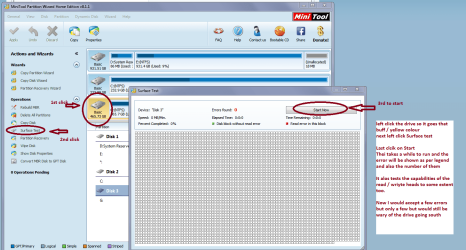
which I am guessing everyoen will put up and this MiniTool Partition Wizard | Best partition magic alternative for Windows PC and Server this will do a surface test see pic
It will test the actual surface of the platters and to some extent the read / write heads/actuating arms
 

Attachments

  • MINI TOOL SURFACE 2.PNG
    MINI TOOL SURFACE 2.PNG
    62.3 KB · Views: 1

My Computer My Computer

Computer type
PC/Desktop
Computer Manufacturer/Model Number
Own build (new) Desk1 / Asus ROG Win 7 / Desk2 1st build
OS
Desk1 7 Home Prem / Desk2 10 Pro / Main lap Asus ROG 10 Pro 2 laptop Toshiba 7 Pro Asus P2520 7 & 10
CPU
Desk1 i5 3750K / Laptop i7 GTX 860M / Desk2 i5 2500
Motherboard
Desk1 Asus P877-V / Desk2 Gigabyte H67 UD3H / Laptop ?
Memory
Desk1 8GB (1866) / Desk2 16GB (1333) / Laptop 8Gb DDR3
Graphics Card(s)
Desk 1& 2NVidia GTX 650 & Laptops on board Intel
Sound Card
Desk 1 & 2 -XONAR DG Realtek High Def audio Laptop
Monitor(s) Displays
Desk 1 Benq HD 2450 / Desk2 Philips 24" / Laptop 17.5"
Screen Resolution
1920x1080 D1 & D2 & Laptop 1
Hard Drives
Desk1 Samsung 120GB 830 SSD
Asus ROG 256GB 850 Pro SSD
Desk2 Samsung 840 256 SSD
Toshiba 120GB EVO
PSU
Desk 1 Corsair HX 1050/ Laptop ? / Desk 2 Corsair HX 650
Case
Desk 1 Cooler HAF XM ? Toshiba laptop / Desk2 Coolermaster
Cooling
Fans on all Desk1 -2 Desk2 - all Coolermasters 5 Laptop ?
Keyboard
Desk 1 MS Sidewinder X6 Desk 2 MS Sidewinder X 4
Mouse
Desk 1&2 - Gigabyte MS 900 gamer - laptop - Logitec wireless
Internet Speed
ADSL2+
Other Info
One other Desktop (tester) and spare Toshba laptop both with SSD's
Running Kaspersky 2016 ISS on all machines config'd identically
Logitec audio stereo systems on each machine (x3)
Canon MG5250MFC
Router/modem TP-Link running WPA2SK
Hi:

Thanks for the update.
Thanks for the Speccy log -- we'll need to wait for someone expert in hardware issues to review it in detail.

In addition to the advice above....

1) ...your MBAM scan detected a LOT of PUPs. While they are not malware, per se, they can slow down a system and many will eventually get the computer into real malware. I suspect that there may already be bonafide malware (or remnants thereof) on the system, given the number of PUP detections.
It would help if you could please ATTACH the MBAM Scan log to your next reply, so that we can see what it found/cleaned.
Additional malware scanning/removal might be needed at some point.
2) Getting back to hardware, your specs look plenty robust, so Win7 should not be sluggish. I'll defer to the others who are more expert in that department, e.g. running Seagate's disk diagnostic tools (SeaTools).
But, for starters: Did you run CHKDSK C:/r on your drive, as explained HERE?
3) The previously requested 2 logs from FRST would be most helpful, to help determine possible software conflicts, excessive programs in the startup folder, malware or malware-related changes, and other issues. It is non-invasive and only takes a few minutes to run. Explained HERE.
Attaching those 2 logs (FRST.txt and Addition.txt) would help us to better help you.
4) I understand that you ran Windows Disk Cleanup. It is not particularly thorough, especially for temp files.
Did you also run a 3rd-party temp file cleaner, such as CCleaner or TFC?
5) Finally, just checking to be sure the system fully updated with at least all critical and important patches.
When you open Windows Update and run a manual check for updates, does it tell you that the system is up to date?
That's all I have for now.

Thanks,
MM


I don't have the MBAM Scan log but most of the PUP were conduit related. They were all deleted. Scan was run a second time and found nothing.

Virus scanning was done with Avast! and then it was removed and Windows Essentials was installed and run. Neither program found anything.

There are no updates available, the computer clearly says it is up to date. I have no tried a manual update and it is still claiming to be up to date.

I have not had time to run FRST yet, but when I can set the machine back up I will do so and post. (That may take a few days to get to)

I ran Chkdsk and I ran scannow. Neither reported any issues.

I will post more when I have it.
 

My Computer My Computer

Computer type
PC/Desktop
Computer Manufacturer/Model Number
unknown
OS
Windows 7 Professional 64 bit
You didn't read my private email. I suggest you do.
As BIOS F15 has a Enhanced SATA compatibility I suggested you to update the BIOS. It's possible that with a driver update it began to conflict with the old BIOS.
 

My Computers My Computers

System One System Two

  • Computer type
    PC/Desktop
    Computer Manufacturer/Model Number
    custom build
    OS
    Windows 7 HP 64
    CPU
    i5 6600K - 800MHz to 4200MHz
    Motherboard
    GA-Z170-HD3P
    Memory
    4+4G GSkill DDR4 3000
    Graphics Card(s)
    IG - Intel 530
    Monitor(s) Displays
    Samsung 226BW
    Screen Resolution
    1680x1050
    Hard Drives
    (1) -1 SM951 – 128GB M.2 AHCI PCIe SSD drive for Windows 7 and Lubuntu
    (2) -1 WD SATA 3 - 1T for Data
    (3) -1 WD SATA 3 - 1T for backup
    PSU
    Thermaltake 450W TR2 gold
    Keyboard
    Old and good Chicony mechanical keyboard
    Mouse
    Logitech mX performance - 9 buttons (had to disable some)
    Internet Speed
    500Mb/s
    Browser
    Firefox 64
    Other Info
    TinyWall firewall
  • Computer type
    Laptop
    System Manufacturer/Model Number
    Asus Q550LF
    OS
    Windows 7 Pro
    CPU
    i7-4500U 800MHz to 3.0GHz
    Motherboard
    Asus Q550LF
    Memory
    (4+4)G DDR3 1600
    Graphics Card(s)
    IG intel 4400 + NVIDIA GeForce GT 745M
    Sound Card
    Realtek
    Monitor(s) Displays
    LG Display LP156WF4-SPH1
    Screen Resolution
    1920 x 1080
    Hard Drives
    BX500 120G SSD for Windows and programs +
    1T HDD for data
    Internet Speed
    500 Mb/s
    Browser
    Firefox
    Other Info
    TinyWall firewall
Sorry ------ I never got notification of a private message. In fact I don't have a private message now that I have looked.

My solution at this time is to take the computer out of service. Since there were no updates done within two weeks of it's slow down I am pretty much convinced that it is a hard drive going bad. It's sister computer same everything purchased at the same time suffered a hard drive failure about two weeks ago complete with blue screen of death unhappy face. It was definitely a HDD failure, replacement of HDD cured all that ailed it. The only difference is that machine had Windows 10 Pro on it.
 

My Computer My Computer

Computer type
PC/Desktop
Computer Manufacturer/Model Number
unknown
OS
Windows 7 Professional 64 bit
Sorry ------ I never got notification of a private message
Theresa unless I have it terribly wrong then it is a general rule that new members cannot make or receive PM's until they have a few more posts up than what you have now.

As for the hard drive did you try the tests I linked yet?? If nothing else they will show nil problems and not cause any damage and at best may confirm your suspicions. It is going to take not much tie to do and what have you got to lose??
 

My Computer My Computer

Computer type
PC/Desktop
Computer Manufacturer/Model Number
Own build (new) Desk1 / Asus ROG Win 7 / Desk2 1st build
OS
Desk1 7 Home Prem / Desk2 10 Pro / Main lap Asus ROG 10 Pro 2 laptop Toshiba 7 Pro Asus P2520 7 & 10
CPU
Desk1 i5 3750K / Laptop i7 GTX 860M / Desk2 i5 2500
Motherboard
Desk1 Asus P877-V / Desk2 Gigabyte H67 UD3H / Laptop ?
Memory
Desk1 8GB (1866) / Desk2 16GB (1333) / Laptop 8Gb DDR3
Graphics Card(s)
Desk 1& 2NVidia GTX 650 & Laptops on board Intel
Sound Card
Desk 1 & 2 -XONAR DG Realtek High Def audio Laptop
Monitor(s) Displays
Desk 1 Benq HD 2450 / Desk2 Philips 24" / Laptop 17.5"
Screen Resolution
1920x1080 D1 & D2 & Laptop 1
Hard Drives
Desk1 Samsung 120GB 830 SSD
Asus ROG 256GB 850 Pro SSD
Desk2 Samsung 840 256 SSD
Toshiba 120GB EVO
PSU
Desk 1 Corsair HX 1050/ Laptop ? / Desk 2 Corsair HX 650
Case
Desk 1 Cooler HAF XM ? Toshiba laptop / Desk2 Coolermaster
Cooling
Fans on all Desk1 -2 Desk2 - all Coolermasters 5 Laptop ?
Keyboard
Desk 1 MS Sidewinder X6 Desk 2 MS Sidewinder X 4
Mouse
Desk 1&2 - Gigabyte MS 900 gamer - laptop - Logitec wireless
Internet Speed
ADSL2+
Other Info
One other Desktop (tester) and spare Toshba laptop both with SSD's
Running Kaspersky 2016 ISS on all machines config'd identically
Logitec audio stereo systems on each machine (x3)
Canon MG5250MFC
Router/modem TP-Link running WPA2SK
Hi:

Sorry ------ I never got notification of a private message
Theresa unless I have it terribly wrong then it is a general rule that new members cannot make or receive PM's until they have a few more posts up than what you have now.

Also, as a general forum policy, we don't generally provide help via PM (in fact, I think it's against forum rules).
It defeats the purpose of having a forum.
It's best to keep the dialogue in the forum, so that we can all learn.
OTOH Many businesses and enterprises prefer to obtain assistance via onsite or brick/mortar services if sensitive data might be involved.

As for the hard drive did you try the tests I linked yet?? If nothing else they will show nil problems and not cause any damage and at best may confirm your suspicions. It is going to take not much tie to do and what have you got to lose??
Yep.
I agree.

The MBAM scan log is very easy to locate, export to a *.txt file, and attach, as explained HERE.
But if you had "Conduit" on the system, then additional cleanup may be needed before this is all done -- Conduit can be quite hard to fully eradicate. The log (and a repeat log, after cleanup) would be most helpful.

It would also help to see the CHKDSK log, rather than a generic report that it was OK (see option 2 HERE).
What was the exact message when you completed the SFC /scannow?
Have you run a 3rd-party temp file cleaner, such as CCleaner or TFC? They do a better job than Windows Cleanup.

FRST takes less than a minute to run. The two resultant logs would greatly help to reduce guesswork.

Aside from the speccy log, we're still pretty much shooting in the dark here, without much data (logs).

Having said all that, I am a bit uncomfortable with this simultaneous hardware-software-malware approach to the problem, especially in a business environment, where critical data and income may be at stake.

My suggestion would be to focus on a stepwise strategy, beginning with backup of all data on the system FIRST, then hardware diagnostics, and then software and malware.
As has been suggested several times, if the hard drive is failing, the #1 priority needs to be timely backup of data. When/if the drive goes "belly up", data recovery will be difficult and complicated.
It could jeopardize your business.

Cheers,
MM
 

My Computer My Computer

Computer type
PC/Desktop
Computer Manufacturer/Model Number
Dell Studio XPS 8500
OS
OEM Windows 7 Ult (x64) SP1
CPU
Intel Core-i7 3770 @ 3.4 GHz
Motherboard
"Dell" branded
Memory
16 GB DDR3 SDRAM @ 1333 MHz
Graphics Card(s)
NVidia GeForce GT620 1 GB
Sound Card
THX TruStudio PC
Monitor(s) Displays
Dell U2410 Full HD
Hard Drives
2.0 TB SATA2 @ 7200 RPM
PSU
350W
Keyboard
MS 4000 Ergon - Wired
Mouse
Logitech Anywhere MX
Internet Speed
Cable HSI w/Turbo (router)
Antivirus
KIS-MBAM Premium-MBAE Premium
Browser
Fx (current version); IE
Other Info
And a Win7/64 Pro laptop; And a Win10/64 Pro desktop.
It's most likely a hardware issue. To be specific, your CPU is dying! The other explanation could be that someone messed up with BIOS/UEFI settings. Since people here already suggested various scanning and system check up things and looks like that none of those helped, I could bet my life that it is one of those two.

Try to load another operating system from something like LiveCD or just connect HDD form another PC that works fine. If after doing that the problems still continues, then it's definitely either a faulting CPU (bad luck, gonna need to buy another one) or bad BIOS/UEFI settings. In the case of previous, just go to BIOS/UEFI CPU settings section and look for things to enable. With some caution (!) try to enable some of those settings and see if that helps OR just restore everything to default settings OR, even better, try to compare those settings with similar PC that works fine.

EDITED:
Look for something like "CPU catching" or something similar. By disabling some of settings/technologies in BIOS/UEFI you can really put PC right into the middle of stone age (speed wise).
 

My Computer My Computer

Computer type
PC/Desktop
OS
Win 7 x64
Just my two cents worth again if it is hardware that is dying then the very first thing I would be checking the PSU then the RAM and hard drive (already linked for that) then the CPU

To check the PSU I use this
Using HW Info
PART A:
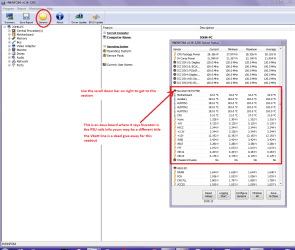
You can test the volts on the PSU with HW Info HWiNFO, HWiNFO32/64 - Download < download the right bit version and close the right hand window select Sensors and scroll down to the power section where you will see what the volts are doing see my pic. In my pic the section (Nuvoton) with VBATT as a dead give away you are in the section for the rail voltages. There are other section titles and one that pops up often is ITE (sometimes the usual one for Gigabyte boards)
Now the voltage on the different rails have to be within 5% =+/- of what is required or the machine will not work properly if at all.
Limits +/-
12v = 11.4 – 12.6v
5v = 4.74 – 5.25v
3.3v = 3.135 – 3.465v
The Power good signal voltage at pin 8 on the 24 pin plug (grey cable) should be the same as the 5v rail reading/s
See this for the rail voltage info
PSUs 101: A Detailed Look Into Power Supplies (Section 2.)
The original right hand window shows the machine running and is handy for that but for looking at the components in some detail close it and use the main left hand side panel
FOR OTHER COMPONENTS
PART B:
Open each small square with + in it on the section the components are in and then click on the individual component/s (it will highlight in blue) - in the right hand side will appear all sorts of details including brands speeds and other essential info that particular device. See pic for example.

Use PART A: for starters lets see what the PSU is up to
 

Attachments

  • HW INFO DESKTOP PSU.PNG
    HW INFO DESKTOP PSU.PNG
    49.8 KB · Views: 0

My Computer My Computer

Computer type
PC/Desktop
Computer Manufacturer/Model Number
Own build (new) Desk1 / Asus ROG Win 7 / Desk2 1st build
OS
Desk1 7 Home Prem / Desk2 10 Pro / Main lap Asus ROG 10 Pro 2 laptop Toshiba 7 Pro Asus P2520 7 & 10
CPU
Desk1 i5 3750K / Laptop i7 GTX 860M / Desk2 i5 2500
Motherboard
Desk1 Asus P877-V / Desk2 Gigabyte H67 UD3H / Laptop ?
Memory
Desk1 8GB (1866) / Desk2 16GB (1333) / Laptop 8Gb DDR3
Graphics Card(s)
Desk 1& 2NVidia GTX 650 & Laptops on board Intel
Sound Card
Desk 1 & 2 -XONAR DG Realtek High Def audio Laptop
Monitor(s) Displays
Desk 1 Benq HD 2450 / Desk2 Philips 24" / Laptop 17.5"
Screen Resolution
1920x1080 D1 & D2 & Laptop 1
Hard Drives
Desk1 Samsung 120GB 830 SSD
Asus ROG 256GB 850 Pro SSD
Desk2 Samsung 840 256 SSD
Toshiba 120GB EVO
PSU
Desk 1 Corsair HX 1050/ Laptop ? / Desk 2 Corsair HX 650
Case
Desk 1 Cooler HAF XM ? Toshiba laptop / Desk2 Coolermaster
Cooling
Fans on all Desk1 -2 Desk2 - all Coolermasters 5 Laptop ?
Keyboard
Desk 1 MS Sidewinder X6 Desk 2 MS Sidewinder X 4
Mouse
Desk 1&2 - Gigabyte MS 900 gamer - laptop - Logitec wireless
Internet Speed
ADSL2+
Other Info
One other Desktop (tester) and spare Toshba laptop both with SSD's
Running Kaspersky 2016 ISS on all machines config'd identically
Logitec audio stereo systems on each machine (x3)
Canon MG5250MFC
Router/modem TP-Link running WPA2SK
Just my two cents worth again if it is hardware that is dying then the very first thing I would be checking the PSU then the RAM and hard drive (already linked for that) then the CPU

Those are the very last things that I would do. I can't imagine any type of PSU, RAM or HDD fault that could cause an instant ultra high grade general system slowdown. Faulting PSU, RAM and HDD can be the cause of operating system's and/or programs crashes, various instabilities or the reason why operating system won't boot at all. HDD might cause some sort of general system slowdown, but not instant, not ultra high grade and mostly due to fragmentation. Checking those would be a time waste in your case.

In the case of CPU then yes, as I already said, this is the one! I personally don't know any programs that could test for that type of CPU faults and it's not really necessary, just do what I said and you'll solve your problem (or find a cause of it) in a matter of minutes if not less.
 

My Computer My Computer

Computer type
PC/Desktop
OS
Win 7 x64
Now that I think, there is a slim chance that your motherboard is failing, but even in that case it would be the part of motherboard related to CPU. In that case, if you have same type PCs, a switch up of CPUs would be a good idea to check whether it's really a CPU that's causing the problems.
 

My Computer My Computer

Computer type
PC/Desktop
OS
Win 7 x64
Back
Top