Super Optimiser shows in 'processes'... cannot delete

base1268

New member
Local time
4:35 AM
Messages
9
Hey guys...

Noticed today while in the task manager that I had a process going on I didn't recognise.

With some research it is known as a piece of malware called Super Optimizer... so I went to get rid of it but 'access denied' even in an elevated cmd prompt... the reason says it cannot delete the file chosen because it is being used by another process... but I have no idea which other process is using it to shut it down so I can delete.

It lists as an application file (.exe) 5,687kb and resides in Program Data folder with this string listing :

{ea15c119-fa35-93e4-ea15-5c119fa30467}

Any help appreciated

Nick
 

My Computer

Computer type
Laptop
Computer Manufacturer/Model Number
Toshiba Qosmio X70-B-102
OS
Win 7 x64 HP + 8.1
CPU
4710
Motherboard
Intel HM86 chipset
Memory
16 gb
Graphics Card(s)
AMD R9 m265X
If you like you can download UVK and run a scan. Upload the log and I could most likely write a script to remove it.

UVK - Ultra Virus Killer - get free version (not beta)

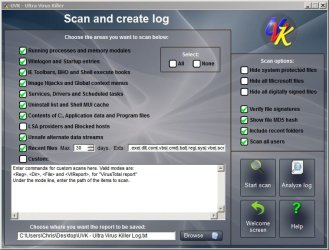
Once installed right click the icon and run as admin. Choose "Scan and create log"

Choose these settings:

UVK - Ultra Virus Killer.jpg

When finished save the log to your desktop. It will be quite a large file so zip it and upload it. If it's too big split the log by cutting and pasting into smaller files.
 

My Computer

Computer type
Laptop
Computer Manufacturer/Model Number
ASUS
OS
Microsoft Windows 7 Home Premium 64-bit 7601 Multiprocessor Free Service Pack 1
CPU
AMD C-60 APU with Radeon(tm) HD Graphics
Motherboard
ASUSTeK COMPUTER INC. X501U
Memory
4.00 GB
Graphics Card(s)
AMD Radeon HD 6290 Graphics
Sound Card
(1) AMD High Definition Audio Device (2) Realtek High Defi
Screen Resolution
1366 x 768 x 32 bits (4294967296 colors) @ 60 Hz
Hard Drives
Hitachi HTS545050A7E380 SATA Disk Device
Antivirus
Comodo CIS & FW, SecureAplus App Whitelisting, Threatfire
Browser
Cyberfox 64bit, Opera 64bit, Airfox
Other Info
Spy-The-Spy, HitmanPro.Alert, Norton Connect Safe, MJRegWatcher, BitDefender TrafficLight, Voodoo Shield, Zemana AntiMalware
Click on the "Processes" tab in task manager and stop the program from running.
Boot into safe mode, then delete the folder, or file found. Reboot into normal mode and run a full scan with Malwarebytes' Antimalware.

Here is the free version, if you don't already have it:
Download (free version) Malwarebytes' Anti-Malware to your desktop
Malwarebytes | Free Anti-Malware Detection & Removal Software
* Double-click mbam-setup.exe and follow the prompts to install the program.Right click to run as Administrator, using Windows 7 or Vista.
* At the end, be sure a checkmark is placed next to Update Malwarebytes' Anti-Malware and Launch Malwarebytes' Anti-Malware, then click Finish.
* If an update is found, it will download and install the latest version.
* Once the program has loaded, select Perform full scan, then click Scan.
* When the scan is complete, click OK, then Show Results to view the results.
* Be sure that everything is checked, and click Remove Selected.
* When completed, a log will open in Notepad. Please save it to a convenient location. Copy and Paste that log into your next reply.
 

My Computer

Computer type
PC/Desktop
Computer Manufacturer/Model Number
Bruce ... somewhere in his 40's
OS
Windows 7 Ultimate 32bit SP1
CPU
Intel(R) Core(TM)2 Quad CPU @ 2.40GHz, 2400 MHz
Motherboard
INTEL/D975XBX2
Memory
4 GB
Graphics Card(s)
ATI Radeon HD 2600 Pro
Monitor(s) Displays
Samsung SyncMaster 914v
Screen Resolution
1280 x 1024
Hard Drives
2/500GB each ... ST3500630AS ATA Device.
One is not connected
PSU
Rocketfish 700 W
Case
G.Skill Gigabyte Chassis
Keyboard
Standard PS/2 Keyboard
Mouse
Microsoft PS/2 Mouse
Internet Speed
DSL
Antivirus
Avira Internet Security
Browser
IE 11
Other Info
ATI HDMI Audio
I had spent a bit of time trying to remove it without success when I posted this question... then it suddenly dawned on me that I recently began to keep a really up to date 'Macrium Reflect' disk image that is set to be incrementally backed up weekly.... so I simply went back prior to the 19th when this thing showed as being created and restored that 'clean' image.

Sure enough of course that killed it, but it's awesome to get the responses here so swiftly and reassuring to know about the community here where those with a deeper level of understanding are happy to exercise those skills by solving issues that some of us are stumped by.

many thanks
 

My Computer

Computer type
Laptop
Computer Manufacturer/Model Number
Toshiba Qosmio X70-B-102
OS
Win 7 x64 HP + 8.1
CPU
4710
Motherboard
Intel HM86 chipset
Memory
16 gb
Graphics Card(s)
AMD R9 m265X
Glad you found the problem :thumbsup:
 

My Computer

Computer type
PC/Desktop
Computer Manufacturer/Model Number
Bruce ... somewhere in his 40's
OS
Windows 7 Ultimate 32bit SP1
CPU
Intel(R) Core(TM)2 Quad CPU @ 2.40GHz, 2400 MHz
Motherboard
INTEL/D975XBX2
Memory
4 GB
Graphics Card(s)
ATI Radeon HD 2600 Pro
Monitor(s) Displays
Samsung SyncMaster 914v
Screen Resolution
1280 x 1024
Hard Drives
2/500GB each ... ST3500630AS ATA Device.
One is not connected
PSU
Rocketfish 700 W
Case
G.Skill Gigabyte Chassis
Keyboard
Standard PS/2 Keyboard
Mouse
Microsoft PS/2 Mouse
Internet Speed
DSL
Antivirus
Avira Internet Security
Browser
IE 11
Other Info
ATI HDMI Audio
Back
Top