svchost.exe 50+ CPU Usage Help

bballuk

New member
Local time
12:25 AM
Messages
18
Location
England
Hi,

I know there been loads of post on svchost but i could not find one with my problem and also i didnt want to bump/hijack someone elses thread.

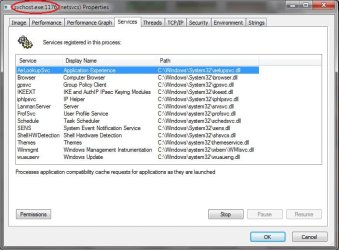
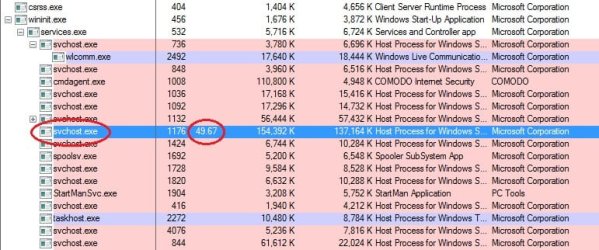
I have a screenshot of ProcessExplorer and showing CPU etc and a screenshot of what Services are running off that sertain svchost.exe.

Im hopeing with the to screenshots and the files names someone will help me out getting the CPU Usage down a bit to a normal speed.

thanks for any reply screenshots attached below.
 

Attachments
  • svchostpe.jpg
    svchostpe.jpg
    67.2 KB · Views: 291
  • svchostservices.jpg
    svchostservices.jpg
    57.3 KB · Views: 273

My Computer

Computer Manufacturer/Model Number
Custom Built
OS
Windows 7 Ultimate x86
CPU
3.2 GHz Duo Core
Motherboard
Gigabyte S-Series 3
Memory
2GB DDR2
Graphics Card(s)
Nvidia 6600 (Waiting on new one)
Sound Card
Built-in
Monitor(s) Displays
Samsung Syncmaster
Hard Drives
120 GB IDE Maxtor
500 GB SATA Seagate
PSU
600w Standard
Case
Gaming Case
Cooling
6 High Speed Fans
Last edited:

My Computer

Computer type
PC/Desktop
Computer Manufacturer/Model Number
Dell XPS 420
OS
Windows 10, Home Clean Install
CPU
Intel Core2 processsor Q8200(2.33Ghz 1333FSB) Quad Core Tech
Motherboard
Dell
Memory
6 gb
Graphics Card(s)
ATI Radeon 256MB HD3650
Sound Card
Intergrated 7.1 Channel Audio
Monitor(s) Displays
Dell SP2009W 20"
Hard Drives
640 GB Serial ATA Hard drive
Cooling
Fan
Keyboard
Dell USB Keyboard
Mouse
Dell Premium Optical USB
Internet Speed
DSL 2.85
thanks for the reply but the info on that link is ok it means there is a way to fix on XP so there must be a way on Win7 just got to wait for someone to find.

I would try the method on the link but the windows update that you have to use with the .bat might only be configured to works with how windows XP is setup and not Win7.

I will keeps searching maybe someone else on the forum for a way to sort it or recognizes one of the services in the screenshot that is slowing down my pc.
 

My Computer

Computer Manufacturer/Model Number
Custom Built
OS
Windows 7 Ultimate x86
CPU
3.2 GHz Duo Core
Motherboard
Gigabyte S-Series 3
Memory
2GB DDR2
Graphics Card(s)
Nvidia 6600 (Waiting on new one)
Sound Card
Built-in
Monitor(s) Displays
Samsung Syncmaster
Hard Drives
120 GB IDE Maxtor
500 GB SATA Seagate
PSU
600w Standard
Case
Gaming Case
Cooling
6 High Speed Fans
thanks for the reply but the info on that link is ok it means there is a way to fix on XP so there must be a way on Win7 just got to wait for someone to find.

I would try the method on the link but the windows update that you have to use with the .bat might only be configured to works with how windows XP is setup and not Win7.

I will keeps searching maybe someone else on the forum for a way to sort it or recognizes one of the services in the screenshot that is slowing down my pc.


I just checked my computer processes and svchost is not there at all. I am using home premium and I thought svchost was only there in Windows XP. Maybe you are running Windows ultimate which supports XP and hence, you are seeing the svchost process but I have never had any problem ever since I upgraded from Windows XP to Windows 7.
 

My Computer

OS
Windows 7
Are you sure svchost.exe isnt there because it only shows up in Task Manager when you have the box ticked for Show Processes For All Users.

but if your right if i keep having problem i could install Home edition maybe that will solve the problem. I dont use the XP Mode any way.
 

My Computer

Computer Manufacturer/Model Number
Custom Built
OS
Windows 7 Ultimate x86
CPU
3.2 GHz Duo Core
Motherboard
Gigabyte S-Series 3
Memory
2GB DDR2
Graphics Card(s)
Nvidia 6600 (Waiting on new one)
Sound Card
Built-in
Monitor(s) Displays
Samsung Syncmaster
Hard Drives
120 GB IDE Maxtor
500 GB SATA Seagate
PSU
600w Standard
Case
Gaming Case
Cooling
6 High Speed Fans
Back
Top