svchost.exe problems...

CR4CK3RW0LF

New member
Local time
7:51 PM
Messages
9
my comp tends to crawl about 5 min after startup. if i try to launch a new program after these 5 min go by, it stalls and doesnt launch..

naturally, i open the task manager to see what is clogging the pipes and none of my processes seem to be taking up a whole lot of memory.. i go to the performance tab and the memory stays at a constant 756MB/1000MB.. obviously i was missing something..

so i go back to the processes tab and check the box that tells it to show everything, and i see 12 instances of svchost.exe running with the highest running one at 160,264k... im not sure if ive ever seen a process run so high..

i didnt know what those processes were, so i googled like a pro and learned that they are important system resources and that its natural to see multiple ones running.

of course its bogging my computer speed immensly and all the tutorials i found that show you how to shut down some of the services are all on XP or earlier.. since im on the Windows 7 forums, i would hope that someone can help me out here.

Here is just about all the info on my comp:
http://www.docs.sony.com/release/specs/PCVRS720G_mksp.pdf

ive upgraded the RAM to 1GB and gave it a graphics card.. otherwize the comp remains the same..
 

My Computer

Computer Manufacturer/Model Number
Sony VAIO/ PCV-RS720G
OS
Windows 7 Ultimate
CPU
Pentium 4 Single Core 3.0 GHz w/Hyperthreading
Motherboard
Asus ????
Memory
1GB DDR PC-3200
Graphics Card(s)
NVIDIA GeForce 9400 GT 1GB 128-bit DDR2 PCI Express 2.0 x16
Sound Card
Onboard Sound
Monitor(s) Displays
VIZIO HDTV 32"
Hard Drives
200GB Hard Drive...
PSU
????
Case
Standard, Factory Case/ Came with PC
Cooling
Stock Fans.
Other Info
http://www.docs.sony.com/release/specs/PCVRS720G_mksp.pdf
Why do you assume it is svchost that is causing you problem? Furthermore a processing like svchost using ~150MB of RAM is nothing to be concerned over. What you need to be looking at is not usage memory, but CPU and I/O usage these are what cause things to slow down. What security software are you running? What applications do you have running on startup?
 

My Computer

Computer type
PC/Desktop
Computer Manufacturer/Model Number
Alienware Aurora ALX R4
OS
Windows 10 Pro (x64)
CPU
Intel Core i7-3930K (3.2GHz - 4.5GHz)
Motherboard
Alienware Aurora-R4 x79
Memory
4x Samsung 4GB PC3-12800 DDR3 (16GB 1600MHz)
Graphics Card(s)
Nvidia Geforce GTX 690
Sound Card
SteelSeries Siberia Elite
Monitor(s) Displays
Dell UltraSharp U3011
Screen Resolution
2560x1600
Hard Drives
Samsung 850 Pro 256 GB, Seagate 1TB Desktop Hybrid HDD, 2x Western Digital 4TB Green HDD
PSU
875W Some Dell PSU <.<
Case
Alienware Aurora ALX
Cooling
Custom Liquid Cooling (EK CPU & GPU blocks) dual EK 480RAD
Keyboard
Logitech G710+ Mechanical
Mouse
Logitech G700s
Internet Speed
Verizon Fios (50 mbps average)
Other Info
Server: Intel NUC D54250WYK: i5-4250U, 16GB, 256 GB mSATA, Windows Server 2012 R2
It is not unusual to find a dozen svchost.exes. This is the home process for the .DLLs (Dynamic Link Libraries) of which there are a lot. They are started by seperate host processes to improve the integrity and reliability of the system.
If you want to know exactly what's running, I suggest you use the Process Explorer. If ou hover over the processes, it will show you which processes they are. If you right click on the processes and go to Properties, you get more info. Then find those that use most of your CPU.
But my guess would be that you do not have enough RAM. 1GB is not enough for /7. You should have at least 2GBs, better 3GBs.
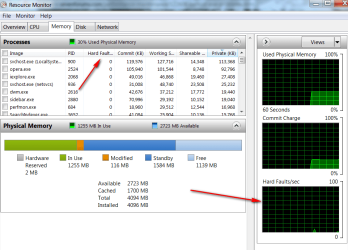
Have a look at Resource Monitor > Memory tab. There you will probably see that you have a lot of hard Faults (page faults) that are slowing the system down. See picture below for your orientation. Note that this is a system with 4GBs of RAM where page faults are rare.
 

Attachments

  • 2010-11-04_192109.png
    2010-11-04_192109.png
    37.2 KB · Views: 100

My Computer

Computer Manufacturer/Model Number
HP, Dell, Gateway, Toshiba - 4 laptops and 2 desktops
OS
Vista, Windows7, Mint Mate, Zorin, Windows 8
CPU
from 1.6GHz Duo to i7
Monitor(s) Displays
2x HP w2207
Hard Drives
5x HDD, 7x SSD, 12x Externals
Keyboard
with trackball - no mices
Mouse
Trackball mice
Internet Speed
DSL 6000
@whs, it seemed to run windows 7 quite fine, in fact ive had it on there since its release! unfourtunately i was hit by 2 or 3 hampering malaware attacks and im not sure the last one has completely gone away, hence why i assumed it was the highest process on the task list.. ill try out the program you posted.

@logicearth, well i assumed that again the thing thats using up the most memory must be a sort of problem, since this stuff didnt happen until about 2 weeks ago, when the afforementioned malaware attack happened. if you must know im using AVG, im not very knowlegable about the antivirus market and ive used the free version for a long time. if there is a better free recommendation, plz point me in the right direction.

im aware that this comp might be heading towards the scrap heap. i mine as well just get a new comp, but this one is all ive got for now since im broke.
 

My Computer

Computer Manufacturer/Model Number
Sony VAIO/ PCV-RS720G
OS
Windows 7 Ultimate
CPU
Pentium 4 Single Core 3.0 GHz w/Hyperthreading
Motherboard
Asus ????
Memory
1GB DDR PC-3200
Graphics Card(s)
NVIDIA GeForce 9400 GT 1GB 128-bit DDR2 PCI Express 2.0 x16
Sound Card
Onboard Sound
Monitor(s) Displays
VIZIO HDTV 32"
Hard Drives
200GB Hard Drive...
PSU
????
Case
Standard, Factory Case/ Came with PC
Cooling
Stock Fans.
Other Info
http://www.docs.sony.com/release/specs/PCVRS720G_mksp.pdf
Aha, so you had malware. In that case all bets are off. If you have the possibility to reset to the time before the malware, that would be best. Else,you may face a reinstallation.
It is for that exact scenario that I always recommend frequent imaging. Then you can pull yourself out of a bind like that in 20 minutes. http://www.sevenforums.com/tutorials/73828-imaging-free-macrium.html?ltr=I
 

My Computer

Computer Manufacturer/Model Number
HP, Dell, Gateway, Toshiba - 4 laptops and 2 desktops
OS
Vista, Windows7, Mint Mate, Zorin, Windows 8
CPU
from 1.6GHz Duo to i7
Monitor(s) Displays
2x HP w2207
Hard Drives
5x HDD, 7x SSD, 12x Externals
Keyboard
with trackball - no mices
Mouse
Trackball mice
Internet Speed
DSL 6000
Aha, so you had malware. In that case all bets are off. If you have the possibility to reset to the time before the malware, that would be best. Else,you may face a reinstallation.
It is for that exact scenario that I always recommend frequent imaging. Then you can pull yourself out of a bind like that in 20 minutes. http://www.sevenforums.com/tutorials/73828-imaging-free-macrium.html?ltr=I

yeah i probably shouldve mentioned the malaware thing first.. >.>

i used system restore to get me out of each one, but im not sure if the last one did the trick. i blamed svchost.exe since ive never seen it run that high before and my comp has bluescreened once or twice. i thought cutting down services would be a good idea as some tutorials suggest doing so, but im not really sure what im messing with..

either way, i figure it might be time for a reinstallation. unfortunately i dont have any storage options to back up my data, maybe if im lucky i can swipe a external for cheap.
 

My Computer

Computer Manufacturer/Model Number
Sony VAIO/ PCV-RS720G
OS
Windows 7 Ultimate
CPU
Pentium 4 Single Core 3.0 GHz w/Hyperthreading
Motherboard
Asus ????
Memory
1GB DDR PC-3200
Graphics Card(s)
NVIDIA GeForce 9400 GT 1GB 128-bit DDR2 PCI Express 2.0 x16
Sound Card
Onboard Sound
Monitor(s) Displays
VIZIO HDTV 32"
Hard Drives
200GB Hard Drive...
PSU
????
Case
Standard, Factory Case/ Came with PC
Cooling
Stock Fans.
Other Info
http://www.docs.sony.com/release/specs/PCVRS720G_mksp.pdf
You can install over your installation without deleting any data.
It would move everything that is used by the current system to a "Windows.old" folder
 

My Computer

Computer type
PC/Desktop
Computer Manufacturer/Model Number
Alienware Aurora ALX R4
OS
Windows 10 Pro (x64)
CPU
Intel Core i7-3930K (3.2GHz - 4.5GHz)
Motherboard
Alienware Aurora-R4 x79
Memory
4x Samsung 4GB PC3-12800 DDR3 (16GB 1600MHz)
Graphics Card(s)
Nvidia Geforce GTX 690
Sound Card
SteelSeries Siberia Elite
Monitor(s) Displays
Dell UltraSharp U3011
Screen Resolution
2560x1600
Hard Drives
Samsung 850 Pro 256 GB, Seagate 1TB Desktop Hybrid HDD, 2x Western Digital 4TB Green HDD
PSU
875W Some Dell PSU <.<
Case
Alienware Aurora ALX
Cooling
Custom Liquid Cooling (EK CPU & GPU blocks) dual EK 480RAD
Keyboard
Logitech G710+ Mechanical
Mouse
Logitech G700s
Internet Speed
Verizon Fios (50 mbps average)
Other Info
Server: Intel NUC D54250WYK: i5-4250U, 16GB, 256 GB mSATA, Windows Server 2012 R2
1. Did you use the Process Explorer to determine the culprit?
2. If you disable ANY of the svchost.exe processes, I bet your system will no more function. Those are vital processes
3. External disks are so cheap these days that you should be able to find one. Have a look here: Deals on Storage Devices
4. To be on the safe side before a reinstallation, I would move the user data to a http://www.sevenforums.com/tutorials/72427-data-partition.html
 

My Computer

Computer Manufacturer/Model Number
HP, Dell, Gateway, Toshiba - 4 laptops and 2 desktops
OS
Vista, Windows7, Mint Mate, Zorin, Windows 8
CPU
from 1.6GHz Duo to i7
Monitor(s) Displays
2x HP w2207
Hard Drives
5x HDD, 7x SSD, 12x Externals
Keyboard
with trackball - no mices
Mouse
Trackball mice
Internet Speed
DSL 6000
1. Did you use the Process Explorer to determine the culprit?
2. If you disable ANY of the svchost.exe processes, I bet your system will no more function. Those are vital processes
3. External disks are so cheap these days that you should be able to find one. Have a look here: Deals on Storage Devices
4. To be on the safe side before a reinstallation, I would move the user data to a http://www.sevenforums.com/tutorials/72427-data-partition.html

well i didnt stop any of the svchost.exe processes.. but i think it finally kicked the bucket.. since it now bluescreens right after the startup logo finishes.. i dont even get to the welcome screen..

i tried using the startup recovery wizard but with no avail. i dont know if a clean install will do it, since now it could possibly have turned into a hardware problem..

well thanks anyway.
 

My Computer

Computer Manufacturer/Model Number
Sony VAIO/ PCV-RS720G
OS
Windows 7 Ultimate
CPU
Pentium 4 Single Core 3.0 GHz w/Hyperthreading
Motherboard
Asus ????
Memory
1GB DDR PC-3200
Graphics Card(s)
NVIDIA GeForce 9400 GT 1GB 128-bit DDR2 PCI Express 2.0 x16
Sound Card
Onboard Sound
Monitor(s) Displays
VIZIO HDTV 32"
Hard Drives
200GB Hard Drive...
PSU
????
Case
Standard, Factory Case/ Came with PC
Cooling
Stock Fans.
Other Info
http://www.docs.sony.com/release/specs/PCVRS720G_mksp.pdf
Back
Top