Ok, I have spent all day searching for an answer to my problem, and have had no luck. I have found it is a pretty big problem with many complaints. I am not a super computer genius, but I can follow direction and pick up on how to do anything, usually. I've had many problems in the past and fixed them myself, but I am now stumped.
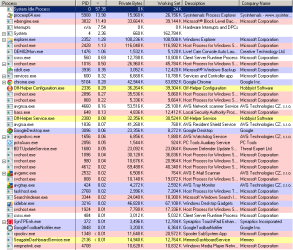
Problem: svchost.exe is taking up way too much of my cpu. It started yesterday (that's when I noticed it in task manager, and noticed the sluggish activity) It was at about 90,000....today it has gone from 92,000 to now....171,000!!! And it is GROWING! It's slowing everything down and IS a problem. I have read many forms where people just say leave it, it's "not a big deal it's normal." NO IT IS NOT!
Before it started: As I said, I noticed it yesterday. I had thought my computer was running slowly throughout that day but never looked into the task manager until I had done something else and thought I had downloaded something bad..let me elaborate because I don't know if this is what caused it.....I had an urge to play The Oregon Trail (lame, I know) So I did some research, found an emulator, installed it (DosBox) and played my game. After I was done and remembered how boring it was (haha) I uninstalled dosbox and everything else. This is when I actually noticed things starting to happen. First of all, I restarted my computer, and it did not boot as usual. I have Iolo System Shield and that immediately started to defrag at the black screen while trying to boot. It had froze...I think...so I tried rebooting again and it did the same thing. Finally I just hit esc (or f1?) and skipped past it, and have gotten back in. So....I don't know if I screwed up with dosbox somehow and totally screwwed my comp, but like I said I THINK it was acting slow all day anyways, before I had done that.
So I am having a complete freak out and I am beyond frustrated. I literally bought this laptop 2 weeks ago and I already have problems. I need a solution PLEASE!
Thank you :]
Update: It's trying to compress when I boot it, not defrag. Sorry.
Also, I have noticed the searchindexer.exe is growing in size. It is at 34,000 right now and I KNOW that is not normal at all.
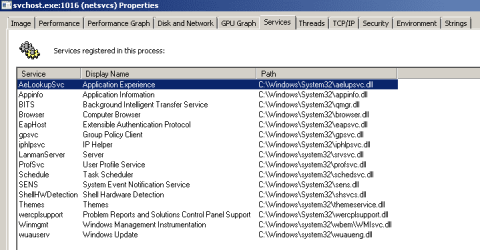
Services under svchost.exe are all LocalSystemNetworkRestricted
Problem: svchost.exe is taking up way too much of my cpu. It started yesterday (that's when I noticed it in task manager, and noticed the sluggish activity) It was at about 90,000....today it has gone from 92,000 to now....171,000!!! And it is GROWING! It's slowing everything down and IS a problem. I have read many forms where people just say leave it, it's "not a big deal it's normal." NO IT IS NOT!
Before it started: As I said, I noticed it yesterday. I had thought my computer was running slowly throughout that day but never looked into the task manager until I had done something else and thought I had downloaded something bad..let me elaborate because I don't know if this is what caused it.....I had an urge to play The Oregon Trail (lame, I know) So I did some research, found an emulator, installed it (DosBox) and played my game. After I was done and remembered how boring it was (haha) I uninstalled dosbox and everything else. This is when I actually noticed things starting to happen. First of all, I restarted my computer, and it did not boot as usual. I have Iolo System Shield and that immediately started to defrag at the black screen while trying to boot. It had froze...I think...so I tried rebooting again and it did the same thing. Finally I just hit esc (or f1?) and skipped past it, and have gotten back in. So....I don't know if I screwed up with dosbox somehow and totally screwwed my comp, but like I said I THINK it was acting slow all day anyways, before I had done that.
So I am having a complete freak out and I am beyond frustrated. I literally bought this laptop 2 weeks ago and I already have problems. I need a solution PLEASE!
Thank you :]
Update: It's trying to compress when I boot it, not defrag. Sorry.
Also, I have noticed the searchindexer.exe is growing in size. It is at 34,000 right now and I KNOW that is not normal at all.
Services under svchost.exe are all LocalSystemNetworkRestricted
Last edited:
My Computer
- OS
- Windows 7 Home Premium 64 bit