Switch Between Windows - Flip 3D Shortcut

How to Create a Flip 3D Switch Between Windows Shortcut in Windows 7

   Information
This will show you how to create a Switch Between Windows, also known as Flip 3D, shortcut in Windows 7.

   Note
Keyboard Shortcut Keys for Flip 3D

NOTE: Press the key combinations below in blue to activate.
  • Windows Key + Tab = Press and hold Windows Key, then press Tab (or roll mouse scroll wheel) to scroll through the open windows. Choose the open window you want by releasing the Windows Key when the window is at the front.
  • Ctrl + Windows Key + Tab = Scroll through the open windows by pressing the Tab key, arrow keys, or roll the mouse scroll wheel. Click on the window you want to see, or press Enter when it is up front.
If you would like to assign your own keyboard shortcut to the shortcut in this tutorial, then for how, see: How to Create a Keyboard Shortcut for a Program in Vista and Windows 7

   Tip
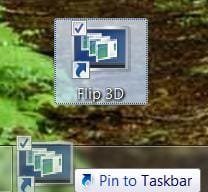
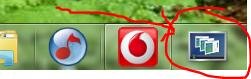
To pin this shortcut to the taskbar, you will need to have Recent Programs turned on.

Taskbar.jpg

   Warning
Aero Requirements to be Enabled in Windows 7:

NOTE: If Aero is not enabled, then Switch Between Windows - Flip 3D - will not work.
  • 1 GHz 32-bit or 64-bit processor
  • 1 GB of system memory
  • A graphics card with support for DirectX 9 graphics with at least 128 MB of memory.
  • The graphics card must support Pixel Shader 2.0 and the Windows Display Driver Model (WDDM).
  • You must be have True Color (32 bit) set instead of High Color (16 bit).
  • The desktop composition and Animate controls and elements inside windows options enabled in Visual Effects.
  • The Desktop Window Manager Session Manager and Themes Services need to be set as Started and Automatic.
  • Refresh or update your WEI score.
  • Using a Aero theme.
This shortcut will not work in Windows 7 Starter and Windows 7 Home Basic editions since they do not include the Aero feature.


EXAMPLE: Switch Between Windows - Flip-3D

Flip_3D.jpg


OPTION ONE

To Download a Flip 3D Shortcut


1. Click on the Download button below to download the file below.
Switch_Between_Windows.zip

Download


2. Click on Save, and save the .zip file to the desktop.

3. Open the .zip file and extract the Switch Between Windows shortcut to the desktop.

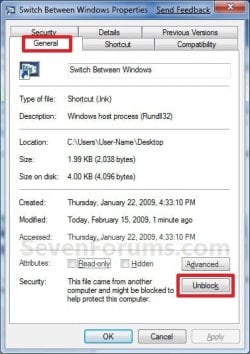
4. Right click on the Switch Between Windows shortcut, and click on Properties, General tab, and on the Unblock button. (See screenshot below)
NOTE: If you do not have a Unblock button under the General tab, then the shortcut is already unblocked and you can continue on to step 5.
Unblock.jpg
5. You can now Pin to Taskbar or Pin to Start Menu this shortcut, assign a keyboard shortcut to it, or move it where you like for easy use.

6. When done, you can delete the downloaded .zip file on the desktop if you like.


OPTION TWO

To Manually Create a Flip 3D Shortcut


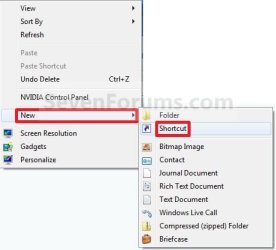
1. Right click on a empty area on desktop, and click on New and Shortcut. (See screenshot below)
Right_Click.jpg
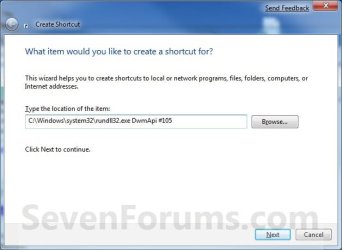
2. Copy and paste the path below into the location area, and click on the Next button. (See screenshot below)
%windir%\system32\rundll32.exe DwmApi #105
Step1.jpg
3. Type Switch Between Windows for the name, and click on the Finish button. (See screenshot below)
NOTE: You can name this anything you would like though. For example, Flip 3D.
Step2.jpg
4. Right click on the new Switch Between Windows shortcut on the Desktop and click on Properties. (See screenshot below)
Step3.jpg
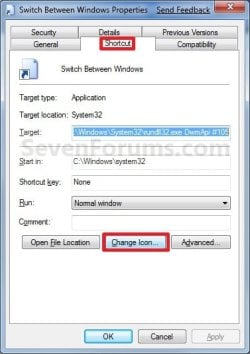
5. Click on the Change Icon button. (See screenshot below)
Step4.jpg
6. In the line under "Look for icons in this file", copy and paste the path below and press Enter. (See screenshot below)
%SystemRoot%\System32\imageres.dll
Step5.jpg
7. Select the Flip-3D icon in blue below and click on OK. (See screenshot above)

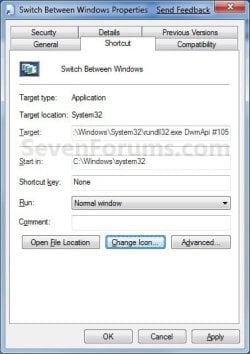
8. Click on OK. (See screenshot below)
Step6.jpg
9. You can now Pin to Taskbar or Pin to Start Menu this shortcut, assign a keyboard shortcut to it, or move it where you like for easy use.
Shortcut.jpg
That's it,
Shawn


Attachments

Last edited:

My Computer

Computer type
PC/Desktop
Computer Manufacturer/Model Number
Self built custom
OS
64-bit Windows 11 Pro for Workstations
CPU
Intel i7-8700K OC'd to 5 GHz
Motherboard
ASUS ROG Maximus XI Formula Z390
Memory
64 GB (4x16GB) G.SKILL TridentZ RGB DDR4 3600 MHz
Graphics Card(s)
ASUS ROG-STRIX-GTX1080TI-O11G-GAMING
Sound Card
Integrated
Monitor(s) Displays
2 x Samsung Odyssey G7 27"
Screen Resolution
2560x1440
Hard Drives
1TB Samsung 990 PRO M.2,
4TB Samsung 990 PRO PRO M.2,
TerraMaster F8 SSD Plus NAS
PSU
Seasonic Prime Titanium 850W
Case
Thermaltake Core P3
Cooling
Corsair Hydro H115i
Keyboard
Logitech wireless K800
Mouse
Logitech MX Master 4
Internet Speed
2 Gb/s Download and 100 Mb/s Upload
Antivirus
Malwarebyte Anti-Malware Premium
Browser
Google Chrome
Other Info
Logitech Z625 speaker system,
Logitech BRIO 4K Pro webcam,
HP Color LaserJet Pro MFP M477fdn,
APC SMART-UPS RT 1000 XL - SURT1000XLI,
Galaxy S23 Plus phone
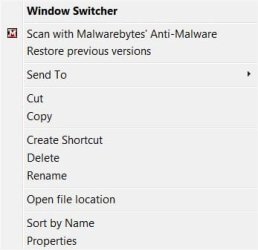
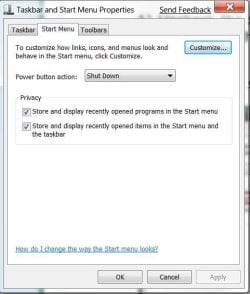
Yes Shawn, Recent items are turned on.

win_switch.jpg

On the 'right' click menu I have no usual - pin to taskbar -or- pin to start menu.
 

My Computer

Computer Manufacturer/Model Number
Built myself
OS
Windows 7 (7000) public beta
CPU
E2180 2 GHz over clocked to 3 Ghz
Motherboard
Asus P5KPL-CM (crash free BIOS) (Stable over clocker)
Memory
4 GB Hynix 2Gb 800MHz DDR2
Graphics Card(s)
Asus EAH3450-HTP-512 RADEON
Sound Card
Onboard VY 1708B, 8-CH High-Definition Audio Codex
Monitor(s) Displays
AOC 22" panel 1680x1050 (Certified for Windows Vista :-)
Screen Resolution
1680x1050
Hard Drives
Samsung 160Gb 7200RPM 8Mb Cache SATA2
PSU
450 watt in case standard
Case
MCG Deluxe Miditower Case - 450W Black (2 front side USB)
Cooling
Stock box Intel heat sink & fan - & CPU paste
Keyboard
Logitech black deluxe 250 DT PS2 (US layout - Vista)
Mouse
Gigabyte GM-M6800 optical mouse (No game,like comfort grip)
Internet Speed
Vodafone Wireless B/Band Australia - official 1500 up & down
Other Info
USB ReadyBoost 4 GB SanDisk (I don't know if these help or not - all quiet as to if it's used in Windows 7.)

My Computer

Computer type
PC/Desktop
Computer Manufacturer/Model Number
Self built custom
OS
64-bit Windows 11 Pro for Workstations
CPU
Intel i7-8700K OC'd to 5 GHz
Motherboard
ASUS ROG Maximus XI Formula Z390
Memory
64 GB (4x16GB) G.SKILL TridentZ RGB DDR4 3600 MHz
Graphics Card(s)
ASUS ROG-STRIX-GTX1080TI-O11G-GAMING
Sound Card
Integrated
Monitor(s) Displays
2 x Samsung Odyssey G7 27"
Screen Resolution
2560x1440
Hard Drives
1TB Samsung 990 PRO M.2,
4TB Samsung 990 PRO PRO M.2,
TerraMaster F8 SSD Plus NAS
PSU
Seasonic Prime Titanium 850W
Case
Thermaltake Core P3
Cooling
Corsair Hydro H115i
Keyboard
Logitech wireless K800
Mouse
Logitech MX Master 4
Internet Speed
2 Gb/s Download and 100 Mb/s Upload
Antivirus
Malwarebyte Anti-Malware Premium
Browser
Google Chrome
Other Info
Logitech Z625 speaker system,
Logitech BRIO 4K Pro webcam,
HP Color LaserJet Pro MFP M477fdn,
APC SMART-UPS RT 1000 XL - SURT1000XLI,
Galaxy S23 Plus phone
Yes, I have that on too.

Proof of life :geek:


Attachments

  • recent_programs.jpg
    recent_programs.jpg
    34.5 KB · Views: 499

My Computer

Computer Manufacturer/Model Number
Built myself
OS
Windows 7 (7000) public beta
CPU
E2180 2 GHz over clocked to 3 Ghz
Motherboard
Asus P5KPL-CM (crash free BIOS) (Stable over clocker)
Memory
4 GB Hynix 2Gb 800MHz DDR2
Graphics Card(s)
Asus EAH3450-HTP-512 RADEON
Sound Card
Onboard VY 1708B, 8-CH High-Definition Audio Codex
Monitor(s) Displays
AOC 22" panel 1680x1050 (Certified for Windows Vista :-)
Screen Resolution
1680x1050
Hard Drives
Samsung 160Gb 7200RPM 8Mb Cache SATA2
PSU
450 watt in case standard
Case
MCG Deluxe Miditower Case - 450W Black (2 front side USB)
Cooling
Stock box Intel heat sink & fan - & CPU paste
Keyboard
Logitech black deluxe 250 DT PS2 (US layout - Vista)
Mouse
Gigabyte GM-M6800 optical mouse (No game,like comfort grip)
Internet Speed
Vodafone Wireless B/Band Australia - official 1500 up & down
Other Info
USB ReadyBoost 4 GB SanDisk (I don't know if these help or not - all quiet as to if it's used in Windows 7.)
Strange. I'm not certain why you cannot pin it then. Have you already tried the manual method to see if you can pin that one?
 

My Computer

Computer type
PC/Desktop
Computer Manufacturer/Model Number
Self built custom
OS
64-bit Windows 11 Pro for Workstations
CPU
Intel i7-8700K OC'd to 5 GHz
Motherboard
ASUS ROG Maximus XI Formula Z390
Memory
64 GB (4x16GB) G.SKILL TridentZ RGB DDR4 3600 MHz
Graphics Card(s)
ASUS ROG-STRIX-GTX1080TI-O11G-GAMING
Sound Card
Integrated
Monitor(s) Displays
2 x Samsung Odyssey G7 27"
Screen Resolution
2560x1440
Hard Drives
1TB Samsung 990 PRO M.2,
4TB Samsung 990 PRO PRO M.2,
TerraMaster F8 SSD Plus NAS
PSU
Seasonic Prime Titanium 850W
Case
Thermaltake Core P3
Cooling
Corsair Hydro H115i
Keyboard
Logitech wireless K800
Mouse
Logitech MX Master 4
Internet Speed
2 Gb/s Download and 100 Mb/s Upload
Antivirus
Malwarebyte Anti-Malware Premium
Browser
Google Chrome
Other Info
Logitech Z625 speaker system,
Logitech BRIO 4K Pro webcam,
HP Color LaserJet Pro MFP M477fdn,
APC SMART-UPS RT 1000 XL - SURT1000XLI,
Galaxy S23 Plus phone
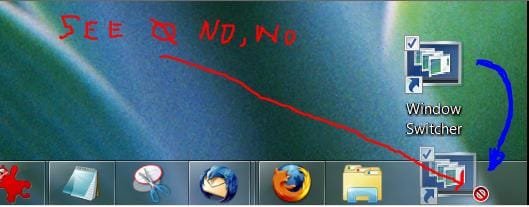
Did you unblock the zip?

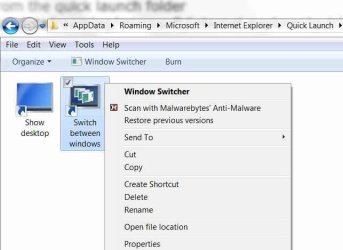
I know it wouldn't let me pin the flip3d icon to the taskbar when I tried the one from the quick launch folder
Appdata/roaming/microsoft/internet explorer/quicklaunch/switch between windows

but the zip one always lets me.
 

My Computer

Computer type
PC/Desktop
Computer Manufacturer/Model Number
Airbot 2.0
OS
Windows 7 Ultimate x64 SP1
CPU
Core i7 920 (D0) @ 4Ghz, *26c idle *65c full load on air
Motherboard
Asus P6X58D Premium - Sata 6Gb/s - USB 3.0
Memory
12GB DDR3 Corsair Dominator -CMD12GX3M6A1600C8 at 1600MHz
Graphics Card(s)
Zotac Geforce GTX 770
Sound Card
ASUS Xonar D2X
Monitor(s) Displays
1 LG 24" Flatron W2453V-PF 1 Samsung 24" P2450H both 2ms RT
Screen Resolution
1920x1080@60hz
Hard Drives
1 Samsung 250GB 840 Evo SSD
1 OCZ Vertex2 180GB SSD
1 TB Samsung Spinpoint F1 7200RPM 32MB cache
2 500GB WD Caviar Blacks 7200RPM 32MB cache (WD5001AALS)

Pioneer DVD Burner DVR-S18M
PSU
Corsair HX1000W
Case
Cooler Master HAF 932
Cooling
Case Fans *3 230mm, *1 140mm/CPU - *Tuniq Tower 120 Extreme
Keyboard
Logitech Wireless MK700
Mouse
Logitech Wireless MK700
Internet Speed
DL 15 Mbps UL 0.98 Mbps
Antivirus
None
Browser
Firefox Nightly
Other Info
Processor-7.7 *RAM- 7.9 *Graphics-7.9 *Gaming Graphics- 7.9 *SSD- 7.8 W.E.I final score= 7.7
*Phone- LG Nexus 5
No, I still don't get it..
 

Attachments

  • switcher1.jpg
    switcher1.jpg
    19.8 KB · Views: 541
  • switcher2.jpg
    switcher2.jpg
    24.8 KB · Views: 496

My Computer

Computer Manufacturer/Model Number
Built myself
OS
Windows 7 (7000) public beta
CPU
E2180 2 GHz over clocked to 3 Ghz
Motherboard
Asus P5KPL-CM (crash free BIOS) (Stable over clocker)
Memory
4 GB Hynix 2Gb 800MHz DDR2
Graphics Card(s)
Asus EAH3450-HTP-512 RADEON
Sound Card
Onboard VY 1708B, 8-CH High-Definition Audio Codex
Monitor(s) Displays
AOC 22" panel 1680x1050 (Certified for Windows Vista :-)
Screen Resolution
1680x1050
Hard Drives
Samsung 160Gb 7200RPM 8Mb Cache SATA2
PSU
450 watt in case standard
Case
MCG Deluxe Miditower Case - 450W Black (2 front side USB)
Cooling
Stock box Intel heat sink & fan - & CPU paste
Keyboard
Logitech black deluxe 250 DT PS2 (US layout - Vista)
Mouse
Gigabyte GM-M6800 optical mouse (No game,like comfort grip)
Internet Speed
Vodafone Wireless B/Band Australia - official 1500 up & down
Other Info
USB ReadyBoost 4 GB SanDisk (I don't know if these help or not - all quiet as to if it's used in Windows 7.)
Graham,

The shortcut located at the path in the right image above will not be allowed to be pinned. Have you tried to see if the shortcut, if created manually, may be allowed to be pinned for you?
 

My Computer

Computer type
PC/Desktop
Computer Manufacturer/Model Number
Self built custom
OS
64-bit Windows 11 Pro for Workstations
CPU
Intel i7-8700K OC'd to 5 GHz
Motherboard
ASUS ROG Maximus XI Formula Z390
Memory
64 GB (4x16GB) G.SKILL TridentZ RGB DDR4 3600 MHz
Graphics Card(s)
ASUS ROG-STRIX-GTX1080TI-O11G-GAMING
Sound Card
Integrated
Monitor(s) Displays
2 x Samsung Odyssey G7 27"
Screen Resolution
2560x1440
Hard Drives
1TB Samsung 990 PRO M.2,
4TB Samsung 990 PRO PRO M.2,
TerraMaster F8 SSD Plus NAS
PSU
Seasonic Prime Titanium 850W
Case
Thermaltake Core P3
Cooling
Corsair Hydro H115i
Keyboard
Logitech wireless K800
Mouse
Logitech MX Master 4
Internet Speed
2 Gb/s Download and 100 Mb/s Upload
Antivirus
Malwarebyte Anti-Malware Premium
Browser
Google Chrome
Other Info
Logitech Z625 speaker system,
Logitech BRIO 4K Pro webcam,
HP Color LaserJet Pro MFP M477fdn,
APC SMART-UPS RT 1000 XL - SURT1000XLI,
Galaxy S23 Plus phone
Graham,

The shortcut located at the path in the right image above will not be allowed to be pinned. Have you tried to see if the shortcut, if created manually, may be allowed to be pinned for you?

SUCCESS!

Thanks Brink.

The zip apparently did not work for me, but creating manually did. Went back in the thread and followed the manual instructions. (Incl. change icon.)
 

Attachments

  • pin3dflip.jpg
    pin3dflip.jpg
    9.9 KB · Views: 2,145
  • pin3dflip2.jpg
    pin3dflip2.jpg
    5.6 KB · Views: 2,155

My Computer

Computer Manufacturer/Model Number
Built myself
OS
Windows 7 (7000) public beta
CPU
E2180 2 GHz over clocked to 3 Ghz
Motherboard
Asus P5KPL-CM (crash free BIOS) (Stable over clocker)
Memory
4 GB Hynix 2Gb 800MHz DDR2
Graphics Card(s)
Asus EAH3450-HTP-512 RADEON
Sound Card
Onboard VY 1708B, 8-CH High-Definition Audio Codex
Monitor(s) Displays
AOC 22" panel 1680x1050 (Certified for Windows Vista :-)
Screen Resolution
1680x1050
Hard Drives
Samsung 160Gb 7200RPM 8Mb Cache SATA2
PSU
450 watt in case standard
Case
MCG Deluxe Miditower Case - 450W Black (2 front side USB)
Cooling
Stock box Intel heat sink & fan - & CPU paste
Keyboard
Logitech black deluxe 250 DT PS2 (US layout - Vista)
Mouse
Gigabyte GM-M6800 optical mouse (No game,like comfort grip)
Internet Speed
Vodafone Wireless B/Band Australia - official 1500 up & down
Other Info
USB ReadyBoost 4 GB SanDisk (I don't know if these help or not - all quiet as to if it's used in Windows 7.)
Graham, I'm happy to hear that you got it sorted. :)
 

My Computer

Computer type
PC/Desktop
Computer Manufacturer/Model Number
Self built custom
OS
64-bit Windows 11 Pro for Workstations
CPU
Intel i7-8700K OC'd to 5 GHz
Motherboard
ASUS ROG Maximus XI Formula Z390
Memory
64 GB (4x16GB) G.SKILL TridentZ RGB DDR4 3600 MHz
Graphics Card(s)
ASUS ROG-STRIX-GTX1080TI-O11G-GAMING
Sound Card
Integrated
Monitor(s) Displays
2 x Samsung Odyssey G7 27"
Screen Resolution
2560x1440
Hard Drives
1TB Samsung 990 PRO M.2,
4TB Samsung 990 PRO PRO M.2,
TerraMaster F8 SSD Plus NAS
PSU
Seasonic Prime Titanium 850W
Case
Thermaltake Core P3
Cooling
Corsair Hydro H115i
Keyboard
Logitech wireless K800
Mouse
Logitech MX Master 4
Internet Speed
2 Gb/s Download and 100 Mb/s Upload
Antivirus
Malwarebyte Anti-Malware Premium
Browser
Google Chrome
Other Info
Logitech Z625 speaker system,
Logitech BRIO 4K Pro webcam,
HP Color LaserJet Pro MFP M477fdn,
APC SMART-UPS RT 1000 XL - SURT1000XLI,
Galaxy S23 Plus phone
You're welcome Jrtiberius, and welcome to Seven Forums. :)
 

My Computer

Computer type
PC/Desktop
Computer Manufacturer/Model Number
Self built custom
OS
64-bit Windows 11 Pro for Workstations
CPU
Intel i7-8700K OC'd to 5 GHz
Motherboard
ASUS ROG Maximus XI Formula Z390
Memory
64 GB (4x16GB) G.SKILL TridentZ RGB DDR4 3600 MHz
Graphics Card(s)
ASUS ROG-STRIX-GTX1080TI-O11G-GAMING
Sound Card
Integrated
Monitor(s) Displays
2 x Samsung Odyssey G7 27"
Screen Resolution
2560x1440
Hard Drives
1TB Samsung 990 PRO M.2,
4TB Samsung 990 PRO PRO M.2,
TerraMaster F8 SSD Plus NAS
PSU
Seasonic Prime Titanium 850W
Case
Thermaltake Core P3
Cooling
Corsair Hydro H115i
Keyboard
Logitech wireless K800
Mouse
Logitech MX Master 4
Internet Speed
2 Gb/s Download and 100 Mb/s Upload
Antivirus
Malwarebyte Anti-Malware Premium
Browser
Google Chrome
Other Info
Logitech Z625 speaker system,
Logitech BRIO 4K Pro webcam,
HP Color LaserJet Pro MFP M477fdn,
APC SMART-UPS RT 1000 XL - SURT1000XLI,
Galaxy S23 Plus phone
great shortcut shawn........;)


W7 just gets better & better......


:)SK
 

My Computer

Computer Manufacturer/Model Number
myself
OS
SEVEN x64
CPU
Q9450 @ 3.6GHZ 1.34v
Motherboard
ASUS P5K PREMIUM P35
Memory
8GB 1066 buffalo firestix @ 1152mhz CL5
Graphics Card(s)
Sapphire HD 5970 + GTX260 (physX)
Sound Card
Creative X-FI Xtreme Gamer
Monitor(s) Displays
SAMSUNG 20'' & SAMSUNG 23'' (dual screens)
Screen Resolution
2048x1152 & 1680x1050
Hard Drives
1x seagate 160gb IDE & 1x seagate 160gb SATA
PSU
XCILIO 850w (78A)
Case
CM590 1x 120x38mm & 2x92x38mm / 4x 120x25mm
Cooling
AC7 PRO @ 92x38mm blower, Lamptron military bus bay controll
Keyboard
LOGITECH E110
Mouse
logitech NX5
Internet Speed
2MB
Other Info
its a continual ''work in progress''....
You're welcome Mitch. :)
 

My Computer

Computer type
PC/Desktop
Computer Manufacturer/Model Number
Self built custom
OS
64-bit Windows 11 Pro for Workstations
CPU
Intel i7-8700K OC'd to 5 GHz
Motherboard
ASUS ROG Maximus XI Formula Z390
Memory
64 GB (4x16GB) G.SKILL TridentZ RGB DDR4 3600 MHz
Graphics Card(s)
ASUS ROG-STRIX-GTX1080TI-O11G-GAMING
Sound Card
Integrated
Monitor(s) Displays
2 x Samsung Odyssey G7 27"
Screen Resolution
2560x1440
Hard Drives
1TB Samsung 990 PRO M.2,
4TB Samsung 990 PRO PRO M.2,
TerraMaster F8 SSD Plus NAS
PSU
Seasonic Prime Titanium 850W
Case
Thermaltake Core P3
Cooling
Corsair Hydro H115i
Keyboard
Logitech wireless K800
Mouse
Logitech MX Master 4
Internet Speed
2 Gb/s Download and 100 Mb/s Upload
Antivirus
Malwarebyte Anti-Malware Premium
Browser
Google Chrome
Other Info
Logitech Z625 speaker system,
Logitech BRIO 4K Pro webcam,
HP Color LaserJet Pro MFP M477fdn,
APC SMART-UPS RT 1000 XL - SURT1000XLI,
Galaxy S23 Plus phone
wow! just found this, very cool. i think i'll map it to an extra key on my keyboard :D

many thanks!
 

My Computer

OS
7600 x86
CPU
Core 2 Duo e7200, 2.53 ghz
Motherboard
Micro-Star MS-7529
Memory
2x DDR2 PC5300 1gb, 667 mhz
Graphics Card(s)
GeForce 9500gt, 512mb
Monitor(s) Displays
22" LG Flatron w2234s
Screen Resolution
1680x1050
Hard Drives
Excelstor SATA-II 250gb 7200rpm, 8mb cache
PSU
CoolerMaster M520
Internet Speed
30/20 mbits
Thanks very helpful and easy
 
Last edited:

My Computer

Computer Manufacturer/Model Number
Handy manny
OS
Windows 7 (x64)
CPU
i7 870
Motherboard
Evga P55 FTW
Memory
G.Skill Trident (F3-17066CL9D-4GBTDS 2x2GB) - 2133MHz
Graphics Card(s)
Evga GTX 460 EE 1GB
Sound Card
On Board
Monitor(s) Displays
Samsung P2350
Screen Resolution
1920x1080
Hard Drives
1 x 64GB G-Skill Falcon SSD
1 x 60GB Corsair Force Series SSD
1 x 1TB WD Caviar Black
2 x 640GB WD Caviar Black
1 x 1TB Samsung Spinpoint F3
PSU
Corsair 620w
Case
Corsair 800D
Cooling
Corsair H50
Keyboard
Logitech MX5500 Revolution
Mouse
Logitech MX5500 Revolution
Internet Speed
http://www.speedtest.net/result/939062765.png
Other Info
http://www.sevenforums.com/overclocking-case-mods/104136-show-us-your-rig-2-a-4.html#post937213
You're welcome Garbanzo and Cashis. :)
 

My Computer

Computer type
PC/Desktop
Computer Manufacturer/Model Number
Self built custom
OS
64-bit Windows 11 Pro for Workstations
CPU
Intel i7-8700K OC'd to 5 GHz
Motherboard
ASUS ROG Maximus XI Formula Z390
Memory
64 GB (4x16GB) G.SKILL TridentZ RGB DDR4 3600 MHz
Graphics Card(s)
ASUS ROG-STRIX-GTX1080TI-O11G-GAMING
Sound Card
Integrated
Monitor(s) Displays
2 x Samsung Odyssey G7 27"
Screen Resolution
2560x1440
Hard Drives
1TB Samsung 990 PRO M.2,
4TB Samsung 990 PRO PRO M.2,
TerraMaster F8 SSD Plus NAS
PSU
Seasonic Prime Titanium 850W
Case
Thermaltake Core P3
Cooling
Corsair Hydro H115i
Keyboard
Logitech wireless K800
Mouse
Logitech MX Master 4
Internet Speed
2 Gb/s Download and 100 Mb/s Upload
Antivirus
Malwarebyte Anti-Malware Premium
Browser
Google Chrome
Other Info
Logitech Z625 speaker system,
Logitech BRIO 4K Pro webcam,
HP Color LaserJet Pro MFP M477fdn,
APC SMART-UPS RT 1000 XL - SURT1000XLI,
Galaxy S23 Plus phone
Hey, Brink...you're the man. Learn alot just by reading your answer to other. Thanks man.
 

My Computer

OS
Windows 7 build 7201 x64
CPU
Intel E8200
Motherboard
ASUS P5 KC
Memory
G Skill 2x 2GB DDR2 800 PC-6400 RAM
Graphics Card(s)
ATI HD 3850 256MB
Sound Card
Creative SB Audigy
Monitor(s) Displays
20" LG W2252TQ
Screen Resolution
1680x1050
Hard Drives
2x Western Digital 640GB SATA II
1x Seagate 320GB SATA II
1x Seagate 500GB SATA II
PSU
iCute TiTaNium 650W
Case
CoolerMaster CM690
Cooling
Zalman 9700LED
Keyboard
Logitech
Mouse
Logitech
Internet Speed
54.0MBs
You're welcome Won, and welcome to Seven Forums. :)

Shawn
 

My Computer

Computer type
PC/Desktop
Computer Manufacturer/Model Number
Self built custom
OS
64-bit Windows 11 Pro for Workstations
CPU
Intel i7-8700K OC'd to 5 GHz
Motherboard
ASUS ROG Maximus XI Formula Z390
Memory
64 GB (4x16GB) G.SKILL TridentZ RGB DDR4 3600 MHz
Graphics Card(s)
ASUS ROG-STRIX-GTX1080TI-O11G-GAMING
Sound Card
Integrated
Monitor(s) Displays
2 x Samsung Odyssey G7 27"
Screen Resolution
2560x1440
Hard Drives
1TB Samsung 990 PRO M.2,
4TB Samsung 990 PRO PRO M.2,
TerraMaster F8 SSD Plus NAS
PSU
Seasonic Prime Titanium 850W
Case
Thermaltake Core P3
Cooling
Corsair Hydro H115i
Keyboard
Logitech wireless K800
Mouse
Logitech MX Master 4
Internet Speed
2 Gb/s Download and 100 Mb/s Upload
Antivirus
Malwarebyte Anti-Malware Premium
Browser
Google Chrome
Other Info
Logitech Z625 speaker system,
Logitech BRIO 4K Pro webcam,
HP Color LaserJet Pro MFP M477fdn,
APC SMART-UPS RT 1000 XL - SURT1000XLI,
Galaxy S23 Plus phone
how can we do the same thing for the alt+tab shortcut?
so we can have a button for 3d flip and a button for flip without touching the keyboard:)
 

My Computer

Computer Manufacturer/Model Number
ff
OS
sfdsf
CPU
sfsf
Motherboard
fsfsf
Memory
sfsdf
Graphics Card(s)
sfsf
Sound Card
sfsf
Monitor(s) Displays
sfsdf
Hard Drives
sfss
PSU
fsfsfs
Case
dfsdf
Cooling
sfsd
Back
Top